Core: Multi WAN with 2 DHCP WAN interfaces not working properly
Important notices
Before you add a new report, we ask you kindly to acknowledge the following:
[X] I have read the contributing guide lines at https://github.com/opnsense/core/blob/master/CONTRIBUTING.md
[X] I have searched the existing issues and I'm convinced that mine is new.
Describe the bug
Multi WAN does not seem to work properly when two WAN interfaces (each of them configured as DHCP client) are used. During a test, unplugging igb1 (WAN) leads to the expected behaviour that traffic is then routed via igb2 (WAN2). Plugging the the cable to igb1 (WAN) in again, is still working as expected (traffic again via WAN). But after a second unplugging of igb1 (WAN), the routing of new connections is not going via WAN2. Only after reloading pf (using the web interface) leads to traffic from LAN reaching the Internet again.
To Reproduce
Install and configure OPNsense:
- Install OPNsense 20.1, apply updates, confiure WAN using DHCP when running the wizard
- Disable IPv6 as described in https://www.thomas-krenn.com/en/wiki/OPNsense_disable_IPv6
3, Enable SSH (System:Settings:Administration) - Configure WAN2 IPv4 (using DHCP)
- In System: Gateways: Single delete "defunct IPv6" GW
- configure GW Monitoring like described in https://docs.opnsense.org/manual/how-tos/multiwan.html
- configure GW group like described in https://docs.opnsense.org/manual/how-tos/multiwan.html
- Configure DNS for each gateway (Systems:Settigs:General) like described in https://docs.opnsense.org/manual/how-tos/multiwan.html + "Allow default gateway switching"
- Policy based routing like described in https://docs.opnsense.org/manual/how-tos/multiwan.html
- Add allow rule for DNS traffic like described in https://docs.opnsense.org/manual/how-tos/multiwan.html
Steps to reproduce the behavior:
- Unplug igb1 (WAN) -> after a short while, traffic is routed via igb2 (WAN2)
- Plug in igb1 again -> traffic is routed via igb1 (WAN) again
- Unplug igb1 (WAN) again -> new traffic from LAN is not routed to the internet
- click the reload symbol of pf in the webinterface -> new traffic from LAN is routed to the internet again (but this clicking on the reload symbol should not be necessary)
Expected behavior
When Multi WAN is configured, and a working WAN is available, traffic routing should be always possible.
Relevant log files
OPNsense-Multi-WAN-Test-Logs.txt
Additional context
Using static IP does not seem to cause problems.
Another user has reported the same issue here: https://forum.opnsense.org/index.php?topic=15943.0
I can fully reproduce the behaviour that the user mentions there.
Environment
OPNsense 20.1.1-amd64, FreeBSD 11.2-RELEASE-p16-HBSD, OpenSSL 1.1.1d 10 Sep 2019
Intel(R) Celeron(R) CPU J3160 @ 1.60GHz (4 cores)
Network 4x Intel® I210-AT
 tk-wfischer
All 13 comments
In case you need further information, here is the configuration file:
I'm planning further testing tomorrow using static IP addresses on the two WAN interfaces. I will then compare the log outputs to get an idea what the root cause of the issue could be.
If anybody has an idea or tips where I should especially look, just let me know. Otherwise I will update this issue tomorrow.
tk-wfischer
on 4 Mar 2020
@tk-wfischer Is it possible to work this out with me on private channel? I'd like to test this with gateway monitoring to rules out if it's failover logic in general or something related to link loss (which is very very rare case in dual setup)
 mimugmail
on 6 Mar 2020
mimugmail
on 6 Mar 2020
In my testings, I always unplugged the cable to test the failover setup. But as we're connecting to our ISP with a direct fiber channel it can happen that the whole link goes down - for instance due to powerloss in some segments of the network.
 qdrop17
on 9 Mar 2020
qdrop17
on 9 Mar 2020
@mimugmail and I did some further testing.
We have changed the configuration beforehand:
- we enabled the checkbox "Upstream Gateway" for both gateways in "System: Gateways: Single"
- we set the priority of the first gateway ("WAN_DHCP") down to 251, so that this gateway is used by default by OPNsense itself. Before that, when both gateways had priority 254, "WAN2_DHCP" was "active".
- under "System: Gateways: Group" we changed the trigger level to "member down". This means that a switch to the other WAN route should be done, when the monitoring IP cannot be reached anymore. Note for other users here: "member down" does not necessarily mean "Interface link down". It means that pings to the monitoring IP do not work any more.
- we changed the monitoring IPs of the two gateways to two IPs of @mimugmail in the Internet. He was then able to block pings from my test system, so that we could do tests how the OPNsense works when the monitoring IP is not available.
Our results:
- Blocking Pings to the monitoring IP of the first wan connection (WAN) leads to switching to the second wan connection (WAN2). Removing the blocking of Pings leads to a failback. Doing a blocking again leads again to a switchover. So this test is working fine.
- The same test, but instead of blocking the pings, we now remove the network cables of the NICs. Unplugging the cable of WAN leads to a switchover to WAN2. Plugging the cable in again leads to a switchback. Doing another unplugging of WAN does not lead to a switchover.
Details of the first unplugging of the WAN interface (igb1):
Mar 10 10:47:15 multiwantest kernel: igb1: link state changed to DOWN
Mar 10 10:47:15 multiwantest opnsense: /usr/local/etc/rc.linkup: DEVD Ethernet detached event for wan
Mar 10 10:47:15 multiwantest dhclient[8302]: connection closed
Mar 10 10:47:15 multiwantest dhclient[8302]: exiting.
Mar 10 10:47:15 multiwantest opnsense: /usr/local/etc/rc.linkup: Clearing states for stale wan route on igb1
Mar 10 10:47:30 multiwantest opnsense: /usr/local/etc/rc.filter_configure: Ignore down inet gateways : WAN_DHCP
Mar 10 10:47:30 multiwantest opnsense: /usr/local/etc/rc.filter_configure: ROUTING: removing /tmp/igb1_defaultgw
Mar 10 10:47:30 multiwantest opnsense: /usr/local/etc/rc.filter_configure: ROUTING: creating /tmp/igb2_defaultgw using '10.1.102.1'
Mar 10 10:47:30 multiwantest opnsense: /usr/local/etc/rc.filter_configure: Ignore down inet6 gateways : WAN_DHCP
Mar 10 10:47:30 multiwantest kernel: pflog0: promiscuous mode disabled
Mar 10 10:47:31 multiwantest kernel: pflog0: promiscuous mode enabled
Mar 10 10:48:05 multiwantest kernel: igb1: link state changed to UP
After plugging the cable of igb1 (WAN) in again, and unplugging the cable again brings the following log content:
Mar 10 10:49:11 multiwantest kernel: igb1: link state changed to DOWN
Mar 10 10:49:12 multiwantest opnsense: /usr/local/etc/rc.linkup: DEVD Ethernet detached event for wan
Mar 10 10:49:12 multiwantest dhclient[76783]: connection closed
Mar 10 10:49:12 multiwantest dhclient[76783]: exiting.
Mar 10 10:49:12 multiwantest opnsense: /usr/local/etc/rc.linkup: Clearing states for stale wan route on igb1
<--- nothing happens here --->
Mar 10 10:50:30 multiwantest kernel: igb1: link state changed to UP
So when doing the unplugging the second time, the following lines are missing:
Mar 10 10:47:30 multiwantest opnsense: /usr/local/etc/rc.filter_configure: Ignore down inet gateways : WAN_DHCP
Mar 10 10:47:30 multiwantest opnsense: /usr/local/etc/rc.filter_configure: ROUTING: removing /tmp/igb1_defaultgw
Mar 10 10:47:30 multiwantest opnsense: /usr/local/etc/rc.filter_configure: ROUTING: creating /tmp/igb2_defaultgw using '10.1.102.1'
Mar 10 10:47:30 multiwantest opnsense: /usr/local/etc/rc.filter_configure: Ignore down inet6 gateways : WAN_DHCP
Mar 10 10:47:30 multiwantest kernel: pflog0: promiscuous mode disabled
Mar 10 10:47:31 multiwantest kernel: pflog0: promiscuous mode enabled
I can fully confirm the behavior decribed by @tk-wfischer.
For us this behavior is especially critical as we have a direct fiber-connection to our OPNsense box using a SFP-module.
Obviously it can happen that the entire link goes (physically) down. This is also the reason we use two links in the first place: They are connected from different sides of the building to eliminate the risk of one link being damaged resulting in our whole location going down.
We highly appreciate any workaround or bugfix to get this working properly.
qdrop17
on 10 Mar 2020
@tk-wfischer can you check if dpinger reported loss around 10:47:15? (/var/log/gateways.log)
 AdSchellevis
on 10 Mar 2020
AdSchellevis
on 10 Mar 2020
Sure - here is the log snipped from this time frame:
[...]
Mar 10 10:46:17 multiwantest dpinger: GATEWAY ALARM: WAN_DHCP (Addr: 81.24.64.2 Alarm: 0 RTT: 11240ms RTTd: 776ms Loss: 6%)
Mar 10 10:47:16 multiwantest dpinger: WAN_DHCP 81.24.64.2: sendto error: 65
Mar 10 10:47:17 multiwantest dpinger: WAN_DHCP 81.24.64.2: sendto error: 65
Mar 10 10:47:18 multiwantest dpinger: WAN_DHCP 81.24.64.2: sendto error: 65
Mar 10 10:47:19 multiwantest dpinger: WAN_DHCP 81.24.64.2: sendto error: 65
Mar 10 10:47:20 multiwantest dpinger: WAN_DHCP 81.24.64.2: sendto error: 65
Mar 10 10:47:21 multiwantest dpinger: WAN_DHCP 81.24.64.2: sendto error: 65
Mar 10 10:47:22 multiwantest dpinger: WAN_DHCP 81.24.64.2: sendto error: 65
Mar 10 10:47:23 multiwantest dpinger: WAN_DHCP 81.24.64.2: sendto error: 65
Mar 10 10:47:24 multiwantest dpinger: WAN_DHCP 81.24.64.2: sendto error: 65
Mar 10 10:47:25 multiwantest dpinger: WAN_DHCP 81.24.64.2: sendto error: 65
Mar 10 10:47:26 multiwantest dpinger: WAN_DHCP 81.24.64.2: sendto error: 65
Mar 10 10:47:27 multiwantest dpinger: WAN_DHCP 81.24.64.2: sendto error: 65
Mar 10 10:47:28 multiwantest dpinger: WAN_DHCP 81.24.64.2: sendto error: 65
Mar 10 10:47:29 multiwantest dpinger: WAN_DHCP 81.24.64.2: sendto error: 65
Mar 10 10:47:29 multiwantest dpinger: WAN_DHCP 81.24.64.2: Alarm latency 11252us stddev 658us loss 22%
[...]
@tk-wfischer ok, can you try https://github.com/opnsense/core/commit/0e2751d2d15da34389f6c2923fb1215aeffd6f38 ?
opnsense-patch 0e2751d
If that solves it, I'm also interested in the gateway monitor status afterwards (is it reporting ok after a while).
AdSchellevis
on 10 Mar 2020
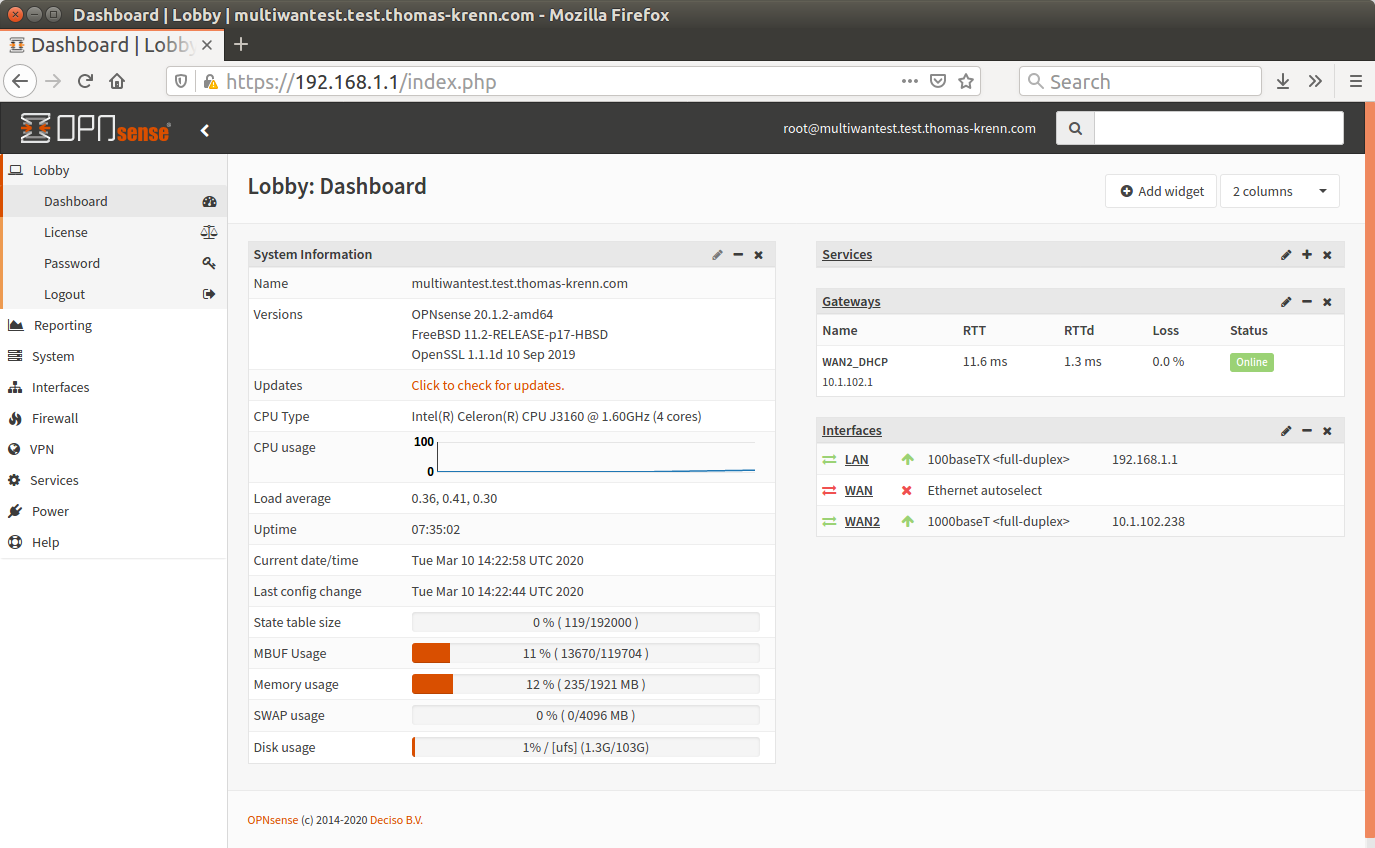
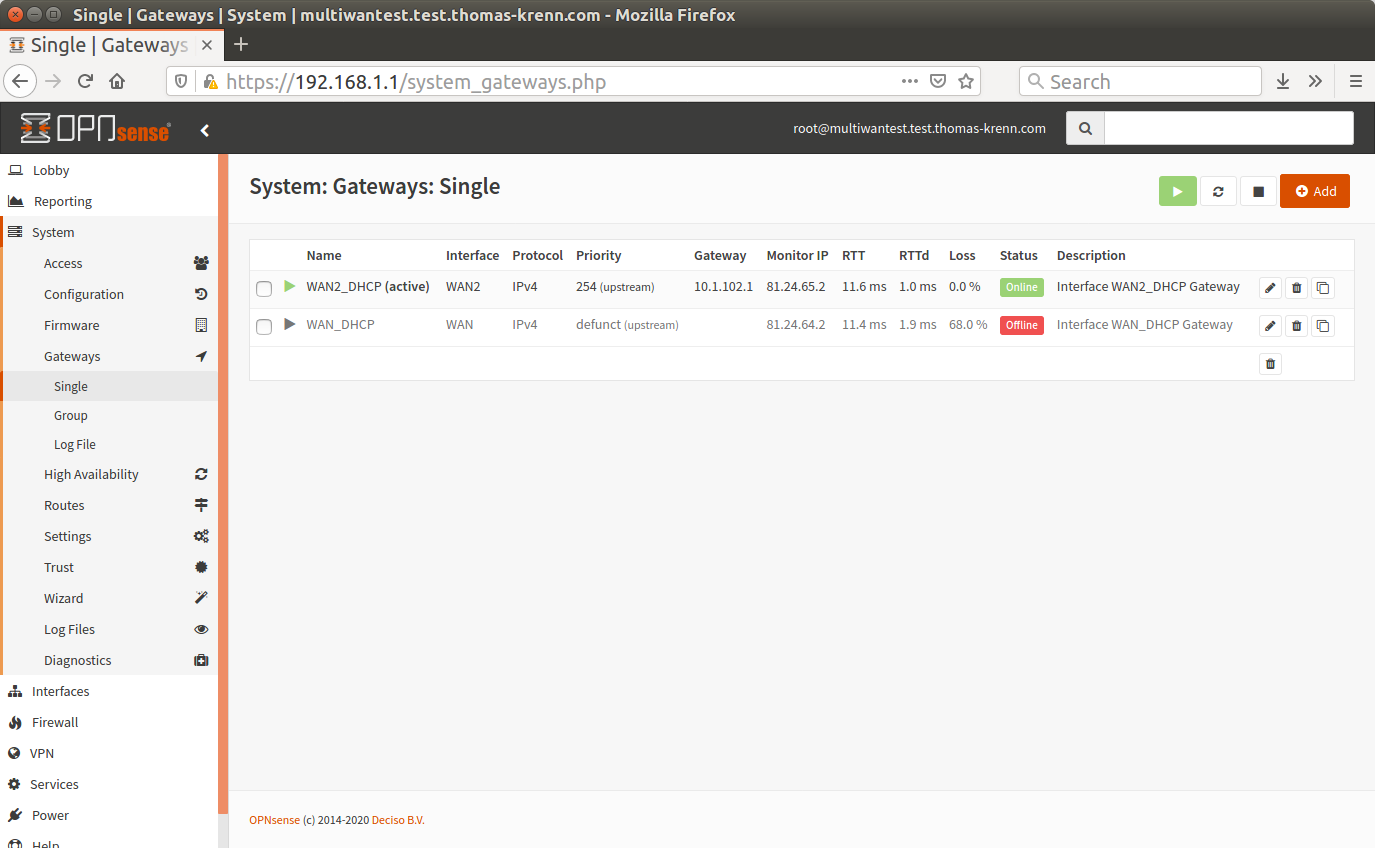
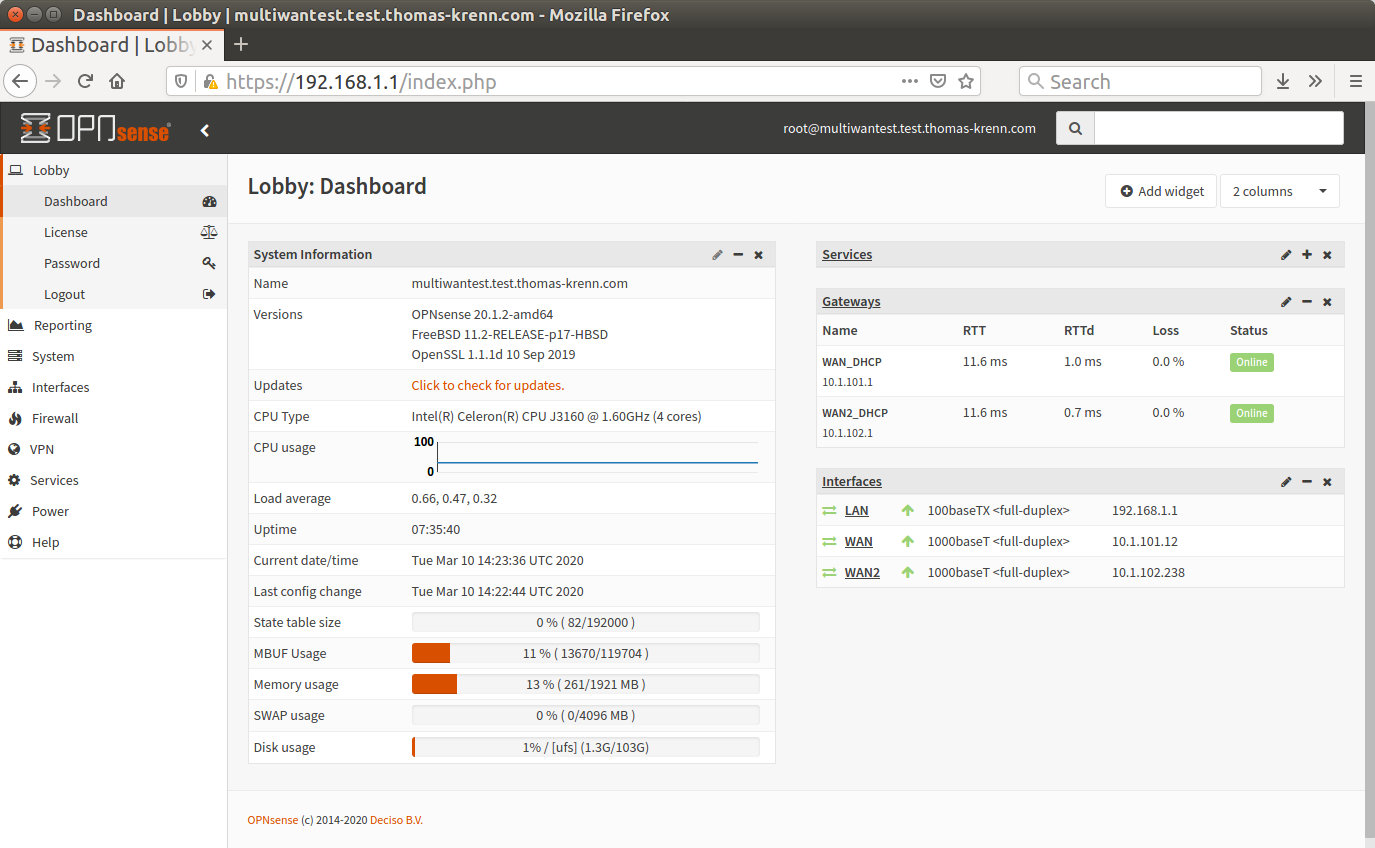
@AdSchellevis and @qdrop17 - good news - the patch solves the issue :-)
Under "System: Gateways: Single" and on the dashboard, the Gateway is in Status "Online" again then, too.
Here are the screens after unplugging igb1:
And here after plugging the cable of igb1 in again:

I think now everything is working fine as expected.
@qdrop17 can you test, too, if the patch solves the issue for you, too?
Thank you @AdSchellevis for your great support - we appreciate it very much.
tk-wfischer
on 10 Mar 2020
alright, I can confirm the fix to be effective. Everything seems to be working as expected now.
Thank you very much @AdSchellevis and @tk-wfischer for your efforts to fix this!
qdrop17
on 11 Mar 2020
This is good news. You are welcome.
@fichtner Should I leave this issue "Open" until the fix is included in OPNsense 20.1.2 or 20.7?
tk-wfischer
on 11 Mar 2020
20.1.3 ;)
 fichtner
on 11 Mar 2020
fichtner
on 11 Mar 2020
Please try again but only unplugging and replugging the frist time. Second time: cut the internet without unplugging the cable on WAN.
See step by step here: https://github.com/opnsense/core/issues/4160#issuecomment-641789848
This seems to bring another problem to light.
 pete1019
on 23 Jun 2020
pete1019
on 23 Jun 2020
Related issues
 tkald
·
5Comments
tkald
·
5Comments
 sooslaca
·
5Comments
sooslaca
·
5Comments
 maurice-w
·
4Comments
mimugmail
·
6Comments
maurice-w
·
4Comments
mimugmail
·
6Comments
 Kimotu
·
4Comments
Kimotu
·
4Comments
Most helpful comment
@AdSchellevis and @qdrop17 - good news - the patch solves the issue :-)
Under "System: Gateways: Single" and on the dashboard, the Gateway is in Status "Online" again then, too.
Here are the screens after unplugging igb1:


And here after plugging the cable of igb1 in again:


I think now everything is working fine as expected.
@qdrop17 can you test, too, if the patch solves the issue for you, too?
Thank you @AdSchellevis for your great support - we appreciate it very much.