Core: HUE spamming error LOG: Error fetching light data:
The problem
Since updating from 0.105.X to 0.106.1 my log becomes spammed with errors.
All hue related items become briefly unavailable in Lovelace and then come back. This is true for all devices on both my hue bridges and always happened simultaneously for both bridges.
Environment
- Home Assistant release with the issue: 0.106.1
- Last working Home Assistant release (if known): 0.105.x
- Operating environment (Hass.io/Docker/Windows/etc.): HASS.IO on NUC
- Integration causing this issue: HUE
- Link to integration documentation on our website:
Problem-relevant configuration.yaml
Traceback/Error logs
2020-02-29 09:21:33 ERROR (MainThread) [homeassistant.components.hue.light] Error fetching group data:
2020-02-29 09:21:33 ERROR (MainThread) [homeassistant.components.hue.light] Error fetching light data:
2020-02-29 09:14:20 ERROR (MainThread) [homeassistant.components.hue.sensor_base] Error fetching sensor data:
Additional information
I also have the custom integration "Hue sensor advanced" running on my setup.
 Kugelfang666
All 84 comments
Hey there @balloob, mind taking a look at this issue as its been labeled with a integration (hue) you are listed as a codeowner for? Thanks!
![probot-home-assistant[bot] picture](https://avatars2.githubusercontent.com/in/36093?v=4&s=40) probot-home-assistant[bot]
on 1 Mar 2020
probot-home-assistant[bot]
on 1 Mar 2020
This is also an issue on 105.5 (just reverted). IP Addresses removed for obvious reasons.
2020-03-01 17:51:00 ERROR (MainThread) [homeassistant.core] Error doing job: Task exception was never retrieved
Traceback (most recent call last):
  File "/usr/src/homeassistant/homeassistant/helpers/entity.py", line 576, in async_request_call
    await coro
  File "/usr/src/homeassistant/homeassistant/components/hue/light.py", line 375, in async_turn_on
    await self.bridge.async_request_call(self.light.set_action(**command))
  File "/usr/src/homeassistant/homeassistant/components/hue/bridge.py", line 108, in async_request_call
    return await coro
  File "/usr/local/lib/python3.7/site-packages/aiohue/groups.py", line 80, in set_action
    json=data)
  File "/usr/local/lib/python3.7/site-packages/aiohue/bridge.py", line 78, in request
    ) from None
aiohue.errors.RequestError: Error requesting data from ###.###.###.###: [Errno 104] Connection reset by peer
2020-03-01 17:51:00 ERROR (MainThread) [homeassistant.components.hue.light] Error fetching light data:
2020-03-01 17:52:00 ERROR (MainThread) [homeassistant.core] Error doing job: Task exception was never retrieved
Traceback (most recent call last):
  File "/usr/src/homeassistant/homeassistant/helpers/entity.py", line 576, in async_request_call
    await coro
  File "/usr/src/homeassistant/homeassistant/components/hue/light.py", line 375, in async_turn_on
    await self.bridge.async_request_call(self.light.set_action(**command))
  File "/usr/src/homeassistant/homeassistant/components/hue/bridge.py", line 108, in async_request_call
    return await coro
  File "/usr/local/lib/python3.7/site-packages/aiohue/groups.py", line 80, in set_action
    json=data)
  File "/usr/local/lib/python3.7/site-packages/aiohue/bridge.py", line 78, in request
    ) from None
aiohue.errors.RequestError: Error requesting data from ###.###.###.###: [Errno 104] Connection reset by peer
2020-03-01 17:52:00 ERROR (MainThread) [homeassistant.components.hue.light] Error fetching light data:
2020-03-01 17:53:52 ERROR (MainThread) [homeassistant.components.hue.light] Error fetching light data:
2020-03-01 17:54:00 ERROR (MainThread) [homeassistant.components.hue.light] Error fetching light data:
2020-03-01 17:55:00 ERROR (MainThread) [homeassistant.components.hue.light] Error fetching light data:
2020-03-01 17:55:00 ERROR (MainThread) [homeassistant.core] Error doing job: Task exception was never retrieved
Traceback (most recent call last):
  File "/usr/src/homeassistant/homeassistant/helpers/entity.py", line 576, in async_request_call
    await coro
  File "/usr/src/homeassistant/homeassistant/components/hue/light.py", line 377, in async_turn_on
    await self.bridge.async_request_call(self.light.set_state(**command))
  File "/usr/src/homeassistant/homeassistant/components/hue/bridge.py", line 108, in async_request_call
    return await coro
  File "/usr/local/lib/python3.7/site-packages/aiohue/lights.py", line 117, in set_state
    json=data)
  File "/usr/local/lib/python3.7/site-packages/aiohue/bridge.py", line 78, in request
    ) from None
aiohue.errors.RequestError: Error requesting data from ###.###.###.###: [Errno 104] Connection reset by peer
2020-03-01 17:55:00 ERROR (MainThread) [homeassistant.components.hue.light] Error fetching light data:
 badrobit
on 2 Mar 2020
badrobit
on 2 Mar 2020
@badrobit that was fixed in 106.
@Kugelfang666 please try without any Hue related custom component.
 balloob
on 2 Mar 2020
balloob
on 2 Mar 2020
HI. just chiming in to let you know on 106.5 this is still observed very frequently, and Hue light go unavailable beyond a workable situation..
2020-03-05 16:47:58 ERROR (MainThread) [homeassistant.components.hue.light] Error fetching group data:
2020-03-05 16:48:18 ERROR (MainThread) [homeassistant.components.hue.light] Error fetching group data:
2020-03-05 16:48:23 ERROR (MainThread) [homeassistant.components.hue.sensor_base] Error fetching sensor data:
2020-03-05 16:48:27 ERROR (MainThread) [homeassistant.components.hue.light] Error fetching light data:
2020-03-05 16:48:42 ERROR (MainThread) [homeassistant.components.hue.light] Error fetching group data:
 Mariusthvdb
on 5 Mar 2020
Mariusthvdb
on 5 Mar 2020
@Mariusthvdb:
Are you using the custom integration "Hue sensor advanced"?
Kugelfang666
on 5 Mar 2020
if you are referring to @robmarkcole 's Custom integration I have used that for ages, and every time I test the Hue integration in Hass.io, I take it out, because dev team wont/can't accept issues with this alive in the setup. It does seem to intensify this issue, so be sure to take it out for testing purposes.

happening as we speak
Mariusthvdb
on 5 Mar 2020
ao i just removed @robmarkcole custom integration from my setup to try it without. Unfortunately my setup heavily relies on this component since im using the hue dimmer switches all over to control non hue stuff via HA.....
Kugelfang666
on 5 Mar 2020
@Mariusthvdb you said in another issue that you use the Rest sensor to hit the Hue API too. Disable those too. Hue only supports a limited number of requests per second. The error shows up when the Hue hub is overwhelmed.
balloob
on 5 Mar 2020
I can confirm the issue also occurs without the custom integration. This makes sense since I was using the combination since months without any issues and they popped up just after the update to 0.106 without any change to my hue setup
Kugelfang666
on 5 Mar 2020
@Mariusthvdb you said in another issue that you use the Rest sensor to hit the Hue API too. Disable those too. Hue only supports a limited number of requests per second. The error shows up when the Hue hub is overwhelmed
Correct, I have 1 rest sensor now that checks the lights for ‘reachable’ which is needed to distinguish lights being truly unavailable because of no power, or unavailable because of this issue. setting allow_unreachable: true shows these lights as on/off so we need a way to get the ‘reachable’ attribute in the HA state machine.
Screenshot
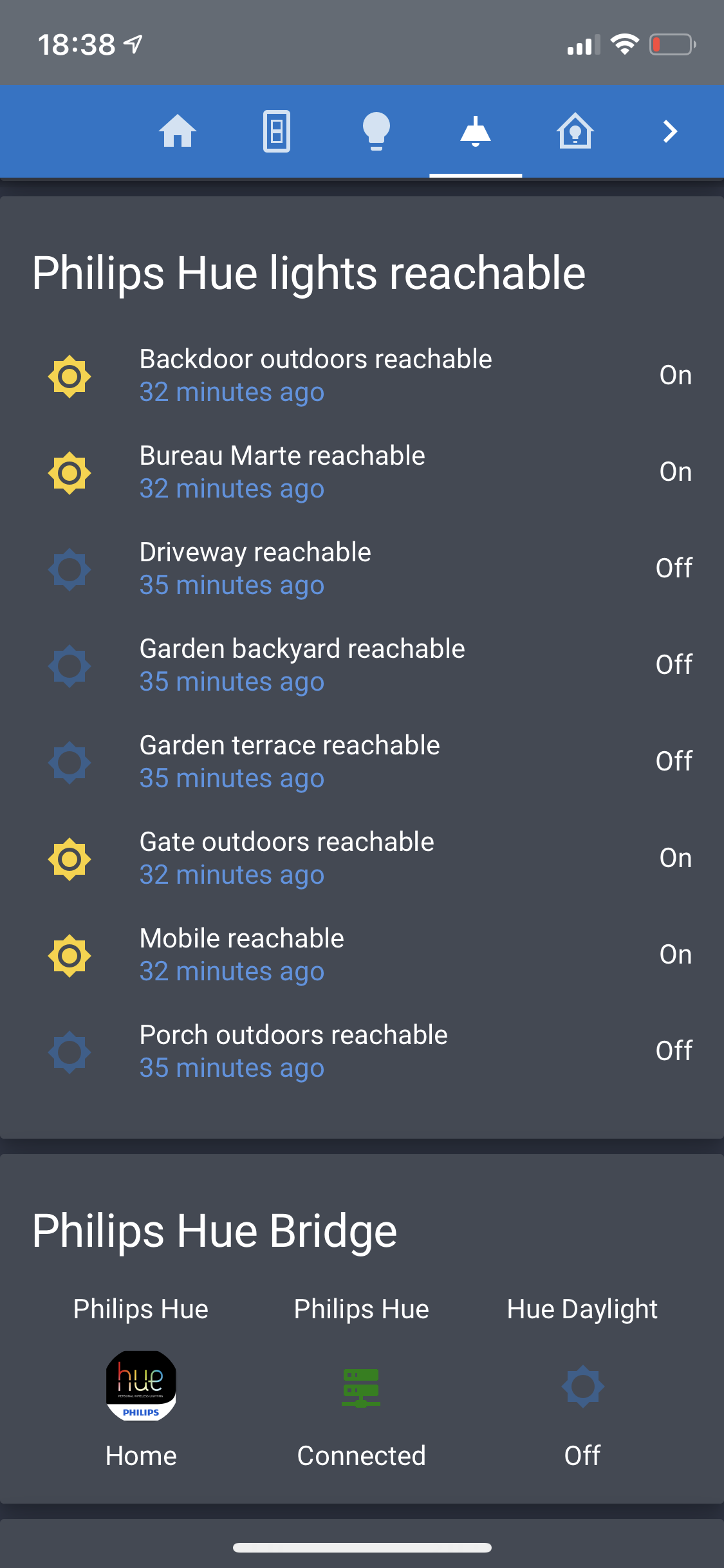
Will take it out for testing also.
Thanks
Mariusthvdb
on 5 Mar 2020
@Kugelfang666 how many hue devices do you have ?
balloob
on 5 Mar 2020
Hue Bridge 1
5x motion detectors,
11x Dimmer switches
23x Lamps
Hue Bridge 2
2x motion detectors,
3x Dimmer switches
1x Hue Tap
10x Lamps
Kugelfang666
on 5 Mar 2020
For the record, the Hue custom integration is absolute trashing your Hue hubs. It doesn't leverage existing caches, it doesn't cache itself either across the different platforms and is just hammering your hubs non-stop. It doesn't just break Home Assistant, I bet a lot of other stuff communicating with Hue (like Harmony) is also hurting by it.
balloob
on 5 Mar 2020
ok, fair point, the only thing i don't understand is why the error popped out just after the update to 0.106. I'm always keeping a close eye on the error log and this is the first time I saw it.
Also as I wrote earlier, I just uninstalled the custom component and removed the entries from config.yaml and after just 30 min the same error was in the log
is there an easy way to diagnose which devices (on my network) or integrations from HA are polling my bridges?
Kugelfang666
on 5 Mar 2020
I just updated to the new version which has the lower polling rate (0.5) , I'll give it a spin and report back,
gernerally speaking, having the hue dimmer switches available in HA as sensors for me is a major asset since I'm heavily using them to trigger automation, control devices... Hence, having a "proper" solution would be fantastic.
Kugelfang666
on 5 Mar 2020
I would get yourself a Conbee 2 stick. Instant sensors/remote updates instead of polling for changes. The Hue Hub API just isn't meant for this.
balloob
on 5 Mar 2020
sorry off topic:
which I actually already have, unfortunately deCONZ had two limitations for me:
it does not allow to configure the scenes which are loaded in case of motion being detected as a function of time. Let's say 7-23 Scene A, 23-7 Scene B
I could not manage to make two dimmer switches within one group cycle through different sets of scenes. Switch 1 Scene 1,2,3 , Switch 2 Scene 3,1,2,6,7
I found the scene transitions to be a bit rougher than with the hue brigade (but im not entirely sure about this one)
I was about to move my whole setup over but 1. and 2. were a deal breaker for me. Currently im using the iOS App iconnecthue to manage my hue bridge which actually allows for all these functions.
Kugelfang666
on 5 Mar 2020
Also with the reduced poll rate I still get the errors in my brige
Kugelfang666
on 5 Mar 2020
i have quite some command line switches in my setup to deactivate my hue motions sensors:
switch:
  - platform: command_line
    switches:
      hue_schedule_we_switch:
        friendly_name: "Fade Light In"
        command_on: curl -X PUT -d '{"on":true}' "192.168.178.36/api/XXXXXXX/sensors/49/config"
        command_off: curl -X PUT -d '{"off":true}' "192.168.178.36/api/XXXXXXX/sensors/49/config"
        value_template: "{{ is_state('sensor.arbeitszimmer_motion_sensor', 'on') }}"
could it be that this is also hammering the bridge to check ists state? I'm just trying to diagnose if something else in my setup might also be contributing to this issue
Kugelfang666
on 6 Mar 2020
I would get yourself a Conbee 2 stick. Instant sensors/remote updates instead of polling for changes. The Hue Hub API just isn't meant for this.
to try and take out the need for the custom integration (which holds a great deal of extra info than the current Core does), we can add some of these extra attributes to the core HA integration, hope this will be allowed.
Next to these attributes, we really need to integrate the Hue remotes into HA. Is anyone working on that, or is an architecture discussion needed for that before doing so.
Mariusthvdb
on 6 Mar 2020
@Kugelfang666 that won't hit the server unless you're turning them on/off. However that value template is sourced from the hub…
@Mariusthvdb you don't need an architecture issue, you need a developer to fix it. Remotes however will never work great, as it's a polling API so things will never be instant unless you hammer the hub, which we won't allow, as that's causing this issue to begin with.
balloob
on 6 Mar 2020
Thanks for the feedback.
Is the value template regularly polled or just checked when the switch is operated?
Kugelfang666
on 6 Mar 2020
Value template is only evaluated when the sensor.arbeitszimmer_motion_sensor state changes. It does not interact directly with the hub to get the state.
balloob
on 6 Mar 2020
ok thanks for pointing this out, the only thing I still don't understand is why this error just popped out with the latest HA update, I'm 100% positive at there was no such entry in the log. could it be that earlier it was not reported?
Kugelfang666
on 6 Mar 2020
@Mariusthvdb you don't need an architecture issue, you need a developer to fix it. Remotes however will never work great, as it's a polling API so things will never be instant unless you hammer the hub, which we won't allow, as that's causing this issue to begin with.
Yes I understand that, and wouldn't want to do so. Thats why I had the Custom integration poll per second, not 0.1 second and that worked fine. Would you consider that too much still? If not, I think this would be just fine to have in core HA.
Mariusthvdb
on 7 Mar 2020
fwiw, Ive deleted all Custom integrations and other rest sensors to the hue hub, except for 2 that only run once a day, and moved over to all core Hue sensors.
Which is a complete let down so far: where I saw only the hue lights go unavailable before (and all Custom integration sensors where rock solid, as they have always been), I now witness all these sensors go unavailable also! So this truly has nothing to do with the custom integration (though relieving the Hub couldn't hurt) and cause should be sought elsewhere.
really am tempted to revert the change but willing to persevere if another way-out can be found. Would love to stick to core integrations... but they should be functional
Now how to proceed.


and a few template sensors built on the core sensor binary...

fwiw, this is the production system, no manual editing in the source files on local dev. plain simple 106.5 Hassio
Mariusthvdb
on 7 Mar 2020
that is perfectly in line whit what I saw. For me removing the custom integration also did not resolve the problem.
Kugelfang666
on 7 Mar 2020
R you using Custom Header?
Taking that out eases up a lot in my setup..
Mariusthvdb
on 7 Mar 2020
?? I can't follow, what are you referring to?
Kugelfang666
on 7 Mar 2020
https://github.com/maykar/custom-header
But it was only my hope speaking I fear... still everything Hue (and Hue only) going unavailable..
fear this all is more fundamental and has also to do with the connection between frontend and backend: as I have reported for many times, on each Lovelace refresh, Hue shows unavailable. No matter what. Can't imagine the Hub has issues with a frontend refresh, so wouldn't this suggest some logic bug in the Hue code for showing unavailable?
Mariusthvdb
on 7 Mar 2020
no I'm not using the custom header
Kugelfang666
on 8 Mar 2020
I thought I should add my bit of information to the conversation:
I've been running Hue with Home Assistant for a couple of months now. I have a small installation: a single Hue bridge listening to three movement sensors and two dimmer controls and directly controlling 5 lights and a light strip. It also sends data to Home Assistant.
I'm running with Home Assistant on HassOS on a Raspberry Pi.
The bridge (BSB002) is on firmware 1937045000.
Home Assistant is v 209; HassOS is 3.12.
I can't tell you the version number at earlier times, but the Hue bridge, Hassio and Home Assistant are kept up to the latest general release software version at any time, with rarely more that a day or so delay from release date.
I'm running no custom components that are likely to be directly involved with the the Hue. I've even turned off Node Red, which was being used to monitor the state of some Hue devices in order to control other non-Hue things.
The log messages show up in pairs:
2020-03-09 16:31:09 ERROR (MainThread) [homeassistant.components.hue.sensor_base] Error fetching sensor data:
2020-03-09 16:31:09 ERROR (MainThread) [homeassistant.components.hue.light] Error fetching light data:(The order may vary)
The messages occur whether or not the Lovelace inteface is being actively used. The sample above was definitely when the UI was idle.
They also occur independently of activity on the sensors. The Home Assistant logbook shows that at the time of the above records, all devices on the bridge became marked as 'changed to unavailable'. A few seconds later (16:31:15) they all returned to the state they were in previously. (Quote Bob Dylan: "everyone commenced to do what they were doin’ before he turned their heads")
Suggestions as to things I could do to help diagnose the issue would be gratefully received:-)
 marriotb
on 9 Mar 2020
marriotb
on 9 Mar 2020
Hi @marriotb, nice report :)
A question though, you say that you have 'three movement sensors and two dimmer controls', are the dimmers configured in HA? (I think they are not implemented in HA Core, and you're saying you have no related custom_components)
What's the frequency of those error pairs? I also have them, but only once in HA startup.
The messages occur whether or not the Lovelace interface is being actively used
This could be interesting. Any custom lovelace card related to hue devs?
 azogue
on 9 Mar 2020
azogue
on 9 Mar 2020
@Mariusthvdb wrote:
on each Lovelace refresh, Hue shows unavailable
Do you have many graph cards in your UI that are rendering historic data? Can you try adding an empty dashboard and refreshing there. I wonder if there is something in your UI that just swamps Home Assistant, causing it to stall for enough time that the request times out.
Note that in 106 we show better errors why a request failed (timeout, something else).
I'll add a tweak so that sensors and ligths don't check for updates at the same time. That might help a bit.
balloob
on 9 Mar 2020
well, tbh, not really no. Have a few graphs of course, but not on my lights pages.
It really doesn't matter on which view I am though. Refreshing Lovelace caused the Hue entities to go unavailable.
Have been thinking about the unavailable and reachable thing some more. couldn't it be you are showing unavailable now for way too many situations? If we think of unavailable as an indicator of Hue communication issues, and only that, we shouldn't have to show unavailable at all for entities that are off power. They are simply unreachable, which has its own representation on the Hue hub.
fyi: I have for the sake of it reinstalled the now improved Custom integration, (mainly because all core Hue sensors showed unavailable all the time, just as frequently as the lights did, never noticed that before..) and with the exception of the startup sequence, I havent seen a single data fetching error yet.
If you are tweaking the Hue integration: would it be feasible to have the creation of the (binary_)sensors optional? That way users can actively select the sensors if they want/need them, and if not, have many entities less to worry about.
About the errors: they are really not very informative:


as said, it has quieted down significantly now, hope this stays for a while.
Thanks for the tweak, anything that can alleviate this is most welcome! very much appreciated, and let me know how to help any further.
Mariusthvdb
on 9 Mar 2020
You can disable any entity via the entities page in config (or more info -> settings). However, all data for all sensors is fetched at once.
balloob
on 9 Mar 2020
of course! thanks for reminding me... sorry.
just so you know: unavailable also shows when checking the config, or restarting it for that matter. It comes during the check and before restart, but thought it was worth mentioning.
secondly: the home-assistant loader fails to report the custom integration for Hue_custom..... this message was introduced specifically for Hue custom at the time, so it is quite remarkable it misses out on it.
Mariusthvdb
on 9 Mar 2020
Hello. It is happening here also. In 0.106.5 every few minutes i get all hue entities unavailable with these logs
[homeassistant.components.hue.light] Error fetching group data:
[homeassistant.components.hue.light] Error fetching light data:
[homeassistant.components.hue.sensor_base] Error fetching sensor data:
Reverted to old snapshots (versions 0.106.3 and 0.105.2), still the same problem.
May be related with last hue bridge update (02/24)?
Really frustrating..
 barramundi
on 9 Mar 2020
barramundi
on 9 Mar 2020
@Mariusthvdb what platform do you run HA on?
balloob
on 9 Mar 2020
Info about mine:
Raspbian GNU/Linux 10 (buster) in a raspberry pi 4.
Worked perfectly for more than eight months and no big changes in my configuration for more than three.
barramundi
on 9 Mar 2020
@azogue wrote:
are the dimmers configured in HA?
No. The dimmers are only configured using the Hue iPhone app Accessory setup component to control one or more of the lights. The state of each light is available to HA via the inbuilt Hue driver. Any automations in use depend only on those HA state values.
I suspect that this approach induces a slight delay in response (this was certainly the case using Node-RED), but I'm happy to wear that. The native Hue automation is sufficient to, for example, turn on a light as I enter a room; any secondary activity (scene lights, HiFi amp, monitors, etc) has no great impact if it is delayed a second or so.
What's the frequency of those error pairs? I also have them, but only once in HA startup.
It's hard to see a pattern. Approximately twice an hour, but very random around that. I attach the log entries for the past 22 hours if you'd like to see the distribution. I've included both the homeassistant.components.hue.sensor_base and homeassistant.components.hue.light errors, because they don't always both occur.
I note, now, that there hasn't been an event now for about 7 hours! I have no explanation for that - no updates have been made to HA or Hue.
The messages occur whether or not the Lovelace interface is being actively used
This could be interesting. Any custom lovelace card related to hue devs?
I am using the HACS plug-in slider-entity-row on some of the Hue lights, but I don't think that's specific to Hue devices.
marriotb
on 10 Mar 2020
Oops. I forgot to attach the log extract:
Log extract 2020-03-10.log
marriotb
on 10 Mar 2020
@Mariusthvdb what platform do you run HA on?
Hassi.io 106.5 Rpi4 4 gb
Reported above things had quieted down, but unfortunately they have not disappeared:

this happens with and without the Custom integration Hue sensors. Somehow this seems to happen alongside script execution too. Cant pin it down just yet to a specific script.
Mariusthvdb
on 10 Mar 2020
Yes, mine went quiet for 10 hrs:
2020-03-10 04:17:39 ERROR (MainThread) [homeassistant.components.hue.light] Error fetching light data:
2020-03-10 04:17:39 ERROR (MainThread) [homeassistant.components.hue.sensor_base] Error fetching sensor data:
2020-03-10 14:43:54 ERROR (MainThread) [homeassistant.components.hue.sensor_base] Error fetching sensor data:
2020-03-10 14:43:54 ERROR (MainThread) [homeassistant.components.hue.light] Error fetching light data:
I'm on same HW & core SW as @Mariusthvdb , except my RPi is only 2GB
marriotb
on 10 Mar 2020
just to report that todays refactoring of the custom Hue integration to 2.13, streamlining it to the new hue datamanager, and with a eased down scan_interval of +1 seconds, still doesn't prevent the above errors to appear/happen. As said, does happen without it also.
Mariusthvdb
on 10 Mar 2020
@Mariusthvdb try to disable all custom integrations and hassio add-ons and see if it happens. If you get timeouts that often, including for other stuff, it means that something is breaking your system, probably doing I/O in the event loop, or that your Pi 4 is unable to handle all the load that you put on it.
balloob
on 10 Mar 2020
mhm thats really od. especially since im running HA on a i3 NUC. There should be plenty of power to run even demanding tasks...
Kugelfang666
on 10 Mar 2020
I'd like to add that I am seeing these errors as well. I hadn't seen them before upgrading to 0.106.5
I'm running Home Assistant in Docker (generic Linux install) on a rpi4 4gb.
I do not run any custom hue components. My hue devices have always worked fine and I have never seen any errors relating to hue.
Here are the latest log entries I found related to this issue:
2020-03-09 14:18:13 ERROR (MainThread) [homeassistant.components.hue.light] Error fetching group data:
2020-03-09 14:18:35 INFO (MainThread) [homeassistant.components.hue.light] Fetching group data recovered
2020-03-10 13:30:20 ERROR (MainThread) [homeassistant.components.hue.light] Error fetching light data:
2020-03-10 13:30:20 ERROR (MainThread) [homeassistant.components.hue.light] Error fetching group data:
2020-03-10 13:30:20 ERROR (MainThread) [homeassistant.components.hue.sensor_base] Error fetching sensor data:
2020-03-10 13:30:26 INFO (MainThread) [homeassistant.components.hue.light] Fetching light data recovered
2020-03-10 13:30:26 INFO (MainThread) [homeassistant.components.hue.light] Fetching group data recovered
2020-03-10 13:30:26 INFO (MainThread) [homeassistant.components.hue.sensor_base] Fetching sensor data recovered
 THATDONFC
on 10 Mar 2020
THATDONFC
on 10 Mar 2020
@Mariusthvdb try to disable all custom integrations and hassio add-ons and see if it happens. If you get timeouts that often, including for other stuff, it means that something is breaking your system, probably doing I/O in the event loop, or that your Pi 4 is unable to handle all the load that you put on it.
sure will do.
please allow me 3 questions:
- why would it be that only Hue integration suffers from this. I've tested before without any CC, and the errors persisted tbh, so will oblige to your suggestion, but fearing it wont lead to anything.
is there a specific log setting I can raise to debug, to check the I/O in the event loop?
as reported, I often see these errors when interacting with the frontend, or even simply load the app (which then briefly but often sate connection lost). Would you have a suggestion what the might be / how I could test that better?
thanks for your time and efforts solving this. Been a long standing thing for now, started when Hue went asyncio some 2 years ago.
the 'cant reach Hue at 192.168.1.212' error messages seem to have simply been replaced by these new ones...
Mariusthvdb
on 10 Mar 2020
@Mariusthvdb in your screenshot there is also an error from pyhaversion being unable to fetch data.
Yes, this is the same cause as the "cant reach Hue" messages from before. And it's very weird that opening the frontend is causing this. That almost feels like your system is coming to a halt. How many lines is your lovelace config? I'm interested to see if you can limit it to see if it impacts it. There are significant changes related to Lovelace configs in 107 too.
balloob
on 10 Mar 2020
many lines is your lovelace config?
well, that's is a bit weird, but I don't know, I use includes to create the Lovelace config. Is here some kind of internal setting calculating the size of the complete frontend.
unless it is the config/.storage/lovelace? But that is an older file:

I can easily test it, since my ui-lovelace.yaml looks like this:
##############################################################################################################
# Main Lovelace configuration file, calling all Views via !include lovelace/view_***
# for ease of editing the separate Views, and prevent errors while doing so to the full setup
# @mariusthvdb
##############################################################################################################

title: Ha Rpi4

resources: !include lovelace/resources.yaml
button_card_templates: !include lovelace/includes/button_card_templates.yaml
decluttering_templates: !include_dir_named lovelace/decluttering_templates
custom_header: !include lovelace/includes/custom_header.yaml
popup_cards: !include lovelace/popup_cards/popup_cards.yaml

views:
  - !include lovelace/views/view_Home.yaml                   #0
  - !include lovelace/views/view_Lights.yaml                 #1
  - !include lovelace/views/view_Ikea_tradfri.yaml           #2
  - !include lovelace/views/view_Philips_hue.yaml            #3
  - !include lovelace/views/view_Philips_hue_settings.yaml   #4 hide | dev show
  - !include lovelace/views/view_Floorplan.yaml              #5 hide
  - !include lovelace/views/view_Settings.yaml               #6
  - !include lovelace/views/view_Notify.yaml                 #7
  - !include lovelace/views/view_Alarm.yaml                  #8 hide
  - !include lovelace/views/view_Home_climate.yaml           #9 hide
  - !include lovelace/views/view_Home_summary.yaml           #10
  - !include lovelace/views/view_Summary_groups.yaml         #11 hide
  - !include lovelace/views/view_Home_assistant.yaml         #12
  - !include lovelace/views/view_Home_energy.yaml            #13 hide
  - !include lovelace/views/view_Home_solar_energy.yaml      #14 hide
  - !include lovelace/views/view_Phones_tablets.yaml         #15 hide
  - !include lovelace/views/view_Travel.yaml                 #16
  - !include lovelace/views/view_Weer_klimaat.yaml           #17
  - !include lovelace/views/view_Alarmclock.yaml             #18
  - !include lovelace/views/view_Tijd_agenda.yaml            #19
  - !include lovelace/views/view_Computer_netwerk.yaml       #20 hide
  - !include lovelace/views/view_Audio_video_gaming.yaml     #21 hide
  - !include lovelace/views/view_Media_players.yaml          #22 hide
  - !include lovelace/views/view_Developer.yaml              #23 hide | dev show
  - !include lovelace/views/view_All_automations.yaml        #24 hide | dev show
  - !include lovelace/views/view_All_lights_scenes.yaml      #25 hide | dev show
  - !include lovelace/views/view_All_switches_devices.yaml   #26 hide | dev show
  - !include lovelace/views/view_Weblinks.yaml               #27 hide
  - !include lovelace/views/view_Leftovers.yaml              #28 hide | dev show
  - !include lovelace/views/view_Test.yaml                   #29 hide
  - !include lovelace/views/view_Cast.yaml                   #30 hide | dev show |Chrome only
quick update: commenting all from tab11 to 30 makes a huge difference already! no error message yet. So glad you suggested this, it corroborates with what I have been saying for a long time now, that Lovelace is rather tasking and the Hue integration indicates that by going unavailable. (maybe not single cause, but it does help)
Now how to solve that, can HA core be improved upon somehow to not cause this effect?
Mariusthvdb
on 10 Mar 2020
Marius, can you try disabling all your resources. I wonder if one of your custom cards is bashing the backend. Also, I suggest we move this to a new issue, as your Lovelace config is causing the issues here, Hue just shows up as a symptom.
balloob
on 11 Mar 2020
Also implementing #32656 which might help .
balloob
on 11 Mar 2020
Let’s hope so, would that stop :
Hue just shows up as a symptom.
too?
Because even with only these couple of views these errors persist.

As a further analysis, it seems the App has even more issues connecting than desktop. App shows the cogwheel in the rightsize corner, and the lost connection popup even more frequently.

Just so I am doing it your way, what would you need the title of the new issue to be, to have focus on the issue at hand? Something like 'Lovelace frontend causing Hue to show unavailable' ?
__update__
all resources disabled: the errors persist. Hue keeps showing unavailable. Even on a single Lovelace view...
So, refreshing Lovelace might invoke the Hue unavailability, it seems it is an underlying issue after all. Unless it takes a lot of the backend to display all red cards for unfound resources (because that's what's happening now with al resources disabled)
HA 106.6 meanwhile
Mariusthvdb
on 11 Mar 2020
for ease of readability, please allow this extra post, if needed after that I'll create a new issue.
Ive been going over my Lovelace config methodically, first making it smaller and show only a single view, building up to the fuller config: no real change after all, the errors kept showing.
After that, I took up on Balloob's request to disable all resources. This helped me identify some unused but listed resources (....) but also didn't really help in deminishing the amount of errors logged.
What does seem to help is taking out the yaml config for Hue, and not allowing the groups, but ,most of all probably, the allow_unavailable. I had that enabled to, well, allow for groups and unavailable lights to show their state (filtering these with an extra 'reachable' attributes, separate discussion)
Not allowing these again (which is the default) seems to have diminished the amount of errors. I have even (accidentally) been able to refresh the Lovelace (3 dots top right corner) without the lights go unavailable or the error logged.
Errors do still occur, and I havent yet heavily tested with running script etc. Which caused the errors/unavailable too. Will see.
Hope this seems a useful contribution in further analyzing the issue of Hue going Unavailable on us.
Mariusthvdb
on 11 Mar 2020
Hi @Mariusthvdb,
After that, I took up on Balloob's request to disable all resources
I see multiple Google Home devices in your screenshot, do these have access to the bulbs?
Naive question: have you tried to unplug _anything_ with hue access (like the GHomes)?
Isolating the problem is difficult, but it is crucial if we want to discover and fix the issues
Much more naive question (from my personal experience): have you tried to restart the hue hub? It seems silly but it worked for me more than once in the past.
azogue
on 11 Mar 2020
Well, I have tried all of that, more than once, and for a very long period already. It is all so very frustrating. In the end, I feel it boils down the fact the HA/Hue integration in its various iterations does 1 thing very consequently, namely indicate the entities (lights And sensors) unavailable way too often.
It makes the integration practically unusable for logic used on states of the lights and sensors.
Just read this, and fully realizing and appreciating this was a very long time ago, and lots and lots of hard work and effort has been put in improving the integration, the issue remains the same:
https://community.home-assistant.io/t/philips-hue-integration-unreliable/3435/13?u=mariusthvdb
If only the unavailable flag wasn't pulled as often as it is done now... why would only Hue suffer from this. Have a look at the sensors the Custom integration creates, they are rock solid, and never blink an eye, (reason for me to use these as base for core logic I my setup), while the core sensors are just as flakey as the lights. I have even disabled them for now, which in my view is almost heresy.
All of this while the lights and sensors in fact are not unstable at all, and proven to be reliable and reachable, and most certainly available, in real life. And in the Hue App for that matter.
So, I can disable as many as all resources, and show only 1 view, it really is of no consequence I am afraid, how much I am willing to keep testing all of that. Just did once more.
Ill follow your efforts here, have installed the latest update already, and though working as fine as ever, I still see the errors logged, and my lights always reflect that in their last_changed field, which is how I can immediately spot what's happening:
at 22:28 I logged in with my phone (error raised all lights reset last-changed, 22:36/6 outside movement lit up the outside lights. Gym audio is an Ikea light, and solid as ever. Turned on at my scene triggers....

Sorry to be a bit sceptic, will keep trying though, and test whatever you guys throw at us. I am as adamant as you to get this solved.
ps about the Google Homes: I have tried indeed, but only using these for a short time, while the issue pre-dates that with a few years.. So it won't be it.
Mariusthvdb
on 11 Mar 2020
so I just updated the CC to 2.14 . while I still encounter the errors in the log something has changed:
ERROR (MainThread) [homeassistant.components.hue.light] Error fetching group data:
ERROR (MainThread) [homeassistant.components.hue.light] Error fetching light data:
ERROR (MainThread) [homeassistant.components.hue.sensor_base] Error fetching sensor data:
Error fetching light data: 83x
Error fetching group data: 84x
Error fetching sensor data: 2x
before they always had the same (similar) count...
Kugelfang666
on 12 Mar 2020
Is it correct we still see the fetching sensor error, after having disabled all core Hue sensors in the entities tab? I would have hoped to at least stop that from causing an error logged, but it apparently doesnt..

note the timing is different, where they previously appear 3 in a row
Mariusthvdb
on 12 Mar 2020
cc @balloob,
maybe those errors should be ignored most of the times, I just discovered how easy it is to generate them, and what is happening really:
Note1: I'm on dev, and working on custom huesensor, so the text on error messages is slightly different
Note2: The
Timeout fetching sensor dataerror was generated by _physically disconnecting the ethernet cable_ 1 second and reconnecting again :)
2020-03-12 18:27:02 DEBUG (MainThread) [custom_components.huesensor.remote] Update requested at 2020-03-12 17:27:02.000531+00:00
2020-03-12 18:27:03 DEBUG (MainThread) [custom_components.huesensor.remote] Update requested at 2020-03-12 17:27:03.002715+00:00
2020-03-12 18:27:04 DEBUG (MainThread) [custom_components.huesensor.remote] Update requested at 2020-03-12 17:27:04.001065+00:00
2020-03-12 18:27:06 DEBUG (MainThread) [custom_components.huesensor.remote] Update requested at 2020-03-12 17:27:06.005077+00:00
2020-03-12 18:27:07 DEBUG (MainThread) [custom_components.huesensor.remote] Update requested at 2020-03-12 17:27:07.003826+00:00
2020-03-12 18:27:08 DEBUG (MainThread) [custom_components.huesensor.remote] Update requested at 2020-03-12 17:27:08.000978+00:00
2020-03-12 18:27:09 ERROR (MainThread) [homeassistant.components.hue.sensor_base] Timeout fetching sensor data
2020-03-12 18:27:09 DEBUG (MainThread) [custom_components.huesensor.remote] Update requested at 2020-03-12 17:27:05.000542+00:00
2020-03-12 18:27:09 DEBUG (MainThread) [custom_components.huesensor.remote] Update requested at 2020-03-12 17:27:09.000580+00:00
2020-03-12 18:27:10 DEBUG (MainThread) [custom_components.huesensor.remote] Update requested at 2020-03-12 17:27:10.004379+00:00
- Update process is kicking in each second, as expected.
- Timeout in data coordinator is of 4 secs.
- Request for '17:27:05' is the one that fails, 4 seconds after being called, at '18:27:09'.
- But meanwhile, requests for '17:27:06', '17:27:07' and '17:27:08' were successful, and bridge data was updated on the time the error is logged.
IMHO we could totally ignore (or at least decrease the log level) these request errors in those situations, and only log 'real bridge disconnects' (> timeout without success). I imagine that A LOT of them would disappear.
azogue
on 12 Mar 2020
Requesting an update is not actually updating the data.
balloob
on 12 Mar 2020
@azogue wrote:
only log 'real bridge disconnects'
Yes, that would be something most of the HA community Hue users ask for, since a very long time indeed... just one of the many posts on the unavailability
Btw, for your info: this is when it all started....
Mariusthvdb
on 12 Mar 2020
Requesting an update is not actually updating the data.
I know, but I was talking about checking if another call does the update request successfully while the current failed one gets the timeout exception. It is better to show it: #32751
azogue
on 13 Mar 2020
Marius, can you try disabling all your resources. I wonder if one of your custom cards is bashing the backend.
I did find 1 card to cause definite trouble in the end. Not saying taking it out solves all errors, but having this on my test page along with some nifty Hue lights auto rendering:
  - type: custom:auto-entities
    card:
      type: entities
      title: Multiple lights
#      show_header_toggle: false
    show_empty: false
    filter:
      include:
        - domain: light
          state: 'on'
          attributes:
            rgb_color: '! none'
          options:
             type: custom:multiple-entity-row
             toggle: true
             secondary_info: last-changed
             entities:
               - entity: this.entity_id
                 attribute: brightness
                 name: Bri
                 unit: '%'
               - entity: this.entity_id
                 attribute: rgb_color
                 name: Rgb
causes these lights to constantly go unavailable. Not sure if it is the Lovelace page, or the backend causing timing issues or what have you, but still, for reference reporting it here:
#      - type: iframe
#        style: |
#          ha-card {
#            overflow: hidden;
#            padding: 0px;
#          }
#        aspect_ratio: 90%
#        url: https://gadgets.buienradar.nl/gadget/zoommap/?lat=5xxx3&lng=4.xxx&overname=2&zoom=13&naam=City&size=3b&voor=1
didn't make a difference if I took out styling or not, is was the buienradar iframe gadget causing trouble.
Mariusthvdb
on 14 Mar 2020
Just wanted to chime in, I'm having the same issue. It's quite annoying when my Hue integration is "Unavailable" quite often during a 24h period, example:

I have one Hue v2 bridge and about 20 bulbs. No third party stuff, no other Philips products like blooms or strips or anything like that.
These are the errors I'm seeing, in chronological order (oldest first).
Log Details (ERROR)
Logger: homeassistant.components.hue.sensor_base
Source: helpers/update_coordinator.py:126
Integration: hue
First occurred: 8:23:04 PM (1 occurrences)
Last logged: 8:23:04 PM
Error requesting sensor data: None
Log Details (ERROR)
Logger: homeassistant.components.hue.light
Source: helpers/update_coordinator.py:126
Integration: hue
First occurred: 8:23:00 PM (2 occurrences)
Last logged: 8:23:04 PM
- Error requesting group data: None
- Error requesting light data: None
Log Details (ERROR)
Logger: homeassistant.components.hue.bridge
Source: components/hue/bridge.py:131
Integration: hue
First occurred: 8:23:00 PM (4 occurrences)
Last logged: 8:23:07 PM
Request failed 3 times, giving up.
 qJake
on 6 Apr 2020
qJake
on 6 Apr 2020
Same issue on Home Assistant 0.108.3
Errors in chronological order below.
I am using a Conbee 2 to integrate some Sengled bulbs if it matters.
Log Details (ERROR)
Logger: homeassistant.components.hue.bridge
Source: components/hue/bridge.py:131
Integration: hue (documentation, issues)
First occurred: 8:17:00 PM (82 occurrences)
Last logged: 10:28:06 PM
Request failed 3 times, giving up.
Log Details (ERROR)
Logger: homeassistant.components.hue.light
Source: helpers/update_coordinator.py:133
Integration: hue (documentation, issues)
First occurred: 8:16:28 PM (13 occurrences)
Last logged: 10:27:13 PM
Timeout fetching light data
Log Details (ERROR)
Logger: homeassistant.components.hue.sensor_base
Source: helpers/update_coordinator.py:133
Integration: hue (documentation, issues)
First occurred: 8:16:24 PM (13 occurrences)
Last logged: 10:27:13 PM
Timeout fetching sensor data
Logger: homeassistant.core
Source: components/hue/bridge.py:124
First occurred: 8:17:00 PM (2 occurrences)
Last logged: 8:17:01 PM
Error doing job: Task exception was never retrieved
Traceback (most recent call last):
File "/usr/local/lib/python3.7/site-packages/aiohttp/connector.py", line 936, in _wrap_create_connection
return await self._loop.create_connection(args, *kwargs) # type: ignore # noqa
File "/usr/local/lib/python3.7/asyncio/base_events.py", line 962, in create_connection
raise exceptions[0]
File "/usr/local/lib/python3.7/asyncio/base_events.py", line 949, in create_connection
await self.sock_connect(sock, address)
File "/usr/local/lib/python3.7/asyncio/selector_events.py", line 473, in sock_connect
return await fut
File "/usr/local/lib/python3.7/asyncio/selector_events.py", line 503, in _sock_connect_cb
raise OSError(err, f'Connect call failed {address}')
ConnectionRefusedError: [Errno 111] Connect call failed ('192.168.1.121', 80)
The above exception was the direct cause of the following exception:
Traceback (most recent call last):
File "/usr/src/homeassistant/homeassistant/core.py", line 1255, in _execute_service
await handler.func(service_call)
File "/usr/src/homeassistant/homeassistant/helpers/entity_component.py", line 213, in handle_service
self._platforms.values(), func, call, required_features
File "/usr/src/homeassistant/homeassistant/helpers/service.py", line 412, in entity_service_call
future.result() # pop exception if have
File "/usr/src/homeassistant/homeassistant/helpers/entity.py", line 600, in async_request_call
await coro
File "/usr/src/homeassistant/homeassistant/helpers/service.py", line 443, in _handle_entity_call
await result
File "/usr/src/homeassistant/homeassistant/components/light/__init__.py", line 243, in async_handle_light_on_service
await light.async_turn_on(*params)
File "/usr/src/homeassistant/homeassistant/components/hue/light.py", line 399, in async_turn_on
partial(self.light.set_state, *command)
File "/usr/src/homeassistant/homeassistant/components/hue/bridge.py", line 124, in async_request_call
return await task()
File "/usr/local/lib/python3.7/site-packages/aiohue/lights.py", line 117, in set_state
json=data)
File "/usr/local/lib/python3.7/site-packages/aiohue/bridge.py", line 63, in request
async with self.websession.request(method, url, json=json) as res:
File "/usr/local/lib/python3.7/site-packages/aiohttp/client.py", line 1012, in __aenter__
self._resp = await self._coro
File "/usr/local/lib/python3.7/site-packages/aiohttp/client.py", line 483, in _request
timeout=real_timeout
File "/usr/local/lib/python3.7/site-packages/aiohttp/connector.py", line 523, in connect
proto = await self._create_connection(req, traces, timeout)
File "/usr/local/lib/python3.7/site-packages/aiohttp/connector.py", line 859, in _create_connection
req, traces, timeout)
File "/usr/local/lib/python3.7/site-packages/aiohttp/connector.py", line 1004, in _create_direct_connection
raise last_exc
File "/usr/local/lib/python3.7/site-packages/aiohttp/connector.py", line 986, in _create_direct_connection
req=req, client_error=client_error)
File "/usr/local/lib/python3.7/site-packages/aiohttp/connector.py", line 943, in _wrap_create_connection
raise client_error(req.connection_key, exc) from exc
aiohttp.client_exceptions.ClientConnectorError: Cannot connect to host 192.168.1.121:80 ssl:None [Connect call failed ('192.168.1.121', 80)]
 atechnical
on 16 Apr 2020
atechnical
on 16 Apr 2020
0.108.5, still experiencing, but (at least for the past 24 hours) seems to be a little better:

Not sure why it's so random/sporadic.
qJake
on 16 Apr 2020
I was fighting this issue as well and did all kinds of troubleshooting. What I discovered was my Hue Hub was rebooting at regular intervals whenever it went offline in HA, which was about every hour. That meant it wasn't just HA that couldn't interact it was everything.
After a lot of digging what I discovered was that because I had the Hue Hub on another VLAN and mDNS reflecting on it was causing the Hue Hub to get overwhelmed and crash. I use all ubiquiti networks unifi equipment and this seems to be a well reported issue that happens with the Hue Hub. Moving to the mDNS repeater over the mDNS reflector immediately resolved the issue.
This probably won't help everyone, but it might help anyone with a similar setup.
 geekofweek
on 16 Apr 2020
geekofweek
on 16 Apr 2020
I also have Ubiquiti with VLANS and mdns. It's way more than I need and I'm still learning how to use it. Can you explain how you ..."Moving to the mDNS repeater over the mDNS reflector"? Thanks very much.
atechnical
on 16 Apr 2020
This is a good forum post to get started. The short of it is you need to disable mDNS reflecting in the GUI and modify the config.gateway.json file on the controller. There is no GUI option for it and does not work on the Dream Machine line.
geekofweek
on 16 Apr 2020
I have a traditional single-mask LAN (192.168.0.*) and both my hub and the VM host that Home Assistant runs on are hard-wired (via the same switch) to the same router.
If my Hue Hub is in fact rebooting... how/where would I be able to tell this information?
qJake
on 16 Apr 2020
Seeing that the update_coordinator pops up in the error logs, it may be related to #33866?
 xeophin
on 17 Apr 2020
xeophin
on 17 Apr 2020
so I fully removed the CC in my setup. Moving forward im using the newly released events for the hue buttons. Unfortunately I still keep getting a lot of these Timeout fetching light data. Since I'm not using any special mDNS server or something I still wonder what might be causing this issue...
Kugelfang666
on 21 Apr 2020
happy to report here, that apart from the issue at startup, the errors have completely gone..
did an update to 108.x, after which Hue became fully stable. What I also did was update the custom button card to version 3.3.0 +, which prevents updating all entities configured, and only updates changed entities.
Lastly, and I haven't tested this 100%, was to exclude the light domain in recorder/history.
Will enable that shorty to see if the error spamming will return.
All of this is with _all_ Hue core sensors and lights (had sensors disabled before because they too became 'unavailable' all the time), and now even the Hue with events.
Goes without saying I only report here without any CC installed.
Can report that installing CC eventsensor by @azogue works very fine indeed, and does Not cause any harm.
All in all, happy camper here. #fingerscrossed...
Mariusthvdb
on 21 Apr 2020
@Mariusthvdb
thanks for this! I can confirm removing the light domain from the recorder seems to have solved the issue for me!! This for me seems to be the actual solution after removing CCs and so one did not work!
Kugelfang666
on 21 Apr 2020
Good to hear!
If this really solves it, I wish I had tried that some 2 years ago, ever since reporting hue going ‘unavailable’....
It would be an issue of true importance though, since of course we should be able to record our lights.
@balloob what would be your thoughts on this?
Mariusthvdb
on 21 Apr 2020
hmmm after some initial euphony the error came back when I increased the polling interval, ill do some more systematic testing tomorrow
Kugelfang666
on 21 Apr 2020
Wait till beta 109 hits and make sure that you make sure that you don't get any errors from integrations that do I/O in the event loop.
balloob
on 22 Apr 2020
for me the problem seems to be gone with 0.109! I updated yesterday and ever since not a single entry occurred!
Kugelfang666
on 30 Apr 2020
updating the OS to 4.10 brought back the problem which before was entirely solved for me :-(
Kugelfang666
on 8 Jun 2020
which is that (awaiting your report before updating...)?
Mariusthvdb
on 8 Jun 2020
which is that (awaiting your report before updating...)?
Sry I don’t understand
Kugelfang666
on 8 Jun 2020
which is the problem that you say is brought back?
Mariusthvdb
on 8 Jun 2020
Please do not continue discussions on closed issues but open a new issue instead.
balloob
on 9 Jun 2020
Related issues
 TheZoker
·
3Comments
TheZoker
·
3Comments
 sogeniusio
·
3Comments
sogeniusio
·
3Comments
 sibbl
·
3Comments
sibbl
·
3Comments
 YellowMonster76
·
3Comments
YellowMonster76
·
3Comments
 bdraco
·
3Comments
bdraco
·
3Comments