The problem
After installing the latest version of the HA (or HA Core now), I've got a notification about a new discovered device:

This is great, because that's my TV. So I clicked Configure to open the popup with the details and then Submit, and see this:
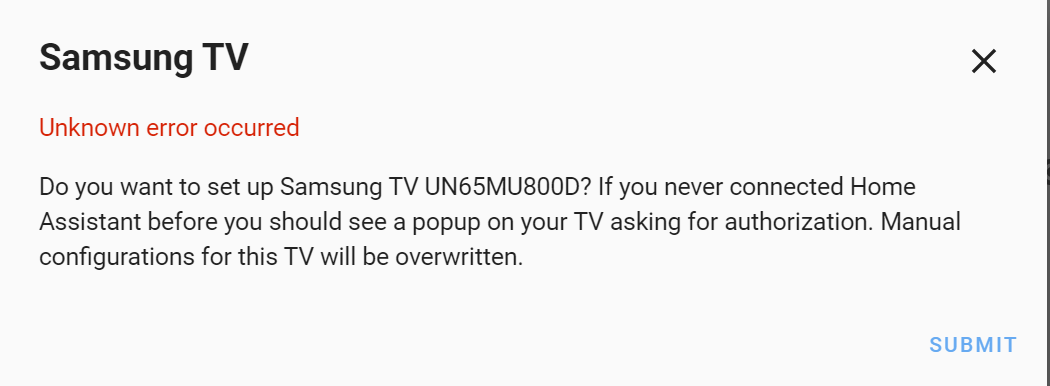
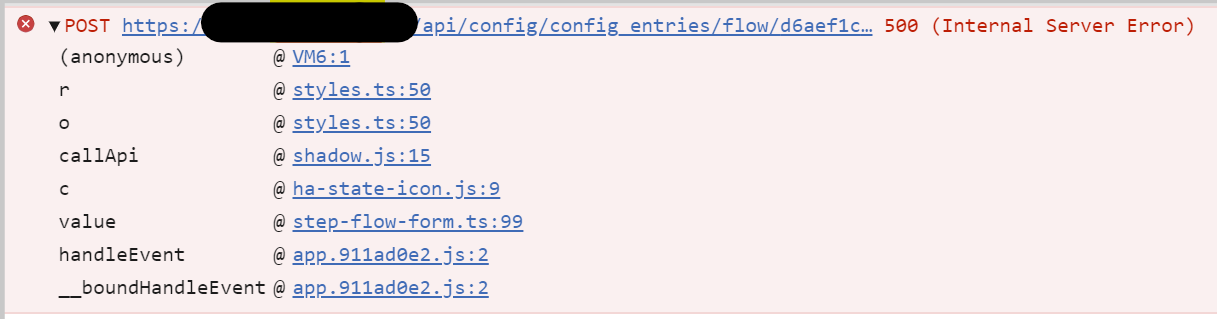
The network trace looks like this, when that error happens:

Environment
- Home Assistant release with the issue: 0.105.2
- Last working Home Assistant release (if known): None (this just started to show up)
- Operating environment (Hass.io/Docker/Windows/etc.): Hass.io (running on Raspberry PI)
- Integration causing this issue: Samsung TV
- Link to integration documentation on our website: https://www.home-assistant.io/integrations/samsungtv/
Problem-relevant configuration.yaml
This is my configuration section related to it. Let me know if you need more
# Samsung TV
media_player:
  - platform: samsungtv
    name: main_tv
    host: 192.168.86.13
    port: 8001
    # mac: ****

  - platform: channels
    name: Family Room Channels
    host: 192.168.86.13
Traceback/Error logs
Error handling request
Traceback (most recent call last):
  File "/usr/local/lib/python3.7/site-packages/aiohttp/web_protocol.py", line 418, in start
    resp = await task
  File "/usr/local/lib/python3.7/site-packages/aiohttp/web_app.py", line 458, in _handle
    resp = await handler(request)
  File "/usr/local/lib/python3.7/site-packages/aiohttp/web_middlewares.py", line 119, in impl
    return await handler(request)
  File "/usr/src/homeassistant/homeassistant/components/http/real_ip.py", line 39, in real_ip_middleware
    return await handler(request)
  File "/usr/src/homeassistant/homeassistant/components/http/ban.py", line 72, in ban_middleware
    return await handler(request)
  File "/usr/src/homeassistant/homeassistant/components/http/auth.py", line 135, in auth_middleware
    return await handler(request)
  File "/usr/src/homeassistant/homeassistant/components/http/view.py", line 123, in handle
    result = await result
  File "/usr/src/homeassistant/homeassistant/components/config/config_entries.py", line 160, in post
    return await super().post(request, flow_id)
  File "/usr/src/homeassistant/homeassistant/components/http/data_validator.py", line 50, in wrapper
    result = await method(view, request, *args, **kwargs)
  File "/usr/src/homeassistant/homeassistant/helpers/data_entry_flow.py", line 89, in post
    result = await self._flow_mgr.async_configure(flow_id, data)
  File "/usr/src/homeassistant/homeassistant/data_entry_flow.py", line 130, in async_configure
    result = await self._async_handle_step(flow, cur_step["step_id"], user_input)
  File "/usr/src/homeassistant/homeassistant/data_entry_flow.py", line 172, in _async_handle_step
    result: Dict = await getattr(flow, method)(user_input)
  File "/usr/src/homeassistant/homeassistant/components/samsungtv/config_flow.py", line 170, in async_step_confirm
    result = await self.hass.async_add_executor_job(self._try_connect)
  File "/usr/local/lib/python3.7/concurrent/futures/thread.py", line 57, in run
    result = self.fn(*self.args, **self.kwargs)
  File "/usr/src/homeassistant/homeassistant/components/samsungtv/config_flow.py", line 92, in _try_connect
    with Remote(config.copy()):
  File "/usr/local/lib/python3.7/site-packages/samsungctl/remote.py", line 11, in __init__
    self.remote = RemoteWebsocket(config)
  File "/usr/local/lib/python3.7/site-packages/samsungctl/remote_websocket.py", line 30, in __init__
    self._read_response()
  File "/usr/local/lib/python3.7/site-packages/samsungctl/remote_websocket.py", line 67, in _read_response
    response = self.connection.recv()
  File "/usr/local/lib/python3.7/site-packages/websocket/_core.py", line 310, in recv
    opcode, data = self.recv_data()
  File "/usr/local/lib/python3.7/site-packages/websocket/_core.py", line 327, in recv_data
    opcode, frame = self.recv_data_frame(control_frame)
  File "/usr/local/lib/python3.7/site-packages/websocket/_core.py", line 340, in recv_data_frame
    frame = self.recv_frame()
  File "/usr/local/lib/python3.7/site-packages/websocket/_core.py", line 374, in recv_frame
    return self.frame_buffer.recv_frame()
  File "/usr/local/lib/python3.7/site-packages/websocket/_abnf.py", line 383, in recv_frame
    frame.validate(self.skip_utf8_validation)
  File "/usr/local/lib/python3.7/site-packages/websocket/_abnf.py", line 182, in validate
    raise WebSocketProtocolException("Invalid close opcode.")
websocket._exceptions.WebSocketProtocolException: Invalid close opcode.
Additional information
I've actually tried even to comment out all existing configuration related to that TV (in the yaml file) and restarted the server, however the issue didn't go away. So I believe it's not related to the current config.
Looking into the error log above, the following line seems the root of the problem:
    raise WebSocketProtocolException("Invalid close opcode.")
websocket._exceptions.WebSocketProtocolException: Invalid close opcode.
 mkArtak
All 4 comments
Hey there @escoand, mind taking a look at this issue as its been labeled with a integration (samsungtv) you are listed as a codeowner for? Thanks!
![probot-home-assistant[bot] picture](https://avatars2.githubusercontent.com/in/36093?v=4&s=40) probot-home-assistant[bot]
on 7 Feb 2020
probot-home-assistant[bot]
on 7 Feb 2020
Thanks, but already have an open issue for this https://github.com/home-assistant/home-assistant/issues/31504
 escoand
on 7 Feb 2020
escoand
on 7 Feb 2020
Thanks folks for jumping on this so quickly. Feel free to close this, if there is no action pending here. I'll start monitoring the referenced issue.
mkArtak
on 7 Feb 2020
Closing this issue as it is a duplicate of #31504
 springstan
on 7 Feb 2020
springstan
on 7 Feb 2020
Related issues
 kirichkov
·
3Comments
kirichkov
·
3Comments
 aweb-01
·
3Comments
aweb-01
·
3Comments
 neonandu
·
3Comments
neonandu
·
3Comments
 arangates
·
3Comments
arangates
·
3Comments
 flsabourin
·
3Comments
flsabourin
·
3Comments