Core: "Error: Unknown Error, see logs" received when trying to update to 0.105.1 or Supervisor 199
I am currently on Home Assistant 0.104.3. When I try to update, I receive the error message above. Which logs should I be reviewing? Here is all I see. It doesn't give me useful info but I'm sure it will all of you.
20-02-06 16:11:00 INFO (MainThread) [hassio.homeassistant] Update Home Assistant to version 0.105.1
20-02-06 16:11:00 INFO (SyncWorker_1) [hassio.docker.interface] Update image homeassistant/qemux86-64-homeassistant:0.104.3 to homeassistant/qemux86-64-homeassistant:0.105.1
20-02-06 16:11:00 INFO (SyncWorker_1) [hassio.docker.interface] Pull image homeassistant/qemux86-64-homeassistant tag 0.105.1.
20-02-06 16:11:00 ERROR (SyncWorker_1) [hassio.docker.interface] Can't install homeassistant/qemux86-64-homeassistant:0.105.1 -> 500 Server Error: Internal Server Error ("Get https://registry-1.docker.io/v2/: dial tcp: lookup registry-1.docker.io on 127.0.0.53:53: server misbehaving").
20-02-06 16:11:00 WARNING (MainThread) [hassio.homeassistant] Update Home Assistant image fails
20-02-06 16:13:00 INFO (MainThread) [hassio.homeassistant] Update Home Assistant to version 0.105.1
20-02-06 16:13:00 INFO (SyncWorker_2) [hassio.docker.interface] Update image homeassistant/qemux86-64-homeassistant:0.104.3 to homeassistant/qemux86-64-homeassistant:0.105.1
20-02-06 16:13:00 INFO (SyncWorker_2) [hassio.docker.interface] Pull image homeassistant/qemux86-64-homeassistant tag 0.105.1.
20-02-06 16:13:00 ERROR (SyncWorker_2) [hassio.docker.interface] Can't install homeassistant/qemux86-64-homeassistant:0.105.1 -> 500 Server Error: Internal Server Error ("Get https://registry-1.docker.io/v2/: dial tcp: lookup registry-1.docker.io on 127.0.0.53:53: server misbehaving").
20-02-06 16:13:00 WARNING (MainThread) [hassio.homeassistant] Update Home Assistant image fails
20-02-06 16:26:22 INFO (MainThread) [hassio.updater] Fetch update data from https://version.home-assistant.io/stable.json
20-02-06 16:26:26 INFO (MainThread) [hassio.homeassistant] Update Home Assistant to version 0.105.1
20-02-06 16:26:26 INFO (SyncWorker_10) [hassio.docker.interface] Update image homeassistant/qemux86-64-homeassistant:0.104.3 to homeassistant/qemux86-64-homeassistant:0.105.1
20-02-06 16:26:26 INFO (SyncWorker_10) [hassio.docker.interface] Pull image homeassistant/qemux86-64-homeassistant tag 0.105.1.
20-02-06 16:26:26 ERROR (SyncWorker_10) [hassio.docker.interface] Can't install homeassistant/qemux86-64-homeassistant:0.105.1 -> 500 Server Error: Internal Server Error ("Get https://registry-1.docker.io/v2/: dial tcp: lookup registry-1.docker.io on 127.0.0.53:53: server misbehaving").
20-02-06 16:26:26 WARNING (MainThread) [hassio.homeassistant] Update Home Assistant image fails
20-02-06 16:29:48 INFO (MainThread) [hassio.homeassistant] Updated Home Assistant API token
 garnern2
All 10 comments
Anything in the Home Assistant logs?
You can find those in /config/home-assistant.log
 frenck
on 6 Feb 2020
frenck
on 6 Feb 2020
I'm still not exactly sure what happened, but when I rebooted the server, it had updated Supervisor to 199 and it allowed me to update Hassio.
garnern2
on 7 Feb 2020
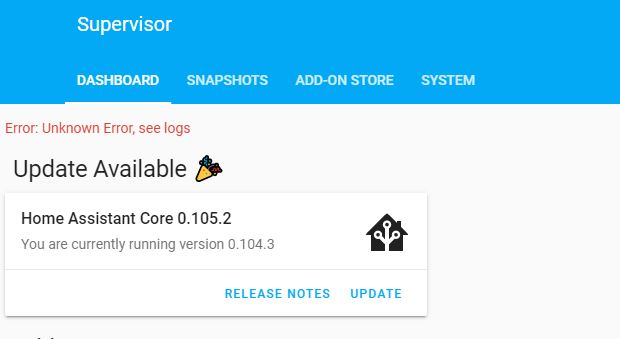
I have the same error too. Restarted Hass OS 3.9 ; Supervisor 199 ; Nothing in the home-assistant.log
 sankeerthb
on 7 Feb 2020
sankeerthb
on 7 Feb 2020
I have the same error too. Restarted Hass OS 3.9 ; Supervisor 199 ; Nothing in the home-assistant.log
Try rebooting the entire server.
garnern2
on 7 Feb 2020
HassOS running within VirtualBox on a Windows PC. All updated.
Restarted the Windows 10 PC also and no help, still the same error.
sankeerthb
on 7 Feb 2020
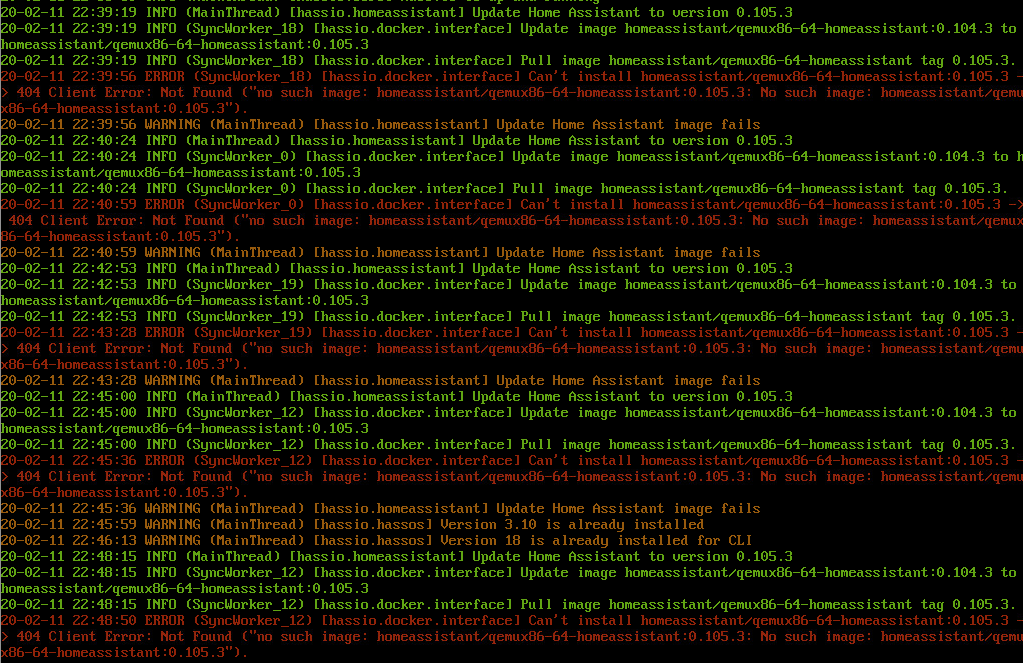
I'm getting the same error. on VMware image of hassio.
Here is errors from console
 cohe4ko
on 11 Feb 2020
cohe4ko
on 11 Feb 2020
any resolution to this?
Having same issue. Just tried to update to 0.107.7 from 0.106.3
Windows 10
VirtualBox running hassio
Update:
Deleted the MisquittoBroker but still failed with same error
Ran hassio su repair
and update went through!
 treflip
on 28 Mar 2020
treflip
on 28 Mar 2020
any resolution to this?
Having same issue. Just tried to update to 0.107.7 from 0.106.3
Windows 10
VirtualBox running hassioUpdate:
Deleted the MisquittoBroker but still failed with same error
Ran hassio su repair
and update went through!
Thank you! I am having the same setup and had the same issue. Your solution repairing supervisor worked for me too.
 donkristo
on 19 Apr 2020
donkristo
on 19 Apr 2020
any resolution to this?
Having same issue. Just tried to update to 0.107.7 from 0.106.3
Windows 10
VirtualBox running hassio
Update:
Deleted the MisquittoBroker but still failed with same error
Ran hassio su repair
and update went through!Thank you! I am having the same setup and had the same issue. Your solution repairing supervisor worked for me too.
hi, how do i run this command, i am new to this, i am running win10, virtualbox (Home Assistant 0.117.6)
 alamoudimoh
on 12 Nov 2020
alamoudimoh
on 12 Nov 2020
hi, how do i run this command, i am new to this, i am running win10, virtualbox (Home Assistant 0.117.6)
Hi @alamoudimoh,
install the official Terminal & SSH addon. Start the Web UI to get the terminal in your browser. Then run the command
hassio su repair
Hope it works for you.
donkristo
on 15 Nov 2020
Related issues
 bdraco
·
3Comments
bdraco
·
3Comments
 sibbl
·
3Comments
sibbl
·
3Comments
 sh0rez
·
3Comments
sh0rez
·
3Comments
 TheZoker
·
3Comments
TheZoker
·
3Comments
 aweb-01
·
3Comments
aweb-01
·
3Comments
Most helpful comment
any resolution to this?
Having same issue. Just tried to update to 0.107.7 from 0.106.3
Windows 10
VirtualBox running hassio
Update:
Deleted the MisquittoBroker but still failed with same error
Ran hassio su repair
and update went through!