Core: Warning appears when trying to uncheck can share checkbox in sharing menu on the sidebar when we have 2 mountpoints with the same backend
Steps to reproduce
- Having oC server 10.4.0. RC1 enable external storage
- Allow users to mount external storage
- Configure a Global Mount point and check option enable sharing
- Configure a personal Mount point with the same configuration data and DO NOT check option enable sharing
- In Files View browse into Global MountPoint folder
- Share a file/folder
- Try to uncheck can share checkbox in sharing menu on the sidebar.
Expected behaviour
Can share permission is disabled
Actual behaviour
An error is shown in Files View
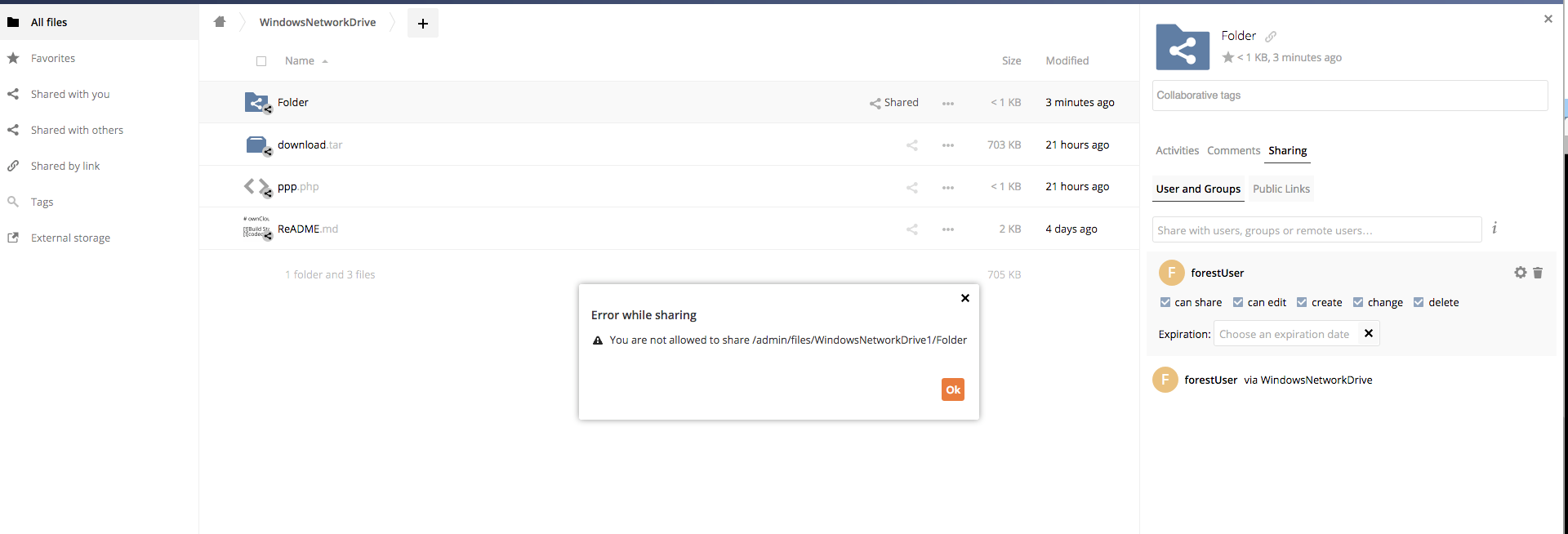

No logs are spotted in owncloud.log
Server configuration
ownCloud 10.4.0. RC1
Note Tested in oC 10.3.2 and it works fine. So it seems to be a regression
@HanaGemela @mbarz JFYI
 davitol
All 27 comments

davitol
on 21 Jan 2020
There are changes/fixes coming for that sharing permissions/expiration date panel - PR https://github.com/owncloud/core/pull/36766
So we should test with that to see if the problem is already getting fixed.
Assigning myself so I notice this when I get to the office, and manually test.
 phil-davis
on 22 Jan 2020
phil-davis
on 22 Jan 2020
I have tried with both the current core master, and the branch for PR #36766
I am trying with external storage type "ownCloud" that points to a different federated server.
I can't reproduce this problem.
@davitol I see that you are using WND. Is it specific to that?
Or can you reproduce this with current core master?
(Or maybe we get PR #36766 merged, and anything else for 10.4 and then start the process of making 10.4RC2... and test with that - RC1 is quite old now)
phil-davis
on 22 Jan 2020
@davitol I see that you are using WND. Is it specific to that?
I reproduced it with WND and with SFTP at least. And as mentioned core version was 10.4.0.RC1
davitol
on 22 Jan 2020
@davitol I think you added the wrong one for JFYI (not the first time).
I think you wanted to link @micbar instead ;)
 mbarz
on 22 Jan 2020
mbarz
on 22 Jan 2020
@davitol I think you added the wrong one for JFYI (not the first time).
I think you wanted to link @micbar instead ;)
You are completely right! Sorry for the noise
davitol
on 22 Jan 2020
@davitol can you try reproducing this and see in the owncloud.log what is the exact line with the exception on the server side?
 mrow4a
on 22 Jan 2020
mrow4a
on 22 Jan 2020
@davitol can you try reproducing this and see in the
owncloud.logwhat is the exact line with the exception on the server side?
@mrow4a No logs in owncloud.log
davitol
on 23 Jan 2020
@davitol @mrow4a this is fixed now?
 micbar
on 20 Feb 2020
micbar
on 20 Feb 2020
@micbar did not work on it as @phil-davis is assigned. Should I?
mrow4a
on 20 Feb 2020
@mrow4a no, i was just asking.
@phil-davis @davitol Does this issue still exist?
micbar
on 20 Feb 2020
@phil-davis @davitol Does this issue still exist?
Tested again in 10.4.0. RC4 and i was able to reproduce it
davitol
on 20 Feb 2020
@pmaier1 @phil-davis @HanaGemela We need to decide on this issue.
I was not aware of it, that it persists. There was a discussion that it could have been fixed by several other PRs.
I have a first estimate that this will require 1-2 md of work.
micbar
on 20 Feb 2020
@micbar we can work on apps releases for 10.4 meanwhile
 HanaGemela
on 20 Feb 2020
HanaGemela
on 20 Feb 2020
Apologies - I had assigned myself just so that I would try this back in January.
I should have unassigned myself - it misled people into thinking that I was working on it.
I took off my assignment.
phil-davis
on 20 Feb 2020
@jvillafanez will investigate. Any help is welcome.
micbar
on 20 Feb 2020
Strange.
git checkout v10.4.0RC3
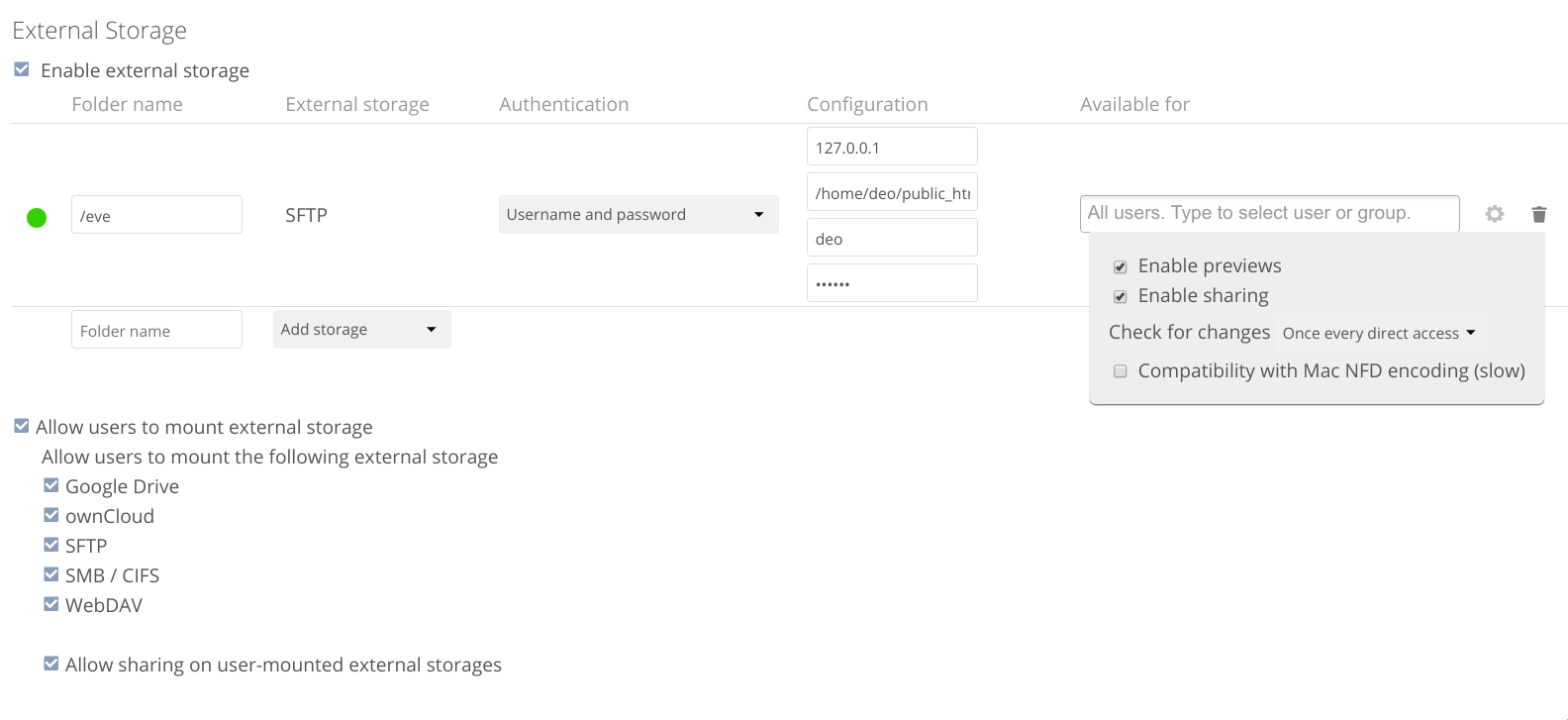
Admin storage
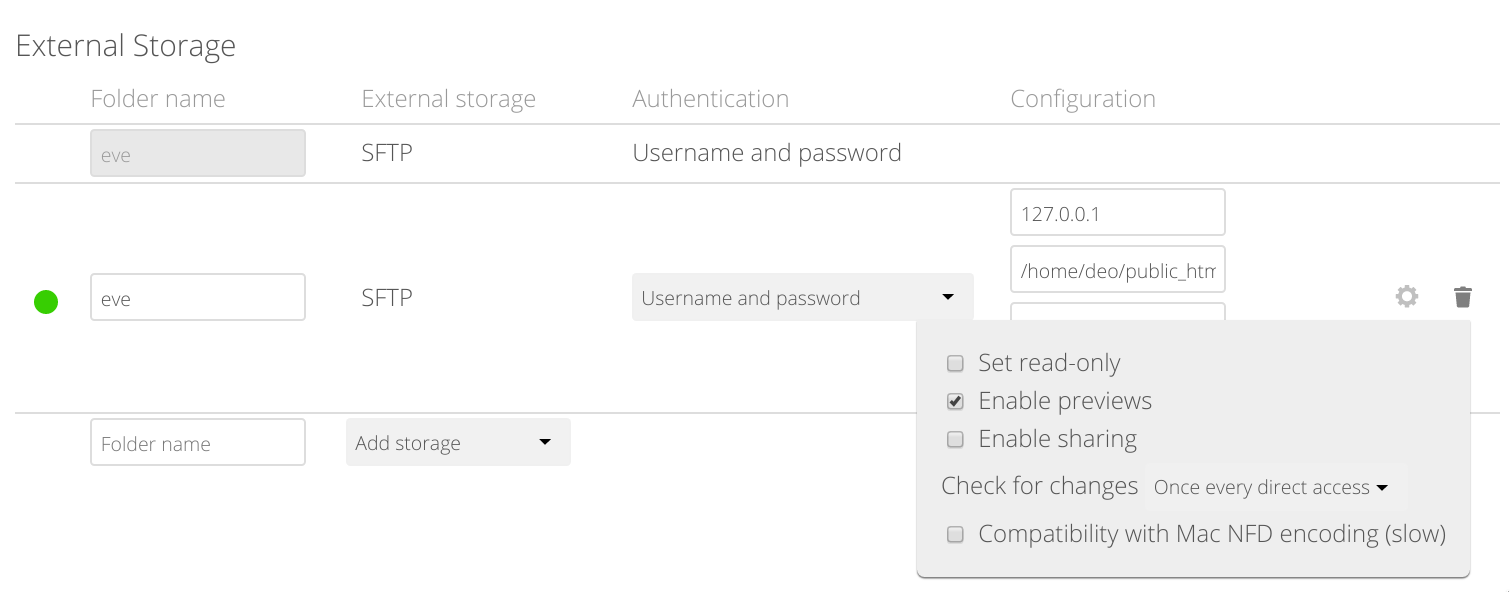
User storage
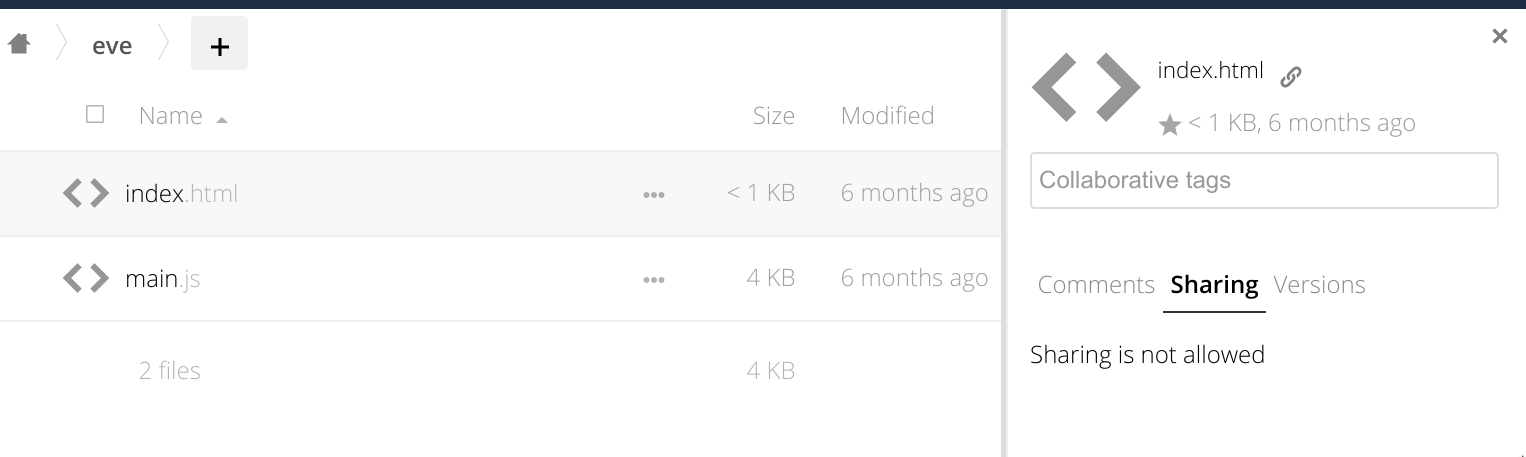
Sharing tab
 VicDeo
on 20 Feb 2020
VicDeo
on 20 Feb 2020
@VicDeo Same mountpoint configuration but different Name. Just in case you named both mountpoints with the same name. Sorry for the unclear info
davitol
on 21 Feb 2020
The error is thrown in https://github.com/owncloud/core/blob/master/lib/private/Share20/Manager.php#L294.
Weird thing is that the share isn't the expected one (also shown in the ticket's screenshots). You're trying to share "/WND/Folder" but the error refers to "/WND1/Folder" (the other endpoint, which actually doesn't have share permissions). So somehow, we're fetching a wrong share.
 jvillafanez
on 21 Feb 2020
jvillafanez
on 21 Feb 2020
Not sure if good or bad, but it's also reproducible with 10.3.2.
It doesn't "fully" happen in demo.owncloud.com because the response to the updates throws a 404 with a web page, causing the js code to crash without being able to show the popup. On my local environment, it throws a json response which handled properly in js, so the popup shows.
I'm not sure if related, but I've seen demo.owncloud.com configured with HTTP/2 but my local environment uses HTTP/1.1
jvillafanez
on 21 Feb 2020
Not sure if good or bad, but it's also reproducible with 10.3.2.
It doesn't "fully" happen in demo.owncloud.com because the response to the updates throws a 404 with a web page, causing the js code to crash without being able to show the popup.
removing regression label
davitol
on 21 Feb 2020
@jvillafanez tested in 10.2.0.5 and also reproducible, so there is a hurry at all to fix this (cc @micbar)
As mentioned i thought i was a regression due to it was not reproducible in demo instance
davitol
on 21 Feb 2020
I have decreased the priority due to this bug has been here since long time ago
davitol
on 21 Feb 2020
I'm not sure if related, but I've seen demo.owncloud.com configured with HTTP/2 but my local environment uses HTTP/1.1
Doesn't seem to be related. Same popup error is shown in my local environment with HTTP/2
(for future reference: https://gist.github.com/GAS85/990b46a3a9c2a16c0ece4e48ebce7300 to setup HTTP/2)
jvillafanez
on 21 Feb 2020
Not sure how we can handle the problem in demo.owncloud.com. It might be a problem caused by an app, or maybe a "wrong" apache configuration.
jvillafanez
on 21 Feb 2020
Regarding the ticket, the problem seems to be big.

You can see the request being made to get the shares with a "/SFTP/bar.zip" path in the request. However, the response contains a "/SFTP1/bar.zip" path.
Although the POST request contains the path, that path seems to be lost. There is no reference connecting the share with the path because it's connected through the fileid. Both mounts (SFTP and SFTP1) have the same configuration, so the storage is the same and the fileids of both "/SFTP/bar.zip" and "/SFTP1/bar.zip" files are the same.
The main problem is that the shareManager assumes there is only one node connected to that share even though the code can return multiple nodes (https://github.com/owncloud/core/blob/master/lib/private/Share20/Share.php#L176)
Adjusting the code code on top of that seems quite a lot of work even if it's just for core and the files_sharing app.
jvillafanez
on 24 Feb 2020
Unless someone have a better idea, I'd vote for an unsupported scenario and won't fix this issue.
As said above, there are quite some code assuming that it will get only one node from the share, which isn't true for this scenario. The problem is in core, which means that the same assumption could have been spread over other apps (at least the ones dealing with shares)
In addition to these changes, we might need to refactor the code because we don't really have any information about which mount point the share is attached to. Basically, we have several nodes but we don't know which one to pick. I don't think we can make this change without breaking things.
jvillafanez
on 25 Feb 2020
Related issues
 PVince81
·
4Comments
PVince81
·
4Comments
 emmenlau
·
5Comments
jvillafanez
·
4Comments
emmenlau
·
5Comments
jvillafanez
·
4Comments
 michaelstingl
·
3Comments
michaelstingl
·
3Comments
 j-holub
·
3Comments
j-holub
·
3Comments
Most helpful comment
Unless someone have a better idea, I'd vote for an unsupported scenario and won't fix this issue.
As said above, there are quite some code assuming that it will get only one node from the share, which isn't true for this scenario. The problem is in core, which means that the same assumption could have been spread over other apps (at least the ones dealing with shares)
In addition to these changes, we might need to refactor the code because we don't really have any information about which mount point the share is attached to. Basically, we have several nodes but we don't know which one to pick. I don't think we can make this change without breaking things.