Problem encountered on https://dotnet.microsoft.com/learn/dotnet/hello-world-tutorial/edit
Operating System: windows
Provide details about the problem you are experiencing. Include your operating system version, exact error message, code sample, and anything else that is relevant.
 RPJack
All 4 comments
Provide details about the problem you are experiencing. Include your operating system version, exact error message, code sample, and anything else that is relevant.
 scalablecory
on 15 Jan 2020
scalablecory
on 15 Jan 2020
Looks like the problem they experience is the Continue button is too close to the "I ran into an issue" button, and they don't know what GitHub is, so they click the button to submit an issue with an empty description in the hopes of continuing the tutorial.

 HebaruSan
on 16 Jan 2020
HebaruSan
on 16 Jan 2020
Impressive theory... since users are directed to type dotnet run on that part of the tutorial, and typing "dotnet run" and pressing enter submits an issue just like this, it all adds up. I've filed https://github.com/dotnet/website/issues/1703 (private repo) to track investigating a fix with people working on the site. I'm personally not sure how to clarify this, will be interesting to see what comes up.
 dagood
on 16 Jan 2020
dagood
on 16 Jan 2020
With some discussion in https://github.com/dotnet/website/issues/1703, we think that left aligning the buttons, putting Continue first, and separating the buttons a little more might help clarify this. We've done that, and the page now looks like this at the end:
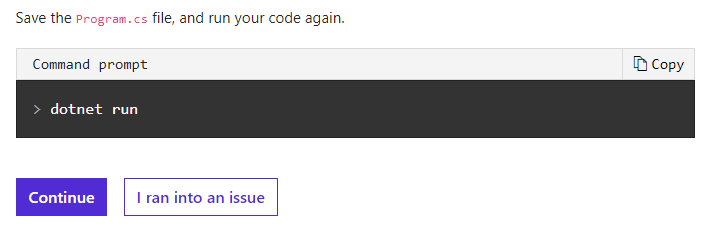
Another idea that came out of the thread is auto-closing issues that only have template text in the description, which I've filed https://github.com/dotnet/core/issues/4166 for. (Cutting down the work of manually sorting through these.)
Thanks again for pointing out a potential root cause, @HebaruSan. 😄
Closing this issue due to lack of information about the original issue, and no response.
dagood
on 21 Jan 2020
Related issues
 AxxlForce
·
3Comments
AxxlForce
·
3Comments
 ffes
·
3Comments
ffes
·
3Comments
 omerlh
·
4Comments
omerlh
·
4Comments
 Rand-Random
·
4Comments
Rand-Random
·
4Comments
 Luis-DdlFG
·
3Comments
Luis-DdlFG
·
3Comments