Important notices
Before you add a new report, we ask you kindly to acknowledge the following:
[X] I have read the contributing guide lines at https://github.com/opnsense/core/blob/master/CONTRIBUTING.md
[X] I have searched the existing issues and I'm convinced that mine is new.
Is your feature request related to a problem? Please describe.
On 30th december the license of GeoIP dabase will change and an account is required to download signatures. Also the download location will change.
https://blog.maxmind.com/2019/12/18/significant-changes-to-accessing-and-using-geolite2-databases/
Describe the solution you'd like
Maybe we have to force all users to create an account and save them somewhere.
In the meantime there won't be any updates
 mimugmail
All 31 comments
I'm not sure if there are alternatives, need to look into it.
 AdSchellevis
on 23 Dec 2019
AdSchellevis
on 23 Dec 2019
pretty inconvenient this, there aren’t a lot of other choices, the link to create an account is currently non-existent and the current link will fail to work in about a week....
AdSchellevis
on 23 Dec 2019
The blog post has been updated with the new license and sign-up details.
 oschwald
on 23 Dec 2019
oschwald
on 23 Dec 2019
@oschwald ok, thanks, I'll take a look.
AdSchellevis
on 24 Dec 2019
It's a work in progress, you can enter the download location now
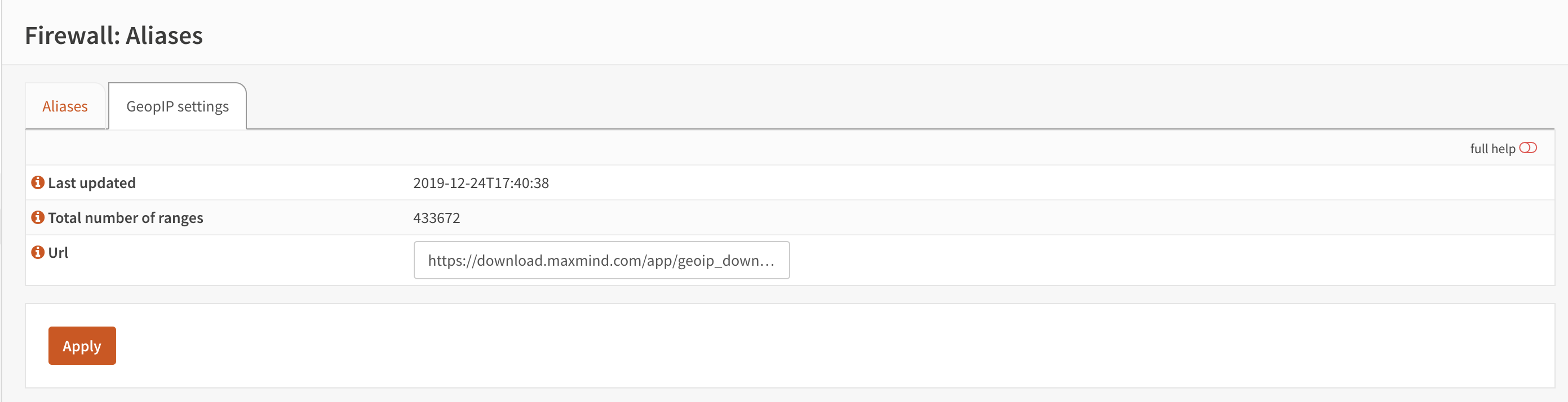
We might need a bit more feedback and documentation, maybe also document the zip payload so other option might be possible as well.
AdSchellevis
on 25 Dec 2019
Looks nice, thx. I'll create an account later today
mimugmail
on 25 Dec 2019
I've added the zip link, should it update as soon as I click save?
 marjohn56
on 25 Dec 2019
marjohn56
on 25 Dec 2019
CSV zip link works great, you'll see the downloads in your statistics at maxmind.
Seems they are collecting every bit of your privacy ...
mimugmail
on 26 Dec 2019
Yep, it worked overnight. The timestamp is a little ambiguous though, I think that it needs to be made clear that it relates to that date/time that Maxmind updated the data, otherwise I foresee comments and questions arising.
Nice work Ad..
marjohn56
on 26 Dec 2019
I'm likely going to add a bit of documentation about the settings.
We might consider hosting a file for our commercial users ourselves, although we haven't decided about that yet.
AdSchellevis
on 26 Dec 2019
Sounds good, If I get chance I'll create a wiki for it, I have a few days off but at present I'm re-purposing my mail server ( no longer using it ) into a Hyper-V system, should be done today hopefully.
marjohn56
on 26 Dec 2019
Have you noticed that if you don't enter a licence key and just leave it like this:
You still get the file..
I was just creating a wiki help file and clicked on the link before I put my licence key in and I got the file..
marjohn56
on 27 Dec 2019
After 12/30, the license key will be required to be valid. Right now, an invalid key is treated the same as no key for free GeoLite downloads.
oschwald
on 27 Dec 2019
Cool.. OK, well it works so that's all good. I'll remove the comment I added to the wiki.
marjohn56
on 27 Dec 2019
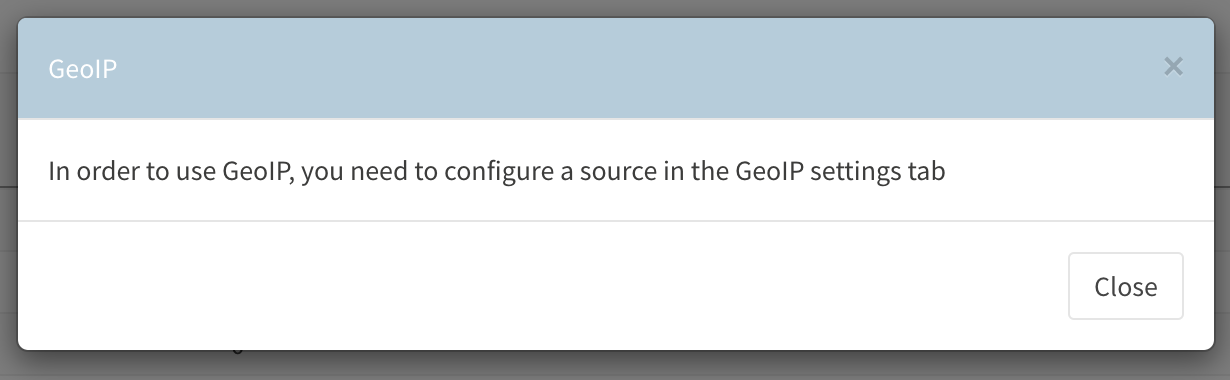
Added a small message when using GeoIP and no addresses are found (yet)
AdSchellevis
on 29 Dec 2019
We should probably do a squash merge of the changes into stable/19.7, so we can offer a opnsense-patch statement for people to use this until we have a release available. @fichtner what do you think?
AdSchellevis
on 29 Dec 2019
Yes, needs to be in 19.7.9 anyway. 😊
On 29. Dec 2019, at 14:59, Ad Schellevis notifications@github.com wrote:
We should probably do a squash merge of the changes into stable/19.7, so we can offer a opnsense-patch statement for people to use this until we have a release available. @fichtner what do you think?—
You are receiving this because you were mentioned.
Reply to this email directly, view it on GitHub, or unsubscribe.
 fichtner
on 29 Dec 2019
fichtner
on 29 Dec 2019
opnsense-patch 0229cd54
should do the trick.
AdSchellevis
on 29 Dec 2019
I was exactly following the guide, created an account at maxmind,created a licence key, but always only get "_Invalid license key_" when trying to download the zip as a first validation test - even after more than 5 mins to get the key activated.
Are you sure this works, when do it right from scratch? I just updated to OPNsense 19.7.9.
 andreaslink-de
on 9 Jan 2020
andreaslink-de
on 9 Jan 2020
a pull request has already been issued. Damn sure I originally copied the text from their site when I created the doc. Either they changed it or I was in spelling correct mode.
marjohn56
on 9 Jan 2020
@marjohn56 my machine at home has the following (which worked and still does):
AdSchellevis
on 9 Jan 2020
I'll pull the docs and publish them again, didn't see the typo as well :)
AdSchellevis
on 9 Jan 2020
Yes, solved it as well, there was an issue with "licence_key" vs. "license_key" and I did not recognize it either. Problem solved with correct spelling :). So updating the documentation will fix it!
andreaslink-de
on 9 Jan 2020
AdSchellevis
on 9 Jan 2020
BTW: The documentation does not say anything about an automated refresh cycle, so do I need to setup a cron in parallel (like "Update and reload firewall aliases") or how often are the GeoIP details updated aka the CSV downloaded? Who/What is responsible for updating it and where can I verify it was successful?
andreaslink-de
on 9 Jan 2020
@Ad - is there any reason for the Geo page not having a manual test button?
I know you put it together at very short notice, and very well done, but after 20.1 is released should we take another look at that?
marjohn56
on 9 Jan 2020
@marjohn56 I'm not against a test button, but functionally it's the same as it was now. @andreaslink-de it's updated once a day if used (the same as it was before)
It doesn't make sense to update more often, since these lists don't change that often anyway.
AdSchellevis
on 10 Jan 2020
No I agree with that, but if you are a first time user or as with the kerfuffle that happened yesterday, it would be useful to be able to test. I think the free version is only updated weakly or weekly. :)
marjohn56
on 10 Jan 2020
I followed the guide exactly today morning (https://docs.opnsense.org/manual/how-tos/maxmind_geo_ip.html) and I can download the zip file successfully from my browser.
If I put the link in the opnsense config and click apply nothing happens. Counter still on "0". Also after a reboot so I don't know if it's working.
Everytime I open the "Aliases" again I get the PopUp Message again:
"In order to use GeoIP, you need to configure a source in the GeoIP settings tab."
Is this normal? If it's just once a day, then it should be mentioned in the Docs or build in a test button to test if it works.
Should this message disappear if a proper link is set?
 vistalba
on 10 Jan 2020
vistalba
on 10 Jan 2020
Hej @vistalba I had the same problem and finally "fixed it" by going into my GeoIP Alias (first tab) added one random country, saved it and and clicked on "Apply" on the Alias page at the botton. That moment it was refreshed first time and on second tab you could see the file to be downloaded and geolocations were counted. So it seems, it needs at least one change to refresh it all.
andreaslink-de
on 10 Jan 2020
@andreaslink-de Thanks! Worked for me too.
vistalba
on 10 Jan 2020
Related issues
 sooslaca
·
5Comments
sooslaca
·
5Comments
 gauthig
·
3Comments
gauthig
·
3Comments
 StrikerTwo
·
8Comments
StrikerTwo
·
8Comments
 nikaro
·
3Comments
nikaro
·
3Comments
 lordraiden
·
7Comments
lordraiden
·
7Comments
Most helpful comment
@marjohn56 I'm not against a test button, but functionally it's the same as it was now. @andreaslink-de it's updated once a day if used (the same as it was before)
https://github.com/opnsense/core/blob/644b4f82c26a06af8c4abdc58c2f45d497ee1de4/src/opnsense/scripts/filter/lib/alias.py#L169-L173
It doesn't make sense to update more often, since these lists don't change that often anyway.