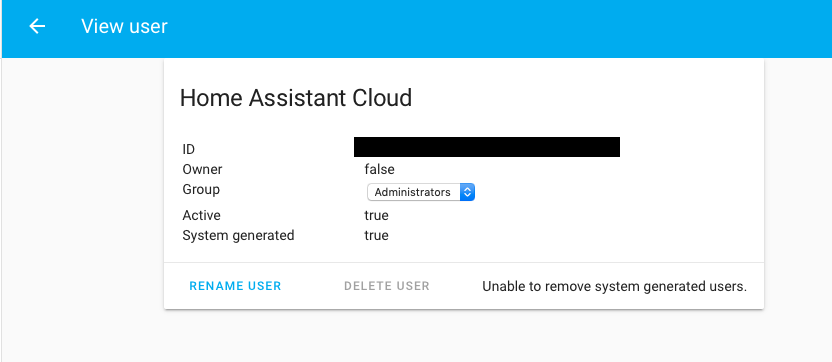
Core: Cannot delete unused cloud system generated user
Home Assistant release with the issue:
0.103.0
Last working Home Assistant release (if known):
N/A - Was a previous issue with cloud integration appearing but user still remains.
Operating environment (Hass.io/Docker/Windows/etc.):
Docker
Integration:
cloud / mobile previously
Description of problem:
See previous issue here - https://github.com/home-assistant/home-assistant/issues/28083
The cloud integration was being added due to the use of mobile. Even though I do not use the cloud integration, the system generated user was added to my user repo with admin access to my home assistant environment. @balloob added a fix in the above issue to make it not add the cloud user unless the cloud was added. Mobile was changed to not require cloud.
My environment and I suspect anyone else who used these abilities now have a user I cannot delete. There is no way I can see to delete this user.
Problem-relevant configuration.yaml entries and (fill out even if it seems unimportant):
http://github.com/mcaminiti/homeassistant
Traceback (if applicable):
Additional information:
 mcaminiti
All 8 comments
Hey there @home-assistant/cloud, mind taking a look at this issue as its been labeled with a integration (cloud) you are listed as a codeowner for? Thanks!
![probot-home-assistant[bot] picture](https://avatars2.githubusercontent.com/in/36093?v=4&s=40) probot-home-assistant[bot]
on 13 Dec 2019
probot-home-assistant[bot]
on 13 Dec 2019
log in and then log back out will remove it.
 balloob
on 13 Dec 2019
balloob
on 13 Dec 2019
@mcaminiti has this solved your problem?
 springstan
on 14 Jan 2020
springstan
on 14 Jan 2020
Yes this procedure worked to remove the account added automatically. Thank you.
mcaminiti
on 14 Jan 2020
I am still having trouble removing this user.
I've disabled the cloud integration component in the config. I even went as far as disabling the mobile_app component. I have removed all refresh tokens, all long lived access tokens, logged out, tried restarting HA for good measure, but the cloud admin user remains.
I am fairly certain that the cloud integration is disabled, as it no longer shows up in the configuration page as it had before. I have no idea what I need to do to remove this user. Am I missing something?
 Bernie
on 16 Jan 2020
Bernie
on 16 Jan 2020
I am still having trouble removing this user.
I've disabled the cloud integration component in the config. I even went as far as disabling the mobile_app component. I have removed all refresh tokens, all long lived access tokens, logged out, tried restarting HA for good measure, but the cloud admin user remains.
I am fairly certain that the cloud integration is disabled, as it no longer shows up in the configuration page as it had before. I have no idea what I need to do to remove this user. Am I missing something?
So i enables cloud in my config, signed up for a free trial and signed into my account. Give it some time to show connected.
Then sign out of cloud but leave it configured. When you sign out it should delete the account. I did it twice and it did it the second time around just fine. I then removed the cloud integration and was all fine after a restart.
mcaminiti
on 16 Jan 2020
What? That's quite a load of BS.
I should not have to be forced to register to some cloud provider in order to be able to remove access to it. Why should they be allowed to hold my HomeAssistant hostage until I give them my info and then make me ask them to kindly relinquish control of my device?
There has to be a way to forcibly remove this entry from my HomeAssistant one way or another. Hopefully I won't have to resort to completely resetting and starting over from scratch. Any additional assistance in this matter would be greatly appreciated.
Bernie
on 16 Jan 2020
I found a way to force it by removing it from the actual data store.
Went into my configuration add-on, to .storage/auth in the config directory. There, I was able to find the system user entry. I removed it, saved the file, and restarted homeassistant.
Now the user is gone!
Bernie
on 16 Jan 2020
Related issues
 TheZoker
·
3Comments
TheZoker
·
3Comments
 kirichkov
·
3Comments
kirichkov
·
3Comments
 neonandu
·
3Comments
neonandu
·
3Comments
 YellowMonster76
·
3Comments
YellowMonster76
·
3Comments
 piitaya
·
3Comments
piitaya
·
3Comments
Most helpful comment
I found a way to force it by removing it from the actual data store.
Went into my configuration add-on, to .storage/auth in the config directory. There, I was able to find the system user entry. I removed it, saved the file, and restarted homeassistant.
Now the user is gone!