Core: Z-Wave device detected as 5 separate devices rather than 5 entities in one device
Home Assistant release with the issue:
0.101.2
Last working Home Assistant release (if known):
N/A
Operating environment (Hass.io/Docker/Windows/etc.):
Docker on Ubuntu w/ AEOTEC Z-Stick
Integration:
Z-Wave
Description of problem:
I opened a thread on the community forums for this, and we ended up agreeing the current behavior is odd.
Currently, when adding a ZHC5010 switch (wall switch with 4 physical buttons and one on/off relay), HA automatically detects it as 5 (maybe 6?) separate devices, each with one entity on it. I'd prefer this to come out as one device with 5 entities on it.
Problem-relevant configuration.yaml entries and (fill out even if it seems unimportant):
N/A
Traceback (if applicable):
N/A
Additional information:
core.device_registry.txt
core.entity_registry.txt
Entity states (screenshot)

 LordMike
All 10 comments
Looks like the value_instance is the culprit here. Comparing to one of my sensors that has multiple entnties, the node id and value_instances are all identical. For non-multi-channel devices (or single endpoint I guess you could say) the instance IDs are the same. It looks like values for multiple endpoints have different instance values.
In your core.device_registry, the actual Z-Wave device has this value:
            {
                "area_id": null,
                "config_entries": [
                    "86bb161b47314fdea53417062319c1f8"
                ],
                "connections": [],
                "id": "87f03b6418fc436786b3787d02688ec1",
                "identifiers": [
                    [
                        "zwave",
                        3
                    ]
                ],
                "manufacturer": "Logic Soft",
                "model": "ZHC5010 Wall switch",
                "name": "Logic Soft ZHC5010 Wall switch",
                "name_by_user": "ZHC5010-Room",
                "sw_version": null,
                "via_device_id": "d74d8d63760f4453b481851a45ccf399"
            }
Notice the "identifiers" only contains the node id. For your extra switch devices, the value instance is being included as the identifier, which matches what the states are showing. For comparison, I don't have any devices that set the instance ID.
            {
                "area_id": null,
                "config_entries": [
                    "86bb161b47314fdea53417062319c1f8"
                ],
                "connections": [],
                "id": "bdd4d37ccd7b4b719d3e7df744dd8cfe",
                "identifiers": [
                    [
                        "zwave",
                        3,
                        5
                    ]
                ],
                "manufacturer": "Logic Soft",
                "model": "ZHC5010 Wall switch",
                "name": "Logic Soft ZHC5010 Wall switch (5)",
                "name_by_user": "ZHC5010-Room-05",
                "sw_version": null,
                "via_device_id": null
            },
 ```
It looks like the z-wave integration code is intentionally using the instance ID to create separate devices. I don't think this is necessarily the right thing to do, but I don't have any multi-channel devices to say otherwise.
```python
# from zwave/__init__.py
    @property
    def device_info(self):
        """Return device information."""
        identifier, name = node_device_id_and_name(
            self.node, self.values.primary.instance
        )
        info = {
            "name": name,
            "identifiers": {identifier},
            "manufacturer": self.node.manufacturer_name,
            "model": self.node.product_name,
        }
        if self.values.primary.instance > 1:
            info["via_device"] = (DOMAIN, self.node_id)
        elif self.node_id > 1:
            info["via_device"] = (DOMAIN, 1)
        return info

# from zwave/util.py
def node_device_id_and_name(node, instance=1):
    """Return the name and device ID for the value with the given index."""
    name = node_name(node)
    if instance == 1:
        return ((const.DOMAIN, node.node_id), name)
    name = f"{name} ({instance})"
    return ((const.DOMAIN, node.node_id, instance), name)
Tagging @Swamp-Ig who implemented this and might have some thoughts.
 kpine
on 12 Nov 2019
kpine
on 12 Nov 2019
Hey there @home-assistant/z-wave, mind taking a look at this issue as its been labeled with a integration (zwave) you are listed as a codeowner for? Thanks!
![probot-home-assistant[bot] picture](https://avatars2.githubusercontent.com/in/36093?v=4&s=40) probot-home-assistant[bot]
on 12 Nov 2019
probot-home-assistant[bot]
on 12 Nov 2019
I've just acquired a new device, an AEON Labs Door Sensor 6. I don't know if this is the same multichannel command class, but it appears as 3 entities in one device.
EDIT: This is likely not relevant.
Collapsed as it's likely not relevant
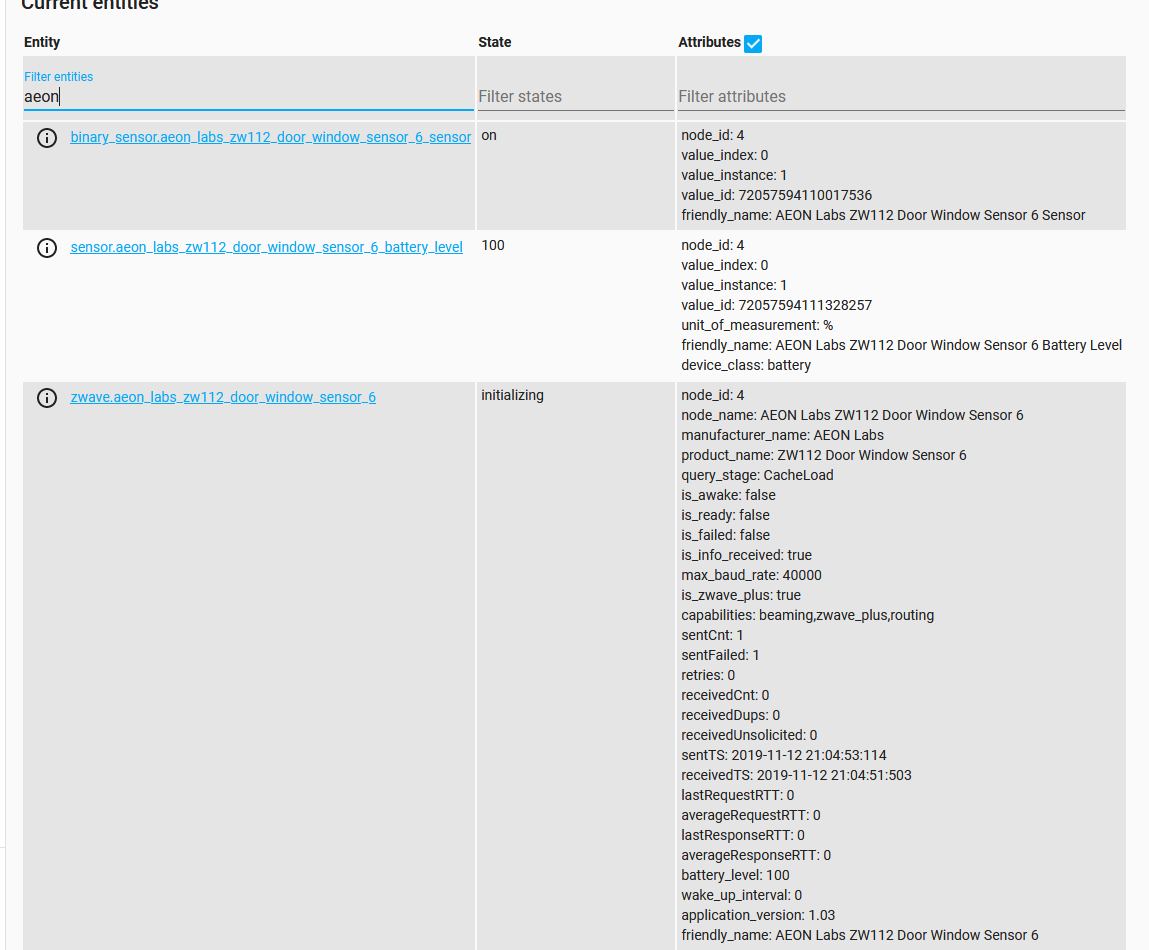
Relevant core.device_registry
{
  "area_id": null,
  "config_entries": [
      "86bb161b47314fdea53417062319c1f8"
  ],
  "connections": [],
  "id": "6ca2fc065afb41e797810f1691fb91fc",
  "identifiers": [
      [
          "zwave",
          4
      ]
  ],
  "manufacturer": "AEON Labs",
  "model": "ZW112 Door Window Sensor 6",
  "name": "AEON Labs ZW112 Door Window Sensor 6",
  "name_by_user": null,
  "sw_version": null,
  "via_device_id": "d74d8d63760f4453b481851a45ccf399"
}
Relevant core.entity_registry
{
    "config_entry_id": "86bb161b47314fdea53417062319c1f8",
    "device_id": "6ca2fc065afb41e797810f1691fb91fc",
    "disabled_by": null,
    "entity_id": "zwave.aeon_labs_zw112_door_window_sensor_6",
    "name": null,
    "platform": "zwave",
    "unique_id": "node-4"
},
{
    "config_entry_id": "86bb161b47314fdea53417062319c1f8",
    "device_id": "6ca2fc065afb41e797810f1691fb91fc",
    "disabled_by": null,
    "entity_id": "binary_sensor.aeon_labs_zw112_door_window_sensor_6_sensor",
    "name": null,
    "platform": "zwave",
    "unique_id": "4-72057594110017536"
},
{
    "config_entry_id": "86bb161b47314fdea53417062319c1f8",
    "device_id": "6ca2fc065afb41e797810f1691fb91fc",
    "disabled_by": null,
    "entity_id": "sensor.aeon_labs_zw112_door_window_sensor_6_battery_level",
    "name": null,
    "platform": "zwave",
    "unique_id": "4-72057594111328257"
}
What the current spec does is correct, a wall button with four switches should get four devices as the four switches could potentially end up controlling stuff in four separate areas. If you force the devices all to be the same, then there's no way to output to different areas which rapidly gets annoying.
There was some talk around "sub-devices" but in the end this was felt to be too complicated, and the splitting devices method gave an easier way forward.
Please don't undo this change.
 Swamp-Ig
on 13 Nov 2019
Swamp-Ig
on 13 Nov 2019
Not that this also is aligned with the z-wave spec, and is the intended purpose of instances - for exactly when there's a multi-switch device.
Swamp-Ig
on 13 Nov 2019
Thanks for the explanation, I understand where you're coming from and the current behavior is in line with the developer docs definition of "device". I doubt most users are looking there though, so it might continue to be confusing. At least for me "device" means the actual physical entity and I doubt I'm alone. Maybe the dev docs need to be ported to a simplified form in the user docs.
I could be wrong, but I think most users are still looking for a place where all the related entities for a "physical" device are grouped together. The Devices page does that with single-instance devices very well, and with the recent changes renaming all entities is a breeze. The integrations page used to (I am guessing, I've never had a multi-channel device), but now it just re-directs to the devices page. Come to think of it, I guess the Z-Wave Control panel still provides that functionality (it shows all the entities), it probably needs a GUI makeover.
Question: is the zwave entity always associated with root device?
kpine
on 13 Nov 2019
The area concept might get a little strange depending on what the device actually does. For example, a 5-plug power strip might expose 5 endpoints and 1 root device. The root device could be a master switch that toggles all the endpoints simultaneously. I'm not sure how areas would work with that. You could of course put each endpoint in a different area, but where would the root device go?
Anyways,
Please don't undo this change.
I don't think anyone is proposing that! The Devices support is great, thanks for the contribution.
kpine
on 13 Nov 2019
Well damn. Thanks for the responses. I'll go ahead and figure out a naming setup then :)
LordMike
on 13 Nov 2019
So like, on the device page, all the sub-devices are grouped together with their parent device. Each sub-device links to the parent through a via_device link.
I did toy with changing the UI and putting them one after another in the same box layout, but it would have been a lot of work to do and not really worth the effort.
Can we close this one then?
Swamp-Ig
on 13 Nov 2019
There hasn't been any activity on this issue recently. Due to the high number of incoming GitHub notifications, we have to clean some of the old issues, as many of them have already been resolved with the latest updates.
Please make sure to update to the latest Home Assistant version and check if that solves the issue. Let us know if that works for you by adding a comment 👍
This issue now has been marked as stale and will be closed if no further activity occurs. Thank you for your contributions.
![stale[bot] picture](https://avatars3.githubusercontent.com/in/1724?v=4&s=40) stale[bot]
on 11 Feb 2020
stale[bot]
on 11 Feb 2020
Related issues
 flsabourin
·
3Comments
flsabourin
·
3Comments
 TheZoker
·
3Comments
TheZoker
·
3Comments
 MartinHjelmare
·
3Comments
MartinHjelmare
·
3Comments
 YellowMonster76
·
3Comments
YellowMonster76
·
3Comments
 kirichkov
·
3Comments
kirichkov
·
3Comments
Most helpful comment
So like, on the device page, all the sub-devices are grouped together with their parent device. Each sub-device links to the parent through a
via_devicelink.I did toy with changing the UI and putting them one after another in the same box layout, but it would have been a lot of work to do and not really worth the effort.
Can we close this one then?