Core: Abode Light, Humidity and Temperature Sensors Not Exposing All Three Functions as Entities
Home Assistant release with the issue:
0.101
Last working Home Assistant release (if known):
0.100.3
Operating environment (Hass.io/Docker/Windows/etc.):
Hass.io
Integration:
Abode
Description of problem:
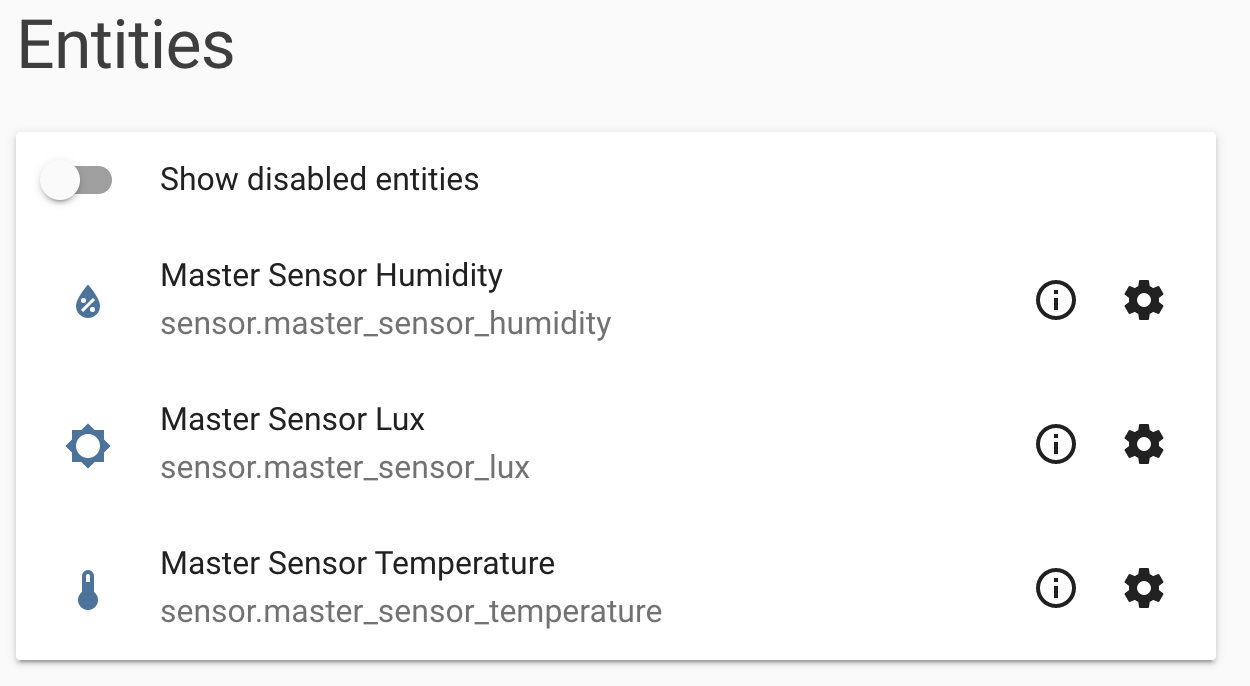
In the 0.101 release there were major changes made to the Adode component, since upgrading to that release, the Adobe Light, Humidity and Temperature Sensors are only exposing a single function as an entity, where in the past all three functions would appear in HASS as discrete entities. For example, I have a Sensor called "Master" and in prior versions I'd get these sensors:
- sensor.master_sensor_temperature
- sensor.master_sensor_humidity
- sensor.master_sensor_lux
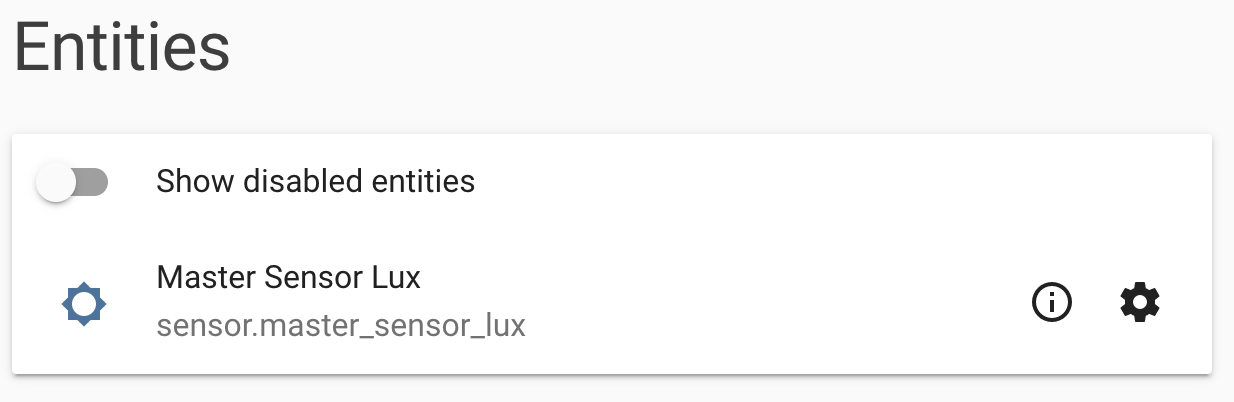
In 0.101 I only get a single one of the above entries, and it appears to be random which function will work.
In the PR that @shred86 submitted for these changes, they state that "The entity registry unique ID is based on device_id from Abode (no devices in Abode should ever have the same device_id)." I believe this might be related to the issue and that these multi-function sensor scenarios might not have been tested.
 gregorymartin
All 16 comments
Hm, I think it’s because the three separate entities are being assigned the same unique ID since that is based on uuid from Abodepy. I’ll have to take a closer look later tonight or tomorrow but we should be able to append something else to uuid for Abode sensors so the temp, humidity and lux sensors have different unique IDs. Unfortunately I don’t have one of these sensors to test so I may need some help with testing.
 shred86
on 2 Nov 2019
shred86
on 2 Nov 2019
I'm happy to help test.
gregorymartin
on 2 Nov 2019
Are you familiar with running a custom component? If so, could you run this forked version of the Abode component?
I added the following to sensor.py:
@property
    def unique_id(self):
        """Return a unique ID to use for this device."""
        return self._device.device_uuid + self._sensor_type
All this will do is assign a unique_id of the uuid from the Abode device combined with self._sensor_type which should be either temp, humidity or lux.
shred86
on 3 Nov 2019
This appears to work. The first image below is the pre-fix screenshot of the sensor device, and the second is with your fixed component:
gregorymartin
on 3 Nov 2019
Great! Just to make sure, are the entities reporting the correct humidity, lux and temp values? They should be as none of the actual functionality of how they’re reporting data was changed. Also, have you tried restarting HA just to make sure everything still works properly?
I’ll submit a PR with this fix. Thanks for testing this!
Edit: @gregorymartin, do you have the ability to view the JSON data for your abode devices? If so, I'd like to look at the JSON data for your occupancy sensor. I'm trying to fix another related issue. If you're willing, I have another version of sensor.py to test. Hoping to fix both of these issues with one PR.
shred86
on 3 Nov 2019
Yes, the values appear to be correct, with correct units as well.
gregorymartin
on 3 Nov 2019
Thanks for checking. Could you try running this updated version of the Abode component again as a custom component:
https://github.com/shred86/home-assistant/tree/abode_fix/homeassistant/components/abode
I only updated the sensor.py module. Just looking to see that everything still shows up correctly. If you also have the ability to remove the Abode integration and add it again, that would be a good test point.
This should hopefully fix #24346 as well.
shred86
on 3 Nov 2019
This does not appear to be working, the old behavior is back and I'm seeing this error in the logs:
2019-11-03 20:17:04 ERROR (MainThread) [homeassistant.components.sensor] Error while setting up platform abode
Traceback (most recent call last):
  File "/Users/gregm/Source/home-assistant/homeassistant/helpers/entity_platform.py", line 150, in _async_setup_platform
    await asyncio.wait_for(asyncio.shield(task), SLOW_SETUP_MAX_WAIT)
  File "/usr/local/Cellar/python/3.7.5/Frameworks/Python.framework/Versions/3.7/lib/python3.7/asyncio/tasks.py", line 442, in wait_for
    return fut.result()
  File "/Users/gregm/.homeassistant/custom_components/abode/sensor.py", line 38, in async_setup_entry
    devices.append(AbodeSensor(data, device, CONST.TEMP_STATUS_KEY))
  File "/Users/gregm/.homeassistant/custom_components/abode/sensor.py", line 55, in __init__
    self._device.name, SENSOR_TYPES[self._sensor_type][0]
KeyError: 'temperature'
Just updated the sensor.py module again in my repo - would you mind trying it one more time.
The TEMP_STATUS_KEY const in abodepy is for "temperature" where we actually need "temp" from the JSON.
shred86
on 4 Nov 2019
That's better, looks good.
gregorymartin
on 4 Nov 2019
~I think Abode changed how they're reporting the temperature with the latest occupancy sensor, which I believe you have. If you have time and are able, I'd really like to take a look at the JSON data for your occupancy sensor. There's instructions on how to get this here:~
~https://github.com/MisterWil/abodepy/issues/10~
~It's easiest to just do it from a web browser. View > Developer > Developer Tools if using Chrome.~
shred86
on 4 Nov 2019
I don't have the occupancy sensor, I have the Temperature, Humidity and Light sensor which they seem to have taken off their site for purchase recently.
gregorymartin
on 4 Nov 2019
Ah okay. I just updated sensor.py in my repo yet again. If you can test this, I believe we'll be good to go! Again, really appreciate you testing this for me. It's tough trying to develop stuff without the actual sensor.
shred86
on 4 Nov 2019
That appears to still work. No problem on testing, happy to support.
gregorymartin
on 4 Nov 2019
Pull request #28516 was made with the changes. This also fixes another issue folks are having with the occupancy sensor that doesn't report humidity resulting in errors in the log.
shred86
on 4 Nov 2019
I've installed 0.102 and am seeing all three sensors now, but the temperature sensors are not returning data as expected (lux and humidity seem to be OK). This issue did not happen when I tested the fix earlier, so unsure what might be the cause. I assume I should open a new issue to report it as it is different than this one. @shred86 FYI as this might also be true for you related fix for the occupancy sensor.
gregorymartin
on 21 Nov 2019
Related issues
 ofuangka
·
3Comments
ofuangka
·
3Comments
 Konstigt
·
3Comments
Konstigt
·
3Comments
 sibbl
·
3Comments
sibbl
·
3Comments
 Elmardus
·
3Comments
Elmardus
·
3Comments
 bdraco
·
3Comments
bdraco
·
3Comments