Core: TRADFRI cannot be set up - "Unknown error occured"
Home Assistant release with the issue:
0.100.1
Last working Home Assistant release (if known):
unknown
Operating environment (Hass.io/Docker/Windows/etc.):
Docker
Integration:
https://www.home-assistant.io/integrations/tradfri/
Description of problem:
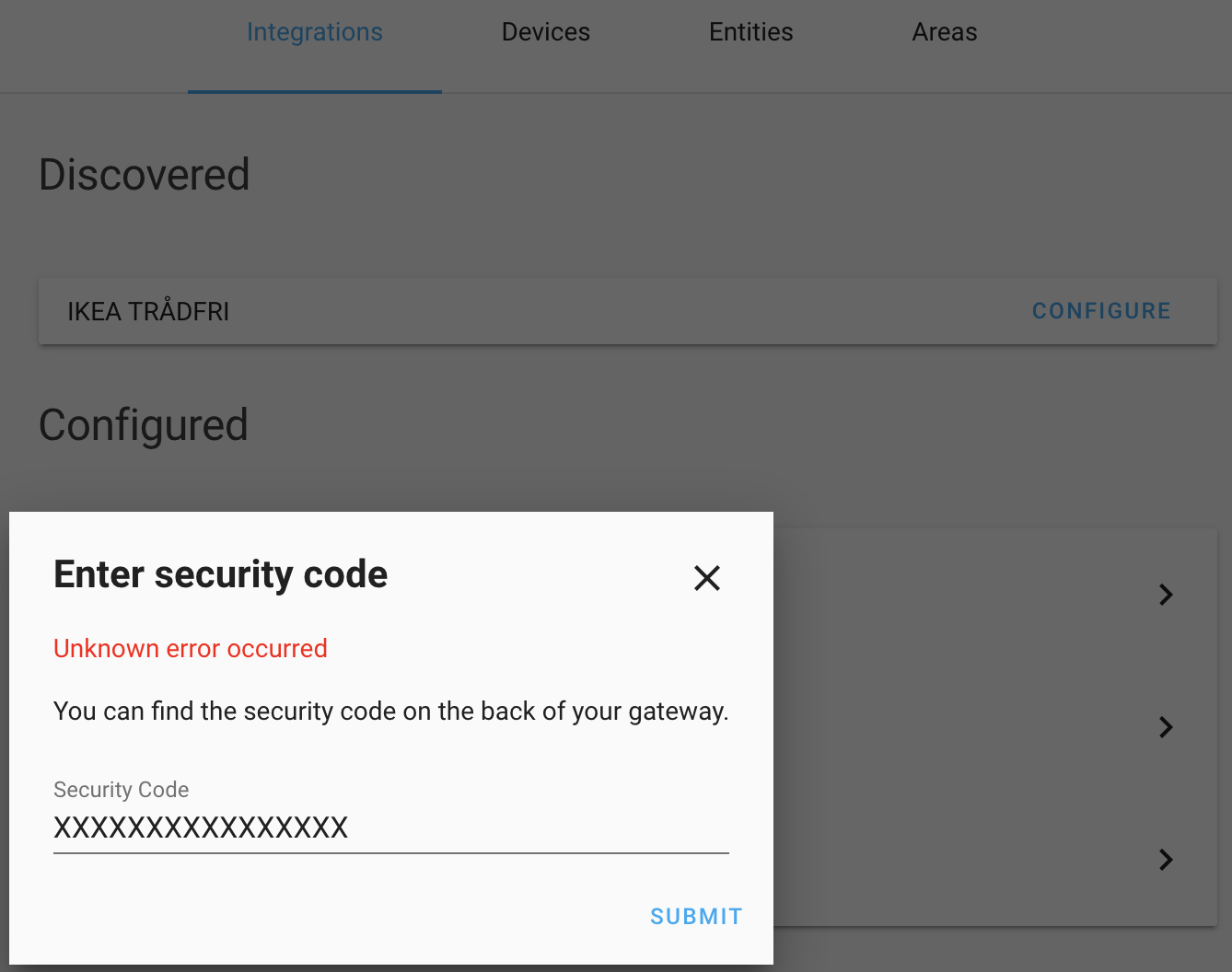
When setting up Tradfri, the integration panel to enter the security code comes up. No matter what I enter (correct or incorrect data), it gives shows "Unknown error occured".
Problem-relevant configuration.yaml entries and (fill out even if it seems unimportant):
Traceback (if applicable):
Error handling request
Traceback (most recent call last):
  File "/usr/local/lib/python3.7/site-packages/aiohttp/web_protocol.py", line 418, in start
    resp = await task
  File "/usr/local/lib/python3.7/site-packages/aiohttp/web_app.py", line 458, in _handle
    resp = await handler(request)
  File "/usr/local/lib/python3.7/site-packages/aiohttp/web_middlewares.py", line 119, in impl
    return await handler(request)
  File "/usr/src/homeassistant/homeassistant/components/http/real_ip.py", line 40, in real_ip_middleware
    return await handler(request)
  File "/usr/src/homeassistant/homeassistant/components/http/ban.py", line 73, in ban_middleware
    return await handler(request)
  File "/usr/src/homeassistant/homeassistant/components/http/auth.py", line 231, in auth_middleware
    return await handler(request)
  File "/usr/src/homeassistant/homeassistant/components/http/view.py", line 128, in handle
    result = await result
  File "/usr/src/homeassistant/homeassistant/components/config/config_entries.py", line 164, in post
    return await super().post(request, flow_id)
  File "/usr/src/homeassistant/homeassistant/components/http/data_validator.py", line 48, in wrapper
    result = await method(view, request, *args, **kwargs)
  File "/usr/src/homeassistant/homeassistant/helpers/data_entry_flow.py", line 90, in post
    result = await self._flow_mgr.async_configure(flow_id, data)
  File "/usr/src/homeassistant/homeassistant/data_entry_flow.py", line 89, in async_configure
    result = await self._async_handle_step(flow, cur_step["step_id"], user_input)
  File "/usr/src/homeassistant/homeassistant/data_entry_flow.py", line 132, in _async_handle_step
    result: Dict = await getattr(flow, method)(user_input)
  File "/usr/src/homeassistant/homeassistant/components/tradfri/config_flow.py", line 55, in async_step_auth
    self.hass, host, user_input[KEY_SECURITY_CODE]
  File "/usr/src/homeassistant/homeassistant/components/tradfri/config_flow.py", line 164, in authenticate
    key = await api_factory.generate_psk(security_code)
  File "/usr/local/lib/python3.7/site-packages/pytradfri/api/aiocoap_api.py", line 195, in generate_psk
    self._psk = await self.request(command)
  File "/usr/local/lib/python3.7/site-packages/pytradfri/api/aiocoap_api.py", line 155, in request
    result = await self._execute(api_commands)
  File "/usr/local/lib/python3.7/site-packages/pytradfri/api/aiocoap_api.py", line 146, in _execute
    _, res = await self._get_response(msg)
  File "/usr/local/lib/python3.7/site-packages/pytradfri/api/aiocoap_api.py", line 105, in _get_response
    await self._reset_protocol(e)
  File "/usr/local/lib/python3.7/site-packages/pytradfri/api/aiocoap_api.py", line 77, in _reset_protocol
    protocol = await self._get_protocol()
  File "/usr/local/lib/python3.7/site-packages/pytradfri/api/aiocoap_api.py", line 72, in _get_protocol
    return (await self._protocol)
  File "/usr/local/lib/python3.7/site-packages/pytradfri/api/aiocoap_api.py", line 93, in _get_response
    protocol = await self._get_protocol()
  File "/usr/local/lib/python3.7/site-packages/pytradfri/api/aiocoap_api.py", line 72, in _get_protocol
    return (await self._protocol)
  File "/usr/local/lib/python3.7/site-packages/aiocoap/protocol.py", line 528, in create_client_context
    self.transport_endpoints.append((yield from TransportEndpointUDP6.create_client_transport_endpoint(new_message_callback=self._dispatch_message, new_error_callback=self._dispatch_error, log=self.log, loop=loop, dump_to=dump_to)))
  File "/usr/local/lib/python3.7/site-packages/aiocoap/transports/udp6.py", line 191, in create_client_transport_endpoint
    sock = socket.socket(family=socket.AF_INET6, type=socket.SOCK_DGRAM)
  File "/usr/local/lib/python3.7/socket.py", line 151, in __init__
    _socket.socket.__init__(self, family, type, proto, fileno)
OSError: [Errno 97] Address family not supported by protocol
Additional information:
It makes no difference if using discovery or manual setup in configuration.yaml.
For testing I managed to get pytradfri directly setup inside the docker container of home-assistant. From there the commandline was able to connect to the Tradfri gateway and receive status information.
 mmmente
All 21 comments
Hey there @ggravlingen, mind taking a look at this issue as its been labeled with a integration (tradfri) you are listed as a codeowner for? Thanks!
![probot-home-assistant[bot] picture](https://avatars2.githubusercontent.com/in/36093?v=4&s=40) probot-home-assistant[bot]
on 12 Oct 2019
probot-home-assistant[bot]
on 12 Oct 2019
Looks like you’re running ipv6?
 ggravlingen
on 13 Oct 2019
ggravlingen
on 13 Oct 2019
It does look like that, but I am not. I figured out that UDP6 includes IPv4 and IPv6. Actually a file like udp4.py does not exist. Makes me clueless.
mmmente
on 13 Oct 2019
Did it work prior to version 0.100?
ggravlingen
on 13 Oct 2019
No, I only got the Tradfri gateway last week. I tried downgrading to something like 0.89, but that brought a lot of other issues up, as there is no downwards compatibility of the config.
mmmente
on 13 Oct 2019
This sounds very related to your own environment so I’m not sure I can help. 😔
ggravlingen
on 13 Oct 2019
What I find curious is, that it works outside of home-assistant. As said above: For testing I managed to get pytradfri directly setup inside the docker container of home-assistant. From there the commandline was able to connect to the Tradfri gateway and receive status information.
mmmente
on 13 Oct 2019
try setting this in the running environment:
AIOCOAP_CLIENT_TRANSPORT=tinydtls
AIOCOAP_SERVER_TRANSPORT=tinydtls
 catokolas
on 27 Oct 2019
catokolas
on 27 Oct 2019
WOW! Yes, that solved it for me 👍 Thank you so much!
mmmente
on 27 Oct 2019
great!
catokolas
on 27 Oct 2019
try setting this in the running environment:
AIOCOAP_CLIENT_TRANSPORT=tinydtls
AIOCOAP_SERVER_TRANSPORT=tinydtls
Hi, noobie question I know.. But where do I put this settings? In which file and format?
 msoderberg76
on 24 Jan 2020
msoderberg76
on 24 Jan 2020
I'm not sure how you do it if you are running it in a docker container, maybe @mmmente can answer?
I'm running home assistant directly on a debian server and modified /etc/systemd/system/home-assistant.service:
[Unit]
Description=Home Assistant
After=network-online.target
[Service]
Type=simple
User=homeassistant
Environment=AIOCOAP_CLIENT_TRANSPORT=tinydtls
Environment=AIOCOAP_SERVER_TRANSPORT=tinydtls
ExecStart=/opt/homeassistant/bin/hass -c "/opt/homeassistant/.homeassistant"
Restart=on-failure
RestartSec=5s
...
then ran systemctl daemon-reload && systemctl restart home-assistant
catokolas
on 24 Jan 2020
Thanks! I try that!
//Mårten
24 jan. 2020 kl. 12:03 skrev Cato Kolås notifications@github.com:
I'm not sure how you do it if you are running it in a docker container, maybe @mmmente can answer?
I'm running home assistant directly on a server and modified /etc/systemd/system/home-assistant.service:[Unit]
Description=Home Assistant
After=network-online.target[Service]
Type=simple
User=homeassistant
Environment=AIOCOAP_CLIENT_TRANSPORT=tinydtls
Environment=AIOCOAP_SERVER_TRANSPORT=tinydtls
ExecStart=/opt/homeassistant/bin/hass -c "/opt/homeassistant/.homeassistant"
Restart=on-failure
RestartSec=5s
...then ran systemctl daemon-reload && systemctl restart home-assistant
—
You are receiving this because you commented.
Reply to this email directly, view it on GitHub, or unsubscribe.
msoderberg76
on 24 Jan 2020
Unfortunately it still doesn’t work. Still get the unknown error when I enter the security code from Trådfri Gateway to Homeassistant...
On 24 Jan 2020, at 12:03, Cato Kolås notifications@github.com wrote:
Environment=AIOCOAP_CLIENT_TRANSPORT=tinydtls
Environment=AIOCOAP_SERVER_TRANSPORT=tinydtls
msoderberg76
on 24 Jan 2020
can you verify that env is set by running:
systemctl status home-assistant # find the PID
cat /proc/[PID]/environ # and look for AIOCOAP...
catokolas
on 24 Jan 2020
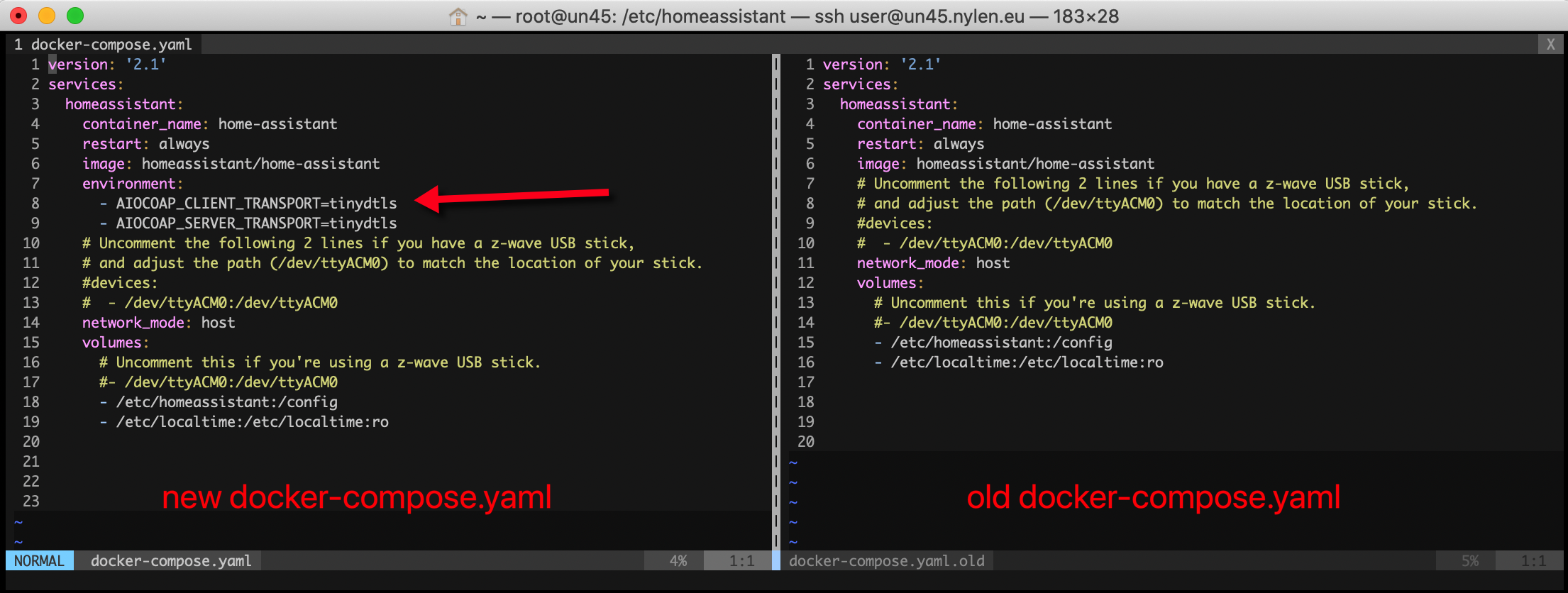
I have in my docker compose file added a section like this
...
homeassistant:
      container_name: home-assistant
      image: homeassistant/home-assistant:0.102.3
      environment:
        - AIOCOAP_CLIENT_TRANSPORT=tinydtls
        - AIOCOAP_SERVER_TRANSPORT=tinydtls
 ...
and that solved it for me immediately
mmmente
on 24 Jan 2020
I'm running HomeAssistant using Docker, and came across this issue today. After finding the post above by @mmmente the issue was resolved. In summary:
HomeAssistant error
HomeAssistant error when trying to add the Tradfri gateway:
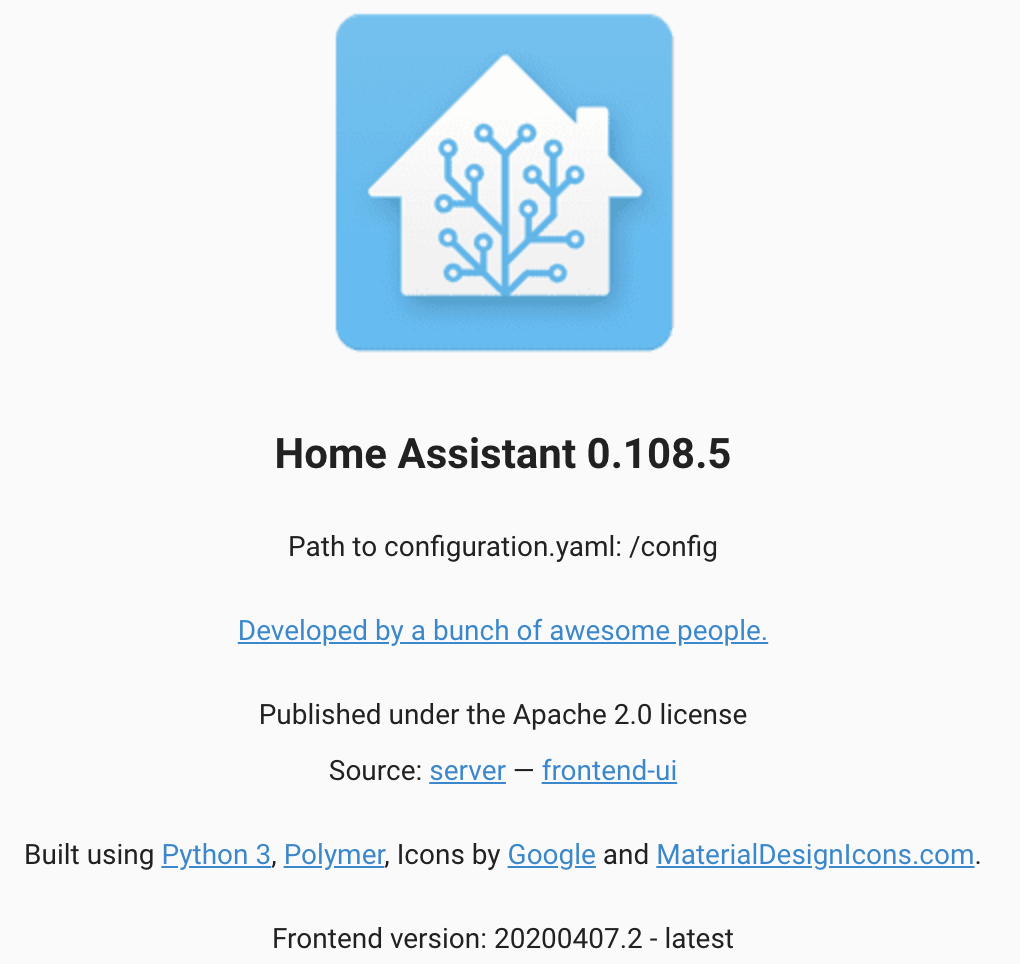
Version:
HomeAssistant version:
Fix
Fixed by updating the docker-compose.yaml file:
Restart
docker-compose stop
docker-compose start
Result
No problems adding the Tradfri Gateway security key
 kodarn
on 17 Apr 2020
kodarn
on 17 Apr 2020
Hi, I have walked through everything now I have set up the tinydtls settings in my service. If I check the PID I see the AIOCOAP. If I run the command python3 -i -m pytradfri IP and enter my security code I manage to run commands for my lightning. But on the webpage the error is the same when I try to enter the security code. I have home assistant installed in an Venv on my Ubuntu server. If I cannot get this to work now I'm losing my hair!!! Oh wait, that already happened... :-)
msoderberg76
on 21 Apr 2020
hm, what version of HA are you running? And do any logfiles (like syslog, home-assistant.log) say anything related to this?
catokolas
on 23 Apr 2020
Hi,
marten@marten-hass:/$ hass --version
0.103.6
Found this in the log
ile "/usr/local/lib/python3.7/site-packages/aiocoap/credentials.py", line 285, in credentials_from_request
raise CredentialsMissingError("No suitable credentials for %s" % uri)
aiocoap.credentials.CredentialsMissingError: No suitable credentials for coaps
So I have now tried to change the manifest.json in tradfri to user pytradfri 6.3.1 instead and that did the trick!
Thanks!!
On 23 Apr 2020, at 21:45, Cato Kolås notifications@github.com wrote:
hm, what version of HA are you running? And do any logfiles (like syslog, home-assistant.log) say anything related to this?
—
You are receiving this because you commented.
Reply to this email directly, view it on GitHub https://github.com/home-assistant/core/issues/27545#issuecomment-618623251, or unsubscribe https://github.com/notifications/unsubscribe-auth/AOLWROZY4HNXABMMKVQOGXTROCLDZANCNFSM4JADE2EA.
msoderberg76
on 24 Apr 2020
There hasn't been any activity on this issue recently. Due to the high number of incoming GitHub notifications, we have to clean some of the old issues, as many of them have already been resolved with the latest updates.
Please make sure to update to the latest Home Assistant version and check if that solves the issue. Let us know if that works for you by adding a comment 👍
This issue now has been marked as stale and will be closed if no further activity occurs. Thank you for your contributions.
![stale[bot] picture](https://avatars3.githubusercontent.com/in/1724?v=4&s=40) stale[bot]
on 25 Jul 2020
stale[bot]
on 25 Jul 2020
Related issues
 sogeniusio
·
3Comments
sogeniusio
·
3Comments
 coolriku
·
3Comments
coolriku
·
3Comments
 sh0rez
·
3Comments
sh0rez
·
3Comments
 flsabourin
·
3Comments
flsabourin
·
3Comments
 sibbl
·
3Comments
sibbl
·
3Comments
Most helpful comment
I have in my docker compose file added a section like this
and that solved it for me immediately