Core: Visual Studio 2019 .NET Core 3 project not included in release
When creating a new .NET core project, .NET core 3.0 is not listed in the templates:

Also it doesn't show up in the .NET Core selection of the project properties:
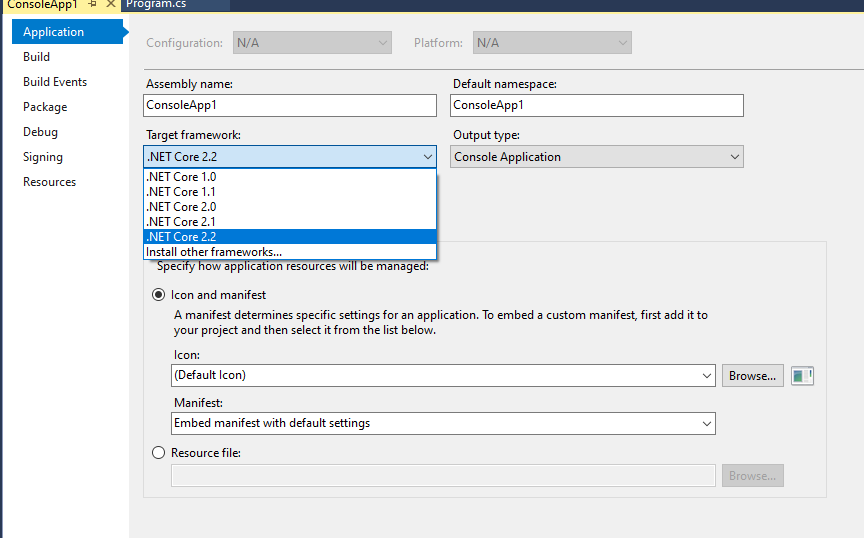
dotnet --list-sdks lists:
2.1.802 [C:\Program Files\dotnet\sdk]
2.2.204 [C:\Program Files\dotnet\sdk]
3.0.100 [C:\Program Files\dotnet\sdk]
This was an issue before too but I assumed that the release of 3 would include it.
I use VS2019 Community and installed dotnet-sdk-3.0.100-win-x64.exe
Will we have to wait for Visual Studio 16.4 before this is released?
 rogerfar
All 8 comments
I'm also excited to give it a try on VS 2019 Community, but same issue. Till date, i was using another instance of VS 2019 Community Preview with .net core 3 rc. Just, uninstalled it and installed .net core 3 and I can see it in VS 2019 Community Preview but not in VS 2019 Community.
 itorian
on 23 Sep 2019
itorian
on 23 Sep 2019
@dagood any idea here?
 scalablecory
on 23 Sep 2019
scalablecory
on 23 Sep 2019
Got it, .NET Core 3.0 requires Visual Studio 2019 16.3 or later. Ref https://devblogs.microsoft.com/aspnet/asp-net-core-and-blazor-updates-in-net-core-3-0/
itorian
on 23 Sep 2019
Sorry, just realized we're still on 16.2.5! I suppose we're waiting on the 16.3 release.
rogerfar
on 23 Sep 2019
Glad you all were able to figure it out. 😄
You can also see this info on the SDK download page, the yellow banner: https://dotnet.microsoft.com/download/thank-you/dotnet-sdk-3.0.100-windows-x64-installer.
 dagood
on 23 Sep 2019
dagood
on 23 Sep 2019
@dagood Any insider information about if 16.3 will be released soon? 😄
rogerfar
on 23 Sep 2019
Yah, but waiting to see 16.3 in VS. Even MS team using Preview in live stream.
itorian
on 23 Sep 2019
Well that was quick, 16.3 just released now 😅
rogerfar
on 23 Sep 2019
Related issues
 zuosc
·
3Comments
zuosc
·
3Comments
 wq807319473
·
3Comments
wq807319473
·
3Comments
 jigarce
·
3Comments
jigarce
·
3Comments
 lesomnus
·
3Comments
lesomnus
·
3Comments
 leo2d
·
3Comments
leo2d
·
3Comments
Most helpful comment
Well that was quick, 16.3 just released now 😅