Core: icon: mdi:weather-partlycloudy not shown after upgrade
Home Assistant release with the issue:
0.98.0
Last working Home Assistant release (if known):
0.97.2
Operating environment (Hass.io/Docker/Windows/etc.):
Hassio
Component/platform:
Lovelace
Description of problem:
After upgrading to 0.98.0, one icon is not shown on the header:
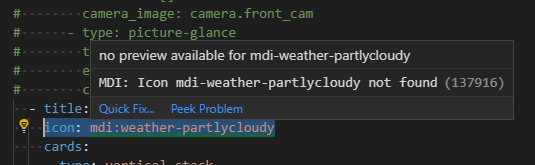
All the other icons are still there.
I am using the Compact Custom Header.
Problem-relevant configuration.yaml entries and (fill out even if it seems unimportant):
Traceback (if applicable):
Additional information:
 bouwew
All 2 comments
I have not updated or checked if this is working in Home Assistant yet, though it seems that the name has changed. Instead of weather-partlycloudy it is now called weather-partly-cloudy according to Materialdesignicons.com
 springstan
on 29 Aug 2019
springstan
on 29 Aug 2019
👍3
Yes, that it!
Thank you!
bouwew
on 29 Aug 2019
Was this page helpful?
0 / 5 - 0 ratings
Related issues
 flsabourin
·
3Comments
flsabourin
·
3Comments
 piitaya
·
3Comments
piitaya
·
3Comments
 YellowMonster76
·
3Comments
YellowMonster76
·
3Comments
 ofuangka
·
3Comments
ofuangka
·
3Comments
 moskovskiy82
·
3Comments
moskovskiy82
·
3Comments
Most helpful comment
I have not updated or checked if this is working in Home Assistant yet, though it seems that the name has changed. Instead of
weather-partlycloudyit is now calledweather-partly-cloudyaccording to Materialdesignicons.com