Core: uk_transport monitor doesn't respect DST.
Home Assistant release with the issue: 0.97.2
Last working Home Assistant release (if known):
Operating environment (Hass.io/Docker/Windows/etc.): Hass.io
Component/platform: https://www.home-assistant.io/components/uk_transport/
Description of problem:
The transport module ignore timezone configuration when calculating time to next train / bus. This seems to affect all components using datetime.now() as previously reported in issue 19082 that was closed due to inactivity.
IE: If timezone is America/Los_Angeles but the system clock is UTC, radiotherm will set the thermostat clock to UTC.
Additional information:
Previously reported in issue 19082 that was closed. Still happening
 compynei
All 14 comments
Looking at the code for uk_transport it seems that the API returns HH:MM time code which is localized to GMT. We only use datetime.now() to append the date, but we don't localize it to the user's timezone.
Just to try and understand the use case, why would you want the time of the next bus in the UK localized to Los Angeles time?
I'll take a look at radiotherm next.
 tsvi
on 8 Sep 2019
tsvi
on 8 Sep 2019
Radiotherm is a bug: the component should use util/dt.py's now function which localizes the time used by homeassistant.
I'll try and cookup a PR.
tsvi
on 8 Sep 2019
Looking at the code for uk_transport it seems that the API returns HH:MM time code which is localized to GMT. We only use datetime.now() to append the date, but we don't localize it to the user's timezone.
Just to try and understand the use case, why would you want the time of the next bus in the UK localized to Los Angeles time?
I'll take a look at radiotherm next.
I wouldn't want it LA time but the UK is at the moment GMT+1 due to daylight saving so not the same as UTC, meaning time to next bus is 1hr out.
Looks like an easy fix as mentioned in #19082
def set_time(self):
    now = datetime.datetime.now()
....
def set_time(self):
    now = dt_util.as_local(dt_util.now())
....
That's a local fix for radiotherm. And it's wrong, we have homeassistant version of datetime.now() which takes into account the configured timezone.
But that won't help for the uk_transport integration. In the case of uk_transport we don't really use datetime.now() for time just for the date. Meaning we get the scheduled arrival from the API and add today's date to the time we received. The time we get has no timezone info just hour:minute, so the fix should be localizing the time based on the user defined timezone.
I'm going through the homeassistant repository trying to see who else is using datetime.now() and to understand why they're not seeing any problems. Most of them seem to be that they store the value and then compare to that value to check whether they should update or not. So since they get a 'bad' time but they compare using the same method everything stays ok.
tsvi
on 8 Sep 2019
@compynei, I contacted transportapi.com, as they return the time without any info regarding the time zone.
Based on their reply we'll be better informed on how to fix this bug: either localize the response, or maybe they have another field which will allow us to understand better what time they're referring to.
tsvi
on 8 Sep 2019
Thanks for the update, as they are UK based I imagine the time they return
will always be GMT though.
On Sun, 8 Sep 2019, 09:27 Tsvi Mostovicz, notifications@github.com wrote:
@compynei https://github.com/compynei, I contacted transportapi.com, as
they return the time without any info regarding the time zone.
Based on their reply we'll be better informed on how to fix this bug:
either localize the response, or maybe they have another field which will
allow us to understand better what time they're referring to.—
You are receiving this because you were mentioned.
Reply to this email directly, view it on GitHub
https://github.com/home-assistant/home-assistant/issues/26237?email_source=notifications&email_token=ALXVACAXUM6RX7HIHPT76O3QISZO7A5CNFSM4IQGQVPKYY3PNVWWK3TUL52HS4DFVREXG43VMVBW63LNMVXHJKTDN5WW2ZLOORPWSZGOD6FKYLI#issuecomment-529181741,
or mute the thread
https://github.com/notifications/unsubscribe-auth/ALXVACHNPBK47NHSCNG7UQLQISZO7ANCNFSM4IQGQVPA
.
compynei
on 8 Sep 2019
I suppose so. but then again, I'd expect them to return the localized time including adjustments for DST.
tsvi
on 8 Sep 2019
@compynei Could you post your relevant configuration.yaml, with the value received for the sensor, the time it updated, and the expected value. It will help me better communicate with transportapi.com what we're seeing.
Also while you're at it please rename the issue to uk_transport monitor doesn't respect DST.
tsvi
on 10 Sep 2019
Here is the code:
#UK Transport
  - platform: uk_transport
    app_id: !secret UKtransport_id
    app_key: !secret UKtransport_key
    queries:
      - mode: train
        origin: BON
        destination: MAN
      - mode: train
        origin: BON
        destination: MCV
      - mode: train
        origin: BON
        destination: PRE
# Train Details
  - platform: template
    sensors:
# To Manchester Picadilly
      next_train_status_man:
        friendly_name: 'Train Status - Picadilly'
        value_template: '{{states.sensor.next_train_to_man.attributes.next_trains[0].status}}'
      next_trains_origin_man:
        friendly_name: 'Train Origin - Picadilly'
        value_template: '{{states.sensor.next_train_to_man.attributes.next_trains[0].origin_name}}'
      next_trains_estimated_man:
        friendly_name: 'Train Estimated - Picadilly'
        value_template: '{{states.sensor.next_train_to_man.attributes.next_trains[0].estimated}}'
      next_trains_scheduled_man:
        friendly_name: 'Train Scheduled - Picadilly'
        value_template: '{{states.sensor.next_train_to_man.attributes.next_trains[0].scheduled}}'
      next_trains_platform_man:
        friendly_name: 'Train Platform - Picadilly'
        value_template: '{{states.sensor.next_train_to_man.attributes.next_trains[0].platform}}'
# To Manchester Victoria
      next_train_status_mcv:
        friendly_name: 'Train Status - Victoria'
        value_template: '{{states.sensor.next_train_to_mcv.attributes.next_trains[0].status}}'
      next_trains_origin_mcv:
        friendly_name: 'Train Origin - Victoria'
        value_template: '{{states.sensor.next_train_to_mcv.attributes.next_trains[0].origin_name}}'
      next_trains_estimated_mcv:
        friendly_name: 'Train Estimated - Victoria'
        value_template: '{{states.sensor.next_train_to_mcv.attributes.next_trains[0].estimated}}'
      next_trains_scheduled_mcv:
        friendly_name: 'Train Scheduled - Victoria'
        value_template: '{{states.sensor.next_train_to_mcv.attributes.next_trains[0].scheduled}}'
      next_trains_platform_mcv:
        friendly_name: 'Train Platform - Victoria'
        value_template: '{{states.sensor.next_train_to_mcv.attributes.next_trains[0].platform}}'
# To Preston
      next_train_status_pre:
        friendly_name: 'Train Status - Preston'
        value_template: '{{states.sensor.next_train_to_pre.attributes.next_trains[0].status}}'
      next_trains_origin_pre:
        friendly_name: 'Train Origin - Preston'
        value_template: '{{states.sensor.next_train_to_pre.attributes.next_trains[0].origin_name}}'
      next_trains_estimated_pre:
        friendly_name: 'Train Estimated - Preston'
        value_template: '{{states.sensor.next_train_to_pre.attributes.next_trains[0].estimated}}'
      next_trains_scheduled_pre:
        friendly_name: 'Train Scheduled - Preston'
        value_template: '{{states.sensor.next_train_to_pre.attributes.next_trains[0].scheduled}}'
      next_trains_platform_pre:
        friendly_name: 'Train Platform - Preston'
        value_template: '{{states.sensor.next_train_to_pre.attributes.next_trains[0].platform}}'
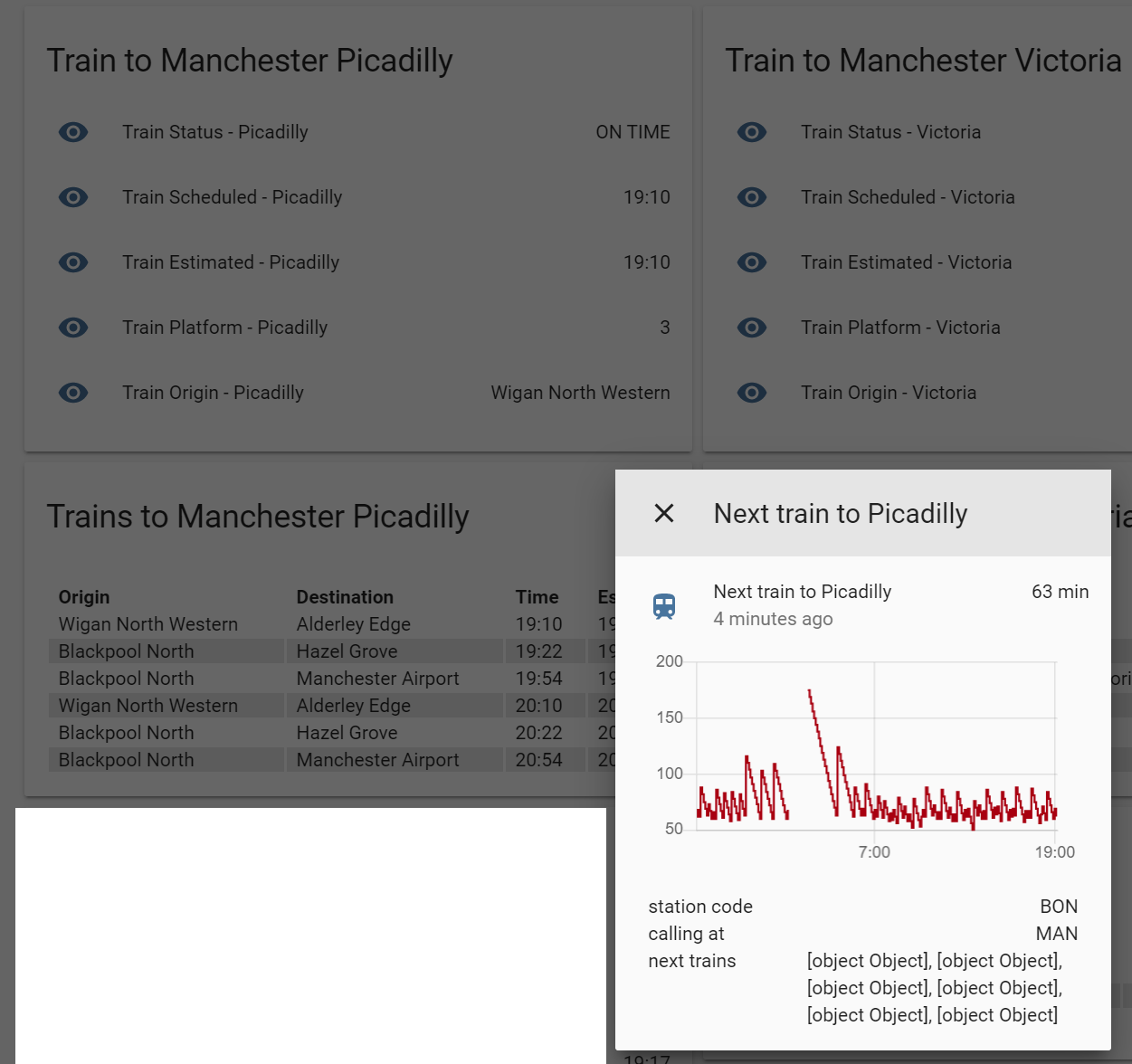
And here is a screenshot, you can see the sensor is 60 min out on next train (also bus) but when using the templates it is fine.
compynei
on 10 Sep 2019
Dave from TransportAPI here. We return the time as HH:MM in the local time zone, and account for daylight saving time. So you shouldn't have to do any conversion on these to meet the end users expectations.
Let me know if you have examples where this is not the case.
 davidmountain
on 10 Sep 2019
davidmountain
on 10 Sep 2019
@compynei so if I understand correctly, you're saying that the "Next train to picadilly" is supposed to show 3 minutes instead of 63? But estimated and scheduled times are fine (meaning 19:10 is correct)?
tsvi
on 11 Sep 2019
Ok, I found the bug in our code.
@davidmountain, this is a bug on our side. Thank you for taking the time to respond. You can close the ticket I opened.
tsvi
on 11 Sep 2019
@compynei so if I understand correctly, you're saying that the "Next train to picadilly" is supposed to show 3 minutes instead of 63? But estimated and scheduled times are fine (meaning 19:10 is correct)?
Exactly yes, the screenshot was 19:07 - the departure board from the template is fine but the next train to Piccadilly is 63mins instead of 3.
Also as maybe a linked issue note the sensor value which is just listed as object,Object.
compynei
on 11 Sep 2019
@compynei, I submitted a bugfix. Probably will land in 0.99 (Hoping it will be merged quickly 😉 @MartinHjelmare)
tsvi
on 11 Sep 2019
Related issues
 sh0rez
·
3Comments
sh0rez
·
3Comments
 TheZoker
·
3Comments
TheZoker
·
3Comments
 ofuangka
·
3Comments
ofuangka
·
3Comments
 i-am-shodan
·
3Comments
i-am-shodan
·
3Comments
 sogeniusio
·
3Comments
sogeniusio
·
3Comments