Core: Device-specific hvac modes do not work anymore
Home Assistant release with the issue: 0.96.1
Last working Home Assistant release (if known): 0.95.4
Operating environment (Hass.io/Docker/Windows/etc.): Docker
Component/platform: Z-Wave / Climate (https://www.home-assistant.io/components/zwave/)
Description of problem:
After upgrading to the new version all device specific hvac modes are not working anymore. I use Eurotronic Spirit Z devices, that have some special hvac modes.
https://eurotronic.org/produkte/z-wave-heizkoerperthermostat/spirit-z-wave-plus/
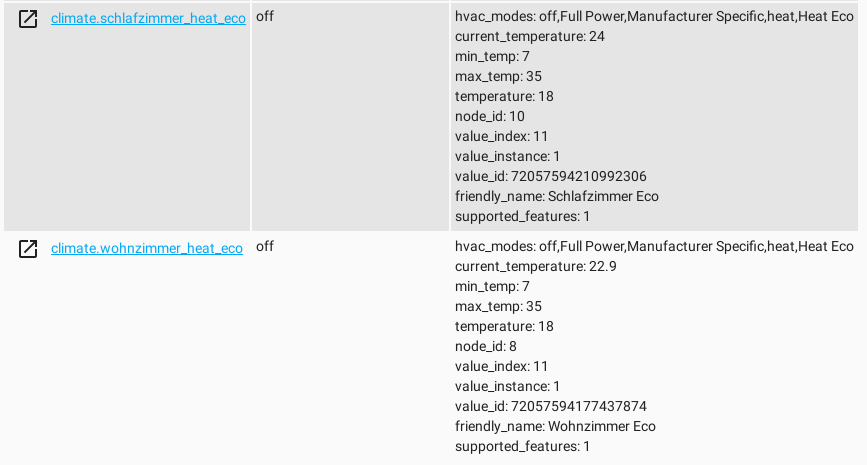
These special modes (e.g. Heat Eco) do not work anymore. Neither can they be seen in lovelace ui:

Problem-relevant configuration.yaml entries and (fill out even if it seems unimportant):
No relevant entries
Traceback (if applicable):
2019-07-19 23:24:13 ERROR (MainThread) [homeassistant.components.websocket_api.http.connection.140051300553936] value is not allowed for dictionary value @ data['hvac_mode']
Traceback (most recent call last):
  File "/usr/src/app/homeassistant/components/websocket_api/commands.py", line 121, in handle_call_service
    connection.context(msg))
  File "/usr/src/app/homeassistant/core.py", line 1130, in async_call
    processed_data = handler.schema(service_data)
  File "/usr/local/lib/python3.7/site-packages/voluptuous/schema_builder.py", line 267, in __call__
    return self._compiled([], data)
  File "/usr/local/lib/python3.7/site-packages/voluptuous/schema_builder.py", line 589, in validate_dict
    return base_validate(path, iteritems(data), out)
  File "/usr/local/lib/python3.7/site-packages/voluptuous/schema_builder.py", line 427, in validate_mapping
    raise er.MultipleInvalid(errors)
voluptuous.error.MultipleInvalid: value is not allowed for dictionary value @ data['hvac_mode']
Additional information:
 Santobert
All 20 comments
I am having the same issue with a Honeywell Z-wave thermostat. My "Heat Econ" and "Cool Econ" modes no longer show up or function in the hvac_mode list (there are just blank spots where these modes used to be. This started when upgrading from 0.95.4. to 0.96.1.
Device: Honeywell Z-wave Thermostat TH6320ZW2003
<Item label="Off" value="0" />
<Item label="Heat" value="1" />
<Item label="Cool" value="2" />
<Item label="Heat Econ" value="11" />
<Item label="Cool Econ" value="12" />
 DaveCo1701
on 20 Jul 2019
DaveCo1701
on 20 Jul 2019
Ive been digging around and it appears this issue was noticed with a different zwave thermostat. Something similar was found by @olbjan. https://github.com/home-assistant/home-assistant/pull/25274
DaveCo1701
on 20 Jul 2019
25287 This seems similar, too.
Unfortunately I'm not experienced enough to see if the referenced pull request would fix our problem. The Eurotronic Spirit Z thermostat uses the following hvac modes:
- heat
- off
- Full power (opens the valve completely)
- Heat Eco (which uses a different target temperature)
- Manufacturer Specific ( which allows the user to manually adjust the valve)
I could not discover the last three modes in the PR.
Santobert
on 20 Jul 2019
Below is a list of all the thermostat modes known to openzwave. Currently the climate component is not parsing all of them.
static char const* c_modeName[] =
            { "Off", "Heat", "Cool", "Auto", "Aux Heat", "Resume", "Fan Only", "Furnace", "Dry Air", "Moist Air", "Auto Changeover", "Heat Econ", "Cool Econ", "Away", "Unknown", "Full Power", "Unknown", "Unknown", "Unknown", "Unknown", "Unknown", "Unknown", "Unknown", "Unknown", "Unknown", "Unknown", "Unknown", "Unknown", "Unknown", "Unknown", "Unknown", "Manufacturer Specific" };
My basic understanding of how the code is currently working is that it parses the list of modes presented by the thermostat and simplifies the mode to off, heat, cool, or heat_cool to make the integration consistent for use with Alexa/Google Assistant. These simplified mode names appear in the drop down list in the UI.
My linear thermostat with HA 0.96.2 is currently showing the following modes available.
hvac_modes: cool,heat,heat_cool,off,Aux Heat
However Aux Heat does not show up in the drop down list and the space in the list where it presumably would be is blank. Selecting that will generate a "value not allowed for dictionary value" error. Manually calling climate.set_hvac_mode with "Aux Heat" as the target mode generates the same dictionary value error. Somehow "Aux Heat" is showing up in the list of valid modes but for the purposes of setting the mode it is not. My thermostat has both "Heat" and "Aux Heat" modes. Both of these will be simplified to appear as "heat" in the mode selection. Is having two modes under the same key of "heat" is causing one of them to be dropped from the list in the UI because there is a limitation to a single "heat" mode?
 eyager1
on 20 Jul 2019
eyager1
on 20 Jul 2019
Looks like this pull request may solve the problem...
DaveCo1701
on 20 Jul 2019
Only standard modes are supported by HA. Special modes need to make use of presets.
 elupus
on 21 Jul 2019
elupus
on 21 Jul 2019
Only standard modes are supported by HA. Special modes need to make use of presets.
That looks like a downgrade to me.
Can you please explain how to use presets?
Santobert
on 21 Jul 2019
It's just a separate attribute/setting from hvac_mode. I have no idea if the integration you mention support it.
elupus
on 21 Jul 2019
Obviously the integration doesn't support preset modes:
Traceback (most recent call last):
  File "/usr/src/app/homeassistant/components/websocket_api/commands.py", line 121, in handle_call_service
    connection.context(msg))
  File "/usr/src/app/homeassistant/core.py", line 1150, in async_call
    self._execute_service(handler, service_call))
  File "/usr/src/app/homeassistant/core.py", line 1172, in _execute_service
    await handler.func(service_call)
  File "/usr/src/app/homeassistant/helpers/entity_component.py", line 194, in handle_service
    required_features
  File "/usr/src/app/homeassistant/helpers/service.py", line 316, in entity_service_call
    future.result()  # pop exception if have
  File "/usr/src/app/homeassistant/helpers/service.py", line 337, in _handle_service_platform_call
    await getattr(entity, func)(**data)
  File "/usr/src/app/homeassistant/components/climate/__init__.py", line 399, in async_set_preset_mode
    self.set_preset_mode, preset_mode)
  File "/usr/local/lib/python3.7/concurrent/futures/thread.py", line 57, in run
    result = self.fn(*self.args, **self.kwargs)
  File "/usr/src/app/homeassistant/components/climate/__init__.py", line 394, in set_preset_mode
    raise NotImplementedError()
NotImplementedError
Unfortunately the documentation is also not very helpful:
https://www.home-assistant.io/components/climate/
I'm wondering if release 0.96.3 solves this issue.
25347
Santobert
on 21 Jul 2019
@DaveCo1701 is your problem solved? Mine is not.
I'm glad it's summer and I don't need my heaters.
Can someone please take a look at this problem?
Santobert
on 22 Jul 2019
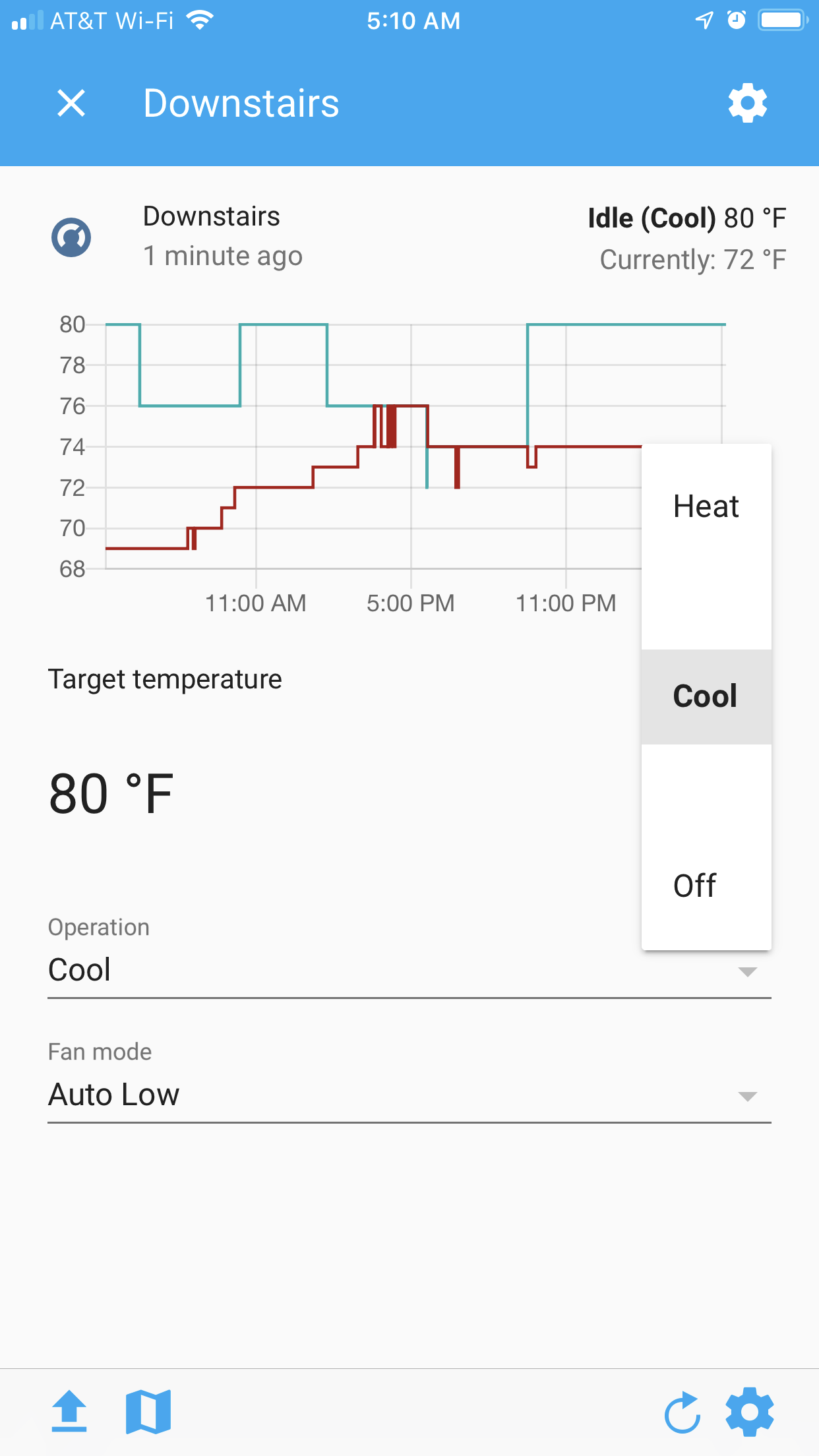
Just downloaded the the 0.96.3 docker container (which includes https://github.com/home-assistant/home-assistant/pull/25347). It did not resolve the issue. @schmic, was https://github.com/home-assistant/home-assistant/pull/25347 supposed to address missing entities in the hvac_modes list or was that related to something else?
DaveCo1701
on 22 Jul 2019
Seems that the Zwave Climate Integration needs to translate the values to the Home Assistant Standard.
 ronytomen
on 22 Jul 2019
ronytomen
on 22 Jul 2019
@ronytomen, do you know of any examples I could take a look at from other climate integrations? I don’t mind taking a whack at it, but I’m not a programmer...
DaveCo1701
on 22 Jul 2019
I think #25393 has the same problem.
@ronytomen I would be interested, too. I have some python skills, but no experience with homeassistant
Santobert
on 22 Jul 2019
@DaveCo1701 No, my bugfix was for something completly different. Some devices don't have modes at all and that made issues in the Ui.
 schmic
on 23 Jul 2019
schmic
on 23 Jul 2019
@pvizeli As you created the pull request for the climate-1.0 feature, can you please take a look at this issue? It feels like we are walking in the wrong direction. Is this issue a bug or are we misunderstanding the new preset modes? Thank you for your time.
TL,DR: Some special modes like Heat Eco, Full Power or Manufacturer Mode are unusable since the release of 0.96.0. There are blank fields in the ui. When we try to set the modes manually by calling set_preset_mode() an error occurs. The integration has an attribute, that lists all available hvac_modes. This attribute is still working.
Santobert
on 23 Jul 2019
It looks like nobody currently supports the zwave integration, because the openzwave-python library is no longer supported, either. I'll take a look at the zwave integration and try to restore its functionality with the latest version of openzwave-python. Let's hope someone updates openzwave-python soon.
Santobert
on 26 Jul 2019
@schmic I guess you're more experienced than me with zwave climate integration. Do you think my approach is going in the right direction? Have I missed anything in particular? Please give me a hint, if you can.
Santobert
on 27 Jul 2019
@Santobert Sorry, can't help you with that.
schmic
on 27 Jul 2019
No worries, I'll try it myself. At the moment I'm just hesitating to rip my zwave network apart to use the devices for testing purposes. I will do it next week.....
Santobert
on 27 Jul 2019
Related issues
 bdraco
·
3Comments
bdraco
·
3Comments
 arangates
·
3Comments
arangates
·
3Comments
 moskovskiy82
·
3Comments
moskovskiy82
·
3Comments
 piitaya
·
3Comments
piitaya
·
3Comments
 Konstigt
·
3Comments
Konstigt
·
3Comments
Most helpful comment
@pvizeli As you created the pull request for the climate-1.0 feature, can you please take a look at this issue? It feels like we are walking in the wrong direction. Is this issue a bug or are we misunderstanding the new preset modes? Thank you for your time.
TL,DR: Some special modes like Heat Eco, Full Power or Manufacturer Mode are unusable since the release of 0.96.0. There are blank fields in the ui. When we try to set the modes manually by calling set_preset_mode() an error occurs. The integration has an attribute, that lists all available hvac_modes. This attribute is still working.