Core: filter sensor component failing at start
Home Assistant release with the issue: 0.96.0
Last working Home Assistant release (if known):
Operating environment (Hass.io/Docker/Windows/etc.): Archlinux
Component/platform: Filter Sensor
Description of problem:
After upgrade to 0.96.0 my filter sensor is no longer starting up.
Problem-relevant configuration.yaml entries and (fill out even if it seems unimportant):
sensor:
  - platform: filter
    name: bathroom norm humidity
    entity_id: sensor.bathroom_relative_humidity
    filters:
      - filter: time_simple_moving_average
        window_size: 48:00:00
        precision: 1
Traceback (if applicable):
Jul 19 10:09:54 piggy hass[1877]: 2019-07-19 10:09:54 WARNING (MainThread) [homeassistant.components.sensor] Setup of platform filter is taking over 10 seconds.
Jul 19 10:11:50 piggy hass[1877]: 2019-07-19 10:11:50 ERROR (MainThread) [homeassistant.core] Error doing job: Task exception was never retrieved
Jul 19 10:11:50 piggy hass[1877]: Traceback (most recent call last):
Jul 19 10:11:50 piggy hass[1877]:   File "/usr/lib/python3.7/site-packages/homeassistant/helpers/entity_platform.py", line 363, in _async_add_entity
Jul 19 10:11:50 piggy hass[1877]:     await entity.async_added_to_hass()
Jul 19 10:11:50 piggy hass[1877]:   File "/usr/lib/python3.7/site-packages/homeassistant/components/filter/sensor.py", line 223, in async_added_to_hass
Jul 19 10:11:50 piggy hass[1877]:     self._entity, prev_state, state, False)
Jul 19 10:11:50 piggy hass[1877]:   File "/usr/lib/python3.7/site-packages/homeassistant/components/filter/sensor.py", line 157, in filter_sensor_state_listener
Jul 19 10:11:50 piggy hass[1877]:     filtered_state = filt.filter_state(copy(temp_state))
Jul 19 10:11:50 piggy hass[1877]:   File "/usr/lib/python3.7/site-packages/homeassistant/components/filter/sensor.py", line 334, in filter_state
Jul 19 10:11:50 piggy hass[1877]:     filtered = self._filter_state(FilterState(new_state))
Jul 19 10:11:50 piggy hass[1877]:   File "/usr/lib/python3.7/site-packages/homeassistant/components/filter/sensor.py", line 485, in _filter_state
Jul 19 10:11:50 piggy hass[1877]:     * prev_state.state
Jul 19 10:11:50 piggy hass[1877]: TypeError: can't multiply sequence by non-int of type 'float'
Additional information:
 wasperen
All 24 comments
Did this work with 0.95? There were no changes to filter in this release. What sensor are you feeding into filter?
 cgtobi
on 19 Jul 2019
cgtobi
on 19 Jul 2019
Hey -- this has worked with all versions for the last 6 months or so. The input is sensor.bathroom_relative_humidity which still works well:
{
  "node_id": 8,
  "value_index": 5,
  "value_instance": 1,
  "value_id": "72057594177142866",
  "unit_of_measurement": "%",
  "friendly_name": "Badkamer Vochtigheid"
}
This happened after I did an upgrade and restarted home-assistant a number of times. It then lost this filter.
wasperen
on 19 Jul 2019
Ok, but what type of sensor (as in component/integration) is that?
cgtobi
on 19 Jul 2019
ah -- that is a humidity sensor. ZWave with node name: Aeotec ZW100 MultiSensor 6
wasperen
on 19 Jul 2019
Hey there @dgomes, mind taking a look at this issue as its been labeled with a integration (filter) you are listed as a codeowner for? Thanks!
_This is a automatic comment generated by codeowners-mention to help ensure issues and pull requests are seen by the right people._
 ghost
on 19 Jul 2019
ghost
on 19 Jul 2019
To me it is very clear that the problem lies in sensor.bathroom_relative_humidity which is not providing a number but a sequence.
Can you use the developers tool to check the current state of sensor.bathroom_relative_humidity ? I'm betting it has a string instead of a number...
 dgomes
on 19 Jul 2019
dgomes
on 19 Jul 2019
Well -- using the developer tools gives me a value. The front-end does not really indicate the type of that value. May be string. The graph on the GUI is now also strange and missing values for the last couple of hours...
So -- what has happened then? This issue needs re-classification?
wasperen
on 19 Jul 2019
can you share a print screen of the graph ?
dgomes
on 19 Jul 2019
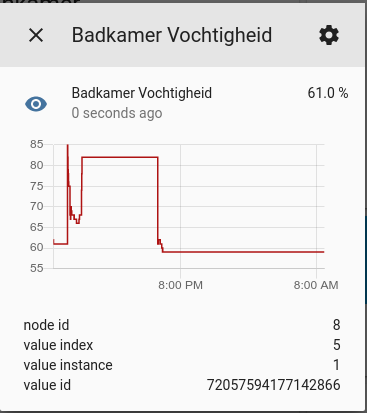
Around 18:00 I restarted home assistant. It then shows some signs of making sense - after which the values get stuck.
The same behavior happens with the other sensors on this device (temperature, illumination).
This has never given me problems... feels like a waste of time. Should I open a new issue with this strange behavior?
wasperen
on 20 Jul 2019
Ok -- just "curl-ed" the api and, seems that you are right @dgomes. The state is a string!
{
    "attributes": {
        "friendly_name": "Badkamer Vochtigheid",
        "node_id": 8,
        "unit_of_measurement": "%",
        "value_id": "72057594177142866",
        "value_index": 5,
        "value_instance": 1
    },
    "context": {
        "id": "5a51fb86b1c74233bb4af32adb29efd1",
        "parent_id": null,
        "user_id": null
    },
    "entity_id": "sensor.bathroom_relative_humidity",
    "last_changed": "2019-07-20T06:59:06.081857+00:00",
    "last_updated": "2019-07-20T06:59:06.081857+00:00",
    "state": "61.0"
}
How did that happen...?
wasperen
on 20 Jul 2019
Oh no... it is worse that this... It seems like _all_ my Z-Wave sensors now have this same issue...
wasperen
on 20 Jul 2019
That is really interesting.
cgtobi
on 20 Jul 2019
Hey there @home-assistant/z-wave, mind taking a look at this issue as its been labeled with a integration (zwave) you are listed as a codeowner for? Thanks!
_This is a automatic comment generated by codeowners-mention to help ensure issues and pull requests are seen by the right people._
ghost
on 20 Jul 2019
So I thought, maybe there is a newer / older version of this openzwave installed... I tried removing the zwcfg file and restart, so openzwave would d a fresh discovery of all the devices. It did, except for some issues related to my battery powered sleeping devices (makes sense).
It does, however, not recognize my (battery powered) door-sensor by Manufacturer or Device... That may be unrelated but worth mentioning because of potential version issues.
wasperen
on 20 Jul 2019
From the OZW log file:
2019-07-20 09:42:08.244 Info, Node008, Received SensorMultiLevel report from node 8, instance 1, Relative Humidity: value=62%
2019-07-20 09:42:08.244 Detail, Node008, Refreshed Value: old value=62, new value=62, type=decimal
2019-07-20 09:42:08.244 Detail, Node008, Changes to this value are not verified
2019-07-20 09:42:08.244 Detail, Node008, Notification: ValueChanged
2019-07-20 09:42:08.274 Detail, Node005,   Received: 0x01, 0x05, 0x00, 0x47, 0x7b, 0x01, 0xc7
So the value is seen (62) and identified as a decimal.
wasperen
on 20 Jul 2019
For information:
2019-07-20 09:50:41.228 Always, ***************************************************************************
2019-07-20 09:50:41.228 Always, *********************  Cumulative Network Statistics  *********************
2019-07-20 09:50:41.229 Always, *** General
2019-07-20 09:50:41.229 Always, Driver run time: . .  . 0 days, 0 hours, 20 minutes
2019-07-20 09:50:41.229 Always, Frames processed: . . . . . . . . . . . . . . . . . . . . 687
2019-07-20 09:50:41.230 Always, Total messages successfully received: . . . . . . . . . . 687
2019-07-20 09:50:41.230 Always, Total Messages successfully sent: . . . . . . . . . . . . 147
2019-07-20 09:50:41.231 Always, ACKs received from controller:  . . . . . . . . . . . . . 132
2019-07-20 09:50:41.231 Always, *** Errors
2019-07-20 09:50:41.232 Always, Unsolicited messages received while waiting for ACK:  . . 1
2019-07-20 09:50:41.232 Always, Reads aborted due to timeouts:  . . . . . . . . . . . . . 0
2019-07-20 09:50:41.232 Always, Bad checksum errors:  . . . . . . . . . . . . . . . . . . 0
2019-07-20 09:50:41.233 Always, CANs received from controller:  . . . . . . . . . . . . . 1
2019-07-20 09:50:41.233 Always, NAKs received from controller:  . . . . . . . . . . . . . 0
2019-07-20 09:50:41.234 Always, Out of frame data flow errors:  . . . . . . . . . . . . . 0
2019-07-20 09:50:41.234 Always, Messages retransmitted: . . . . . . . . . . . . . . . . . 1
2019-07-20 09:50:41.234 Always, Messages dropped and not delivered: . . . . . . . . . . . 22
2019-07-20 09:50:41.235 Always, ***************************************************************************
Ok -- Just after a restart of Home Assistant, the Z-Wave devices behave but failing a minute or so after that... That with the new zwcfg file.
wasperen
on 20 Jul 2019
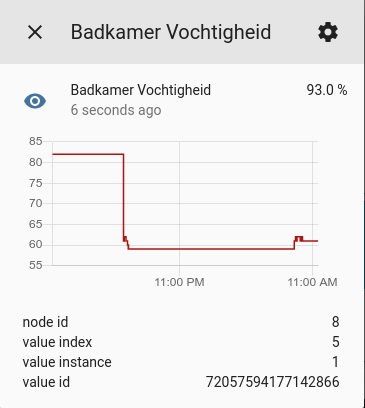
same thing happening. the "state" shows a 90+ value but the graph does not reflect that. I think because the state is reported as a string rather than a numeric value.
wasperen
on 20 Jul 2019
Just connected a new Z-Wave device -- same thing. The state is reported, but not recorded.
wasperen
on 20 Jul 2019
Nothing with HA's OZW version or the Z-Wave sensor component changed in 0.96, so that's definitely strange behavior. If you roll back to 0.95 does it start working again?
 cgarwood
on 20 Jul 2019
cgarwood
on 20 Jul 2019
restarted:
2019-07-20 16:47:29.962 Always, OpenZwave Version 1.4.3440 Starting Up
Ok. Further to this story. I have a sensor that reports temperature of an out-house, using MQTT. This morning I found that also on that one the history of the values is not correct...
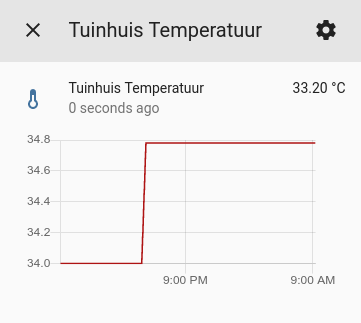
In fact -- even my non-numeric histories seem to be wrong:
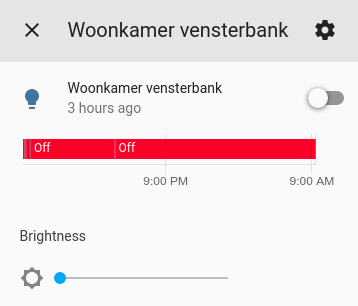
This is a Hue light that I know has been on for a number of hours last night... It does not show up.
Finally, this morning the movement-sensor in the bathroom that should trigger a script to flip a switch downstairs, did not fire. The movement sensor history does not show the movement, but the actual state shows up correctly.
So it seems that there is something else wrong here. Somehow the recording and/or triggering service does not work no more.
Sorry to bother you guys with this, but I am at a loss. Next thing I will do is look into the database and see if there is history in there. Will report back.
wasperen
on 21 Jul 2019
Ok, so here are the most recent 50 rows of some state. It seems that the recording worked for thirty minutes after reboot and then just stopped.
sqlite> select entity_id, state, created from states where entity_id == 'sensor.tuinhuis_temperatuur' order by created desc limit 50;
entity_id                    state       created
---------------------------  ----------  --------------------------
sensor.tuinhuis_temperatuur  34.78       2019-07-20 15:17:47.994427
sensor.tuinhuis_temperatuur  34.77       2019-07-20 15:17:17.983713
sensor.tuinhuis_temperatuur  34.75       2019-07-20 15:16:48.527413
sensor.tuinhuis_temperatuur  34.73       2019-07-20 15:16:17.974602
sensor.tuinhuis_temperatuur  34.72       2019-07-20 15:15:47.983095
sensor.tuinhuis_temperatuur  34.70       2019-07-20 15:15:17.974249
sensor.tuinhuis_temperatuur  34.68       2019-07-20 15:14:47.978466
sensor.tuinhuis_temperatuur  34.67       2019-07-20 15:14:17.996147
sensor.tuinhuis_temperatuur  34.65       2019-07-20 15:13:47.994264
sensor.tuinhuis_temperatuur  34.63       2019-07-20 15:13:17.978176
sensor.tuinhuis_temperatuur  34.62       2019-07-20 15:12:47.974176
sensor.tuinhuis_temperatuur  34.60       2019-07-20 15:12:17.983110
sensor.tuinhuis_temperatuur  34.58       2019-07-20 15:11:47.980623
sensor.tuinhuis_temperatuur  34.57       2019-07-20 15:11:17.980373
sensor.tuinhuis_temperatuur  34.55       2019-07-20 15:10:48.002664
sensor.tuinhuis_temperatuur  34.53       2019-07-20 15:10:18.018016
sensor.tuinhuis_temperatuur  34.52       2019-07-20 15:09:47.991165
sensor.tuinhuis_temperatuur  34.50       2019-07-20 15:09:25.168704
sensor.tuinhuis_temperatuur  34.48       2019-07-20 15:08:47.987093
sensor.tuinhuis_temperatuur  34.47       2019-07-20 15:08:18.009943
sensor.tuinhuis_temperatuur  34.45       2019-07-20 15:07:47.976622
sensor.tuinhuis_temperatuur  34.43       2019-07-20 15:07:17.993993
sensor.tuinhuis_temperatuur  34.42       2019-07-20 15:06:47.993348
sensor.tuinhuis_temperatuur  34.40       2019-07-20 15:06:17.971861
sensor.tuinhuis_temperatuur  34.38       2019-07-20 15:05:47.992915
sensor.tuinhuis_temperatuur  34.37       2019-07-20 15:05:17.955601
sensor.tuinhuis_temperatuur  34.35       2019-07-20 15:04:47.978887
sensor.tuinhuis_temperatuur  34.33       2019-07-20 15:04:17.956349
sensor.tuinhuis_temperatuur  34.32       2019-07-20 15:03:47.977464
sensor.tuinhuis_temperatuur  34.30       2019-07-20 15:03:17.978062
sensor.tuinhuis_temperatuur  34.28       2019-07-20 15:02:47.952874
sensor.tuinhuis_temperatuur  34.27       2019-07-20 15:02:17.982000
sensor.tuinhuis_temperatuur  34.25       2019-07-20 15:01:47.979132
sensor.tuinhuis_temperatuur  34.23       2019-07-20 15:01:24.925553
sensor.tuinhuis_temperatuur  34.22       2019-07-20 15:00:47.970244
sensor.tuinhuis_temperatuur  34.20       2019-07-20 15:00:17.946203
sensor.tuinhuis_temperatuur  34.18       2019-07-20 14:59:47.958748
sensor.tuinhuis_temperatuur  34.17       2019-07-20 14:59:17.964213
sensor.tuinhuis_temperatuur  34.15       2019-07-20 14:58:47.933935
sensor.tuinhuis_temperatuur  34.13       2019-07-20 14:58:17.963916
sensor.tuinhuis_temperatuur  34.12       2019-07-20 14:57:48.020200
sensor.tuinhuis_temperatuur  34.10       2019-07-20 14:57:17.957111
sensor.tuinhuis_temperatuur  34.08       2019-07-20 14:56:48.005604
sensor.tuinhuis_temperatuur  34.07       2019-07-20 14:56:17.947970
sensor.tuinhuis_temperatuur  34.05       2019-07-20 14:55:17.959695
sensor.tuinhuis_temperatuur  34.03       2019-07-20 14:54:47.952500
sensor.tuinhuis_temperatuur  34.02       2019-07-20 14:54:18.563243
sensor.tuinhuis_temperatuur  34.00       2019-07-20 14:48:32.907670
sensor.tuinhuis_temperatuur  unknown     2019-07-20 14:48:31.454941
sensor.tuinhuis_temperatuur  34.00       2019-07-20 07:52:03.848709
Ok -- So this is more an issue with the history recording. I had a 45GB big Sqllite3 database... Removing that seems to solve this problem.
Thanks for all the support!
wasperen
on 22 Jul 2019
Related issues
 bdraco
·
3Comments
bdraco
·
3Comments
 sibbl
·
3Comments
sibbl
·
3Comments
 coolriku
·
3Comments
coolriku
·
3Comments
 Konstigt
·
3Comments
Konstigt
·
3Comments
 missedtheapex
·
3Comments
missedtheapex
·
3Comments
Most helpful comment
Ok -- So this is more an issue with the history recording. I had a 45GB big Sqllite3 database... Removing that seems to solve this problem.
Thanks for all the support!