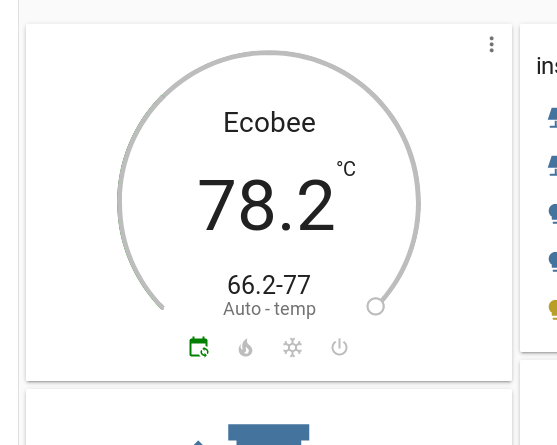
Core: climate control card does not convert celsius units properly
.96
Last working Home Assistant release (if known):
.95.4
Operating environment (Hass.io/Docker/Windows/etc.):
Component/platform:
4.15.0-48-generic #51-Ubuntu SMP Wed Apr 3 08:28:49 UTC 2019 x86_64 x86_64 x86_64 GNU/Linux
Description of problem:
Temperature units given in F, even though metric is selected See pic
Problem-relevant configuration.yaml entries and (fill out even if it seems unimportant):
  # metric for Metric, imperial for Imperial
  unit_system: metric


climate.thermo:
  max_temp: 28
  min_temp: 18
  operation_list:
  - auto
  - cool
  - heat
  - 'off'
 illumilore
All 9 comments
Same issue. Kind of scary, disable for now, don't want my furnace to heat the house to 71C :)
 ghost
on 18 Jul 2019
ghost
on 18 Jul 2019
Same here. It showed current temp as 76.7C with metric. When I switched to imperial, it showed 170F!
 luisiam
on 18 Jul 2019
luisiam
on 18 Jul 2019
Please try to comment out lines 171-172 in homeassistant/components/ecobee/climate.py
 cgtobi
on 18 Jul 2019
cgtobi
on 18 Jul 2019
Please try to comment out lines 171-172 in
homeassistant/components/ecobee/climate.py
this worked for me
 madrose
on 18 Jul 2019
madrose
on 18 Jul 2019
@madrose Do you use imperial or metric units?
cgtobi
on 18 Jul 2019
I am using metric both on the ecobee and HASS configuration.
madrose
on 18 Jul 2019
How can I find the file in my Raspberry Pi? I am running Hass.io. I tried to copy the ecobee folder to /config/custom_components/ but it doesn't work. The ecobee platform fails to load after restart.
luisiam
on 18 Jul 2019
@luisiam You mean to test this? I'll probably ship pretty soon.
cgtobi
on 18 Jul 2019
@cgtobi if it will be fixed soon then I will wait for it. Thanks for all the great works =]
luisiam
on 18 Jul 2019
Related issues
 i-am-shodan
·
3Comments
i-am-shodan
·
3Comments
 kirichkov
·
3Comments
kirichkov
·
3Comments
 sogeniusio
·
3Comments
sogeniusio
·
3Comments
 flsabourin
·
3Comments
flsabourin
·
3Comments
 moskovskiy82
·
3Comments
moskovskiy82
·
3Comments