Core: Motion binary sensors and Meteoalarm with inverted color bar
Home Assistant release with the issue:
93.2
Last working Home Assistant release (if known):
-
Operating environment (Hass.io/Docker/Windows/etc.):
Hassio on raspbian lite
Component/platform:
meteoalarm but also motion binary sensors
Description of problem:
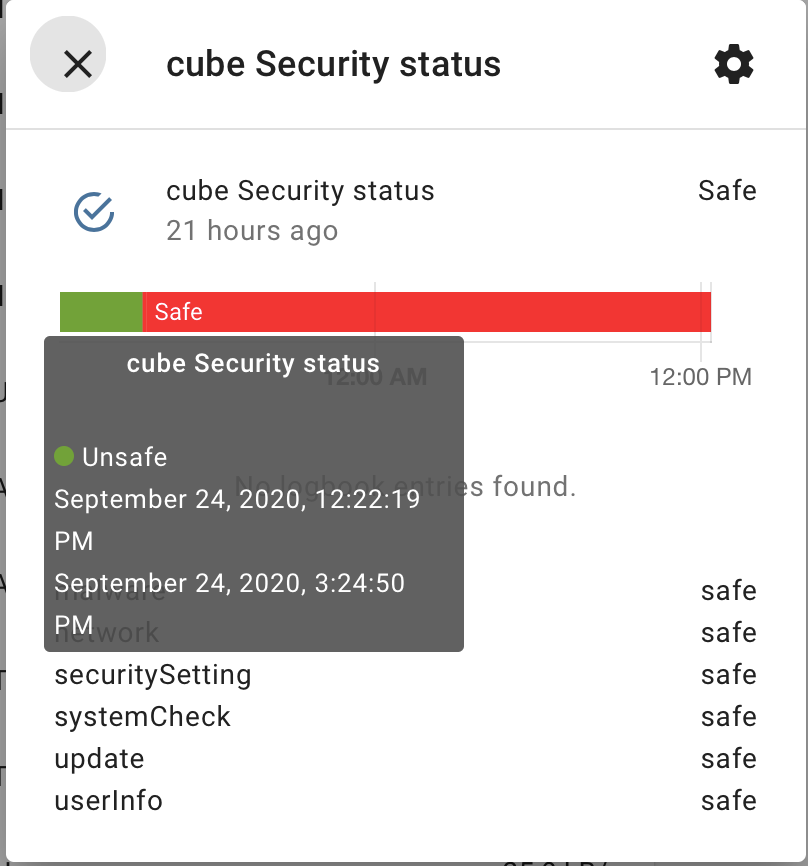
Color green/red is shifted results in things like:
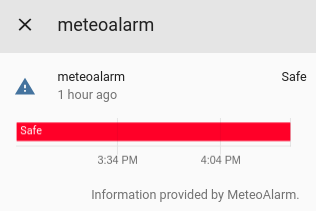
In my world green should indicate Safe
On to other way:
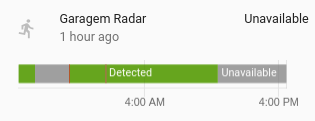
I would motion detected to be considered red...
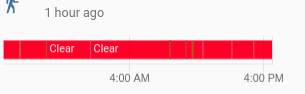
certainly not clear! Clear could be green instead - no?
Problem-relevant configuration.yaml entries and (fill out even if it seems unimportant):
binary_sensor:
  - platform: meteoalarm
    country: 'NL'
    province: 'Groningen'
Traceback (if applicable):
Additional information:
fresh install with clean yaml, no import, no templates no design changes in any way
 rradar
All 10 comments
Same here, Iam new to hassio, but would prever red for triggered events and green or gray for other.
 matajumotors
on 30 May 2019
matajumotors
on 30 May 2019
There is no visual representation of the state in the history, as far as I remember. The colors are chosen randomly.
 fabaff
on 8 Jun 2019
fabaff
on 8 Jun 2019
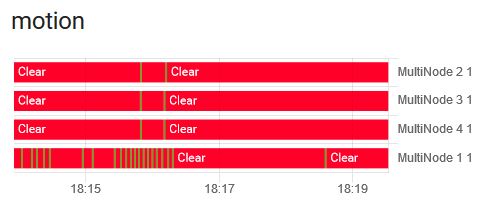
@fabaff this would be very new to me. I use home assistant since version 0.7x and since always the binary (motion) sensor had green for clear and red for (motion) detected.
I really think their is a bug in the most recent versions....
rradar
on 9 Jun 2019
The binary sensors is "off" when there is no warning, thus red.
The binary sensor is "on" when alerts are active, thus green.
It's just the way it is implemented (in meteoalarm)I guess.
The same for motion sensors. No motion = binary sensor off = red color, because in "off" state.
I don't know how it was in the past, I actually never looked at it before.
 ArnoutVerbeken
on 11 Jun 2019
ArnoutVerbeken
on 11 Jun 2019
It's weird. Over the last two years for me the motion binary sensor was always green when clear and red when motion detected (which would be the be the correct color code for me because red is somehow alarming and therefor green the normal state). For meteoalarm I can't tell because I just added it to my config. It's just odd that the state safe is presented by a red color because of it's alarming character.
I can just think of that the behavior for the binary motion sensor was (silently) changed in a recent version.
@ArnoutVerbeken any idea how the colors could be changed to make sense? Is their a customizing option? Best would be for sure to get it right for all people and include a fix in the next version
rradar
on 13 Jun 2019
+1 on this, just installed HA and noticed the same. Windows are all closed bu shown red etc. Was wondering if there is some customization options or something and found this issue
 dave93cab
on 22 Jun 2019
dave93cab
on 22 Jun 2019
There hasn't been any activity on this issue recently. Due to the high number of incoming GitHub notifications, we have to clean some of the old issues, as many of them have already been resolved with the latest updates.
Please make sure to update to the latest Home Assistant version and check if that solves the issue. Let us know if that works for you by adding a comment 👍
This issue now has been marked as stale and will be closed if no further activity occurs. Thank you for your contributions.
![stale[bot] picture](https://avatars3.githubusercontent.com/in/1724?v=4&s=40) stale[bot]
on 20 Sep 2019
stale[bot]
on 20 Sep 2019
unstale
rradar
on 16 Mar 2020
I can't believe that this still has not been fixed - the whole logic of colours in visual displays is to use Red for bad stuff - Red does not mean there is no motion on my motion sensor, nor does it mean my door is safely closed. We need a way of configuring the colours used to represent binary sensors, particularly for alarm type sensors like door or motion where the current default scheme is the exact opposite of common sense....
 seangordon
on 7 Jun 2020
seangordon
on 7 Jun 2020
+1
"Unsafe" should be red, NOT green!
 kdeyko
on 25 Sep 2020
kdeyko
on 25 Sep 2020
Related issues
 arangates
·
3Comments
arangates
·
3Comments
 sibbl
·
3Comments
sibbl
·
3Comments
 ofuangka
·
3Comments
ofuangka
·
3Comments
 kirichkov
·
3Comments
kirichkov
·
3Comments
 i-am-shodan
·
3Comments
i-am-shodan
·
3Comments
Most helpful comment
I can't believe that this still has not been fixed - the whole logic of colours in visual displays is to use Red for bad stuff - Red does not mean there is no motion on my motion sensor, nor does it mean my door is safely closed. We need a way of configuring the colours used to represent binary sensors, particularly for alarm type sensors like door or motion where the current default scheme is the exact opposite of common sense....