Core: Input_Number adding decimal places to integer state
Home Assistant release with the issue:
0.92.1
Last working Home Assistant release (if known):
Unsure
Operating environment (Hass.io/Docker/Windows/etc.):
Debian Linux
Component/platform:
input_number
Description of problem:
When using input_number such that only integers should be selected, the state of the input_number is adding decimal points. The screenshot below sums this up pretty well. These input_numbers have always been set up like this and only controlled using the GUI slider.
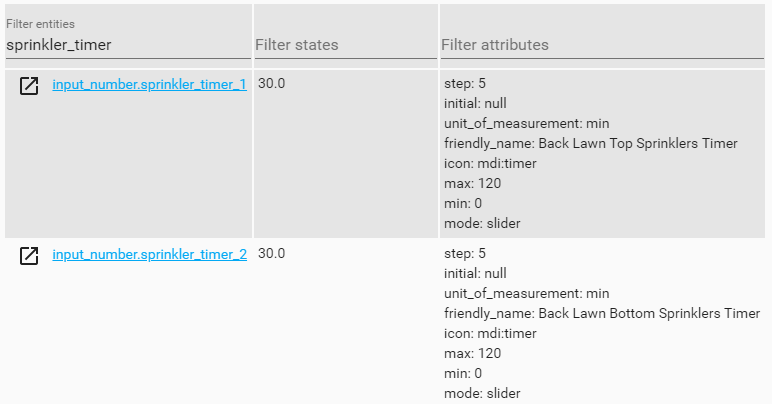
This doesn't cause functional issues obviously, but is a (seemingly) unnecessary pain when it comes to displaying these in the front end as not all ways I want to display this support formatting, and I'd rather not have to create template sensors for each of these or a custom ui.
Problem-relevant configuration.yaml entries and (fill out even if it seems unimportant):
input_number:
  sprinkler_timer_1:
    name: Back Lawn Top Sprinklers Timer
    icon: mdi:timer
    min: 0
    max: 120
    step: 5
    mode: slider
    unit_of_measurement: 'min'
Traceback (if applicable):
Additional information:
Lovelace example when displaying using hui-text-entity-row

 mynameisdaniel32
All 11 comments
I am not seeing this behaviour with the following:
ground_floor_color_transition:
  name: Speed
  min: 0
  max: 30
  step: 1
  mode: slider
Also, why does the same thing not happen to the Sprinkler Trigger Temp? which is nicely 30 degrees.
 pbavinck
on 30 Apr 2019
pbavinck
on 30 Apr 2019
Is it from unit of measurement ?
 SNoof85
on 30 Apr 2019
SNoof85
on 30 Apr 2019
Sprinkler Trigger Temp is being displayed using the default entity row (as opposed to hui-text-entity-row in the others) which I'm guessing has some sort of conditioning to remove/hide the decimals. The state for that one also has a decimal.

mynameisdaniel32
on 1 May 2019
That is front end issue.
 awarecan
on 1 May 2019
awarecan
on 1 May 2019
@awarecan is it a frontend issue? I have notification emails and syslog where the integer value is displayed with decimal. They are processed through the template engine, but I don't know if that makes a difference.
Example Email:
Subject: Front Yard Irrigation

Completed after 15.0 Minutes
 ronytomen
on 8 May 2019
ronytomen
on 8 May 2019
Internally, we use float. How to present it in what format is front-end issue.
awarecan
on 8 May 2019
Makes sense that is float internally and that would show through on the UI and template values.
ronytomen
on 8 May 2019
There hasn't been any activity on this issue recently. Due to the high number of incoming GitHub notifications, we have to clean some of the old issues, as many of them have already been resolved with the latest updates.
Please make sure to update to the latest Home Assistant version and check if that solves the issue. Let us know if that works for you by adding a comment 👍
This issue now has been marked as stale and will be closed if no further activity occurs. Thank you for your contributions.
![stale[bot] picture](https://avatars3.githubusercontent.com/in/1724?v=4&s=40) stale[bot]
on 7 Aug 2019
stale[bot]
on 7 Aug 2019
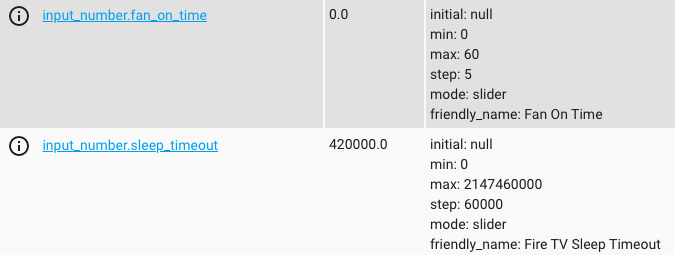
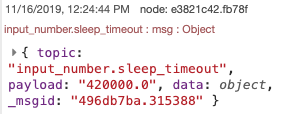
I believe this is still an issue. All of my input numbers have an added decimal. I'm trying to use that number in other areas and have errors because this.

 JohnnyPicnic
on 16 Nov 2019
JohnnyPicnic
on 16 Nov 2019
I also find this behaviour counter-intuitive.
IMHO: if the step is an integer, the state should be an integer too.
(Regardless of how things are stored internally – that's an implementation detail.)
 rsmeral
on 13 Apr 2020
rsmeral
on 13 Apr 2020
Just ran into the same issue, is there any resolution since?
 ipetrovits
on 3 Sep 2020
ipetrovits
on 3 Sep 2020
Related issues
 MartinHjelmare
·
3Comments
MartinHjelmare
·
3Comments
 missedtheapex
·
3Comments
missedtheapex
·
3Comments
 sogeniusio
·
3Comments
sogeniusio
·
3Comments
 YellowMonster76
·
3Comments
YellowMonster76
·
3Comments
 bdraco
·
3Comments
bdraco
·
3Comments
Most helpful comment
Just ran into the same issue, is there any resolution since?