Core: Adblock admin sharing settings hiding
Steps to reproduce
- Enabled Adblock
- Check admin settings
- Disabled Adblock
- Check again addmin settings
Expected behaviour
Warning on Adblock shown or sharing icon shown.
Maybe use idea by https://github.com/sualko/cloud_piwik/pull/65 or by https://github.com/nextcloud/server/pull/4337?
Actual behaviour
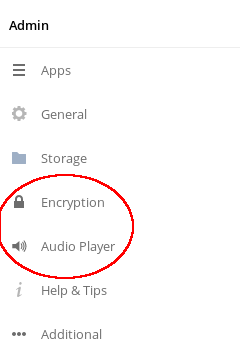
With Adblock no sharing icon
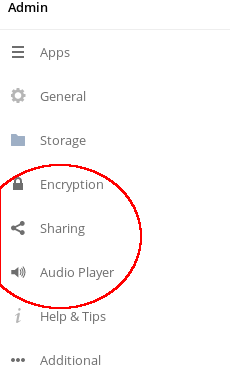
Without Adblock sharing icon
Server configuration
ownCloud version: 10.1.1
Client configuration
Browser: Firefox 66.0.3 + Adblock +
Adblock Warning Removal List
Fanboy's Social Blocking List
ABP filters
EasyList
Allow nonintrusive advertising without third-party tracking
 ho4ho
ho4ho
All 5 comments
Similar issue by past: https://github.com/owncloud/core/issues/24190, https://github.com/owncloud/core/issues/17581, https://github.com/owncloud/core/issues/2711, https://github.com/owncloud/core/issues/17053, https://github.com/owncloud/core/issues/8360, https://github.com/owncloud/core/issues/6913, https://github.com/owncloud/core/issues/33579
ho4ho
on 19 Apr 2019
so it seems that renaming "share-" to "shared-" would solve the issue.
however if the icon file name needs to be renamed, it could have an impact on some themes that might use this name, so would consider this a breaking change that needs mentioning in release notes.
cc @pmaier1
 PVince81
on 25 Apr 2019
PVince81
on 25 Apr 2019
Thanks for reporting this issue. Just a side note: ABP is not the best adblock solution as you can whitelist addresses if you put in some coins. Better use 'uBlock'. The described issue does not occur with this one ;)
 pmaier1
on 25 Apr 2019
pmaier1
on 25 Apr 2019
Better use 'uBlock'. The described issue does not occur with this one ;)
Happen also: https://github.com/owncloud/core/issues/33642
Look like matter of rules in blocker used.
Closing duplicate of https://github.com/owncloud/core/issues/33642 ? (Didn't remembered :disappointed: )
ho4ho
on 25 Apr 2019
Contacts: https://github.com/owncloud/contacts/pull/663
Activity: https://github.com/owncloud/activity/issues/727, https://github.com/owncloud/activity/pull/728
Others: ?
ho4ho
on 11 May 2019
Related issues
 dpeger
·
3Comments
dpeger
·
3Comments
 mattcatt00
·
4Comments
mattcatt00
·
4Comments
 individual-it
·
3Comments
individual-it
·
3Comments
 emmenlau
·
5Comments
PVince81
·
4Comments
emmenlau
·
5Comments
PVince81
·
4Comments
Most helpful comment
so it seems that renaming "share-" to "shared-" would solve the issue.
however if the icon file name needs to be renamed, it could have an impact on some themes that might use this name, so would consider this a breaking change that needs mentioning in release notes.
cc @pmaier1