Core: UPnP/IGD Integration failing after 0.91.x
0.90.0
Home Assistant release with the issue:
not sure..
Last working Home Assistant release (if known):
hass.io generic linux install debian
Operating environment (Hass.io/Docker/Windows/etc.):
Component/platform:
UPnP/IGD Integration
Description of problem:
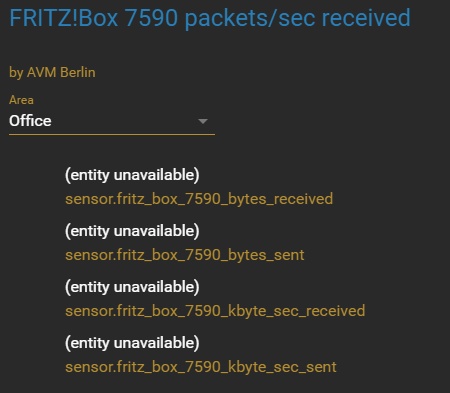
I remove the integration, restart Home Assistant and it configures the integration again as it should but if I restart Home Assistant again they all show as unavailable. First noticed in 0.90.0 but maybe it was doing this in previous as well

Problem-relevant configuration.yaml entries and (fill out even if it seems unimportant):
Traceback (if applicable):
Additional information:
@StevenLooman
 DavidFW1960
All 42 comments
Hey there @robbiet480, mind taking a look at this issue as its been labeled with a integration (upnp) you are listed as a codeowner for? Thanks!
![github-actions[bot] picture](https://avatars2.githubusercontent.com/in/15368?v=4&s=40) github-actions[bot]
on 6 Apr 2019
github-actions[bot]
on 6 Apr 2019
upnp is automatically enabled/activated as you have it configured in your configuration.yaml file.
Not sure why it shows up as entity unavailable. I'll investigate later.
 StevenLooman
on 6 Apr 2019
StevenLooman
on 6 Apr 2019
The confusing thing it that it’s there is I add the integration but it disappears after a restart of Home Assistant.
DavidFW1960
on 7 Apr 2019
I am having exactly the same issue. I use upnp to get a connection to my fritzbox. After each restart the devices are shown as unavailable. I need to remove the integration and integrate it again.
 lweberru
on 10 Apr 2019
lweberru
on 10 Apr 2019
Does your router/device get a new UDN every time it reboots?
StevenLooman
on 11 Apr 2019
Not that I know of. In fact, my router has not rebooted for months... There does seem to be a strange interaction with the mobile_app integration... I was adding/removing that the other day and when HA restarted the UPnP integration showed all the devices again. But they are gone now - maybe because mobile_app is running/
DavidFW1960
on 12 Apr 2019
Also i never reboot my router/device. It happens when HA reboots not when the router reboots. Probably there could be a way to enable some kind of debug logging to narrow the problem?
lweberru
on 12 Apr 2019
You can try adding this to your configuration:
logger:
  default: warning
  logs:
    homeassistant.components.upnp: debug
    async_upnp_client: debug
    async_upnp_client.traffic: info
This will silence most of home assistant but upnp related parts. If you want a full traffic dump you can set async_upnp_client.traffic to debug.
StevenLooman
on 12 Apr 2019
Im getting the exact same error. My router is pfSense.
Are there any logs that i can provide to help diagnose this?
 mokshmridul
on 12 Apr 2019
mokshmridul
on 12 Apr 2019
I think it might have to do with the combining of the sensors. Hopefully I'll have more time to check this.
StevenLooman
on 12 Apr 2019
I don't know if it's related but I've enabled device tracker for my Fritz
device_tracker:
  - platform: fritz
    host: !secret my_fritz_host
    consider_home: 180
    new_device_defaults:
      track_new_devices: false
      hide_if_away: false
  - platform: fritz
    host: !secret my_fritz_repeater
    consider_home: 180
    new_device_defaults:
      track_new_devices: false
      hide_if_away: false
When I had this active before it added every device to my known_devices.yaml Now with UPnP not working, this tracker isn't detecting any devices either....
Actually maybe because track_new_devices is false... I'll check on that..
DavidFW1960
on 13 Apr 2019
ah yeah.... that was why....
DavidFW1960
on 13 Apr 2019
So... this is solved?
StevenLooman
on 14 Apr 2019
No it is not.
lweberru
on 14 Apr 2019
No the device tracker isn’t working properly either and the UPnP is not working as per original post on this issue.
DavidFW1960
on 14 Apr 2019
I think the merging of sensors is the problem, introduced by https://github.com/home-assistant/home-assistant/pull/21414.
Can't reproduce it myself though (dev branch)! Can you test if the problem is also present on that branch?
StevenLooman
on 15 Apr 2019
I'm running 0.91.4 now and I'm on the beta branch, not dev... I can't really run 2 branches here. Can I test this by a custom component from the dev branch?
DavidFW1960
on 17 Apr 2019
Would I just clone this: https://github.com/home-assistant/home-assistant/tree/dev/homeassistant/components/upnp to custom_components folder to run it and test?
DavidFW1960
on 17 Apr 2019
ok well I downloaded the dev folder upnp into custom_components and restarted and it recognises it as a custom component. Removed UPnP integration and restarted. Added UPnP integration and it sees all my Fritz!Box UPnP. Restarting again and same old issue.
DavidFW1960
on 17 Apr 2019


Restarting:
DavidFW1960
on 17 Apr 2019
No I think it's a combination of the component and other parts of hass.
StevenLooman
on 17 Apr 2019
Have tried a bit more to reproduce this, but no luck. I do see that sometimes the 'group' has the name of a sensor (e.g., bytes_received) and the next restart has a another name (e.g., packets_sec_received.)
In homeassistant/components/upnp/sensor.py (or via a copy to custom_components), can you try commenting/deleting lines 111-113. It should be as follows:
    @property
    def device_info(self):
        """Get device info."""
        return {
            'identifiers': {
                (DOMAIN_UPNP, self.unique_id)
            },
            # 'connections': {
            #     (dr.CONNECTION_UPNP, self._device.udn)
            # },
            'name': self.name,
            'manufacturer': self._device.manufacturer,
        }
This prevents merging the sensors, but will hopefully fix the problem.
StevenLooman
on 17 Apr 2019
Just tried the solution from @StevenLooman and it appears to work for me. I have hassio with google wifi. Every time I would add the upnp component the devices would become unavailable after a hassio restart. I created a custom_component, commented out the 3 lines. Deleted the current integration, removed all associated entities in the entity registry (there were a lot because it would add new ones each time I would setup the integration). Then restarted. Readded the integration and have restarted hassio 3 times since and the integration still works. Any chance this could be updated for 0.92?
One thing I did notice is that the sensors for bytes and kbytes are not changing while all the sensors for packets are changing. The bytes sent and bytes received are both frozen on 4294967295 bytes. While the kbytes sent and received are both stuck at 0.0 kbyte/sec. Any suggestions?
 omriasta
on 18 Apr 2019
omriasta
on 18 Apr 2019
Thank you for testing! Will create a PR now.
StevenLooman
on 18 Apr 2019
I don't think resolved the issue, also as I mentioned it seems that some of the sensors are broken. Using this for Google Wifi and noticed that all the sensors that measure bytes/kbytes do not change at all. All the sensors that measure packets are working though. the sensors also appear to become "unavailable" as before this change but not as often as before.
omriasta
on 26 Apr 2019
0.92.1 here now and it is still doing the exact same thing. Presume dev was merged in .92.
@StevenLooman
DavidFW1960
on 27 Apr 2019
0.92.1 here now and it is still doing the exact same thing. Presume dev was merged in .92.
@StevenLooman
Running 0.92.1 myself, it wasn't merged into 0.92(.1). Please try again in 0.93.
I don't think resolved the issue, also as I mentioned it seems that some of the sensors are broken. Using this for Google Wifi and noticed that all the sensors that measure bytes/kbytes do not change at all. All the sensors that measure packets are working though.
Some devices don't properly report traffic via UPnP. This is probably the case for your router. Same for mine... You can try another UPnP/IGD tool to check the values. If this tool also reports no traffic, then you have a device which does not report it properly.
the sensors also appear to become "unavailable" as before this change but not as often as before.
As noted before, this PR did not land in 0.92. Please try again with 0.93.
StevenLooman
on 27 Apr 2019
I'll tag it for 92.2
 balloob
on 27 Apr 2019
balloob
on 27 Apr 2019
Thanks @StevenLooman & @balloob
DavidFW1960
on 28 Apr 2019
As I mentioned above I don't think this fixed the issue for me. I did try to load the component in the configuration.yaml and that seems to be working better (all the sensors are working now). I'll keep an eye to see if it remains stable. My thought is since I'm not using this to forward ports, just to get sensors, it's possibly failing when trying to autodetect IP and forward ports? Maybe we need a check to verify if ports are already forwarded? I'm also behind a reverse proxy which may be confusing the IP detection...
omriasta
on 3 May 2019
I'm using 0.92.2 and am having the same problem as the original one, where on restart the sensors say "entity unavailable". Additionally, on restart the port forwarding rules no longer get re-activated. If I remove the integration and re-add it, everything starts working again until the next restart. So I don't think this issue is fully resolved.
 chamberlain2007
on 4 May 2019
chamberlain2007
on 4 May 2019
I am at a loss. I'm unable to reproduce the issue. @dgomes, do you know how to approach this or do you know somebody who could help?
StevenLooman
on 4 May 2019
I'm also unable to reproduce, which makes things real hard to debug/fix :(
@chamberlain2007 have you disabled all custom_components ?
 dgomes
on 4 May 2019
dgomes
on 4 May 2019
@dgomes No custom_components. Here's a video of the issue in action, just to confirm we're talking about the same thing: https://gfycat.com/PertinentRaggedFlee
chamberlain2007
on 4 May 2019
I have also still the same problem as before this fix: Entities are shown as unavailable after a restart. I have added the mentioned debugging in the configuration
logger:
  default: warning
  logs:
    homeassistant.components.upnp: debug
    async_upnp_client: debug
    async_upnp_client.traffic: info
but got not one log entry :-(
Any idea what I can do to help closing this issue?
lweberru
on 5 May 2019
What is also happening, that the names of the created entities are switching each time, So I have to re-add it twice...
lweberru
on 5 May 2019
What are the names?
StevenLooman
on 5 May 2019
right now I have the following instances:
sensor.cluefb_kbytesec_received
sensor.cluefb_kbytesec_sent
sensor.cluefb_bytes_received
sensor.cluefb_bytes_sent
sensor.cluefb_packets_received
sensor.cluefb_packets_sent
after a delete and another add I have:
sensor.internetgatewaydevicev2_clue_fb_kbyte_sec_received
sensor.internetgatewaydevicev2_clue_fb_kbyte_sec_sent
sensor.internetgatewaydevicev2_clue_fb_bytes_received
sensor.internetgatewaydevicev2_clue_fb_bytes_sent
sensor.internetgatewaydevicev2_clue_fb_packets_received
sensor.internetgatewaydevicev2_clue_fb_packets_sent
lweberru
on 5 May 2019
Oh it is not switching always. Sometimes it stays on second list for several tries.
lweberru
on 5 May 2019
I suspect your router advertises as two devices (IGDv1 and IGDv2), but under the same UDN (identification number.)
Can you try to run the following and post the results? It is a tool available from async_upnp_client, which is already installed through home assistant/the UPNP component. If you're running from a virtual env you have to activate that first. If you're running from docker, then... you can probably find it there.
$ upnp-client search
This will return something like this:
$ upnp-client search
{"Cache-Control": "max-age=1900", "Location": "http://192.168.178.1:80/RootDevice.xml", "Server": "UPnP/1.0 UPnP/1.0 UPnP-Device-Host/1.0", "ST": "upnp:rootdevice", "USN": "uuid:upnp-InternetGatewayDevice-1_0-889ffacb9043::upnp:rootdevice", "EXT": "", "_timestamp": "2019-05-06 20:31:21.264268", "_address": "192.168.178.1:1900", "_udn": "uuid:upnp-InternetGatewayDevice-1_0-889ffacb9043", "_source": "search"}
{"Cache-Control": "max-age=1900", "Location": "http://192.168.178.1:80/RootDevice.xml", "Server": "UPnP/1.0 UPnP/1.0 UPnP-Device-Host/1.0", "ST": "uuid:upnp-InternetGatewayDevice-1_0-889ffacb9043", "USN": "uuid:upnp-InternetGatewayDevice-1_0-889ffacb9043", "EXT": "", "_timestamp": "2019-05-06 20:31:21.264617", "_address": "192.168.178.1:1900", "_udn": "uuid:upnp-InternetGatewayDevice-1_0-889ffacb9043", "_source": "search"}
...
It appears the logger from the upnp-component is broken. #23724 fixes this.
We should also create a new issue for this problem, and not continue on this closed issue!
StevenLooman
on 6 May 2019
@lweberru please open the new issue referencing this issue.
dgomes
on 6 May 2019
Related issues
 i-am-shodan
·
3Comments
i-am-shodan
·
3Comments
 neonandu
·
3Comments
neonandu
·
3Comments
 ofuangka
·
3Comments
ofuangka
·
3Comments
 Konstigt
·
3Comments
Konstigt
·
3Comments
 TheZoker
·
3Comments
TheZoker
·
3Comments
Most helpful comment
I'll tag it for 92.2