Core: 2.2.202-SDK not available in Visual Studio 2017
.NET Core 2.2 is not available as a "Target framework" in Visual Studio 2017 (15.9.11) after installing the 2.2.202-SDK (x86/x64).
After installing the 2.2.101-SDK, however, "Target framework" correctly displays ".NET Core 2.2" as an option.
 gthvidsten
All 23 comments
The 2.2.2xx train only works with VS 2019 (same as 2.1.6xx only works in VS 2019 and 2.1.5xx in VS 2017).
Did you have a 2.2.1xx installed previously? Some users seem to have upgrade issues with vs - https://github.com/dotnet/sdk/issues/3076
 dasMulli
on 5 Apr 2019
dasMulli
on 5 Apr 2019
I did not have 2.2.1 installed previously.
What is so special about 2.2.2xx that it won't work in VS 2017?
gthvidsten
on 5 Apr 2019
It is based on a new major version of MSBuild - 16.0 - which ships in VS 2019. The SDK selection inside of VS only selects SDKs with a compatible MSBuild version, which is 15.* in VS 2017, regardless of whether or not it would actually work anyway.
dasMulli
on 5 Apr 2019
I do agree that the versioning scheme is confusing regarding to which VS versions work with which SDK version..
Maybe the download pages - https://dotnet.microsoft.com/download/dotnet-core/2.2 - could be updated to reflect which VS versions they work with?.. Some do read "included in VS 16.0" for example but that doesn't say what you need for which version to be able to target which .NET Core runtime..
cc @KathleenDollard @leecow
dasMulli
on 5 Apr 2019
Thanks @dasMulli, @rowanmiller and I are looking at ways to make the VS compatibility visible and clear.
 leecow
on 5 Apr 2019
leecow
on 5 Apr 2019
That explains why my Azure DevOps build are failing with VS2017 agent.
 tomkerkhove
on 5 Apr 2019
tomkerkhove
on 5 Apr 2019
@dasMulli FYI, @leecow is working on updating the downloads page to call out the compatibility more clearly so that there is less confusion in this area.
 peterhuene
on 5 Apr 2019
peterhuene
on 5 Apr 2019
Oh sorry, had this issue open and it was stale. I didn't see Lee already replied :)
peterhuene
on 5 Apr 2019
Another dup: https://github.com/aspnet/AspNetCore.Docs/issues/11844 - migrating 2.1 to 2.2 page now is somehow busted because it basically says / conveys "Make sure you have VS 2017 15.9.4 or greater and get a 2.2 SDK" pointing to that download page.
dasMulli
on 5 Apr 2019
@peterhuene @leecow
Please also make sure that the "main" download page https://dotnet.microsoft.com/download clearifies this and offers downloads for both VS2017 and VS2019. Right now you can only download the VS2019 compatible .NET Core from there
 cremor
on 11 Apr 2019
cremor
on 11 Apr 2019
This is very silly. It took us two hours to find this issue. Mostly because this isn't the first time this sort of issue has happened:
The clutter that already exists for similar issues:
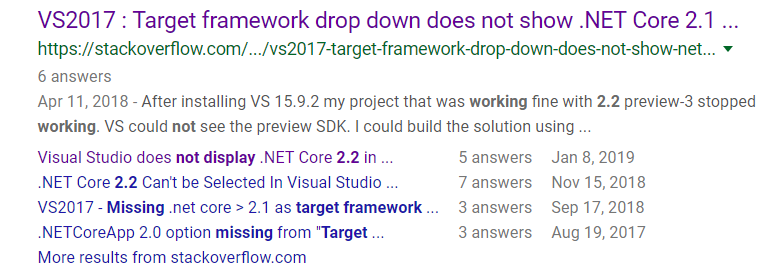
This was the stackoverflow post that finally helped: https://stackoverflow.com/a/55535131/4175241
 timmyreilly
on 11 Apr 2019
timmyreilly
on 11 Apr 2019
I have Visual Studio 2019 version 16.0.1 and .NET SDK 2.2.203, but still the .NET Core 2.2 is not displayed in Target Framework.
I posted a question here:
https://stackoverflow.com/questions/55643900/visual-studio-2019-does-not-display-net-core-2-2-in-target-framework-dropdown
 rosdi
on 12 Apr 2019
rosdi
on 12 Apr 2019
Why VS? I got this issue on my local too, and I am using windows and I do have VS 2017. But what will happen if I use Linux, like Ubuntu? I think the build engine for .NET Core should be self-contained, no need to check what I have installed. Sorry if I misunderstand this, and please correct me if I am wrong. Thanks.
 ferdeli
on 12 Apr 2019
ferdeli
on 12 Apr 2019
Meh.. this is embarassing. I had global.json file in my project root folder that specifies .NET Core 2.1 ... that's why Visual Studio refused to show 2.2 Target Framework.
Deleting this file solves my problem immediately.
rosdi
on 12 Apr 2019
This was the fix for why I was suddenly unable to load / reload my project. VS 2017 kept throwing error : Project file is incomplete. Expected imports are missing.
I guess that's what I get for running a chocolately update all -y without checking for breaking changes!
 Eevoo
on 12 Apr 2019
Eevoo
on 12 Apr 2019
@ferdeli You can read more here: https://github.com/dotnet/announcements/issues/108
This is a problem with tools that carry their own copy of MSBuild or other tools. Tools like VS that have MSBuild 15 can't use SDKs with MSBuild 16 because we don't support forward compatibility. MSBuild is the proxy we use for compatibility of the entire toolset.
 KathleenDollard
on 18 Apr 2019
KathleenDollard
on 18 Apr 2019
If there was some way of clarifying to developers what environment variables need to be set, how we should configure our path, where our SDK should reside, how we should generate .csproj files, which tool we should be using with each version, and how we should manage upgrading/working between dotnet core versions would be sweet. The number of 'variables' to a local build environment configuration are powerful, but are hard to grok.
Update as of approximately 2 weeks later... After lots of patience and practice I've been able to grok the build configuration for dotnet core especially for VS Code. The Omnisharp server is important to understand as is .csproj, where your global.json resides and how you organize your projects. Anyways, just thought I'd add this as a positive. Once you get a hang of it its not too bad.
timmyreilly
on 18 Apr 2019
@peterhuene @leecow So can you please clarify this MSFT? Are you basically saying going forward that if you want to do ASP.NET Core 2.2+ development and your dev environment has projects in VS 2017 and VS 2019, that you have to choose either VS 2017 or VS 2019? Is it possible to install both SDK versions so that both VS 2017 and VS 2019 can work on the projects correctly?
 bryanfarrell
on 3 Jun 2019
bryanfarrell
on 3 Jun 2019
You can use both VS 2017 and VS 2019. Just install both versions.
VS 2017 will ignore 2.2.2xx use 2.2.1xx and VS 2019 will use 2.2.2xx.
KathleenDollard
on 7 Jun 2019
I always recommend not updating to the latest VS for a year and let everyone else work out the kinks.
I guess that now includes .netcore versions.
 wulveagfin
on 14 Jun 2019
wulveagfin
on 14 Jun 2019
@KathleenDollard @leecow is this issue still actionable or can we close it as resolved?
 carlossanlop
on 12 Aug 2019
carlossanlop
on 12 Aug 2019
I think we can close this.
KathleenDollard
on 13 Aug 2019
Please refer the link:
https://dotnet.microsoft.com/download/visual-studio-sdks?utm_source=getdotnetsdk&utm_medium=referral
 JayadevSoftura
on 30 Oct 2019
JayadevSoftura
on 30 Oct 2019
Related issues
 shanselman
·
3Comments
shanselman
·
3Comments
 sravan1022
·
4Comments
sravan1022
·
4Comments
 steevcoco
·
4Comments
steevcoco
·
4Comments
 mmacneil
·
3Comments
mmacneil
·
3Comments
 leo2d
·
3Comments
leo2d
·
3Comments
Most helpful comment
I do agree that the versioning scheme is confusing regarding to which VS versions work with which SDK version..
Maybe the download pages - https://dotnet.microsoft.com/download/dotnet-core/2.2 - could be updated to reflect which VS versions they work with?.. Some do read "included in VS 16.0" for example but that doesn't say what you need for which version to be able to target which .NET Core runtime..
cc @KathleenDollard @leecow