Core: History graph shows more entities than it is supposed to.
Home Assistant release with the issue:
0.89.1
Last working Home Assistant release (if known):
0.86.X
Operating environment (Hass.io/Docker/Windows/etc.):
Raspberry Pi 3b+
Raspbian 9.8 (stretch)
homeassistant in virtual environment with user homeassistant
Component/platform:
Nor sure. Either the database is corrupted or the history graph functionality is broken.
I'm using lovelace UI.
Description of problem:
When clicking on an entity, the history graph is mixed up with lots of entities which aren't supposed to be shown. See the example of a climate entity.
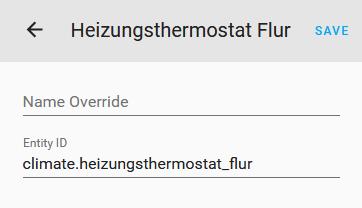
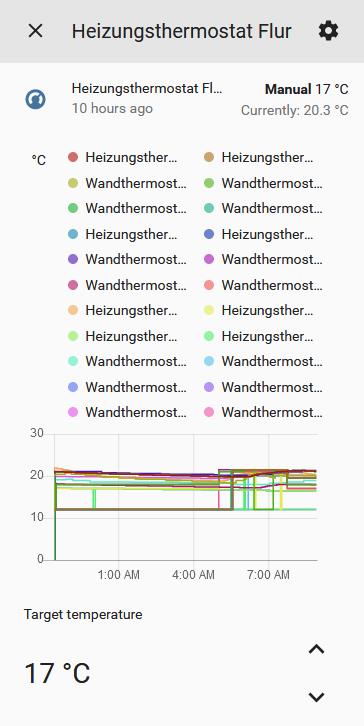
Even properly defined history graph cards in the lovelace ui file show various graphs.
This was working already in an older version of homeassistant (0.86.X) and is broken since I've updated to the latest one (0.89.1).
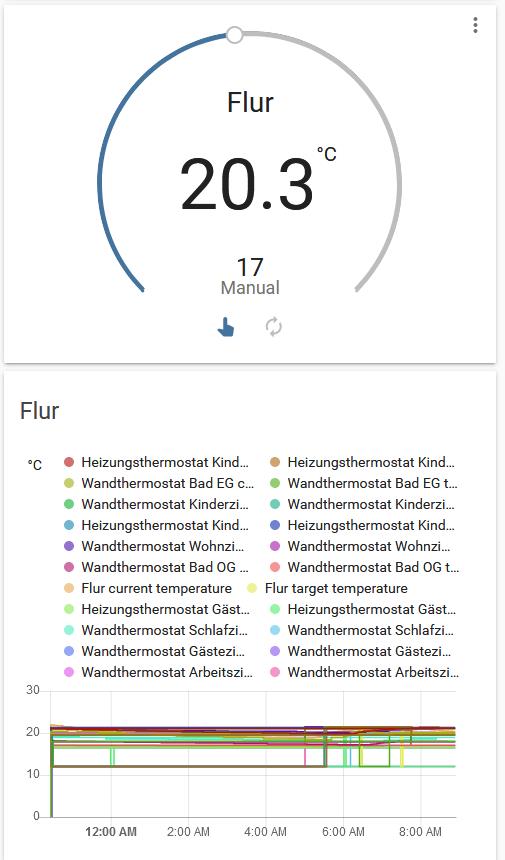
Problem-relevant configuration.yaml entries and (fill out even if it seems unimportant):
This is in ui-lovelace.yaml:
      - type: vertical-stack
        cards:
          - type: entities
            title: Flur
            show_header_toggle: false
            entities:
              - sensor.heating_mode_hall
              - input_select.heating_mode_hall
              - input_number.boost_countdown_hall
              - sensor.window_hall

          - type: thermostat
            name: Flur
            entity: climate.heizungsthermostat_flur

          - type: history-graph
            refresh_interval: 5
            title: Flur
            entities:
              - entity: climate.heizungsthermostat_flur
                name: Flur
Traceback (if applicable):
n/a
Additional information:
n/a
 DieterChmod
All 25 comments
Same here. Exactly the same problem
 km4lin
on 13 Mar 2019
km4lin
on 13 Mar 2019
Same here. Ha ver 0.87. What is going on in background? Some weird update massed around?
 novitibo
on 13 Mar 2019
novitibo
on 13 Mar 2019
Same problem here since upgrading to 0.89.2 from 0.88.2
 andreaswulff
on 13 Mar 2019
andreaswulff
on 13 Mar 2019
what is going on?
I tried to delete log file, restart several times, delete history tab in config.yaml ... nothing helps
Someone from HA is seeing this issue?
novitibo
on 13 Mar 2019
Downgrading is not solving the problem either.
andreaswulff
on 13 Mar 2019
just noticed, impossible to upgrade from 0.87:
" Could not find a version that satisfies the requirement cffi!=1.11.3,>=1.8 (from versions: 0.7.1, 0.8, 0.8.4, 1.1.1, 1.1.2, 1.4.1, 1.5.2)
No matching distribution found for cffi!=1.11.3,>=1.8"
is this related?
novitibo
on 13 Mar 2019
All graphing and history is the same for me too (was OK on 0.89.1)- I get 32 days history when is should be showing 1 day. iPhone status entities showing up on my Nest entity graphs and mutliple entities on individual graphs. Also I am unable to downgrade. Problem exists on both Lovelace and StatesUI.
 digitore
on 14 Mar 2019
digitore
on 14 Mar 2019
Interestingly for me it is not OK with 0.89.1.
Could this be another issue? This issue is not about the time span shown but about the number of entities within one graph.
DieterChmod
on 14 Mar 2019
Ok, in my case everything was good until I made an apt-get update and apt-get upgrade.
I have been checked log in /var/log/apt/history.log and this what I have got:
Start-Date: 2019-03-13  14:43:52
Commandline: apt-get upgrade
Requested-By: pi (1000)
Upgrade: libopenjp2-7:armhf (2.1.2-1.1+deb9u2, 2.1.2-1.1+deb9u3), php7.0-cgi:armhf (7.0.33-0+deb9u2, 7.0.33-0+deb9u3), php7.0-cli:armhf (7.0.33-0+deb9u2, 7.0.33-0+deb9u3), php7.0-fpm:armhf (7.0.33-0+deb9u2, 7.0.33-0+deb9u3), php7.0-opcache:armhf (7.0.33-0+deb9u2, 7.0.33-0+deb9u3), raspi-copies-and-fills:armhf (0.6, 0.10), php7.0-common:armhf (7.0.33-0+deb9u2, 7.0.33-0+deb9u3), php7.0-sqlite3:armhf (7.0.33-0+deb9u2, 7.0.33-0+deb9u3), php7.0-json:armhf (7.0.33-0+deb9u2, 7.0.33-0+deb9u3), php7.0-readline:armhf (7.0.33-0+deb9u2, 7.0.33-0+deb9u3), php7.0-xml:armhf (7.0.33-0+deb9u2, 7.0.33-0+deb9u3), php7.0-curl:armhf (7.0.33-0+deb9u2, 7.0.33-0+deb9u3), php7.0-snmp:armhf (7.0.33-0+deb9u2, 7.0.33-0+deb9u3), php7.0-mysql:armhf (7.0.33-0+deb9u2, 7.0.33-0+deb9u3)
End-Date: 2019-03-13  14:45:44
So i reverted this changes by commands:
sudo dpkg -i /var/cache/apt/archives/libopenjp2-7_2.1.2-1.1+deb9u2_armhf.deb
sudo dpkg -i /var/cache/apt/archives/php7.0-common_7.0.33-0+deb9u2_armhf.deb
sudo dpkg -i /var/cache/apt/archives/php7.0-cgi_7.0.33-0+deb9u2_armhf.deb
sudo dpkg -i /var/cache/apt/archives/php7.0-cli_7.0.33-0+deb9u2_armhf.deb
sudo dpkg -i /var/cache/apt/archives/php7.0-fpm_7.0.33-0+deb9u2_armhf.deb
sudo dpkg -i /var/cache/apt/archives/php7.0-opcache_7.0.33-0+deb9u2_armhf.deb
sudo dpkg -i /var/cache/apt/archives/raspi-copies-and-fills_0.6_armhf.deb
sudo dpkg -i /var/cache/apt/archives/php7.0-sqlite3_7.0.33-0+deb9u2_armhf.deb
sudo dpkg -i /var/cache/apt/archives/php7.0-json_7.0.33-0+deb9u2_armhf.deb
sudo dpkg -i /var/cache/apt/archives/php7.0-readline_7.0.33-0+deb9u2_armhf.deb
sudo dpkg -i /var/cache/apt/archives/php7.0-xml_7.0.33-0+deb9u2_armhf.deb
sudo dpkg -i /var/cache/apt/archives/php7.0-curl_7.0.33-0+deb9u2_armhf.deb
sudo dpkg -i /var/cache/apt/archives/php7.0-snmp_7.0.33-0+deb9u2_armhf.deb
sudo dpkg -i /var/cache/apt/archives/php7.0-mysql_7.0.33-0+deb9u2_armhf.deb
After reboot my raspberry pi working like before.
In my case it works. I hope that this will help you too.
km4lin
on 14 Mar 2019
This is mine:
Start-Date: 2019-03-12  17:33:36
Commandline: apt upgrade
Requested-By: pi (1000)
Upgrade: raspi-copies-and-fills:armhf (0.6, 0.10), openssh-sftp-server:armhf (1:7.4p1-10+deb9u5, 1:7.4p1-10+deb9u6), ssh:armhf (1:7.4p1-10+deb9u5, 1:7.4p1-10+deb9u6), wpasupplicant:armhf (2:2.4-1+deb9u2, 2:2.6-21~bpo9~rpt1), openssh-server:armhf (1:7.4p1-10+deb9u5, 1:7.4p1-10+deb9u6), openssh-client:armhf (1:7.4p1-10+deb9u5, 1:7.4p1-10+deb9u6), pivccu3:armhf (3.41.11-17, 3.43.15-18), wireless-regdb:armhf (2016.06.10-1, 2018.05.09-0~rpt1)
End-Date: 2019-03-12  17:35:49
The only thing they have in common is: raspi-copies-and-fills:armhf (0.6, 0.10)
See: https://www.raspberrypi.org/forums/viewtopic.php?t=235795&p=1441868
https://bootlin.com/blog/raspberry-pi-update-breaks-raspbian-stretch/
I don't know how to roll back, since I cannot find /var/cache/apt/archives/raspi-copies-and-fills_0.6_armhf.deb.
DieterChmod
on 14 Mar 2019
Maybe try:
sudo apt-get install raspi-copies-and-fills=0.6
km4lin
on 14 Mar 2019
This doesn't work, but this:
sudo apt-get remove raspi-copies-and-fills
After simply removing this package everything is fine again. :)
PS: Don't forget to log out and in again into homeassistant.
Please can anyone else confirm? Then we can close this issue.
DieterChmod
on 14 Mar 2019
sudo apt-get remove raspi-copies-and-fills
doesn’t solve the problem for me.
I have both restarted the pi, logged out and in and cleared cache.
andreaswulff
on 14 Mar 2019
Interesting. Maybe then there is something else fishy.
DieterChmod
on 14 Mar 2019
Now I got it working. I installed it again and removed it once more and rebooted. Now it works again. I’m on 0.88.2 since I downgraded yesterday
andreaswulff
on 14 Mar 2019
So, does that mean 'it' is the raspi-copies-and-fills package?
DieterChmod
on 14 Mar 2019
Looks like it. Do anyone know what it does?
andreaswulff
on 14 Mar 2019
https://github.com/simonjhall/copies-and-fills
Replacement memcpy and memset functionality for the Raspberry Pi with the intention of gaining greater performance.
DieterChmod
on 14 Mar 2019
same here: uninstall-install-uninstall of raspi-copies-and-fills package worked.
strange...
novitibo
on 14 Mar 2019
apt-get remove raspi-copies-and-fills and rebooted - history graphs are fine again!
 priiduonu
on 14 Mar 2019
priiduonu
on 14 Mar 2019
Yes - this worked for me too - Thanks for your help
digitore
on 14 Mar 2019
so, what causes this strange behavior:
-regular apt update&upgrade (raspi-copies-and-fills)
-ha incompatibility with raspi-copies-and-fills
what future users should be aware of?
novitibo
on 14 Mar 2019
@novitibo I guess, that this is not an incompatibility, it is just a bug in the raspbian update. Homeassistant has nothing to do with it.
I did not try, but I also guess, that they have fixed the problem already with a new raspbian update.
DieterChmod
on 14 Mar 2019
I had the same issue with raspi-copies-and-fills installed by apt-get upgrade (v0.10), but after upgrading again (now to v0.11) and rebooting the server, all is back to normal in Home Assistant also.
 pplucky
on 14 Mar 2019
pplucky
on 14 Mar 2019
Thanks a lot. Closing...
DieterChmod
on 15 Mar 2019
Related issues
 bdraco
·
3Comments
bdraco
·
3Comments
 YellowMonster76
·
3Comments
YellowMonster76
·
3Comments
 i-am-shodan
·
3Comments
i-am-shodan
·
3Comments
 arangates
·
3Comments
arangates
·
3Comments
 sh0rez
·
3Comments
sh0rez
·
3Comments