Core: Adding IP Alias to tracking LAN interface breaks tracking
Describe the bug
TL;WR: Adding an IPv6 Alias to a LAN interface which is configured to track an IPv6 WAN interface causes the LAN interface to stop tracking after a reboot. It subsequently only uses the IP Alias and hosts in the LAN lose Internet connectivity.
To Reproduce
Steps to reproduce the behavior:
- Set the WAN interface IPv6 configuration type to DHCPv6.
- Configure the LAN interface to track the WAN interface and enable _Manual configuration_. (The ULA prefix which we add in the next step won't be advertised unless we "allow the manual adjustment of DHCPv6 and Router Advertisements", although we don't actually adjust anything manually. This might be considered another bug, but let's not get into this here.)
- Add a Virtual IP to the LAN interface: Type _IP Alias_, address fd01:2:3:4::1/64 (ULA)
- On the Dashboard, restart the
radvdservice. This seems to be required to make it pick up the additional interface address and advertise the additional prefix. - Check that hosts in the LAN have both GUAs and ULAs and working Internet connectivity. In my tests this worked fine at this point.
- Reload DHCP on WAN interface or reboot the router.
Expected behavior
LAN interface has an auto-generated GUA as well as the manually added ULA and advertises both prefixes. LAN hosts have GUAs and ULAs and working Internet connectivity.
Actual behavior
After a WAN DHCP Reload or a router reboot, the LAN interface doesn't track the WAN interface, uses the IP Alias as its only address and only advertises the ULA prefix. Hosts in the LAN only have ULAs and lose Internet connectivity.
Additional context
This has been mentioned on the forum here and here but I couldn't find a matching bug report.
This is important because using an IP Alias seems to be the only way to add ULAs to a tracking LAN interface. Using both GUAs and ULAs is recommended when the prefix delegated by the ISP isn't static. (For example, OpenWrt adds ULAs to all LANs by default.)
Environment
OPNsense 19.1.3-amd64
_Update_
I initially mixed up advertising prefixes and routes. I updated the steps to reproduce the behavior accordingly. This doesn't change anything about the bug itself.
 maurice-w
All 92 comments
@maurice-w would you mind testing this on 19.1.7's development version (19.7.a_701)?
 fichtner
on 2 May 2019
fichtner
on 2 May 2019
@fichtner, thanks for looking into this. I've tested with the development version and the issue has shifted: Tracking seems to keep working after a DHCP reload or reboot. But the IP Alias doesn't seem to be applied correctly. I don't get a response when pinging the IP Alias, the web interface isn't reachable via the IP Alias etc. Also, I got this error message (which I've never seen in 19.1.x); not sure whether it is related:
PHP Warning: escapeshellarg() expects exactly 1 parameter, 2 given in /usr/local/etc/inc/interfaces.inc on line 1667
After rolling back to 19.1.7 the IP Alias works again (but of course the original issue is back).
maurice-w
on 4 May 2019
@maurice-w uhh, my bad, can you try devel again with 8427198 on top?
# opnsense-patch 8427198
Cheers,
Franco
fichtner
on 4 May 2019
@fichtner, with devel + patch it's back to the original issue: No GUA on the tracking LAN interface after a DHCP reload on the WAN. Also, new error messages (right after DHCP reload):
[04-May-2019 15:43:28 Europe/Berlin] PHP Warning:  vsprintf(): Too few arguments in /usr/local/etc/inc/util.inc on line 984
[04-May-2019 15:43:39 Europe/Berlin] PHP Fatal error:  Uncaught Error: Call to undefined function lookup_gateway_interface_by_name() in /usr/local/etc/rc.dyndns:46
Stack trace:
#0 {main}
  thrown in /usr/local/etc/rc.dyndns on line 46
[04-May-2019 15:43:45 Europe/Berlin] PHP Warning:  vsprintf(): Too few arguments in /usr/local/etc/inc/util.inc on line 984
(BTW, in 19.1.7 the "no GUA on LAN" issue is 100% reproducible on WAN DHCP reloads, but not on reboots. After a reboot it often works, but sometimes doesn't. Seems like some kind of race condition.)
Cheers
Maurice
maurice-w
on 4 May 2019
the error is from not using os-dyndns-devel, but can be neglected for the purpose of this ticket. let me see if I can reproduce this locally...
EDIT: OK I don't have tracking at home. Need to try Monday at the office.
fichtner
on 4 May 2019
Note: I wan't at work this week due to sick leave.
fichtner
on 11 May 2019
No worries and get well soon!
(Prefix tracking + ULAs essentially works as long as the delegated prefix doesn't change and you don't reboot or make configuration changes which cause a DHCP reload. For me it's currently mostly an extra step of sometimes having to remove and re-add the ULA IP Alias after reboots. It probably becomes a much bigger issue if the delegated prefix actually changes regularly.)
maurice-w
on 12 May 2019
I have to move this to the next version due to time constraints. My day job away from OPNsense is quite challenging at the moment. Sorry. :(
fichtner
on 11 Jul 2019
Is there something I can do to help find the root cause of this issue? Where to start?
I'm aware priorities differ. For me, this currently is the single most annoying bug. The issue shifted from "sometimes breaks after reboots" to "always breaks after reboots" (I think since the 19.7 upgrade). Which unfortunately means having to manually reconfigure a production OPNsense instance after every single reboot.
maurice-w
on 24 Nov 2019
Morning all.. had a look at this and I have it behaving now. I was able to replicate the issue that @maurice-w gave in his bug report, namely that on reboot the VIP came up on the interface before the dhcp6 address, of course this will also happen when the prefix changes. What I've done to cure it, at least it works on my test system, is in the call to interface_track6_configure() I remove the VIP from the interface, carry on with the dhcp6c routine and then before it returns is re-apply the VIP to the interface, this appears to work OK and the dhcp6 server is now showing the proper address and the VIP is shown on the interface. I cannot fully test this as I need someone who has a silly ISP that doesn't do static to check this. I guess we overlooked this issue when we refactored the dhcp6c stuff last year.
@fichtner - thoughts, is this a valid solution?
 marjohn56
on 28 Jan 2020
marjohn56
on 28 Jan 2020
@maurice-w do you want to try this to see if it fixes your issues and has no side effects?
marjohn56
on 28 Jan 2020
@marjohn56, thanks a lot for picking this up! Looks like a sensible workaround to me.
I performed opnsense-patch cb7af9b on OPNsense 19.7.10 and then did a reboot as well as a DHCP reload on the WAN. Looking good! Don't consider this in-depth testing, but another data point that your patch seems to work as intended. I will keep you updated if any side effects should come up.
Again, thanks a lot! This was a big PITA for a long time.
maurice-w
on 28 Jan 2020
Thanks @maurice-w.
Let's run it for a while and see how it behaves.
marjohn56
on 28 Jan 2020
As expected, the issue was back after upgrading to 20.1. I re-applied the patch and now it's working again. Still no side effects.
maurice-w
on 1 Feb 2020
Yes, as expected. Glad that it's still behaving with zero side effects. @fichtner is aware of this, it's just that his 'to do' list is never ending.
marjohn56
on 1 Feb 2020
Side effects will happen eventually. I'm still not convinced this is the minimum impact solution, especially since aliases are marked as such but seemingly ignored for what they are elsewhere.
fichtner
on 3 Feb 2020
Can I throw something into the mud pit here.. The issue appears to be that when dhcp6c removes its address or there is not a dhcp6c assigned address on the interface ( when dhcp6c is in use on that interface ) i.e. during a boot up or address change, then when dhcp6 server is configured it is picking up the alias address from the interface directly and configuring the server with that address as the alias address is now top of the list on the interface. That leaves two options, either we remove the alias from the interfaces during a dhcp6c configure or force a re-configure of the dhcpc6 server after the GUA has been assigned by dhcp6c and making sure it ignores any alias IPv6 address already active on the interfaces. Unless you know of a way of re-arranging the order of the addresses on the interfaces when dhcp6c assigns its address.
marjohn56
on 3 Feb 2020
Aha! Can you diff /var/dhcpd/etc/dhcpdv6.conf for me when it works and when it breaks?
fichtner
on 3 Feb 2020
OK, pretty easy..
Working:
option dhcp6.domain-search "queens-park.com";

default-lease-time 7200;
max-lease-time 86400;
log-facility local7;
one-lease-per-client true;
deny duplicates;
ping-check true;
update-conflict-detection false;
authoritative;

subnet6 2a02:8010:6228:ed00::/64 {
  range6 2a02:8010:6228:ed00:0:0:0:1000 2a02:8010:6228:ed00:0:0:0:2000;
  option dhcp6.name-servers 2a02:8010:6228:ed00:20e:c4ff:fed2:8142;

}

ddns-update-style none;
Not working:
option dhcp6.domain-search "queens-park.com";

default-lease-time 7200;
max-lease-time 86400;
log-facility local7;
one-lease-per-client true;
deny duplicates;
ping-check true;
update-conflict-detection false;
authoritative;

subnet6 fd01:2:3:4::/64 {
  range6 fd01:2:3:4:0:0:0:1000 fd01:2:3:4:0:0:0:2000;
  option dhcp6.name-servers fd01:2:3:4::1;

}

ddns-update-style none;
okay, that explains it... we are to blame then :D
fichtner
on 3 Feb 2020
I didn't think it was President Trump, I blame him for most things, but in this case....
marjohn56
on 3 Feb 2020
How about b8beea435d ?
fichtner
on 3 Feb 2020
Also a93815f1e968 57de0596f ;)
fichtner
on 3 Feb 2020
OK, so to clean my test I've done a code core and deleted any orig files. I'm getting an error now when trying to apply b8beea4. Do I need to apply that one or just leave that one, clean it and apply the other two?
marjohn56
on 3 Feb 2020
All on master, just take the clean git state
fichtner
on 3 Feb 2020
Seem to have gone back a step.
`option dhcp6.domain-search "queens-park.com";
default-lease-time 7200;
max-lease-time 86400;
log-facility local7;
one-lease-per-client true;
deny duplicates;
ping-check true;
update-conflict-detection false;
authoritative;
subnet6 fd01:2:3:4::/64 {
range6 fd01:2:3:4:0:0:0:1000 fd01:2:3:4:0:0:0:2000;
option dhcp6.name-servers fd01:2:3:4::1;
}
ddns-update-style none;`
marjohn56
on 3 Feb 2020
Hey guys, thanks for working on this. I just wanted to clarify that the original issue is about radvd, not about dhcpd6. I never had the DHCPv6 server enabled on a LAN interface which has a ULA IP alias. So I never tested whether dhcpd6 was affected, too (I probably should have). But I'm not surprised it is.
So if you plan not to use Martin's original workaround and instead implement a fix in dhcpd6: Please don't forget about radvd.
maurice-w
on 3 Feb 2020
Yup.. I did not check the radvd config when I did my patch, as I immediately saw the dhcpd6 issue and went off down that path, perhaps that also gets affected.
marjohn56
on 3 Feb 2020
OK, checked and yes radvd.conf is also affected. Without my patch then only the VIP is added. I suspect the reason is that the v6 GUA address does not exist on the interface when the call to write radvd.conf is made.
marjohn56
on 3 Feb 2020
Let's stay on point... so master doesn't work for dhcpd6?
fichtner
on 3 Feb 2020
Nope, I posted after you said just do a code-core. Just done another, definitely does not work for me.
marjohn56
on 3 Feb 2020
@fichtner, are you sure it is a good idea to patch this in individual services (radvd, dhcpd6, ...)? Wouldn't it be better to make sure that the dynamic address is always the first one on a tracking interface (like Martin's patch does)? What about other services binding to such an interface? What about the interface address which is being displayed on the dashboard? I see quite a few things that still could go wrong. Just some thoughts to consider, not saying I have all the answers.
(If you are going down the dhcpd6 rabbit hole: Users actually might want to use an IP Alias for DHCPv6. I do, but am using an external DHCPv6 server for this.)
maurice-w
on 3 Feb 2020
@marjohn56 5ebae48 should work for you now
@maurice-w we already have a function we can use in all of dhcpd.inc -- if the function is useful for other parts we will migrate it to interfaces.inc for everyone to use, but only if necessary. Maybe we need to restrict the case to dynamic IPv6 at some point we will have to define the limits of the implementation because while VIPs are nice if you have static setups it should use static configurations :)
fichtner
on 6 Feb 2020
Hi @fichtner
Sorry, that's a negative, still giving me the alias address in dhcpd6.
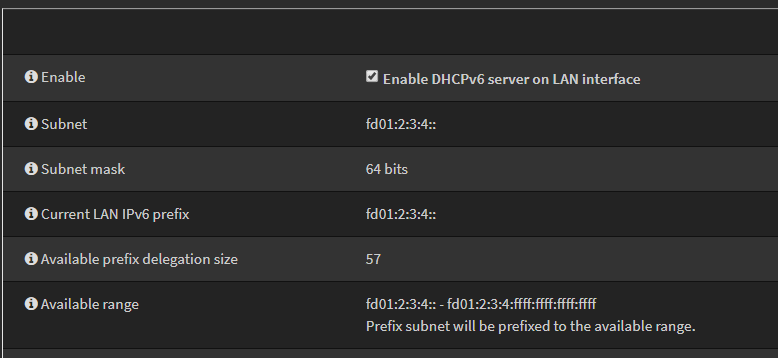
marjohn56
on 6 Feb 2020
can you check the config, the page may be broken in the same way, but only visually...
fichtner
on 6 Feb 2020
Will do, give me couple of minutes, I applied my patch afterwards to check so I need to remove it and reboot.
marjohn56
on 6 Feb 2020
OK, confirm, dhcpdv6.conf looks good, as you say, the GUI is wrong.
marjohn56
on 6 Feb 2020
However, radvd.conf is still wrong.
marjohn56
on 6 Feb 2020
@maurice-w a0464ab is for you fixing radvd under the condition @marjohn56 test is ok
fichtner
on 6 Feb 2020
I beat you to it. :)
marjohn56
on 6 Feb 2020
ok, so how's your radvd.conf now? :D
fichtner
on 6 Feb 2020
Still rebooting.. just a mo.
marjohn56
on 6 Feb 2020
Nay lad... still only have the Alias in radvd.conf.
marjohn56
on 6 Feb 2020
I suppose you use manual tracker for dynamic IPv6 WAN, I only fixed the automatic case in radvd
fichtner
on 6 Feb 2020
Yup.. It's the manual tracker that breaks the balls ;)
marjohn56
on 6 Feb 2020
@marjohn56 GUI fix d6b7845
fichtner
on 6 Feb 2020
Yes... GUI looks good now.
marjohn56
on 6 Feb 2020
stupid github automation.... @marjohn56 try 4b68737 for manual radvd fix
fichtner
on 6 Feb 2020
C'est bon!
NOW you can close it. :)
marjohn56
on 6 Feb 2020
let's play with this for a couple of days and wait for feedback from @maurice-w as well :)
Thanks for the help so far 👍
fichtner
on 6 Feb 2020
@maurice-w - Hope you are running dev, lots of patches otherwise. :D
marjohn56
on 6 Feb 2020
could also wait for 20.1.1 dev version to come around, should be next week
fichtner
on 6 Feb 2020
Wow, lots of activity! I think I've lost track of the patches... Currently running 20.1 (production) with Martin's patch cb7af9b. Could you summarize what I should test, please?
maurice-w
on 6 Feb 2020
this should work:
# opnsense-code core tools
# cd /usr/core
# make upgrade CORE_NAME=opnsense
To get back to 20.1 just reinstall the "opnsense" package from the firmware GUI (packages tab).
fichtner
on 6 Feb 2020
OK, I tried that, but something went horribly wrong. After executing make upgrade CORE_NAME=opnsense, OPNsense seems to be completely gone. What now?
root@router:/usr/core # make upgrade CORE_NAME=opnsense
pkg: No package(s) matching suricata-devel
Updating OPNsense repository catalogue...
OPNsense repository is up to date.
All repositories are up to date.
The following 1 package(s) will be affected (of 0 checked):

New packages to be INSTALLED:
        suricata-devel: 5.0.1

Number of packages to be installed: 1

The process will require 7 MiB more space.
2 MiB to be downloaded.
[1/1] Fetching suricata-devel-5.0.1.txz: 100%    2 MiB   2.1MB/s    00:01
Checking integrity... done (1 conflicting)
  - suricata-devel-5.0.1 conflicts with suricata-4.1.6 on /usr/local/bin/suricata
Checking integrity... done (0 conflicting)
Conflicts with the existing packages have been found.
One more solver iteration is needed to resolve them.
The following 3 package(s) will be affected (of 0 checked):

Installed packages to be REMOVED:
        opnsense-20.1
        suricata-4.1.6

New packages to be INSTALLED:
        suricata-devel: 5.0.1

Number of packages to be removed: 2
Number of packages to be installed: 1

The operation will free 20 MiB.
[1/3] Deinstalling opnsense-20.1...
Stopping configd...done
Resetting root shell
Updating /etc/shells
Unhooking from /etc/rc
Unhooking from /etc/rc.shutdown
[1/3] Deleting files for opnsense-20.1: 100%
[2/3] Deinstalling suricata-4.1.6...
You may need to manually remove /usr/local/etc/suricata/classification.config if it is no longer needed.
You may need to manually remove /usr/local/etc/suricata/suricata.yaml if it is no longer needed.
[2/3] Deleting files for suricata-4.1.6: 100%
==> If you are permanently removing this port, run rm -rf /usr/local/etc/suricata to remove configuration files.
[3/3] Installing suricata-devel-5.0.1...
[3/3] Extracting suricata-devel-5.0.1: 100%
=====
Message from suricata-devel-5.0.1:

--
If you want to run Suricata in IDS mode, add to /etc/rc.conf:

        suricata_enable="YES"
        suricata_interface="<if>"

NOTE: Declaring suricata_interface is MANDATORY for Suricata in IDS Mode.

However, if you want to run Suricata in Inline IPS Mode in divert(4) mode,
add to /etc/rc.conf:

        suricata_enable="YES"
        suricata_divertport="8000"

NOTE:
        Suricata won't start in IDS mode without an interface configured.
        Therefore if you omit suricata_interface from rc.conf, FreeBSD's
        rc.d/suricata will automatically try to start Suricata in IPS Mode
        (on divert port 8000, by default).

Alternatively, if you want to run Suricata in Inline IPS Mode in high-speed
netmap(4) mode, add to /etc/rc.conf:

        suricata_enable="YES"
        suricata_netmap="YES"

NOTE:
        Suricata requires additional interface settings in the configuration
        file to run in netmap(4) mode.

RULES: Suricata IDS/IPS Engine comes without rules by default. You should
add rules by yourself and set an updating strategy. To do so, please visit:

 http://www.openinfosecfoundation.org/documentation/rules.html
 http://www.openinfosecfoundation.org/documentation/emerging-threats.html

You may want to try BPF in zerocopy mode to test performance improvements:

        sysctl -w net.bpf.zerocopy_enable=1

Don't forget to add net.bpf.zerocopy_enable=1 to /etc/sysctl.conf
pkg: No package(s) matching syslog-ng325
Updating FreeBSD repository catalogue...
Fetching meta.txz: 100%    944 B   0.9kB/s    00:01
Fetching packagesite.txz: 100%    2 MiB  35.0kB/s    01:00
pkg: http://pkg.FreeBSD.org/FreeBSD:11:amd64/quarterly/packagesite.txz: Operation timed out
Unable to update repository FreeBSD
Error updating repositories!
*** Error code 3

Stop.
make: stopped in /usr/core
# make install && make upgrade CORE_NAME=opnsense
okay, sorry that other thing doesn't work. try this:
# make bootstrap && pkg install opnsense-devel
Thanks! make bootstrap && pkg install opnsense-devel brought me back into business. I'm now on OPNsense 20.1.r_12-amd64. Does this include the patches?
maurice-w
on 7 Feb 2020
I don't know, I'm obviously on a different path, mine is 20.7_a20
marjohn56
on 7 Feb 2020
20.1.r_12 is the dev version of 20.1 installed from the binary packages, now a final "make upgrade" from core git to go to 20.7.a_23
fichtner
on 7 Feb 2020
root@router:/usr/core # make upgrade CORE_NAME=opnsense
pkg: No package(s) matching opnsense
>>> Cannot find package.  Please run 'opnsense-update -t opnsense'
*** Error code 1

Stop.
make: stopped in /usr/core
# opnsense-update -t opnsense brings me back to 20.1 production.
maurice-w
on 7 Feb 2020
just make upgrade, CORE_NAME is already correct...
fichtner
on 7 Feb 2020
OK, that did the trick. First impressions after a reboot:
- radvd.conf looks good.
- DHCPv6 server looks consistent (uses tracked GUA in both dhcpdv6.conf and GUI).
- Interfaces widget on the dashboard only shows the IP Alias.
status_interfaces.phpshows the IP Alias as "primary" address, tracked GUA as "secondary" address (plus sign in a box).
maurice-w
on 7 Feb 2020
@maurice-w try this. Not saying it will be the final fix, but it appears to solve the same issue on mine.
e2a84d5
marjohn56
on 7 Feb 2020
@marjohn56 Looking good! 👍
maurice-w
on 7 Feb 2020
@maurice-w @marjohn56 please try latest master for status page and interface list widget, hopefully I didn't break dhcp stuff while refactoring :>
fichtner
on 10 Feb 2020
So just to make sure, I do:
# opnsense-code core tools
# cd /usr/core
# make upgrade
Right?
maurice-w
on 10 Feb 2020
Yes, though it's equal to this:
# cd /usr/core && git pull && make upgrade
Are you still on opnsense-devel? Check using:
# opnsense-version -n
(it would print "opnsense-devel")
fichtner
on 10 Feb 2020
Yes, still on opnsense-devel. I performed the upgrade and am now on OPNsense 20.7.a_34.
Status page and interface list widget issues are unfortunately not fixed. (Btw., same issue on the console.)
DHCPv6 server and radvd still seem okay.
maurice-w
on 10 Feb 2020
_34 is correct. I'll try this live tomorrow at the office, maybe a typo somewhere. Thanks again for testing!
fichtner
on 10 Feb 2020
Confirm, still the same.
Maybe not the prettiest solution, but perhaps an intermediate function for the interfaces(s) gui displays that sorts the data before returning it. That would leave everything else intact. The other option is to fix the source of the problem.... ifconfig. :)
just joking... but then....
marjohn56
on 10 Feb 2020
and how's _35 ?
fichtner
on 10 Feb 2020
Don't know, I cannot remember...for me it was a long time ago.
marjohn56
on 10 Feb 2020
haha :P in general the idea should work now... we already have a concept of a primary address in the interface stats subframework, but we can't directly manipulate ifconfig (interfaces.lib.inc) because there we shouldn't know about the config.xml... so we need to merge somewhere, interfaces.inc seems like the appropriate spot
fichtner
on 10 Feb 2020
That appears to have sorted it...:)
marjohn56
on 10 Feb 2020
good, now the only thing left on my list is fix that just-discovered bug in the interface stats regarding separate IPv6 interfaces such as stf/6RD. Anything else you guys see in the scope of this ticket?
fichtner
on 10 Feb 2020
I think this one is put to bed, dhcpd6.conf and radvd.conf look good too.
marjohn56
on 10 Feb 2020
Is this stf/6rd that one mentioned in the German forum - IPv6 radvd config (Telekom VDSL) ?
marjohn56
on 10 Feb 2020
_35 fixed it in the dashboard widget, but it's now a little weird on status_interfaces.php: The order is correct (IP Alias is second), but the primary (tracked) address is displayed like this: 2001:db8:1:2:234:56ff:fe78:9abc / 2001:db8:1:2::/64
Still IP Alias only on the console (banner after login),
Regarding other issues:
- What are your thoughts about letting the user choose which prefix to use for the DHCPv6 server?
- When "allow manual adjustment of DHCPv6 and Router Advertisements" is disabled, radvd.conf is still missing the IP Alias prefix.
Probably out of scope for this ticket, but I noticed some other radvd.conf oddities in the "automatic" mode:
AdvManagedFlagis _not_ set although arange6is specified in dhcpdv6.conf.MinRtrAdvIntervalandMaxRtrAdvIntervalare set to very low values (3 and 10).DeprecatePrefixis not set.
Should we clean this up?
maurice-w
on 10 Feb 2020
The diag tools (ping, port probe, trace route) use the IP Alias as the source address...
maurice-w
on 11 Feb 2020
Should we automatically restart radvd when a VIP is added / modified / deleted?
maurice-w
on 11 Feb 2020
Hmm, sorry I only did a quick look at the interfaces widget and very cursory look at the overview. It appears it's showing the primary address and a sort of prefix, that would be cool if the prefix was correct, but it isn't. It's just showing the first 64 bits of the address.
Just noticed something else too, dhcpv6 is showing the available prefix size as /57, it should be /56. To top that, I cannot see the 'dhcp6c added a prefix *' log entry either. I'll go take a look at that and find out why that has vanished. I cannot check it on my primary router as that's full static.
marjohn56
on 11 Feb 2020
Now we are wading into esoteric territory... I'd like to wrap up this ticket, split off some tasks if so be it. But we can't classify everything as a bug especially if we want to avoid work for things that nobody needed in almost two decades worth of time. We easily have the same amount of time to make IPv6 just right. ;)
I also indicated that with https://github.com/opnsense/core/commit/b8beea435d it is just the beginning and it is applicable virtually everywhere.
fichtner
on 11 Feb 2020
OK, well if you can clean up that 'stutter' of half an address being shown in the interfaces info page and the radvd config thing then that resolves this ticket.

I'm still going off to have a look at why the prefixes log entry is missing from dhcp6c, I used to use that a lot for debugging. :)
marjohn56
on 11 Feb 2020
have you tried https://github.com/opnsense/core/commit/d21780177b yet
fichtner
on 11 Feb 2020
just arrived at the office, OPNsense 20.7.a_36-amd64 looks good even on status page
fichtner
on 11 Feb 2020
Nuts, posted last comment on the commit. Yes, its looking fine, I was looking at my live system which is on 35... :(
marjohn56
on 11 Feb 2020
It seems that the issue with dhcp6c is that the d_printf entry for the prefix is using INFO where the one for the IA is using DEBUG, guess we need to change the one for prefix to debug. I'll issue a PR for that.
marjohn56
on 11 Feb 2020
@maurice-w is correct, tools is using the Alias.
marjohn56
on 11 Feb 2020
for tools please create a new feature ticket. I don't think we should add dhcp reload to VIP pages, basically we start to restart everything on every minor change and this affects operation and could cause new side effects.
When "allow manual adjustment of DHCPv6 and Router Advertisements" is disabled, radvd.conf is still missing the IP Alias prefix.
Also a feature request, not a bug.
What are your thoughts about letting the user choose which prefix to use for the DHCPv6 server?
IMO this should only work with the primary address. Tying DHCPd to VIPs will only lead to more validation and complexity we do not wish to support from a core perspective.
Probably out of scope for this ticket, but I noticed some other radvd.conf oddities in the "automatic" mode [...] Should we clean this up?
Sure, please create a ticket.
I'll try to include this particular fix in 20.1.2.
fichtner
on 11 Feb 2020
- 20.7.a_36 indeed fixed the interfaces overview, thanks.
- I'll create a ticket for the tools issue. Would classify it as a bug, but this debate is as old as software.
- I'm okay with having to manually reload radvd after VIP changes. Will create a PR with some help text on
firewall_virtual_ip.phpwhich explains that. - I'm also okay with having to enable manual configuration if you want to advertise IP Alias prefixes. Will create a PR with help text for that, too.
- About dhcpdv6 not being able to use a VIP prefix, I'm not so sure. I have no immediate need for this so let's leave it at that until someone else also requests is.
- I'll create a PR for the out of scope radvd.conf oddities in auto mode.
@marjohn56, an available prefix delegation size of /57 is correct. If you get a /56 from upstream, you can delegate no more than a /57 to downstream.
maurice-w
on 11 Feb 2020
Whilst playing with the combined WAN dhcp6c stuff I noticed there is one more cleanup, console only shows the first v6 address, if there is an alias it's only showing that one. Can we make it show all alias and GUAs?
marjohn56
on 17 Feb 2020
Related issues
 BPtLNfxZWo
·
3Comments
BPtLNfxZWo
·
3Comments
 lordraiden
·
7Comments
lordraiden
·
7Comments
 darkain
·
4Comments
darkain
·
4Comments
 linuxmail
·
4Comments
linuxmail
·
4Comments
 nikaro
·
3Comments
nikaro
·
3Comments