Core: MSTest projects fail to build with .Net Core 2.2.102 on Azure Devops
Issue Title
An MS Test project (netcoreapp2.0, or netcoreapp2.1) fails to build on Azure Devops since the installation of .Net Core 2.2.102
General
The error is this:
2019-01-25T17:43:36.3668681Z ##[warning]MSTestProject\MSTestProject.csproj(0,0): Warning NU1604: Project dependency Microsoft.NETCore.App does not contain an inclusive lower bound. Include a lower bound in the dependency version to ensure consistent restore results.
2019-01-25T17:43:36.3677628Z D:\a\1\s\MSTestProject\MSTestProject.csproj : warning NU1604: Project dependency Microsoft.NETCore.App does not contain an inclusive lower bound. Include a lower bound in the dependency version to ensure consistent restore results.
2019-01-25T17:43:36.3944076Z ##[error]MSTestProject\MSTestProject.csproj(0,0): Error : NETSDK1061: The project was restored using Microsoft.NETCore.App version 1.0.0, but with current settings, version 2.0.0 would be used instead. To resolve this issue, make sure the same settings are used for restore and for subsequent operations such as build or publish. Typically this issue can occur if the RuntimeIdentifier property is set during build or publish but not during restore. For more information, see https://aka.ms/dotnet-runtime-patch-selection.
2019-01-25T17:43:36.3952399Z D:\a\1\s\MSTestProject\MSTestProject.csproj : error : NETSDK1061: The project was restored using Microsoft.NETCore.App version 1.0.0, but with current settings, version 2.0.0 would be used instead. To resolve this issue, make sure the same settings are used for restore and for subsequent operations such as build or publish. Typically this issue can occur if the RuntimeIdentifier property is set during build or publish but not during restore. For more information, see https://aka.ms/dotnet-runtime-patch-selection.
2019-01-25T17:43:36.4363349Z Done Building Project "D:\a\1\s\MSTestProject\MSTestProject.csproj" (default targets) -- FAILED.
2019-01-25T17:43:36.4704580Z Done Building Project "D:\a\1\s\MSTestProject.sln" (default targets) -- FAILED.
I have a minimal repro here, which is just an MSTest project based on netcoreapp2.1. There is a 3-step Azure Devops pipeline (using all default values) to go with this:
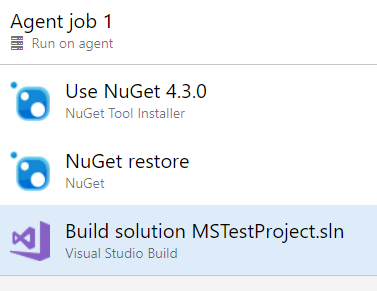
These builds work correctly on Azure Devops with version 2.1.403.
If I "Pin" the version to 2.1.403 in DevOps the build works fine.
Desktop builds work just fine, which is really weird.
 cleemullins
All 14 comments
I have the same problem
 danielpalme
on 26 Jan 2019
danielpalme
on 26 Jan 2019
Are you able to reproduce the problem outside of Azure DevOps? (i.e. locally)
If it is specific to Azure DevOps environment then it would be best to start with them. Do you know if they have public facing feedback channel?
@kendrahavens you might be interested in this one.
 karelz
on 26 Jan 2019
karelz
on 26 Jan 2019
@karelz, Our desktops all have 2.2.100 on them, not the .102 patch. Given that, yes, desktop builds work like a charm.
The repo on DevOps is 100%.
cleemullins
on 26 Jan 2019
Can you try on .102 build locally too? That would make better comparison.
We need to find what is most likely at fault - regression in 2.2.102 against .100, or Azure DevOps environment?
karelz
on 26 Jan 2019
@karelz @cleemullins In Azure DevOps, the build fails with both 2.2.100 and 2.2.102. @cleemullins the difference from you Desktop could be that you are either not using Nuget.exe to restore the packages or you are using a version higher than 4.3.0.
In Azure DevOps, restore works with Nuget.exe 4.4.1 (you can update it in the 1st task in your sample pipeline) or when using "dotnet restore" command (Azure DevOps has a .Net Core task also).
So, I think the crux of the problem is that Nuget.exe 4.3.0 stopped restoring correctly when .Net core SDK 2.2.* is installed.
 sachinma
on 28 Jan 2019
sachinma
on 28 Jan 2019
Thanks @sachinma! We had the same problem and this fixed it for us!
 VPred
on 28 Jan 2019
VPred
on 28 Jan 2019
Thanks @sachinma. I can confirm that updated to Nuget 4.4.1 in the Devops pipeline fixed the issue.
The default version when I add the step to the Pipeline is 4.3, but manually setting to 4.4.1 seems to fix everything.
cleemullins
on 28 Jan 2019
@sachinma thanks a lot for finding the root cause!
I thought that Nuget is part of .NET Core distribution and therefore there should not be problems like this one.
Does it mean that the default .NET Core installation on local machine won't work either? Or is Azure DevOps somehow downgrading nuget.exe?
@rrelyea @livarcocc can you shed some light here from SDK & used nuget.exe client side point of view?
I'd like to keep it open until we confirm where the problem primarily resides.
karelz
on 29 Jan 2019
@karelz in this case, the customer's pipeline was using a specific version of nuget.exe to do the restore. The default .Net core installation with "dotnet restore" or MSBuild /restore would work. The customer may choose explicit Nuget tasks for connecting to custom feeds with authentication. The same functionality of connecting to custom feeds is available in .Net Core task in Azure pipelines which would invoke dotnet restore.
sachinma
on 29 Jan 2019
Ah, ok. Then it was explicit customer choice (without understanding the implications and potential problems).
Given that there is nothing for .NET Core to do here, I will close it. Thanks!
karelz
on 29 Jan 2019
BTW: @sachinma @cleemullins you might want to link your GH account to MS - that will show clearly to internal (and potentially external) people you are truly working for MS: https://github.com/dotnet/core/blob/master/Documentation/microsoft-team.md
karelz
on 29 Jan 2019
@karelz, my GitHub account is linked. :) I'm part of all those teams. Not sure why it doesn't show up, or why you don't see it. I see @sachinma is also part of those teams.
cleemullins
on 29 Jan 2019
Ooops, sorry - the 1ES extension in browser failed to authenticate (without me noticing) and that's why I thought you are not properly linked to MS. Sorry for that!
You're all good.
karelz
on 29 Jan 2019
I had this same problem attempting to build a Roslyn analyzer solution which uses .NET Standard 1.3. I was using the default NuGet version chosen by Azure DevOps, which was 4.1.0.
I added the "NuGet Tool Installer" task to the start of my build pipeline with and specified the version as "4.x" and ticked the box for "Always download the latest matching version". My build is now working successfully.

 DMEvans
on 13 Feb 2019
DMEvans
on 13 Feb 2019
Related issues
 zuosc
·
3Comments
zuosc
·
3Comments
 jigarce
·
3Comments
jigarce
·
3Comments
 lesomnus
·
3Comments
lesomnus
·
3Comments
 tai-yi
·
4Comments
tai-yi
·
4Comments
 omerlh
·
4Comments
omerlh
·
4Comments
Most helpful comment
@karelz @cleemullins In Azure DevOps, the build fails with both 2.2.100 and 2.2.102. @cleemullins the difference from you Desktop could be that you are either not using Nuget.exe to restore the packages or you are using a version higher than 4.3.0.
In Azure DevOps, restore works with Nuget.exe 4.4.1 (you can update it in the 1st task in your sample pipeline) or when using "dotnet restore" command (Azure DevOps has a .Net Core task also).
So, I think the crux of the problem is that Nuget.exe 4.3.0 stopped restoring correctly when .Net core SDK 2.2.* is installed.