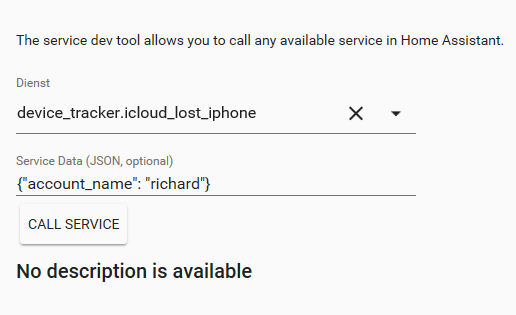
Core: device_tracker.icloud_lost_iphone service doesn't work since 0.85.1
Tracking the iPhone is working well, since Home Assistant Version 0.85.1 i am getting the following error:
2019-01-17 20:35:29 ERROR (MainThread) [homeassistant.components.websocket_api.http.connection.1944567632] Error handling message: {'type': 'call_service', 'domain': 'device_tracker', 'service': 'icloud_lost_iphone', 'service_data': {'account_name': 'richard'}, 'id': 21}
Traceback (most recent call last):
  File "/usr/local/lib/python3.6/site-packages/homeassistant/components/websocket_api/decorators.py", line 17, in _handle_async_response
    await func(hass, connection, msg)
  File "/usr/local/lib/python3.6/site-packages/homeassistant/components/websocket_api/commands.py", line 148, in handle_call_service
    connection.context(msg))
  File "/usr/local/lib/python3.6/site-packages/homeassistant/core.py", line 1121, in async_call
    self._execute_service(handler, service_call))
  File "/usr/local/lib/python3.6/site-packages/homeassistant/core.py", line 1145, in _execute_service
    await self._hass.async_add_executor_job(handler.func, service_call)
  File "/usr/local/lib/python3.6/concurrent/futures/thread.py", line 56, in run
    result = self.fn(*self.args, **self.kwargs)
  File "/usr/local/lib/python3.6/site-packages/homeassistant/components/device_tracker/icloud.py", line 104, in lost_iphone
    ICLOUDTRACKERS[account].lost_iphone(devicename)
  File "/usr/local/lib/python3.6/site-packages/homeassistant/components/device_tracker/icloud.py", line 448, in lost_iphone
    if str(device) == str(self.devices[devicename]):
KeyError: None
 darootler
All 6 comments
I'm having the same issue. It works perfectly up to v .82, then .83 broke it. I'm up to .86.4 and it's still broken.
 mldkfa
on 5 Feb 2019
mldkfa
on 5 Feb 2019
Same here, using 0.88.1. got this error call stack when trying to call device_tracker.icloud_lost_iphone service:
Traceback (most recent call last):
  File "/usr/src/app/homeassistant/core.py", line 1142, in _safe_execute
    await self._execute_service(handler, service_call)
  File "/usr/src/app/homeassistant/core.py", line 1155, in _execute_service
    await handler.func(service_call)
  File "/usr/src/app/homeassistant/components/script/__init__.py", line 115, in service_handler
    context=service.context)
  File "/usr/src/app/homeassistant/components/script/__init__.py", line 173, in async_turn_on
    kwargs.get(ATTR_VARIABLES), context)
  File "/usr/src/app/homeassistant/helpers/script.py", line 131, in async_run
    await self._handle_action(action, variables, context)
  File "/usr/src/app/homeassistant/helpers/script.py", line 210, in _handle_action
    action, variables, context)
  File "/usr/src/app/homeassistant/helpers/script.py", line 299, in _async_call_service
    context=context
  File "/usr/src/app/homeassistant/helpers/service.py", line 85, in async_call_from_config
    domain, service_name, service_data, blocking=blocking, context=context)
  File "/usr/src/app/homeassistant/core.py", line 1133, in async_call
    self._execute_service(handler, service_call))
  File "/usr/src/app/homeassistant/core.py", line 1157, in _execute_service
    await self._hass.async_add_executor_job(handler.func, service_call)
  File "/usr/local/lib/python3.7/concurrent/futures/thread.py", line 57, in run
    result = self.fn(*self.args, **self.kwargs)
  File "/usr/src/app/homeassistant/components/device_tracker/icloud.py", line 104, in lost_iphone
    ICLOUDTRACKERS[account].lost_iphone(devicename)
  File "/usr/src/app/homeassistant/components/device_tracker/icloud.py", line 448, in lost_iphone
    if str(device) == str(self.devices[devicename]):
KeyError: None
 ohadbenita
on 25 Feb 2019
ohadbenita
on 25 Feb 2019
I am working on an iCloud component upgrade, I'll take a look at it at the same time.
 Quentame
on 13 May 2019
Quentame
on 13 May 2019
There hasn't been any activity on this issue recently. Due to the high number of incoming GitHub notifications, we have to clean some of the old issues, as many of them have already been resolved with the latest updates.
Please make sure to update to the latest Home Assistant version and check if that solves the issue. Let us know if that works for you by adding a comment 👍
This issue now has been marked as stale and will be closed if no further activity occurs. Thank you for your contributions.
![stale[bot] picture](https://avatars3.githubusercontent.com/in/1724?v=4&s=40) stale[bot]
on 11 Aug 2019
stale[bot]
on 11 Aug 2019
The issue is not resolved yet.
Regards
Richard
darootler
on 19 Aug 2019
Happens to me as well.
ohadbenita
on 19 Aug 2019
Related issues
 neonandu
·
3Comments
neonandu
·
3Comments
 Konstigt
·
3Comments
Konstigt
·
3Comments
 i-am-shodan
·
3Comments
i-am-shodan
·
3Comments
 moskovskiy82
·
3Comments
moskovskiy82
·
3Comments
 sh0rez
·
3Comments
sh0rez
·
3Comments
Most helpful comment
I'm having the same issue. It works perfectly up to v .82, then .83 broke it. I'm up to .86.4 and it's still broken.