Core: multipart/form-data (Upload File)
Hi, and thanks for this great works, it's been a long time since I use api-platform.
I read in the doc, that the format "multipart/form-data" for the file upload is not taken.
Also in the doc, he made an integration with Vich, but using a symfony form builder.
Can you give us an idea or an example of image upload with the format: multipart / form-data with api-platform?
Thank you in advance !
PS: i'm using React-redux for my front app
 RaphaelBlehoue
All 15 comments
You can upload an image to API-Platform using the example in the documentation without using a symfony form on your front-end. I've used this exact example on the back-end and a colleague of mine used it with an Angular 7 front-end.
If you want to test the upload feature in the Swagger documentation, you can use these annotations on the MediaObject entity: it will display an upload field.
```
- @ApiResource(iri="http://schema.org/MediaObject", collectionOperations={
- "get",
- "post"={
- "method"="POST",
- "path"="/media_objects",
- "controller"=CreateMediaObjectAction::class,
- "defaults"={"_api_receive"=false},
- "denormalization_context"={"groups"={"media_object_post"}},
- "validation_groups"={"media_object_post"},
- "swagger_context" = {
- "consumes" = {
- "multipart/form-data",
- },
- "parameters" = {
- {
- "name" = "file",
- "in" = "formData",
- "required" = "true",
- "type" = "file",
- "description" = "The file to upload"
- }
- },
- }
- },
- })
 z31fbras
on 31 Dec 2018
z31fbras
on 31 Dec 2018
@z31fbras .. nice thanks
RaphaelBlehoue
on 1 Jan 2019
How to make method PUT for file?
 mrkonovalov
on 21 Feb 2019
mrkonovalov
on 21 Feb 2019
How to make method PUT for file?
Struggling with this as well.
My problem is that it I'm not able to get the 'file' parameter in my custom operation.
I mapped a custom operation as follows:
/**
* @ORM\Entity
* @ApiResource(
*
* ...
*
* itemOperations={
* "get",
* "put"={
* "controller"=EditMediaObject::class,
* "deserialize"=false,
* "validation_groups"={"Default", "media_object_create"},
* "swagger_context"={
* "consumes"={
* "multipart/form-data",
* },
* "parameters"={
* {
* "in"="formData",
* "name"="file",
* "type"="file",
* "description"="The file to upload",
* },
* },
* },
* },
* "delete"
* },
* )
* @Vich\Uploadable
*/
The operation itself looks like this:
<?php
// api/src/Controller/EditMediaObject.php
namespace App\Controller;
use App\Entity\MediaObject;
use Symfony\Component\HttpFoundation\RequestStack;
use Symfony\Component\HttpKernel\Exception\BadRequestHttpException;
final class EditMediaObject
{
/**
* @var RequestStack
*/
private $requestStack;
public function __construct(RequestStack $requestStack)
{
$this->requestStack = $requestStack;
}
public function __invoke(MediaObject $data): MediaObject
{
$request = $this->requestStack->getCurrentRequest();
$uploadedFile = $request->attributes->get('file');
if (!$uploadedFile) {
throw new BadRequestHttpException ('"file" is required');
}
$data->file = $uploadedFile;
return $data;
}
}
It populates $data correctly (the MediaObject property which I would like to replace), but file is not accessible from $requestStack
What am I missing?
(sorry for bumping this thread)
 9heun9
on 4 Sep 2019
9heun9
on 4 Sep 2019
Why inject the RequestStack? Just add Request $request argument in the __invoke method.
That said, I seem to remember it's not possible to upload a file as part of the form data when using the PUT method, because of how PHP works. ~But I can't find any sources for now.~ Found it: https://stackoverflow.com/a/9469615/1529493
I'd recommend just POST-ing to a new MediaObject resource.
 teohhanhui
on 5 Sep 2019
teohhanhui
on 5 Sep 2019
Thank you, this is really helpful
9heun9
on 5 Sep 2019
Hi!
This worked for me before, but after an upgrade, I'm getting this error:
"@context": "/api/contexts/Error",
"@type": "hydra:Error",
"hydra:title": "An error occurred",
"hydra:description": "The content-type \"multipart/form-data; boundary=----WebKitFormBoundaryss4XqvUy3Dknawjh\" is not supported. Supported MIME types are \"application/ld+json\", \"application/json\", \"text/html\".",
 dvalverdeGF
on 16 Dec 2019
dvalverdeGF
on 16 Dec 2019
@dvalverdeGF It looks like your comment has something missing...
This
?
teohhanhui
on 17 Dec 2019
Sorry, was a mistake.
However, today I've found a solution:
I've added this elements to api-platform config file:
api_platform:
multipart:
mime_types: ['multipart/form-data']
and this attribute to my swagger description:
"deserialize"=false
it works again.
dvalverdeGF
on 17 Dec 2019
Sorry, was a mistake.
However, today I've found a solution:I've added this elements to api-platform config file:
api_platform: multipart: mime_types: ['multipart/form-data']and this attribute to my swagger description:
"deserialize"=falseit works again.
@dvalverdeGF my api_platform.yaml file doesn't recognise the multipart attribute.
 tomsihap
on 24 Feb 2020
tomsihap
on 24 Feb 2020
Sorry, was a mistake.
However, today I've found a solution:
I've added this elements to api-platform config file:api_platform: multipart: mime_types: ['multipart/form-data']and this attribute to my swagger description:
"deserialize"=false
it works again.@dvalverdeGF my
api_platform.yamlfile doesn't recognise themultipartattribute.
@tomsihap use it:
patch_formats:
multipart: ['multipart/form-data']
 ilove3q
on 5 Mar 2020
ilove3q
on 5 Mar 2020
I added mime_types: ['multipart/form-data'] to my config file, but now I am getting the error message: Deserialization for the format multipart is not supported, where can I specify the "deserialize"=false option?
EDIT: Ok found the solution, need to be specified in the entities operations:
 *   collectionOperations={
 *     "get"={"method"="GET"},
 *     "custom_action"={
 *       ...
 *       "deserialize"=false,
 *     },
 llaurenz
on 30 Mar 2020
llaurenz
on 30 Mar 2020
Hello,
I'm using the same example provided by api platform to upload file and i tried with postman to make a multi upload and i tried to dump the request :
public function __invoke(Request $request): MediaObject
    {
        $uploadedFile = $request->files->get('file');
        dd($uploadedFile);
        if (!$uploadedFile) {
            throw new BadRequestHttpException('"file" is required');
        }

        $mediaObject = new MediaObject();
        $mediaObject->file = $uploadedFile;

        return $mediaObject;
    }
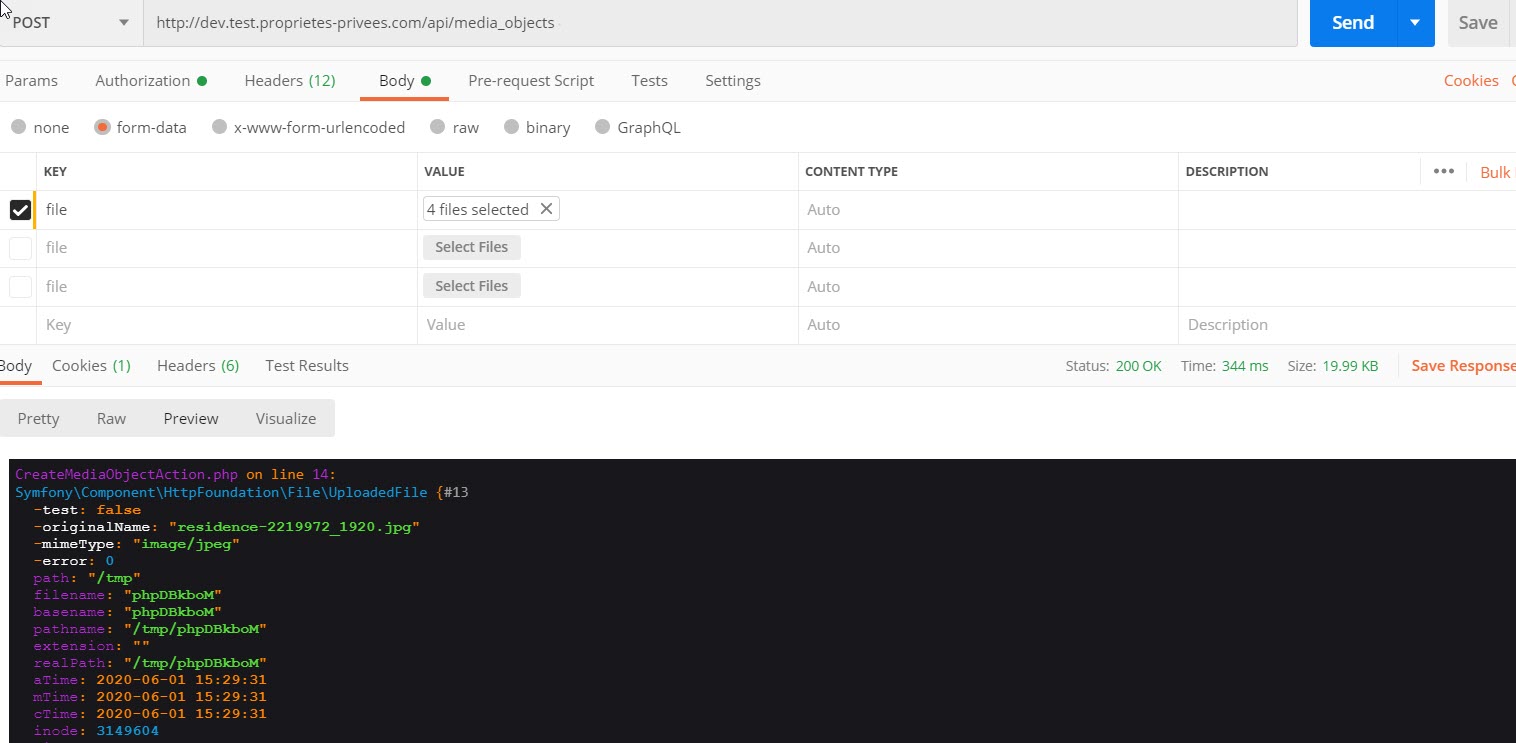
I always got one file , How can i make a multi upload ?
 khaledBou
on 1 Jun 2020
khaledBou
on 1 Jun 2020
@khaledBou Just use different keys for your files in Postman (file1; file2; etc)
And use the code $request->files->all() to get them all.
 Renrhaf
on 16 Jun 2020
Renrhaf
on 16 Jun 2020
i used files all like this :
`$uploadedFile = $request->files->all();
    if (!$uploadedFile) {
        throw new BadRequestHttpException('"file" is required');
    }

    $mediaObject = new MediaObject();
    $mediaObject->file = $uploadedFile;

    return $mediaObject;`
and i got this error :
Return value of Vich\UploaderBundle\Mapping\PropertyMapping::getFile() must be an instance of Symfony\Component\HttpFoundation\File\File or null, array returned
khaledBou
on 16 Jun 2020
Related issues
 soyuka
·
3Comments
soyuka
·
3Comments
 mahmoodbazdar
·
3Comments
mahmoodbazdar
·
3Comments
 tezvi
·
3Comments
tezvi
·
3Comments
 lukasluecke
·
3Comments
lukasluecke
·
3Comments
 bendavies
·
3Comments
bendavies
·
3Comments
Most helpful comment
I added
mime_types: ['multipart/form-data']to my config file, but now I am getting the error message:Deserialization for the format multipart is not supported, where can I specify the "deserialize"=false option?EDIT: Ok found the solution, need to be specified in the entities operations: