Steps to reproduce
- Updated to OC 10.0.10.4
2.
3.
Expected behaviour
I should get the login screen when pointing to my owncloud installation
Actual behaviour
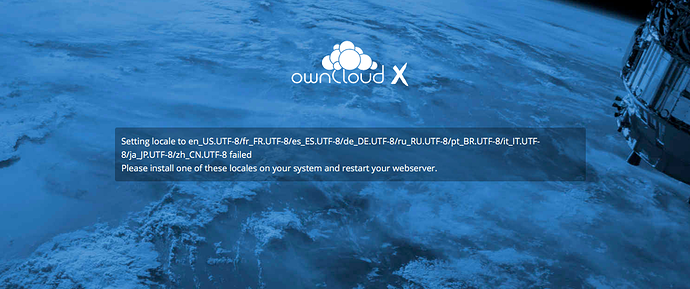
I get a message stating:
Setting locale to en_US.UTF-8/fr_FR.UTF-8/es_ES.UTF-8/de_DE.UTF-8/ru_RU.UTF-8/pt_BR.UTF-8/it_IT.UTF-8/ja_JP.UTF-8/zh_CN.UTF-8 failed
Please install one of these locales on your system and restart your webserver.
Server configuration
Operating system: Debian buster
Web server: Apache/2.4.37 (Debian)
Database: mysql Ver 15.1 Distrib 10.1.37-MariaDB, for debian-linux-gnu (x86_64) using readline 5.2
PHP version: PHP Version 7.2.9-1
ownCloud version: (see ownCloud admin page) 10.0.10.4
Updated from an older ownCloud or fresh install: Updated from the previous version
Where did you install ownCloud from: deb http://download.owncloud.org/download/repositories/production/Debian_9.0/ /
Signing status (ownCloud 9.0 and above):
Login as admin user into your ownCloud and access
http://example.com/index.php/settings/integrity/failed
paste the results into https://gist.github.com/ and puth the link here.
Unable to get there: https://marino-johnson.org/owncloud/index.php/settings/integrity/failed
The content of config/config.php:
Log in to the web-UI with an administrator account and click on
'admin' -> 'Generate Config Report' -> 'Download ownCloud config report'
This report includes the config.php settings, the list of activated apps
and other details in a well sanitized form.

or

If you have access to your command line run e.g.:
sudo -u www-data php occ config:list system
from within your ownCloud installation folder

{
    "system": {
        "updatechecker": false,
        "instanceid": "ocu6n3lunjaf",
        "passwordsalt": "***REMOVED SENSITIVE VALUE***",
        "secret": "***REMOVED SENSITIVE VALUE***",
        "trusted_domains": [
            "marino-johnson.org"
        ],
        "datadirectory": "\/var\/www\/owncloud\/data",
        "overwrite.cli.url": "https:\/\/marino-johnson.org\/owncloud",
        "dbtype": "mysql",
        "version": "10.0.10.4",
        "dbname": "owncloud9",
        "dbhost": "localhost",
        "dbtableprefix": "oc_",
        "dbuser": "***REMOVED SENSITIVE VALUE***",
        "dbpassword": "***REMOVED SENSITIVE VALUE***",
        "logtimezone": "America\/New_York",
        "installed": true,
        "maintenance": false,
        "loglevel": 1,
        "htaccess.RewriteBase": "\/owncloud",
        "theme": "",
        "memcache.local": "\\OC\\Memcache\\APCu",
        "memcache.distributed": "\\OC\\Memcache\\APCu",
        "memcache.locking": "\\OC\\Memcache\\Redis",
        "redis": {
            "host": "localhost",
            "port": 6379
        },
        "mail_smtpmode": "php",
        "mail_smtpsecure": "tls"
    }
}


*ATTENTION:* Do not post your config.php file in public as is. Please use one of the above
methods whenever possible. Both, the generated reports from the web-ui and from occ config:list
consistently remove sensitive data. You still may want to review the report before sending.
If done manually then it is critical for your own privacy to dilligently
remove *all* host names, passwords, usernames, salts and other credentials before posting.
You should assume that attackers find such information and will use them against your systems.
List of activated apps:
If you have access to your command line run e.g.:
sudo -u www-data php occ app:list
from within your ownCloud installation folder.
Enabled:
- activity: 2.3.8
- calendar: 1.6.0
- comments: 0.3.0
- configreport: 0.1.1
- dav: 0.4.0
- duo: 2.5.1
- federatedfilesharing: 0.3.1
- federation: 0.1.0
- files: 1.5.1
- files_external: 0.7.1
- files_pdfviewer: 0.9.0
- files_sharing: 0.11.0
- files_trashbin: 0.9.1
- files_versions: 1.3.0
- files_videoplayer: 0.9.8
- firstrunwizard: 1.1
- gallery: 16.1.0
- guests: 0.5.0
- market: 0.2.5
- provisioning_api: 0.5.0
- systemtags: 0.3.0
- templateeditor: 0.3.1
- twofactor_totp: 0.4.4
- updatenotification: 0.2.1
Disabled: - contacts
- encryption
- external
- notifications
- user_external
Are you using external storage, if yes which one: local/smb/sftp/...
No
Are you using encryption: yes/no
No
Are you using an external user-backend, if yes which one: LDAP/ActiveDirectory/Webdav/...
No
Client configuration
Browser: Safari Version 12.0
Operating system: Mac OS High Sierra
Logs
Web server error log
[Thu Nov 15 11:19:41.779680 2018] [mpm_prefork:notice] [pid 2496] AH00163: Apache/2.4.37 (Debian) OpenSSL/1.1.1 mod_wsgi/4.5.17 Python/3.6 mod_perl/2.0.10 Perl/v5.28.0 configured -- resuming normal operations
[Thu Nov 15 11:19:41.779713 2018] [core:notice] [pid 2496] AH00094: Command line: '/usr/sbin/apache2'
ownCloud log (data/owncloud.log)
{"reqId":"f3x4jmswBvUTf20CSbgE","level":4,"time":"2018-11-15T11:45:02-05:00","remoteAddr":"","user":"--","app":"cron","method":"--","url":"--","message":"Exception: {\"Exception\":\"Error\",\"Message\":\"Call to undefined function simplexml_load_file()\",\"Code\":0,\"Trace\":\"#0 \\\/var\\\/www\\\/owncloud\\\/lib\\\/private\\\/legacy\\\/app.php(645): OC\\\\App\\\\InfoParser->parse('\\\/var\\\/www\\\/ownclo...')\\n#1 \\\/var\\\/www\\\/owncloud\\\/lib\\\/private\\\/legacy\\\/app.php(618): OC_App::getAppInfo('\\\/var\\\/www\\\/ownclo...', true)\\n#2 \\\/var\\\/www\\\/owncloud\\\/lib\\\/private\\\/App\\\/AppManager.php(630): OC_App::getAppVersionByPath('\\\/var\\\/www\\\/ownclo...')\\n#3 \\\/var\\\/www\\\/owncloud\\\/lib\\\/private\\\/App\\\/AppManager.php(579): OC\\\\App\\\\AppManager->getAppVersionByPath('\\\/var\\\/www\\\/ownclo...')\\n#4 \\\/var\\\/www\\\/owncloud\\\/lib\\\/private\\\/App\\\/AppManager.php(522): OC\\\\App\\\\AppManager->findAppInDirectories('files')\\n#5 \\\/var\\\/www\\\/owncloud\\\/lib\\\/private\\\/legacy\\\/app.php(570): OC\\\\App\\\\AppManager->getAppPath('files')\\n#6 \\\/var\\\/www\\\/owncloud\\\/lib\\\/private\\\/legacy\\\/app.php(117): OC_App::getAppPath('files')\\n#7 \\\/var\\\/www\\\/owncloud\\\/lib\\\/base.php(577): OC_App::loadApps(Array)\\n#8 \\\/var\\\/www\\\/owncloud\\\/lib\\\/base.php(994): OC::init()\\n#9 \\\/var\\\/www\\\/owncloud\\\/cron.php(35): require_once('\\\/var\\\/www\\\/ownclo...')\\n#10 {main}\",\"File\":\"\\\/var\\\/www\\\/owncloud\\\/lib\\\/private\\\/App\\\/InfoParser.php\",\"Line\":41}"}
{"reqId":"f3x4jmswBvUTf20CSbgE","level":3,"time":"2018-11-15T11:45:02-05:00","remoteAddr":"","user":"--","app":"PHP","method":"--","url":"--","message":"You are using a fallback implementation of the intl extension. Installing the native one is highly recommended instead. at \/var\/www\/owncloud\/lib\/composer\/patchwork\/utf8\/src\/Patchwork\/Utf8\/Bootup\/intl.php#18"}
Browser log
Insert your browser log here, this could for example include:

a) The javascript console log
b) The network log
c) ...
 leonardomarino
All 12 comments
GitMate.io thinks the contributor most likely able to help you is @ownclouders.
Possibly related issues are https://github.com/owncloud/core/issues/7113 (ob_end_clean problem), https://github.com/owncloud/core/issues/26207 (autoload problem), https://github.com/owncloud/core/issues/2338 (Problem setting the locale), https://github.com/owncloud/core/issues/27814 (Problem with OwnCloud Debian 8 Repo?), and https://github.com/owncloud/core/issues/7042 (LDAP Problems).
 ownclouders
on 15 Nov 2018
ownclouders
on 15 Nov 2018
@ownclouders I think that OC is looking for “en_US.UTF-8”, but the output of ‘locale -a’ has no dash:
locale -a | fgrep en_US
en_US.utf8
leonardomarino
on 15 Nov 2018
I think that OC is looking for “en_US.UTF-8”,
Doesn't look like:
https://github.com/owncloud/core/blob/v10.0.10/lib/private/legacy/util.php#L1210-L1216
Related to below and broken in your env?
{"reqId":"f3x4jmswBvUTf20CSbgE","level":4,"time":"2018-11-15T11:45:02-05:00","remoteAddr":"","user":"--","app":"cron","method":"--","url":"--","message":"Exception: {\"Exception\":\"Error\",\"Message\":\"Call to undefined function simplexml_load_file()
{"reqId":"f3x4jmswBvUTf20CSbgE","level":3,"time":"2018-11-15T11:45:02-05:00","remoteAddr":"","user":"--","app":"PHP","method":"--","url":"--","message":"You are using a fallback implementation of the intl extension. Installing the native one is highly recommended instead. at \/var\/www\/owncloud\/lib\/composer\/patchwork\/utf8\/src\/Patchwork\/Utf8\/Bootup\/intl.php#18"}
 ho4ho
on 15 Nov 2018
ho4ho
on 15 Nov 2018
@ho4ho How can I fix the issue or my environment? I see the lines that you refer to in my installation: /var/www/owncloud/lib/private/legacy/util.php. Please advise
leonardomarino
on 15 Nov 2018
Tried to search, could help: https://github.com/owncloud/core/issues/31191, https://github.com/owncloud/core/issues/31179
ho4ho
on 15 Nov 2018
Thanks @ho4ho I think this is related to #31179
leonardomarino
on 15 Nov 2018
I have php7.0 installed - how do I force it to use that and not be broken every time Debian pushes a fix?
 nigelhorne
on 15 Nov 2018
nigelhorne
on 15 Nov 2018
Thanks @ho4ho I think this is related to #31179
That issue was closed on 30th May, yet it still exists?
nigelhorne
on 16 Nov 2018
That issue was closed on 30th May, yet it still exists?
Is said in https://github.com/owncloud/core/issues/31179#issuecomment-382288176 and https://github.com/owncloud/core/issues/31179#issuecomment-382292906
Patchwork lib does not like php-pcre newer than 8.32
if this is really the case (I cannot judge on this) please report upstream
See point 2. I stated wrong in the previous comment. The problem Patchwork has an issue with php-pcre 7.1 package that is installed together with php 7.1. The php-pcre 7.1 package from Fedore looks like it packages a pcre version 8.42 which fails the check from Patchwork.
An issue which needs to be addressed by patchwork and/or Fedora - I see no way to fix this in ownCloud.
ho4ho
on 16 Nov 2018
@nigelhorne reported a solution. The problem was in Apache, removing the comment in the ‘. ./etc/default/locale’ line in /etc/apache2/envvars solved the problem. See: https://central.owncloud.org/t/locale-problem-on-debian-buster/16769/13
leonardomarino
on 16 Nov 2018
@leonardomarino @nigelhorne Something for documentation? https://github.com/owncloud/documentation/issues
ho4ho
on 16 Nov 2018
@ho4ho I think this could go in a troubleshooting section. Debian users that experience:
Should check their /etc/apache2/envvars file and uncomment the ‘. ./etc/default/locale’ line. Restart Apache and the problem should be solved.
leonardomarino
on 20 Nov 2018
Related issues
 photodude
·
3Comments
photodude
·
3Comments
 jnweiger
·
4Comments
ho4ho
·
3Comments
jnweiger
·
4Comments
ho4ho
·
3Comments
 emmenlau
·
5Comments
emmenlau
·
5Comments
 mattcatt00
·
4Comments
mattcatt00
·
4Comments
Most helpful comment
@nigelhorne reported a solution. The problem was in Apache, removing the comment in the ‘. ./etc/default/locale’ line in /etc/apache2/envvars solved the problem. See: https://central.owncloud.org/t/locale-problem-on-debian-buster/16769/13