Core: Can't set up Homekit component on fresh install
Home Assistant release with the issue:
0.77.3
Last working Home Assistant release (if known):
Operating environment (Hass.io/Docker/Windows/etc.):
Raspberry Pi Zero W, installed with the virtual environment guide
Component/platform:
Homekit
Description of problem:
On a fresh install, I just added "homekit:" to the last line of my configuration.yaml file, but the card with the pairing code doesn't show up in the front-end.
Problem-relevant configuration.yaml entries and (fill out even if it seems unimportant):
Traceback (if applicable):
Additional information:
 Vinz87
All 24 comments
Any log output? I assume you have tried restarting, am I right?
Please add the following to your configuration.yaml file:
logger:
  default: waring
  logs:
    homeassistant.components.homekit: debug
Technically default: warning isn't necessary, but it's a great way to filter for specific log outputs.
Can you paste the resulting log (after restart)?
 cdce8p
on 9 Sep 2018
cdce8p
on 9 Sep 2018
I have a similar issue, this is the result of the logging:
2018-09-09 19:58:03 DEBUG (MainThread) [homeassistant.components.homekit] Begin setup HomeKit
2018-09-09 19:58:05 ERROR (MainThread) [homeassistant.setup] Error during setup of component homekit
Traceback (most recent call last):
  File "/home/pi/.local/lib/python3.5/site-packages/homeassistant/setup.py", line 145, in _async_setup_component
    hass, processed_config)
  File "/home/pi/.local/lib/python3.5/site-packages/homeassistant/components/homekit/__init__.py", line 73, in async_setup
    await hass.async_add_job(homekit.setup)
  File "/usr/lib/python3.5/asyncio/futures.py", line 380, in __iter__
    yield self  # This tells Task to wait for completion.
  File "/usr/lib/python3.5/asyncio/tasks.py", line 304, in _wakeup
    future.result()
  File "/usr/lib/python3.5/asyncio/futures.py", line 293, in result
    raise self._exception
  File "/usr/lib/python3.5/concurrent/futures/thread.py", line 55, in run
    result = self.fn(*self.args, **self.kwargs)
  File "/home/pi/.local/lib/python3.5/site-packages/homeassistant/components/homekit/__init__.py", line 200, in setup
    from .accessories import HomeBridge, HomeDriver
  File "/home/pi/.local/lib/python3.5/site-packages/homeassistant/components/homekit/accessories.py", line 8, in <module>
    from pyhap.accessory_driver import AccessoryDriver
  File "/home/pi/.homeassistant/deps/lib/python3.5/site-packages/pyhap/accessory_driver.py", line 45, in <module>
    from pyhap.hap_server import HAPServer
  File "/home/pi/.homeassistant/deps/lib/python3.5/site-packages/pyhap/hap_server.py", line 19, in <module>
    from Crypto.Protocol.KDF import HKDF
ImportError: cannot import name 'HKDF'
2018-09-09 19:58:17 ERROR (MainThread) [homeassistant.core] Timer got out of sync. Resetting
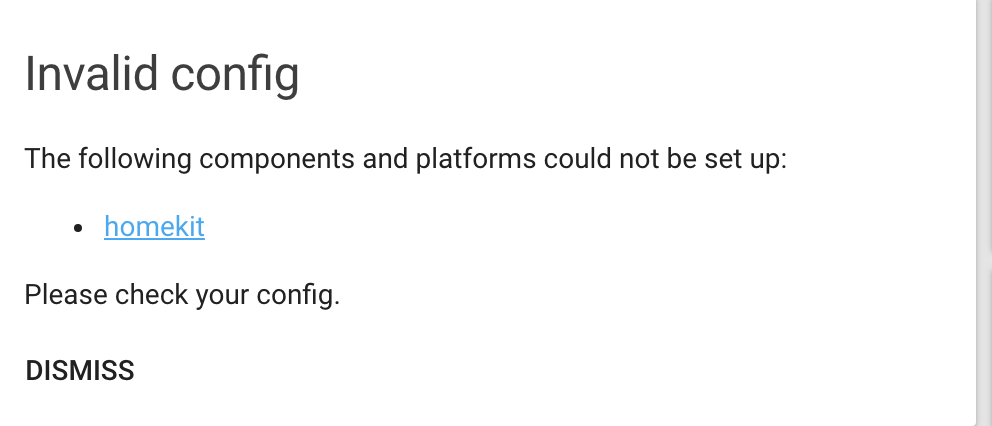
Home assistant (Hass) is running with user pi, on a raspberry pi 3B. I had been using the homebridge homeassistant platform in Homebridge running on this same raspberry pi, and that has been deprecated, and will not run, I added "homekit:" to the configuration.yaml (last line). I am getting a "Invalid configuration The following platforms could not be setup: homekit please check your configuration."
 kenmcdaniel
on 10 Sep 2018
kenmcdaniel
on 10 Sep 2018
the log file is /home/homeassistant/.homeassistant/home-assistant.log?
in this file I don't get recent entries after restarting and having enabled the logging as you suggested.
Vinz87
on 10 Sep 2018
@kenmcdaniel It seems to be a dependency issue. Please make sure to delete anything within .homeassistant/deps/. Otherwise the following issues might help: #14035, #14461 and #14167.
@Vinz87 Do you get any message at all. If not try default: info. That might spam your log a bit. Searching for homekit within the file might help.
cdce8p
on 10 Sep 2018
wait I found these entries in the main syslog of the Raspberry:
Sep 10 09:46:12 raspberrypi hass[284]: 2018-09-10 09:46:12 ERROR (MainThread) [homeassistant.requirements] Not initializing homekit because could not install requirement HAP-python==2.2.2
Sep 10 09:46:12 raspberrypi hass[284]: 2018-09-10 09:46:12 ERROR (MainThread) [homeassistant.setup] Setup failed for homekit: Could not install all requirements.
Do I miss some package to install?
Vinz87
on 10 Sep 2018
Can you try:
sudo apt-get install libavahi-compat-libdnssd-dev
as described here: https://www.home-assistant.io/components/homekit/
cdce8p
on 10 Sep 2018
Tried, but those pacakges were already installed. Same errors in the log after a reboot.
Vinz87
on 10 Sep 2018
I though so.
Can you check and clear the .homeassistant/deps folder?
cdce8p
on 10 Sep 2018
I cleared the deps folder under .homeassistant and get the same error. This is the message on the frontend:
This is from the home assistant log file:
2018-09-10 08:31:18 WARNING (MainThread) [homeassistant.components.http] legacy_api_password support has been enabled. If you don't require it, remove the 'api_password' from your http config.
2018-09-10 08:31:22 DEBUG (MainThread) [homeassistant.components.homekit] Begin setup HomeKit
2018-09-10 08:31:24 ERROR (MainThread) [homeassistant.setup] Error during setup of component homekit
Traceback (most recent call last):
File "/home/pi/.local/lib/python3.5/site-packages/homeassistant/setup.py", line 145, in _async_setup_component
hass, processed_config)
File "/home/pi/.local/lib/python3.5/site-packages/homeassistant/components/homekit/__init__.py", line 73, in async_setup
await hass.async_add_job(homekit.setup)
File "/usr/lib/python3.5/asyncio/futures.py", line 380, in __iter__
yield self # This tells Task to wait for completion.
File "/usr/lib/python3.5/asyncio/tasks.py", line 304, in _wakeup
future.result()
File "/usr/lib/python3.5/asyncio/futures.py", line 293, in result
raise self._exception
File "/usr/lib/python3.5/concurrent/futures/thread.py", line 55, in run
result = self.fn(self.args, *self.kwargs)
File "/home/pi/.local/lib/python3.5/site-packages/homeassistant/components/homekit/__init__.py", line 200, in setup
from .accessories import HomeBridge, HomeDriver
File "/home/pi/.local/lib/python3.5/site-packages/homeassistant/components/homekit/accessories.py", line 8, in
from pyhap.accessory_driver import AccessoryDriver
File "/home/pi/.homeassistant/deps/lib/python3.5/site-packages/pyhap/accessory_driver.py", line 45, in
from pyhap.hap_server import HAPServer
File "/home/pi/.homeassistant/deps/lib/python3.5/site-packages/pyhap/hap_server.py", line 19, in
from Crypto.Protocol.KDF import HKDF
ImportError: cannot import name 'HKDF'
2018-09-10 08:31:36 ERROR (MainThread) [homeassistant.core] Timer got out of sync. Resetting
Hope this helps,
Thanks,
Ken
kenmcdaniel
on 10 Sep 2018
The log messages are old. Did you get something on the frontend or for lovelace in the notifications tray?
cdce8p
on 10 Sep 2018
Log file:
2018-09-10 11:25:49 DEBUG (MainThread) [homeassistant.components.homekit] Begin setup HomeKit
2018-09-10 11:25:50 ERROR (MainThread) [homeassistant.setup] Error during setup of component homekit
Traceback (most recent call last):
  File "/home/pi/.local/lib/python3.5/site-packages/homeassistant/setup.py", line 145, in _async_setup_component
    hass, processed_config)  # type: ignore
  File "/home/pi/.local/lib/python3.5/site-packages/homeassistant/components/homekit/__init__.py", line 73, in async_setup
    await hass.async_add_job(homekit.setup)
  File "/usr/lib/python3.5/asyncio/futures.py", line 380, in __iter__
    yield self  # This tells Task to wait for completion.
  File "/usr/lib/python3.5/asyncio/tasks.py", line 304, in _wakeup
    future.result()
  File "/usr/lib/python3.5/asyncio/futures.py", line 293, in result
    raise self._exception
  File "/usr/lib/python3.5/concurrent/futures/thread.py", line 55, in run
    result = self.fn(*self.args, **self.kwargs)
  File "/home/pi/.local/lib/python3.5/site-packages/homeassistant/components/homekit/__init__.py", line 200, in setup
    from .accessories import HomeBridge, HomeDriver
  File "/home/pi/.local/lib/python3.5/site-packages/homeassistant/components/homekit/accessories.py", line 8, in <module>
    from pyhap.accessory_driver import AccessoryDriver
  File "/home/pi/.homeassistant/deps/lib/python3.5/site-packages/pyhap/accessory_driver.py", line 45, in <module>
    from pyhap.hap_server import HAPServer
  File "/home/pi/.homeassistant/deps/lib/python3.5/site-packages/pyhap/hap_server.py", line 19, in <module>
    from Crypto.Protocol.KDF import HKDF
ImportError: cannot import name 'HKDF'
It seems that the /deps folder is already empty:
pi@raspberrypi:~ $ ls -la /home/homeassistant/.homeassistant/deps
total 8
drwxr-xr-x 2 homeassistant homeassistant 4096 Sep 6 17:06 .
drwxr-xr-x 6 homeassistant homeassistant 4096 Sep 10 09:43 ..
Vinz87
on 10 Sep 2018
.homeassistant is under the user pi
ls -la /home/pi/.homeassistant/deps
total 20
drwxr-xr-x 5 pi pi 4096 Sep 10 08:27 .
drwxr-xr-x 7 pi pi 4096 Sep 10 13:46 ..
drwxr-xr-x 3 pi pi 4096 Sep 10 08:29 bin
drwx------ 3 pi pi 4096 Sep 10 08:21 lib
drwxr-xr-x 3 pi pi 4096 Sep 10 08:27 share
kenmcdaniel
on 10 Sep 2018
The path depends on your individual setup.
As it seems both of you have some kind of dependency issue. As for @Vinz87 it looks like a problem with HAP-python, @kenmcdaniel an issue with Crypto.
Are you two familiar with the way you activate your specific virtual environment that is running HA? The comments should be found here: https://www.home-assistant.io/docs/installation/ as well.
After activation please try the following.
For @Vinz87
pip uninstall HAP-python
pip install HAP-python
For @kenmcdaniel
pip uninstall pycryptodome
pip uninstall HAP-python
pip install HAP-python
Please post any errors, if you encounter one.
Afterwards try restarting Home Assistant and take a look at your frontend and the log.
cdce8p
on 10 Sep 2018
Neither pycryptodome or HAP-python were installed, so installing HAP-python resolved the issue,
Thanks,
kenmcdaniel
on 10 Sep 2018
I installed HAP-python (it wasn't installed at all), but I get different errors. The Front End doesn't say anymore that Homekit component has configuration problems.
This is the syslog after a Home Assistant restart:
Sep 11 10:52:11 raspberrypi hass[261]: 2018-09-11 10:52:11 ERROR (Thread-4) [homeassistant.util.json] Saving JSON file failed: /home/homeassistant/.homeassistant/.storage/auth
Sep 11 10:52:11 raspberrypi hass[261]: Traceback (most recent call last):
Sep 11 10:52:11 raspberrypi hass[261]:   File "/srv/homeassistant/lib/python3.5/site-packages/homeassistant/util/json.py", line 48, in save_json
Sep 11 10:52:11 raspberrypi hass[261]:     with open(filename, 'w', encoding='utf-8') as fdesc:
Sep 11 10:52:11 raspberrypi hass[261]: PermissionError: [Errno 13] Permission denied: '/home/homeassistant/.homeassistant/.storage/auth'
Sep 11 10:52:11 raspberrypi hass[261]: 2018-09-11 10:52:11 ERROR (MainThread) [homeassistant.helpers.storage] Error writing config for auth: [Errno 13] Permission denied: '/home/homeassistant/.homeassistant/.storage/auth'
Sep 11 10:52:47 raspberrypi systemd[1]: Started Session c18 of user pi.
Sep 11 10:53:42 raspberrypi hass[261]: 2018-09-11 10:53:42 ERROR (MainThread) [homeassistant.bootstrap] Unable to set up error log /home/homeassistant/.homeassistant/home-assistant.log (access denied)
Sep 11 10:53:48 raspberrypi hass[261]: 2018-09-11 10:53:48 INFO (MainThread) [homeassistant.core] Bus:Handling <Event service_registered[L]: domain=homeassistant, service=turn_off>
Sep 11 10:53:48 raspberrypi hass[261]: 2018-09-11 10:53:48 INFO (MainThread) [homeassistant.core] Bus:Handling <Event service_registered[L]: domain=homeassistant, service=turn_on>
Sep 11 10:53:48 raspberrypi hass[261]: 2018-09-11 10:53:48 INFO (MainThread) [homeassistant.core] Bus:Handling <Event service_registered[L]: domain=homeassistant, service=toggle>
Sep 11 10:53:48 raspberrypi hass[261]: 2018-09-11 10:53:48 INFO (MainThread) [homeassistant.core] Bus:Handling <Event service_registered[L]: domain=homeassistant, service=stop>
Sep 11 10:53:48 raspberrypi hass[261]: 2018-09-11 10:53:48 INFO (MainThread) [homeassistant.core] Bus:Handling <Event service_registered[L]: domain=homeassistant, service=restart>
Sep 11 10:53:48 raspberrypi hass[261]: 2018-09-11 10:53:48 INFO (MainThread) [homeassistant.core] Bus:Handling <Event service_registered[L]: domain=homeassistant, service=check_config>
Sep 11 10:53:48 raspberrypi hass[261]: 2018-09-11 10:53:48 INFO (MainThread) [homeassistant.core] Bus:Handling <Event service_registered[L]: domain=homeassistant, service=reload_core_config>
Sep 11 10:53:48 raspberrypi hass[261]: 2018-09-11 10:53:48 INFO (MainThread) [homeassistant.core] Bus:Handling <Event service_registered[L]: domain=persistent_notification, service=create>
Sep 11 10:53:48 raspberrypi hass[261]: 2018-09-11 10:53:48 INFO (MainThread) [homeassistant.core] Bus:Handling <Event service_registered[L]: domain=persistent_notification, service=dismiss>
Sep 11 10:53:48 raspberrypi hass[261]: 2018-09-11 10:53:48 INFO (MainThread) [homeassistant.bootstrap] Home Assistant core initialized
Sep 11 10:53:48 raspberrypi hass[261]: 2018-09-11 10:53:48 INFO (MainThread) [homeassistant.loader] Loaded introduction from homeassistant.components.introduction
Sep 11 10:53:48 raspberrypi hass[261]: 2018-09-11 10:53:48 INFO (MainThread) [homeassistant.setup] Setting up introduction
Sep 11 10:53:48 raspberrypi hass[261]: 2018-09-11 10:53:48 INFO (MainThread) [homeassistant.components.introduction]
Sep 11 10:53:48 raspberrypi hass[261]:     ~~~~~~~~~~~~~~~~~~~~~~~~~~~~~~~~~~~~~~~~~~~~~~~~~~~~~~~~~~~~~~~~~~~~~~~~~~~
Sep 11 10:53:48 raspberrypi hass[261]:         Hello, and welcome to Home Assistant!
Sep 11 10:53:48 raspberrypi hass[261]:         We'll hope that we can make all your dreams come true.
Sep 11 10:53:48 raspberrypi hass[261]:         Here are some resources to get started:
Sep 11 10:53:48 raspberrypi hass[261]:          - Configuring Home Assistant:
Sep 11 10:53:48 raspberrypi hass[261]:            https://home-assistant.io/getting-started/configuration/
Sep 11 10:53:48 raspberrypi hass[261]:          - Available components:
Sep 11 10:53:48 raspberrypi hass[261]:            https://home-assistant.io/components/
Sep 11 10:53:48 raspberrypi hass[261]:          - Troubleshooting your configuration:
Sep 11 10:53:48 raspberrypi hass[261]:            https://home-assistant.io/getting-started/troubleshooting-configuration/
Sep 11 10:53:48 raspberrypi hass[261]:          - Getting help:
Sep 11 10:53:48 raspberrypi hass[261]:            https://home-assistant.io/help/
Sep 11 10:53:48 raspberrypi hass[261]:         This message is generated by the introduction component. You can
Sep 11 10:53:48 raspberrypi hass[261]:         disable it in configuration.yaml.
Sep 11 10:53:48 raspberrypi hass[261]:     ~~~~~~~~~~~~~~~~~~~~~~~~~~~~~~~~~~~~~~~~~~~~~~~~~~~~~~~~~~~~~~~~~~~~~~~~~~~
Sep 11 10:53:48 raspberrypi hass[261]:
Sep 11 10:53:48 raspberrypi hass[261]: 2018-09-11 10:53:48 INFO (MainThread) [homeassistant.loader] Loaded persistent_notification from homeassistant.components.persistent_notification
Sep 11 10:53:48 raspberrypi hass[261]: 2018-09-11 10:53:48 INFO (MainThread) [homeassistant.setup] Setup of domain introduction took 0.0 seconds.
Sep 11 10:53:48 raspberrypi hass[261]: 2018-09-11 10:53:48 INFO (MainThread) [homeassistant.core] Bus:Handling <Event component_loaded[L]: component=introduction>
Sep 11 10:53:48 raspberrypi hass[261]: 2018-09-11 10:53:48 INFO (MainThread) [homeassistant.loader] Loaded logger from homeassistant.components.logger
Sep 11 10:53:48 raspberrypi hass[261]: 2018-09-11 10:53:48 INFO (MainThread) [homeassistant.setup] Setting up logger
Sep 11 10:54:13 raspberrypi hass[261]: 2018-09-11 10:54:13 WARNING (MainThread) [homeassistant.setup] Setup of frontend is taking over 10 seconds.
Sep 11 10:54:16 raspberrypi hass[261]: 2018-09-11 10:54:16 DEBUG (MainThread) [homeassistant.components.homekit] Begin setup HomeKit
Sep 11 10:54:26 raspberrypi hass[261]: 2018-09-11 10:54:26 WARNING (MainThread) [homeassistant.setup] Setup of homekit is taking over 10 seconds.
Sep 11 10:54:28 raspberrypi hass[261]: 2018-09-11 10:54:28 DEBUG (Thread-4) [pyhap.characteristic] set_value: Name to Home Assistant Bridge
Sep 11 10:54:28 raspberrypi hass[261]: 2018-09-11 10:54:28 DEBUG (Thread-4) [pyhap.characteristic] set_value: SerialNumber to default
Sep 11 10:54:28 raspberrypi hass[261]: 2018-09-11 10:54:28 DEBUG (Thread-4) [pyhap.characteristic] set_value: FirmwareRevision to 0.77.3
Sep 11 10:54:28 raspberrypi hass[261]: 2018-09-11 10:54:28 DEBUG (Thread-4) [pyhap.characteristic] set_value: Manufacturer to Home Assistant
Sep 11 10:54:28 raspberrypi hass[261]: 2018-09-11 10:54:28 DEBUG (Thread-4) [pyhap.characteristic] set_value: Model to Bridge
Sep 11 10:54:28 raspberrypi hass[261]: 2018-09-11 10:54:28 DEBUG (Thread-4) [pyhap.characteristic] set_value: SerialNumber to homekit.bridge
Sep 11 10:54:29 raspberrypi hass[261]: 2018-09-11 10:54:29 INFO (Thread-3) [pyhap.accessory_driver] Storing Accessory state in `/home/homeassistant/.homeassistant/.homekit.state`
Sep 11 10:54:34 raspberrypi hass[261]: 2018-09-11 10:54:34 WARNING (MainThread) [homeassistant.components.http.ban] Login attempt or request with invalid authentication from 5.170.121.202
Sep 11 10:55:30 raspberrypi hass[261]: 2018-09-11 10:55:30 ERROR (MainThread) [homeassistant.core] Timer got out of sync. Resetting
Sep 11 10:55:30 raspberrypi hass[261]: 2018-09-11 10:55:30 ERROR (Thread-3) [homeassistant.util.json] Saving JSON file failed: /home/homeassistant/.homeassistant/.storage/auth
Sep 11 10:55:30 raspberrypi hass[261]: Traceback (most recent call last):
Sep 11 10:55:30 raspberrypi hass[261]:   File "/srv/homeassistant/lib/python3.5/site-packages/homeassistant/util/json.py", line 48, in save_json
Sep 11 10:55:30 raspberrypi hass[261]:     with open(filename, 'w', encoding='utf-8') as fdesc:
Sep 11 10:55:30 raspberrypi hass[261]: PermissionError: [Errno 13] Permission denied: '/home/homeassistant/.homeassistant/.storage/auth'
Sep 11 10:55:30 raspberrypi hass[261]: 2018-09-11 10:55:30 ERROR (MainThread) [homeassistant.helpers.storage] Error writing config for auth: [Errno 13] Permission denied: '/home/homeassistant/.homeassistant/.storage/auth'
Sep 11 10:55:31 raspberrypi hass[261]: 2018-09-11 10:55:31 ERROR (MainThread) [homeassistant.core] Error doing job: Future exception was never retrieved
Sep 11 10:55:31 raspberrypi hass[261]: Traceback (most recent call last):
Sep 11 10:55:31 raspberrypi hass[261]:   File "/usr/lib/python3.5/concurrent/futures/thread.py", line 55, in run
Sep 11 10:55:31 raspberrypi hass[261]:     result = self.fn(*self.args, **self.kwargs)
Sep 11 10:55:31 raspberrypi hass[261]:   File "/srv/homeassistant/lib/python3.5/site-packages/homeassistant/components/homekit/__init__.py", line 235, in start
Sep 11 10:55:31 raspberrypi hass[261]:     self.driver.add_accessory(self.bridge)
Sep 11 10:55:31 raspberrypi hass[261]:   File "/srv/homeassistant/lib/python3.5/site-packages/pyhap/accessory_driver.py", line 333, in add_accessory
Sep 11 10:55:31 raspberrypi hass[261]:     self.persist()
Sep 11 10:55:31 raspberrypi hass[261]:   File "/srv/homeassistant/lib/python3.5/site-packages/pyhap/accessory_driver.py", line 439, in persist
Sep 11 10:55:31 raspberrypi hass[261]:     with open(self.persist_file, 'w') as fp:
Sep 11 10:55:31 raspberrypi hass[261]: PermissionError: [Errno 13] Permission denied: '/home/homeassistant/.homeassistant/.homekit.state'
@Vinz87 I notice quite a few PermissionErrors. Are you sure your Home Assistant instance is setup correctly?
cdce8p
on 11 Sep 2018
No I'm not, I simply followed the official guide:
https://www.home-assistant.io/docs/installation/raspberry-pi/
I could try to follow it again, but I don't know how to uninstall it properly before attempting to do a fresh install: any suggestions?
Also, I don't know if this virtual environment thing is necessary, my requirement would be to install it over an official Raspbian installation on the SD card, but as I understood this is the only method.
Vinz87
on 11 Sep 2018
Ok I think I've found the problem.
After following the installation guide, I also followed this tutorial to launch Home Assistant at reboot:
https://www.home-assistant.io/docs/autostart/
https://www.home-assistant.io/docs/autostart/systemd/
I tried to disable the autostart:
sudo systemctl disable home-assistant@pi
Then I manually activated the virtual environement:
bash $ sudo -u homeassistant -H -s $ source /srv/homeassistant/bin/activate
And finally manually launched Home Assistant with the "hass" command, and I see no errors and the Homekit component loads correctly, showing me the pairing code.
Now the question would be: what can I do to make it start at each reboot of Pi?
Vinz87
on 11 Sep 2018
My other concern is that although I have a pairing code, it seems that I can't go forward in the Homekit setup guide:
1.Open the Home Assistant frontend. A new card will display the pin code.
2.Open the Home app.
3.Choose Add Accessory, than select Don't Have a Code or Can't Scan? and enter the pin code.
4.Confirm the you are adding an Uncertified Accessory by clicking on Add Anyway.
5.Follow the setup be clicking on Next and lastly Done in the top right hand corner.
6.The Home Assistant Bridge and the Accessories should now be listed in the Home app.
After entering the code in point 3, the Home app on the iPhone asks me to select an accessory, but it doesn't show any accessory to select from. I have a "My accessory is not present" link, but it only opens a suggestions list.
Do the iPhone and Raspberry Pi running Home Assistant have to be under the same WiFi network?
Vinz87
on 11 Sep 2018
Do the iPhone and Raspberry Pi running Home Assistant have to be under the same WiFi network?
Yes
What can I do to make it start at each reboot of Pi?
Unfortunately I can't help with that. However have you taken a look at Hassbian? It's basically Raspbian with Home Assistant preinstalled. Might be worth checking out: https://www.home-assistant.io/docs/installation/hassbian/ I'm using it for some time now.
cdce8p
on 11 Sep 2018
ok I'll try to configure the Homekit component starting Home Assistant manually, keeping the iPhone in the same WiFi network, and then I'll try to restore the automatic start using systemd and see if it keeps working with the iPhone outside the WiFi network.
I'll let you know.
Vinz87
on 12 Sep 2018
I succeeded in configuring the Homekit component by starting Home Assistant manually enabling the virtual environment, and keeping the iPhone in same WiFi network.
After, I've re-enabled the automatic start via systemctl, and it keeps working (as long as the iPhone is connected to the WiFi network, I've learned that for accessing Homekit from the internet I have to setup a Home hub).
So I can consider the issue closed, but I strongly suggest to update the Virtual Environment installation guide. In addition to the bold sentence above (which is not written in the guide), please consider that pyHAP has to be manually installed in advance (Raspbian Stretch Lite).
Vinz87
on 12 Sep 2018
Thanks for the feedback. Glad to here that your issue is solved.
please consider that pyHAP has to be manually installed in advance
It should get installed automatically by Home Assistant. Sometimes however that doesn't seem to work reliably.
update the Virtual Environment installation guide
Feel free to suggest the change. Just click Edit this page on Github and improve it. You would just need to commit the changes and open a Pull Request afterwards.
cdce8p
on 13 Sep 2018
Related issues
 coolriku
·
3Comments
coolriku
·
3Comments
 TheZoker
·
3Comments
TheZoker
·
3Comments
 flsabourin
·
3Comments
flsabourin
·
3Comments
 arangates
·
3Comments
arangates
·
3Comments
 Konstigt
·
3Comments
Konstigt
·
3Comments