Home Assistant release with the issue: 0.77.2
Last working Home Assistant release (if known): 0.74.0
Operating environment (Hass.io/Docker/Windows/etc.): Pi3 Hassbian, firefox as webbrowser
Component/platform: core login
Description of problem:
After I upgraded from version 0.74.0 to 0.77.2 I get the new login page where you also have a username. It works fine for logging in, however each time i refresh the browser page (F5) it again redirects me to the login page and I have to enter my cridentials agian. I also need to re-enter my credentials after each time I closed the webbrowser and open it again. This happens on both my PC's both accesing homeassistant through firefox as browser.
In the video on the release notes I see that they get a popup stating "Do you want to save this login?". That is exactly what I need and I do want to save my loging, however I never got this popup. I tryed going back to version 0.77.0 in an attempt to get this popup, but I have not manged to get it. I am getting diffrent popups when I turn on/off components etc using homeassistant.
Is their a way to save my credentials?
Is it possible to get the check-box back on the loging page for saving credentials?
Problem-relevant configuration.yaml entries and (fill out even if it seems unimportant):
Traceback (if applicable):
Additional information:
 starkillerOG
All 17 comments
I'm also impacted by this. I get the "save password" dialog on my Pixel, by my spouse is running iOS and is never prompted to save a password.
 karlw00t
on 1 Sep 2018
karlw00t
on 1 Sep 2018
I'm affected as well. I've updated from 0.76.2 to 0.77.2 and no "Save login" box shown.
Latest Firefox 61.0 on Gentoo linux.
 mkyral
on 1 Sep 2018
mkyral
on 1 Sep 2018
I just, all of a sudden got a "Do you want to save this login?" dialog and now it does remember my credentials on my laptop.
Tree things have happend since it did not give this dialog:
1) I am now connected through my VPN to my home network and accesing homeassistant in that way. (schould be unrelated I guess)
2) I had the menu side bar of home assistant collapsed this time while previouse times it was present at the side. (maybe the popup dialog was moved off screen previous times due to the menu side bar??)
3) I just installed sudo apt-get install libatlas-base-dev in the virtual enviremont of homeassistant and removed and reinstalled numpy in the virual enviroment of homeassistant in order to get my binary trend sensor working (it was not working and after doing this it started working). I got this infromation how to do this from this homeassistant issue about the binary trend sensor. (could be completly unrelated, but maybe it did something).
I did not change anything else as far as I can recall compared to all the previous times I tryed getting the "Do you want to save login?" popup.
starkillerOG
on 1 Sep 2018
+1. Also affected, seems to be a regression of 0.77.2
With 0.77.1 I do recall seeing the offer to save - and after accepting it, I could reload the browser (or the page) without being kicked out to the login page.
Now with 0.77.2, every time I re-load the page in the browser (& everytime I start the browser) I get the login prompt, and no offer to save the login.
This happens from both my desktop (linux, firefox 0.61) and my mobile (android, firefox)
I wonder if this is related to some cookie leftover somwhere.
 arigit
on 2 Sep 2018
arigit
on 2 Sep 2018
If that helps, every time the HA webpage is reloaded in the browser, I notice that the browser gets redirected like so:
http://192.168.x.x:8123/frontend_latest/authorize.html?response_type=code&client_id=http://192.168.x.x:8123/&redirect_uri=http://192.168.x.x:8123/states?auth_callback%3D1&state=eyJoYsomeToken
I checked the .storage/auth file, and the token in the URL above is NOT present.
However, everytime I log-in, a new token entry is added to auth, ad-infinitum.
So the problem seems to be that the token used in the URL redirection is garbage (or alternatively, the token stored in .storage/auth is malformed for some reason)
Tried deleting auth / auth_provider.homeassistant and onboarding and reloading HA. This re-retriggers onboarding but it does not fix the problem. page reload causes a new prompt and more tokens to be created.
Now this seems to be a Firefox -specific thing. Or again related to some cookie left on firefox however I couldn't find it so far. In fact, accessing HA in a Firefox "Private" window still suffers from the same issue. So this seems to be a bug of HA's frontend with Firefox (could't reproduce this in Chrome), introduced in 0.77.2
Could be related to:
https://github.com/home-assistant/home-assistant/commit/efa9c82c38e82cd7d680cb212f03174b571a17de
@balloob
arigit
on 2 Sep 2018
This is NOT specific to Firefox. I have the same issue on chrome on my phone and on 2 computers.
 ve6rah
on 2 Sep 2018
ve6rah
on 2 Sep 2018
I just tested in Private Mode in FF and the "Save Login" popup was shown and works. I can refresh HA page without entering password again and again.
EDIT:
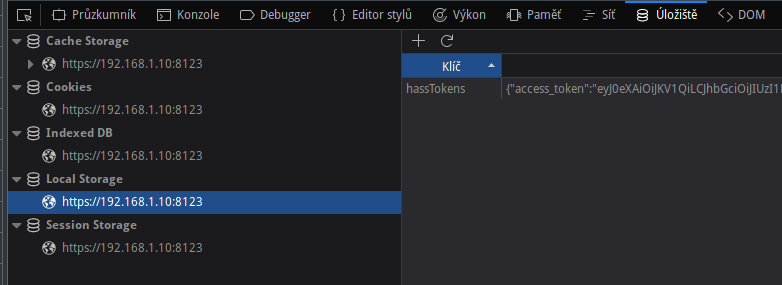
Cleaning of LocalStorage helped. There were four items: lovelace, language, theme...
After cleaning and page refresh, I was able to Save login.
And the content changed to this:
mkyral
on 2 Sep 2018
@arigit
Your assessment regarding token malformed is totally wrong. We never write access_token to any file in back end.
EDIT: state=eyJoYsomeToken in your post, which is not token at all. It is base64 format client_id and hass_url.
 awarecan
on 2 Sep 2018
awarecan
on 2 Sep 2018
I was experiencing these issues (no popup to save credentials, and having to re-authenticate upon every refresh) too. I'm using Firefox 61.0.2 under macOS 10.13.6. As I upgraded Home Assistant from 0.71.x straight to 0.77.2, I can't say if this issue was present in 0.77.0 or 0.77.1.
Things I tried to no avail:
- Use "Forget this site" in my Firefox' browsing history to clear cache for HA specifically
- Access my HA instance via the host IP address rather than my nginx reverse proxy
- Unregister HA's service worker though
about:serviceworkers - ...
Things I tried that did work:
- Access my HA instance via my nginx reverse proxy using Google Chrome's incognito mode
However, thanks to @mkyral I now have it working in Firefox too: I cleared local storage through the developer tools, refreshed the page and re-authenticated. I then got the popup to save my credentials, and now I can refresh the page whichever way I want without having to re-authenticate again! 🎉
 fanaticDavid
on 2 Sep 2018
fanaticDavid
on 2 Sep 2018
I tried clearing all browser data, many times. I also tried incognito mode, and explicit logout. I have tried every combination of these, and on 3 different devices all running chrome.
I have a lot of trouble believing that anything on the browser side will have any impact on this for me.
The WAF on this project just plummeted significantly and I'm not sure what I can do to keep sleeping indoors if we don't come up with a solution soon!
ve6rah
on 2 Sep 2018
For Android Firefox, clearing offline site data in Android did the trick for me. After clearing, after the login I got the Save Login prompt and now I can reload the page without the need to re-login. This is reproducible 100%: every time I clear offline data, I get the auth page and the "Save Login" pop up.
For Desktop (linux) Firefox, clearing Local Storage did NOT work for me. Also browsing inside a new clean Container did NOT work, nor did Incognito mode etc as others reported. If anyone figures out a consistent combination of actions to get Desktop Firefox to save Login that would be appreciated :)
arigit
on 2 Sep 2018
@mkyral (or anyone that could solve this) would you mind posting a full sample of the storage element "hassTokens" (without your actual active token)? I thought I could try adding the token manually in firefox, extracting the token value from .storage/auth
update - somehow after several tries, I could get at least Chrome to prompt Save Login. I saved the chrome login and then copied the hassTokens storage item from chrome to Firefox (my desktop browser), and deleted the copy in Chrome. It did the trick, for now at least.
arigit
on 2 Sep 2018
@ve6rah you can try to downgrade to 0.77.1
I believe the issue was introduced in 0.77.2 by upgrade HAWS to 3.0, which store token in different format than prior version.
If you look at your browser's local storage, you can find either token (0.77.1 and below) or hassToken (0.77.2 and above). Delete them should allow system asking "save login"
Another trick you can try is to "unregister service worker", I found in some case, service work may return different version of frontend code. Unregister them will enforce the new version service worker installed.
awarecan
on 2 Sep 2018
If someone is still interested:
{
  "access_token":"eyJ0eXA...KBKKXu6j_po",
  "expires_in":1800,
  "token_type":"Bearer",
  "hassUrl":"https://192.168.1.10:8123",
  "clientId":"https://192.168.1.10:8123/",
  "expires":1535907405143,
  "refresh_token":"3cc47c...b4fe06"
}
@awarecan thanks for your help.
I could not get firefox to work with remembering the login on my desktop, clearing local storage did not help.
But your trick with using chrome and copying the hassToken from chrome to firfox work for me!
I would still like to get the simple and reliable save login check-box back on the login page, if that is possible.
starkillerOG
on 3 Sep 2018
@arigit the trick with copying from chrome was from you arigit, thank you!
starkillerOG
on 3 Sep 2018
After some investigation, I think I found a flaw in the front end code. The method to show up "Save Login" dialog may be called earlier than the access token retrieved.
This issue was introduced in 0.77.2 release, and easy to be caught if you have one of following condition:
- on a slow network connection, such as through Internet access your home assistant
- use Firefox version before 63 with dom.webcomponents.shadowdom.enabled==false (default is false before 63)
awarecan
on 3 Sep 2018
Related issues
 neonandu
·
3Comments
neonandu
·
3Comments
 piitaya
·
3Comments
piitaya
·
3Comments
 i-am-shodan
·
3Comments
i-am-shodan
·
3Comments
 MartinHjelmare
·
3Comments
MartinHjelmare
·
3Comments
 ofuangka
·
3Comments
ofuangka
·
3Comments
Most helpful comment
I just tested in Private Mode in FF and the "Save Login" popup was shown and works. I can refresh HA page without entering password again and again.
EDIT:
Cleaning of LocalStorage helped. There were four items: lovelace, language, theme...
After cleaning and page refresh, I was able to Save login.
And the content changed to this: