Core: 0.77: Can't login behind non-authenticated NGINX
Home Assistant release with the issue:
0.77.0
Last working Home Assistant release (if known):
N/A
Operating environment (Hass.io/Docker/Windows/etc.):
Docker
Component/platform:
auth
Description of problem:
I have my HASS instance behind a public-facing NGINX instance. NGINX itself does not implement authentication whatsoever; it merely proxies traffic onto HASS (with the assumption that HASS with do the authenticating).
When browsing to my public URL, I see the onboarding page. After filling in name/username/password and clicking "CREATE ACCOUNT", I am shown the HASS header, but the page hangs and I am not redirected.
Problem-relevant configuration.yaml entries and (fill out even if it seems unimportant):
homeassistant:
  http:
    base_url: https://my_public_url.server.com
Traceback (if applicable):
No issues appear in the Chrome developer console or the HASS log.
Additional information:
If I access the local/inside-the-LAN URL for HASS, I am able to progress through onboarding and fully create a user. However, once users are created, attempting to log in with them through the public URL (that is, through NGINX) causes a similar issue: nothing happens.
EDIT: the release notes for 0.77 mention this article, but that use case – allowing NGINX to handle authentication – is different than what I describe here.
 bachya
All 13 comments
Sounds like a good security feature 😄
EDIT: Your additional information... should be the main complaint... User should be able to login...
 awarecan
on 29 Aug 2018
awarecan
on 29 Aug 2018
Sounds like a good security feature 😄
Are you implying that this is intended? If so, why doesn't this page specifically call it out?
EDIT: Your additional information... should be the main complaint... User should be able to login...
That isn't correct. "Logging in" is an irrelevant concept if users cannot be created. To go back to the previous point, if "users cannot be created over a proxy" is the intended behavior, then I think your assumption is more correct...but that still hasn't been clarified.
bachya
on 29 Aug 2018
The first point is just a joke. But since onboarding is just one-time thing, I have more concern about the login.
Can you give more detail about the login scenario, which step failed? Captured HTTP requests will help to analysis the issue.
awarecan
on 29 Aug 2018
I may have found an issue on my side – testing.
bachya
on 29 Aug 2018
Thanks, @awarecan. The onboarding issue appears to have been caused by an incorrect base_url key under http. Now, however, clicking on "CREATE ACCOUNT" shows just the HASS UI header while the page hangs.
Here's the sequence of HTTP requests after I click "CREATE ACCOUNT":
Step 1
Request
curl \
    -H 'Host: my_public_url.server.com' \
    -H 'User-Agent: Mozilla/5.0 (Macintosh; Intel Mac OS X 10_13_6) AppleWebKit/537.36 (KHTML, like Gecko) Chrome/68.0.3440.106 Safari/537.36' \
    -H 'DNT: 1' \
    -H 'Accept: */*' \
    -H 'Referer: https://my_public_url.server.com/frontend_latest/onboarding.html' \
    -H 'Accept-Language: en-US,en;q=0.9' \
    --compressed \
'https://my_public_url.server.com/api/onboarding'
Response
HTTP/1.1 200 OK
Server: nginx/1.15.0
Date: Wed, 29 Aug 2018 19:07:05 GMT
Content-Type: application/json
Content-Length: 33
Keep-Alive: timeout=5
Content-Encoding: deflate
Strict-Transport-Security: max-age=31536000; includeSubdomains
Connection: keep-alive

[{"done": false, "step": "user"}]
Step 2
Request
curl \
    -H 'Host: 40b739181350.bachho.me' \
    -H 'Origin: https://my_public_url.server.com' \
    -H 'User-Agent: Mozilla/5.0 (Macintosh; Intel Mac OS X 10_13_6) AppleWebKit/537.36 (KHTML, like Gecko) Chrome/68.0.3440.106 Safari/537.36' \
    -H 'DNT: 1' \
    -H 'Content-Type: application/json;charset=UTF-8' \
    -H 'Accept: */*' \
    -H 'Referer: https://my_public_url.server.com/frontend_latest/onboarding.html' \
    -H 'Accept-Language: en-US,en;q=0.9' \
    --data-binary '{"name":"Aaron","username":"aaron","password":"my_password"}' \
    --compressed \
'https://my_public_url.server.com/api/onboarding/users'
Response
HTTP/1.1 200 OK
Server: nginx/1.15.0
Date: Wed, 29 Aug 2018 19:07:12 GMT
Content-Type: application/octet-stream
Content-Length: 0
Keep-Alive: timeout=5
Strict-Transport-Security: max-age=31536000; includeSubdomains
Connection: keep-alive
Step 3
Request
curl \
    -H 'Host: my_public_url.server.com' \
    -H 'Upgrade-Insecure-Requests: 1' \
    -H 'DNT: 1' \
    -H 'User-Agent: Mozilla/5.0 (Macintosh; Intel Mac OS X 10_13_6) AppleWebKit/537.36 (KHTML, like Gecko) Chrome/68.0.3440.106 Safari/537.36' \
    -H 'Accept: text/html,application/xhtml+xml,application/xml;q=0.9,image/webp,image/apng,*/*;q=0.8' \
    -H 'Referer: https://my_public_url.server.com/frontend_latest/onboarding.html' \
    -H 'Accept-Language: en-US,en;q=0.9' \
    --compressed \
'https://my_public_url.server.com/'
Response
HTTP/1.1 200 OK
Server: nginx/1.15.0
Date: Wed, 29 Aug 2018 19:07:12 GMT
Content-Type: text/html; charset=utf-8
Content-Length: 2874
Keep-Alive: timeout=5
Strict-Transport-Security: max-age=31536000; includeSubdomains
Connection: keep-alive

<!doctype html>
<html lang="en">
  <head>
    <link rel='preload' href='/frontend_latest/core-64d01504.js' as='script'/>
    <link rel='preload' href='/static/fonts/roboto/Roboto-Regular.ttf' as='font' crossorigin />
    <link rel='preload' href='/static/fonts/roboto/Roboto-Medium.ttf' as='font' crossorigin />
    <meta charset="utf-8">
<link rel='manifest' href='/manifest.json' crossorigin="use-credentials">
<link rel='icon' href='/static/icons/favicon.ico'>
<meta name='viewport' content='width=device-width, user-scalable=no'>
<style>
  body {
    font-family: Roboto, sans-serif;
    -moz-osx-font-smoothing: grayscale;
    -webkit-font-smoothing: antialiased;
    font-weight: 400;
    margin: 0;
    padding: 0;
    height: 100vh;
  }
</style>

    <title>Home Assistant</title>
    <link rel='apple-touch-icon' sizes='180x180'
          href='/static/icons/favicon-apple-180x180.png'>
    <link rel="mask-icon" href="/static/icons/mask-icon.svg" color="#3fbbf4">
    <meta name='apple-mobile-web-app-capable' content='yes'>
    <meta name="msapplication-square70x70logo" content="/static/icons/tile-win-70x70.png"/>
    <meta name="msapplication-square150x150logo" content="/static/icons/tile-win-150x150.png"/>
    <meta name="msapplication-wide310x150logo" content="/static/icons/tile-win-310x150.png"/>
    <meta name="msapplication-square310x310logo" content="/static/icons/tile-win-310x310.png"/>
    <meta name="msapplication-TileColor" content="#3fbbf4ff"/>
    <meta name='mobile-web-app-capable' content='yes'>
    <meta name='referrer' content='same-origin'>
    <meta name='theme-color' content='#03A9F4'>
    <style>
      #ha-init-skeleton::before {
        display: block;
        content: "";
        height: 112px;
        background-color: #03A9F4;
      }
    </style>
    <script>
      window.customPanelJS = '/frontend_latest/custom-panel-c8351669.js';
      window.noAuth = '0';
      window.useOAuth = '1'
      window.Polymer = {
        lazyRegister: true,
        useNativeCSSProperties: true,
        dom: 'shadow',
        suppressTemplateNotifications: true,
        suppressBindingNotifications: true,
      };
    </script>
  </head>
  <body>
    <home-assistant>
      <div id='ha-init-skeleton'></div>
    </home-assistant>

    <script>
      var webComponentsSupported = (
        'customElements' in window &&
        'content' in document.createElement('template'));
      if (!webComponentsSupported) {
        (function() {
          var e = document.createElement('script');
          e.src = '/static/webcomponents-bundle.js';
          document.write(e.outerHTML);
        }());
      }
    </script>
    <script src='/frontend_latest/core-64d01504.js'></script>
    <script src='/frontend_latest/app-605f6e5a.js'></script>
    <script src='/frontend_latest/hass-icons-2d82a5bc.js' async></script>
    </body>
</html>
Step 4.
Request
curl \
    -H 'Host: my_public_url.server.com' \
    -H 'Upgrade-Insecure-Requests: 1' \
    -H 'DNT: 1' \
    -H 'User-Agent: Mozilla/5.0 (Macintosh; Intel Mac OS X 10_13_6) AppleWebKit/537.36 (KHTML, like Gecko) Chrome/68.0.3440.106 Safari/537.36' \
    -H 'Accept: text/html,application/xhtml+xml,application/xml;q=0.9,image/webp,image/apng,*/*;q=0.8' \
    -H 'Referer: https://my_public_url.server.com/' \
    -H 'Accept-Language: en-US,en;q=0.9' \
    --compressed \
'https://my_public_url.server.com/auth/authorize?response_type=code&client_id=https%3A%2F%2Fmy_public_url.server.com%2F&redirect_uri=https%3A%2F%2Fmy_public_url.server.com%2F'
Step 4 is where the hang occurs: there's never a response.
EDIT: should the client_id be the encoded form of the URL?
bachya
on 29 Aug 2018
More follow-up – by the time I arrive at hanging step 4, the following files have been created:
onboarding
{
    "data": {
        "done": [
            "user"
        ]
    },
    "key": "onboarding",
    "version": 1
}
auth
{
    "data": {
        "credentials": [
            {
                "auth_provider_id": null,
                "auth_provider_type": "homeassistant",
                "data": {
                    "username": "aaron"
                },
                "id": "<32-character credential ID>",
                "user_id": "<32-character user ID>"
            }
        ],
        "refresh_tokens": [],
        "users": [
            {
                "id": "<32-character user ID>",
                "is_active": true,
                "is_owner": true,
                "name": "Aaron",
                "system_generated": false
            }
        ]
    },
    "key": "auth",
    "version": 1
}
auth_provider.homeassistant
{
    "data": {
        "salt": "<64-character salt>",
        "users": [
            {
                "password": "<80-character salted password>",
                "username": "aaron"
            }
        ]
    },
    "key": "auth_provider.homeassistant",
    "version": 1
}
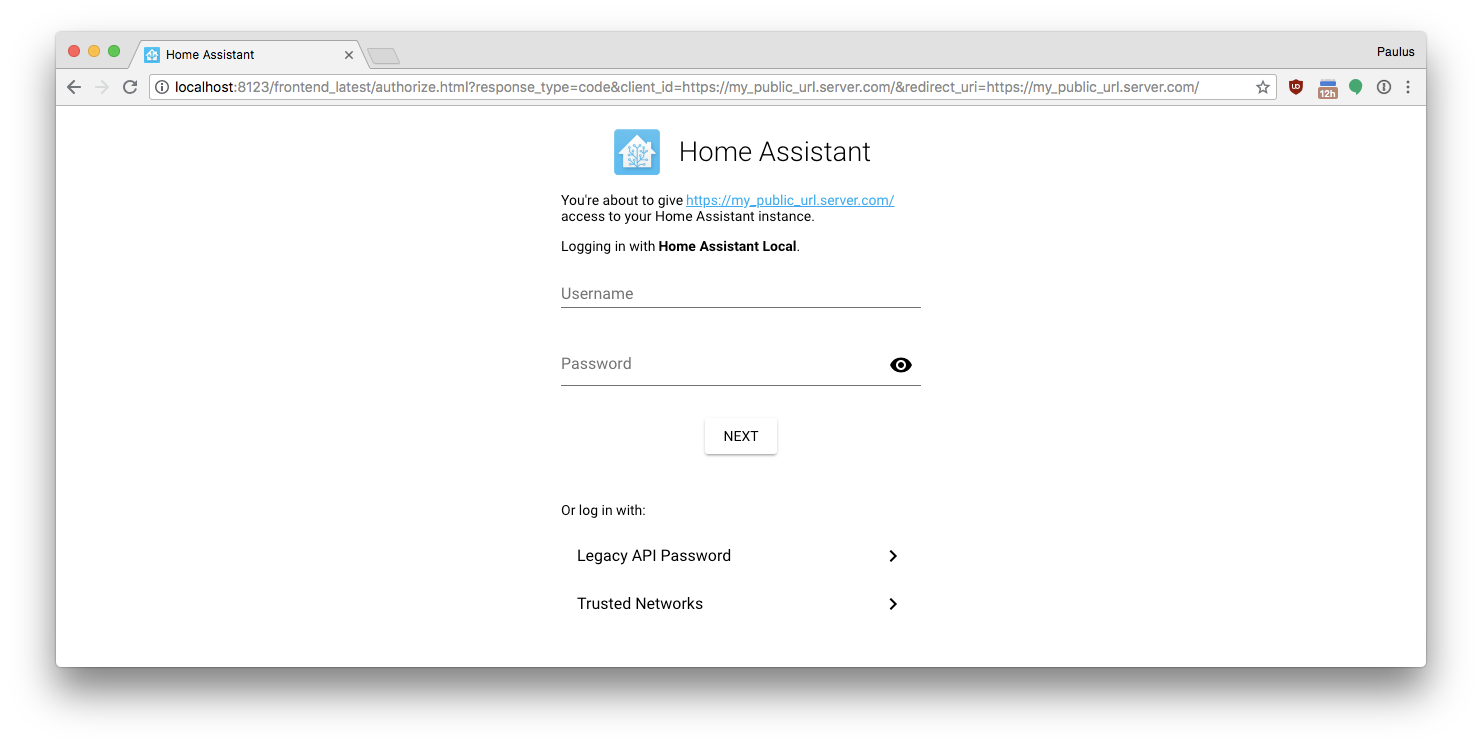
The url that is hanging works here locally if I change the base url to be localhost:
 balloob
on 29 Aug 2018
balloob
on 29 Aug 2018
The server redirects requests from /auth/authorize to /frontend_latest/authorize.html
balloob
on 29 Aug 2018
All behavior looks normal, just the redirect that is not happening, which is weird.
balloob
on 29 Aug 2018
Step 4's response suppose to be a HTTP 302, anything in proxy will block that?
awarecan
on 29 Aug 2018
@awarecan Nothing outright, but your comment led me to finding this: https://gist.github.com/JonasGao/89370dc9cf84f4bbc1131fce2e700635 – will mess around and see if I can make progress.
bachya
on 30 Aug 2018
Well, I feel 🐑-ish: entirely my fault. I use NAXSI as an application firewall in front of NGINX and it was blocking the process. For posterity and if it's of interest, NAXSI believed that:
/auth/login_flowhad an unknown response content type./auth/authorizehad a Remote File Inclusion (RFI) vulnerability in theclient_idargument./auth/authorizehad a Remote File Inclusion (RFI) vulnerability in theredirect_uriargument./auth/tokenhad a Remote File Inclusion (RFI) vulnerability in theclient_idargument./frontend_latest/authorize.htmlhad a Remote File Inclusion (RFI) vulnerability in theredirect_uriargument.
Once these were whitelisted, everything worked as expected. @awarecan and @balloob, thanks for your help and patience.
bachya
on 30 Aug 2018
Lesson learned.
awarecan
on 30 Aug 2018
Related issues
 kirichkov
·
3Comments
kirichkov
·
3Comments
 sh0rez
·
3Comments
sh0rez
·
3Comments
 coolriku
·
3Comments
coolriku
·
3Comments
 TheZoker
·
3Comments
TheZoker
·
3Comments
 arangates
·
3Comments
arangates
·
3Comments
Most helpful comment
Lesson learned.