Core: High CPU usage and spawns lot of threads when running dotnet run
I have a simple console project and whenever I run the dotnet run I can see lot of dotnet process spawns and taking more cpu even after the command got excited in the terminal where I executed.

Here is the project.
Playground.zip
 sfkshan
All 31 comments
Are you aware of Long-running SDK build servers?
 gfoidl
on 24 May 2018
gfoidl
on 24 May 2018
May also be related https://github.com/Microsoft/msbuild/pull/2384
 benaadams
on 24 May 2018
benaadams
on 24 May 2018
@gfoidl I read about it. But the problem is in that extra threads stays until i forcibly terminates it. Also it consumes close to 100% CPU usage. Everytime I run the app and exit and do changes and then re run. This is almost reproducible most of the time in my machine. I uninstalled the dotnet core completely and install the latest version also. Still the same issue.
sfkshan
on 25 May 2018
@sfkshan does this occur only when using VS code or also from executing dotnet run in the console without VS Code running? (there was/is a bug in VS live share that has dotnet processes keeping cores busy at 100%)
Also, which version of the SDK are you running? (dotnet --info output)
 dasMulli
on 28 May 2018
dasMulli
on 28 May 2018
dotnet --info output
Product Information:
 Version:            2.1.200
 Commit SHA-1 hash:  2edba8d7f1

Runtime Environment:
 OS Name:     Mac OS X
 OS Version:  10.13
 OS Platform: Darwin
 RID:         osx.10.13-x64
 Base Path:   /usr/local/share/dotnet/sdk/2.1.200/

Microsoft .NET Core Shared Framework Host

  Version  : 2.0.7
  Build    : 2d61d0b043915bc948ebf98836fefe9ba942be11
@dasMulli yeah i am running through vscode. I will execute in terminal and observe and will post the updates.
sfkshan
on 28 May 2018
I verified as @dasMulli says this is happening only when I run dotnet core inside the vscode terminal.
UPDATE
I am seeing this problem even in regular terminal also.
sfkshan
on 29 May 2018
Hello! We are using dotnet core and running it from the terminal and getting 200-350% CPU load. We are also experiencing that when we quit the program in the terminal it doesn't quit but stays open.
Have the newest SDK dotnet --info output:
```.NET Core SDK (reflecting any global.json):
Version: 2.1.300
Commit: adab45bf0c
Runtime Environment:
OS Name: Mac OS X
OS Version: 10.13
OS Platform: Darwin
RID: osx.10.13-x64
Base Path: /usr/local/share/dotnet/sdk/2.1.300/
Host (useful for support):
Version: 2.1.0
Commit: caa7b7e2ba
.NET Core SDKs installed:
2.1.4 [/usr/local/share/dotnet/sdk]
2.1.105 [/usr/local/share/dotnet/sdk]
2.1.300 [/usr/local/share/dotnet/sdk]
.NET Core runtimes installed:
Microsoft.AspNetCore.All 2.1.0 [/usr/local/share/dotnet/shared/Microsoft.AspNetCore.All]
Microsoft.AspNetCore.App 2.1.0 [/usr/local/share/dotnet/shared/Microsoft.AspNetCore.App]
Microsoft.NETCore.App 2.0.5 [/usr/local/share/dotnet/shared/Microsoft.NETCore.App]
Microsoft.NETCore.App 2.0.7 [/usr/local/share/dotnet/shared/Microsoft.NETCore.App]
Microsoft.NETCore.App 2.1.0 [/usr/local/share/dotnet/shared/Microsoft.NETCore.App]
To install additional .NET Core runtimes or SDKs:
https://aka.ms/dotnet-download
```
Oh, and I'm running mac OS High Sierra 10.13.4 (17E202) if that helps.
Any thoughts on this would be highly appreciated.
 JoiGud
on 5 Jun 2018
JoiGud
on 5 Jun 2018
Happening with me as well.
The environment is the same as that of @JoiGud
 gilbertoalexsantos
on 6 Jun 2018
gilbertoalexsantos
on 6 Jun 2018
Just ran dotnet restore. Now when I do dotnet run I get the same high CPU load. But when I kill that process and do dotnet run again (without changing anything) it behaves normally, with low CPU load.
JoiGud
on 7 Jun 2018
I have a colleague beside me, with almost and identical setup, same OS version, same SDK. He does not get these high CPU loads.
Will report back if we find anything else 😄
JoiGud
on 7 Jun 2018
I am experiencing the same issue on Mac OS X 10.13.4 but the strange thing is I don't have VS Code open nor am I trying to compile any code using terminal. Is anyone else experiencing something like this?
EDIT:
Just to add some more info. VSCode was previously running on my machine a few days ago and I don't recall restarting my machine recently, so I am wondering if the dotnet processes were from back then. I don't use this machine often but I have noticed the fans going off several times since last 2 days.
 parthsha
on 9 Jun 2018
parthsha
on 9 Jun 2018
I usually end up having top -o cpu open in some terminal window and then killing off that one dotnet process that spikes with kill -9 proc_id (where proc_id stands for the process id of the dotnet process).
JoiGud
on 9 Jun 2018
Hi, this issue is observed in Jetbrains Rider as well, seems to have started after 2.1 upgrade. Below is the dotnet --info. This has made environment completely unusable.
.NET Core SDK (reflecting any global.json):
 Version:   2.1.300
 Commit:    adab45bf0c

Runtime Environment:
 OS Name:     Mac OS X
 OS Version:  10.12
 OS Platform: Darwin
 RID:         osx.10.12-x64
 Base Path:   /usr/local/share/dotnet/sdk/2.1.300/

Host (useful for support):
  Version: 2.1.0
  Commit:  caa7b7e2ba

.NET Core SDKs installed:
  1.0.3 [/usr/local/share/dotnet/sdk]
  1.0.4 [/usr/local/share/dotnet/sdk]
  2.1.300-rc1-008673 [/usr/local/share/dotnet/sdk]
  2.1.300 [/usr/local/share/dotnet/sdk]

.NET Core runtimes installed:
  Microsoft.AspNetCore.All 2.1.0-rc1-final [/usr/local/share/dotnet/shared/Microsoft.AspNetCore.All]
  Microsoft.AspNetCore.All 2.1.0 [/usr/local/share/dotnet/shared/Microsoft.AspNetCore.All]
  Microsoft.AspNetCore.App 2.1.0-rc1-final [/usr/local/share/dotnet/shared/Microsoft.AspNetCore.App]
  Microsoft.AspNetCore.App 2.1.0 [/usr/local/share/dotnet/shared/Microsoft.AspNetCore.App]
  Microsoft.NETCore.App 1.0.4 [/usr/local/share/dotnet/shared/Microsoft.NETCore.App]
  Microsoft.NETCore.App 1.0.5 [/usr/local/share/dotnet/shared/Microsoft.NETCore.App]
  Microsoft.NETCore.App 1.1.1 [/usr/local/share/dotnet/shared/Microsoft.NETCore.App]
  Microsoft.NETCore.App 1.1.2 [/usr/local/share/dotnet/shared/Microsoft.NETCore.App]
  Microsoft.NETCore.App 2.1.0-rc1 [/usr/local/share/dotnet/shared/Microsoft.NETCore.App]
  Microsoft.NETCore.App 2.1.0 [/usr/local/share/dotnet/shared/Microsoft.NETCore.App]

To install additional .NET Core runtimes or SDKs:
  https://aka.ms/dotnet-download
 skvsree
on 10 Jun 2018
skvsree
on 10 Jun 2018
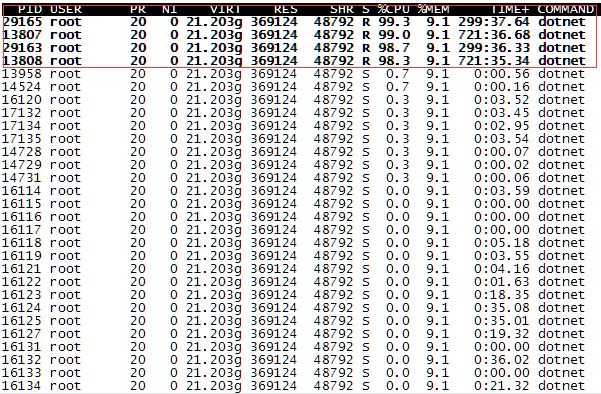
I also encountered the same problem.
Four dotnet servers do the load, and the CPU usage is high at the same time.
Then adjust the two services to do a regular restart dotnet, the other two services did not do a regular restart and other phenomena to reproduce.
.NET Command Line Tools (2.1.4)

Product Information:
 Version:            2.1.4
 Commit SHA-1 hash:  5e8add2190

Runtime Environment:
 OS Name:     centos
 OS Version:  7
 OS Platform: Linux
 RID:         centos.7-x64
 Base Path:   /usr/share/dotnet/sdk/2.1.4/

Microsoft .NET Core Shared Framework Host

  Version  : 2.0.5
  Build    : 17373eb129b3b05aa18ece963f8795d65ef8ea54

top -H -p 16144
pstack 23058    #normal
pstack 16114    #High cpu
The left side is a normal server, and the right side is a server with a high CPU usage.

And I hope this could be a feature in SDK so we can use some built-in commands to do it, like 'dotnet dump', 'dotnet profile'. As I know there are some tools in java like jmap, jstack and they are very popular and useful.
 ddrsql
on 15 Jun 2018
ddrsql
on 15 Jun 2018
@rainersigwald , @AndyGerlicher - does this look related to https://github.com/Microsoft/msbuild/pull/2384?
 leecow
on 22 Jun 2018
leecow
on 22 Jun 2018
I'd be very surprised if it was; that caused production of many threads within msbuild processes but they were short-lived and didn't consume CPU at a particularly high rate. In addition, several of these reports use pre-2.1.300 SDKs, where MSBuild processes were not long-lived. There could be a bug that keeps the processes alive and spinning, but I'm not aware of one.
I'd be very curious to know the command lines of the processes that are consuming CPU.
 rainersigwald
on 22 Jun 2018
rainersigwald
on 22 Jun 2018
I'm running into this issue as well, however I'd like to add that it happens when using the new command as well. Not just when using dotnet run. Process stays open after completing its task and remains at 100+% CPU Usage.
dotnet --info
.NET Core SDK (reflecting any global.json):
 Version:   2.1.301
 Commit:    59524873d6

Runtime Environment:
 OS Name:     Mac OS X
 OS Version:  10.13
 OS Platform: Darwin
 RID:         osx.10.13-x64
 Base Path:   /usr/local/share/dotnet/sdk/2.1.301/

Host (useful for support):
  Version: 2.1.1
  Commit:  6985b9f684

.NET Core SDKs installed:
  2.1.300 [/usr/local/share/dotnet/sdk]
  2.1.301 [/usr/local/share/dotnet/sdk]

.NET Core runtimes installed:
  Microsoft.AspNetCore.All 2.1.0 [/usr/local/share/dotnet/shared/Microsoft.AspNetCore.All]
  Microsoft.AspNetCore.All 2.1.1 [/usr/local/share/dotnet/shared/Microsoft.AspNetCore.All]
  Microsoft.AspNetCore.App 2.1.0 [/usr/local/share/dotnet/shared/Microsoft.AspNetCore.App]
  Microsoft.AspNetCore.App 2.1.1 [/usr/local/share/dotnet/shared/Microsoft.AspNetCore.App]
  Microsoft.NETCore.App 2.1.0 [/usr/local/share/dotnet/shared/Microsoft.NETCore.App]
  Microsoft.NETCore.App 2.1.1 [/usr/local/share/dotnet/shared/Microsoft.NETCore.App]

To install additional .NET Core runtimes or SDKs:
  https://aka.ms/dotnet-download
@rainersigwald @leecow if I can provide any additional information let me know.
 jordevorstenbosch
on 27 Jun 2018
jordevorstenbosch
on 27 Jun 2018
If I do ps aux | grep dotnet then the following is one of the dotnet processes that spikes the CPU:
/usr/local/share/dotnet/dotnet /usr/local/share/dotnet/sdk/2.1.300/Roslyn/bincore/VBCSCompiler.dll -pipename:myusername.F.a8YGquYlqf7WJOhYvGN0wdSxo
Not totally sure if that's what you're looking for @rainersigwald , hope this can help. Let me know if I can do anything else or provide any more info.
JoiGud
on 28 Jun 2018
@JoiGud Yes, that's exactly the kind of thing I'm looking for.
If you're seeing this can you share all of ps aux | grep dotnet? There are a few different build server processes that could be going wrong, so we need to figure out which one(s) are misbehaving to figure out the root cause.
EDIT: After getting some reports, no need to share this if the command consuming CPU is running VBCSCompiler.dll. Please do share if you see something else.
rainersigwald
on 28 Jun 2018
@rainersigwald
ps aux | grep dotnet returns
stephencavaliere 81958 109.0 3.9 25330192 656864 ?? R 1:50PM 3:26.21 /usr/local/share/dotnet/dotnet /usr/local/share/dotnet/sdk/2.1.300/Roslyn/bincore/VBCSCompiler.dll -pipename:stephencavaliere.F.a8YGquYlqf7WJOhYvGN0wdSxo
Other info that may or may not be useful:
brew cask info dotnet-sdk
dotnet-sdk: 2.1.300
https://www.microsoft.com/net/core#macos
/usr/local/Caskroom/dotnet-sdk/2.1.300 (165.6MB)
From: https://github.com/Homebrew/homebrew-cask/blob/master/Casks/dotnet-sdk.rb
==> Name
.NET Core SDK
==> Artifacts
dotnet-sdk-2.1.300-osx-x64.pkg (Pkg)
dotnet --info
.NET Core SDK (reflecting any global.json):
 Version:   2.1.300
 Commit:    adab45bf0c

Runtime Environment:
 OS Name:     Mac OS X
 OS Version:  10.13
 OS Platform: Darwin
 RID:         osx.10.13-x64
 Base Path:   /usr/local/share/dotnet/sdk/2.1.300/

Host (useful for support):
  Version: 2.1.0
  Commit:  caa7b7e2ba

.NET Core SDKs installed:
  2.1.300 [/usr/local/share/dotnet/sdk]

.NET Core runtimes installed:
  Microsoft.AspNetCore.All 2.1.0 [/usr/local/share/dotnet/shared/Microsoft.AspNetCore.All]
  Microsoft.AspNetCore.App 2.1.0 [/usr/local/share/dotnet/shared/Microsoft.AspNetCore.App]
  Microsoft.NETCore.App 2.1.0 [/usr/local/share/dotnet/shared/Microsoft.NETCore.App]

To install additional .NET Core runtimes or SDKs:
  https://aka.ms/dotnet-download
 delasteve
on 28 Jun 2018
delasteve
on 28 Jun 2018
Ok, that looks like at least two instances where it's the Roslyn compiler server that seems to be doing surprising work when it should be idle. @jaredpar can you help route?
rainersigwald
on 28 Jun 2018
Looks like a duplicate of https://github.com/dotnet/roslyn/issues/24137
Problem is a combination of a long user name, a long temp path ends up causing us to spin on named pipe creation APIs.
 jaredpar
on 29 Jun 2018
jaredpar
on 29 Jun 2018
@rainersigwald make that three
/usr/local/share/dotnet/dotnet /usr/local/share/dotnet/sdk/2.1.301/Roslyn/bincore/VBCSCompiler.dll -pipename:<username>.7GIKntv7I38xTHU3BEqdv09i4
@jaredpar could be my username is 17 characters long.
Just made a user account with only 2 characters, the issue does not occur on that account.
jordevorstenbosch
on 29 Jun 2018
@jaredpar I'm having a similar issue. I have long username 20characters with space in between probably something that can back up @jordevorstenbosch theory. Thanks
 pix3lize
on 2 Jul 2018
pix3lize
on 2 Jul 2018
Sorry for not answering sooner, was on vacation. It seems that it's always the VBCSCompiler.dll that has the high CPU load. My username is 17 characters long. Interesting.
JoiGud
on 2 Jul 2018
Sounds like this is definitely a dupe of the roslyn issue then. I think we may have to implement the hueristic around pipe name limits in our code. Short term you can disable this via UseSharedCompilation = false either as an explicit build property or an environment variable.
jaredpar
on 2 Jul 2018
I tried @mikeharder 's workaround that he mentioned here (roslyn issue): https://github.com/dotnet/roslyn/issues/24137
and it seems to solve the issue.
JoiGud
on 2 Jul 2018
Been using the solution @JoiGud talks about for a few days now, can confirm that it works for me as well.
jordevorstenbosch
on 5 Jul 2018
Issue moved to dotnet/cli #9638 via ZenHub
 Petermarcu
on 10 Jul 2018
Petermarcu
on 10 Jul 2018
For those of you trying to trace through the trail of redirections for a fix, Roselyn contributor @agocke suggests:
if you set the
TMPDIRenvironment variable to/tmp, that will probably fix the problem and let you still use the compiler server.
 qguv
on 9 Aug 2018
qguv
on 9 Aug 2018
I tried @mikeharder 's workaround that he mentioned here (roslyn issue): dotnet/roslyn#24137
and it seems to solve the issue.
I tried both solutions and not working for me.
I've done Env Variable and the plist but no luck. I've been using mac in the past 1 year after several years with Windows so I may be not quite good in setting this up although this is the first ever thing didn't work for me so far.
 sseyalioglu
on 20 Dec 2018
sseyalioglu
on 20 Dec 2018
Related issues
 leo2d
·
3Comments
leo2d
·
3Comments
 ugurcemozturk
·
3Comments
ugurcemozturk
·
3Comments
 wq807319473
·
3Comments
wq807319473
·
3Comments
 swapnild2111
·
3Comments
swapnild2111
·
3Comments
 steevcoco
·
4Comments
steevcoco
·
4Comments
Most helpful comment
Sounds like this is definitely a dupe of the roslyn issue then. I think we may have to implement the hueristic around pipe name limits in our code. Short term you can disable this via
UseSharedCompilation = falseeither as an explicit build property or an environment variable.