Core: How to seed the database by sequence?
Let's say we have a UserSeeder.js like this:
const users = await Factory
   .model('App/Models/User')
   .createMany(3)
and factory.js looks like this:
Factory.blueprint('App/Models/User', async (faker, i, data) => {
  return {
    email: ['admin@localhost', 'student@localhost', 'normal@localhost'][i],
    nickname: faker.username(),
    password: '123456',
  }
})
My expected result is:
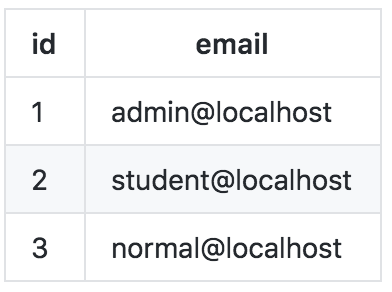
but the actual result is:
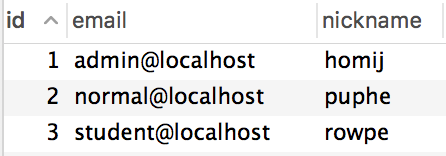
So am wondering if there's any way to approach this or have to seed them one by one?
Thanks!
 18601673727
All 21 comments
I'm guessing this happens because createMany does the inserts asynchrously. Does the order they're inserted really matter to you as long as all the emails are there and they're unique?
 webdevian
on 23 Apr 2018
webdevian
on 23 Apr 2018
Hi @webdevian, The order is somehow matters when you want do some dirty hard code staff instead of keeping some logic inside configs or tables.
18601673727
on 25 Apr 2018
Yes createMany runs queries in parallel. Also I am not sure why order matters in this case?
 thetutlage
on 25 Apr 2018
thetutlage
on 25 Apr 2018
I don't want create new issue. Forgive me.
Why does framework don't support batch like migration?
The first day, I want add some data. Next day, I add new data. When I run seed command, it run both.
 tavsta
on 28 Apr 2018
tavsta
on 28 Apr 2018
Seeds are used to have initial data in your database, that you can use for manual testing.
While development, if you your data requirements change, then you must remove everything from the database and then add it.
So simply within the same seed file, truncate all tables and then add data to them.
thetutlage
on 28 Apr 2018
Run queries in parallel make things unpredictable, I don't think this worth the trade of performance while development, you don't always have tons of data to seed.
18601673727
on 28 Apr 2018
I also would like to suggest make the seeding process more transparent, it's good for people to control which schema should been seeded first, just like the migrations.
18601673727
on 28 Apr 2018
@thetutlage
Using truncate don't resolve our problem. Because truncate and create data run in parallel.
tavsta
on 28 Apr 2018
I believe it is a general programming question.
async run () {
await MyModel.truncate()
await MyModel.create()
}
The both statements are not parallel in any form.
Also there is an RFC for seeds https://github.com/adonisjs/adonis-lucid/issues/307. Please leave your suggestions there
thetutlage
on 28 Apr 2018
When you are using MySQL and you have table with foreign constraints, truncate does not work.
Instead run:
async run () {
await MyModel.query().delete()
await MyModel.create()
}
I thought maybe someone will find this useful, because I was solving the same problem now and google search got me here.
 tomasbruckner
on 12 Sep 2018
tomasbruckner
on 12 Sep 2018
I solved it by creating a new Ace command. There might be better ways of solving this but this is how I did it:
Create a new Ace-command:
adonis make:command SeedSync
Add the following code to the command:
'use strict'

const { Command } = require('@adonisjs/ace')
const util = require('util')
const execSync = util.promisify(require('child_process').execSync)

const defaultSeedOrder = []

class SeedSync extends Command {
  static get signature () {
    return `seed:sync
    {
      order? : Comma separated of seeds
    }`
  }

  static get description () {
    return 'Seeds based on a list instead of running all seeds async.'
  }

  handle (args, options) {
    let seedOrder;

    if (args.order !== null) {
      seedOrder = args.order.split(/=(.+)/)[1].split(',')
    } else {
      seedOrder = defaultSeedOrder
    }

    for (const seed of seedOrder) {
      console.log(seed)
      execSync(`adonis seed --files='${seed}'`, (e, stdout, stderr) => {
        if (!stdout.includes('Seeded database in')) {
          this.error(`${this.icon('error')} Error: `)
        }

        console.log(stdout)
      })
    }
  }
}

module.exports = SeedSync
Now, instead of running adonis migration:refresh --seed you run adonis migration:refresh && adonis seed:sync to run the predefined order in the command file or adonis migration:refresh && adonis seed:sync --order='<seed file name comma separated>'.
As previously mentioned this type of solution will take longer time to execute because of the seeds running asynchronously. For reference, a seed that usually takes ~3s now takes ~7s.
Hopefully this might help others as well.
 iamramo
on 27 Dec 2019
iamramo
on 27 Dec 2019
I solved it by creating a new Ace command. There might be better ways of solving this but this is how I did it:
Create a new Ace-command:
adonis make:command SeedSyncAdd the following code to the command:
'use strict'

const { Command } = require('@adonisjs/ace')
const util = require('util')
const execSync = util.promisify(require('child_process').execSync)

const defaultSeedOrder = []

class SeedSync extends Command {
  static get signature () {
    return `seed:sync
    {
      order? : Comma separated of seeds
    }`
  }

  static get description () {
    return 'Seeds based on a list instead of running all seeds async.'
  }

  handle (args, options) {
    let seedOrder;

    if (args.order !== null) {
      seedOrder = args.order.split(/=(.+)/)[1].split(',')
    } else {
      seedOrder = defaultSeedOrder
    }

    for (const seed of seedOrder) {
      console.log(seed)
      execSync(`adonis seed --files='${seed}'`, (e, stdout, stderr) => {
        if (!stdout.includes('Seeded database in')) {
          this.error(`${this.icon('error')} Error: `)
        }

        console.log(stdout)
      })
    }
  }
}

module.exports = SeedSync
Now, instead of running
adonis migration:refresh --seedyou runadonis migration:refresh && adonis seed:syncto run the predefined order in the command file oradonis migration:refresh && adonis seed:sync --order='<seed file name comma separated>'.As previously mentioned this type of solution will take longer time to execute because of the seeds running asynchronously. For reference, a seed that usually takes ~3s now takes ~7s.
Hopefully this might help others as well.
hello there,
first of all thank you for sharing this. But would you mind explaining this line to me please:
const execSync = util.promisify(require('child_process').execSync)
 amit2maha1
on 18 Jan 2020
amit2maha1
on 18 Jan 2020
would you mind explaining this line to me please:
const execSync = util.promisify(require('child_process').execSync)
That creates a promise object directly.
iamramo
on 18 Jan 2020
I solved it by creating a new Ace command. There might be better ways of solving this but this is how I did it:
Create a new Ace-command:
adonis make:command SeedSyncAdd the following code to the command:
'use strict'

const { Command } = require('@adonisjs/ace')
const util = require('util')
const execSync = util.promisify(require('child_process').execSync)

const defaultSeedOrder = []

class SeedSync extends Command {
  static get signature () {
    return `seed:sync
    {
      order? : Comma separated of seeds
    }`
  }

  static get description () {
    return 'Seeds based on a list instead of running all seeds async.'
  }

  handle (args, options) {
    let seedOrder;

    if (args.order !== null) {
      seedOrder = args.order.split(/=(.+)/)[1].split(',')
    } else {
      seedOrder = defaultSeedOrder
    }

    for (const seed of seedOrder) {
      console.log(seed)
      execSync(`adonis seed --files='${seed}'`, (e, stdout, stderr) => {
        if (!stdout.includes('Seeded database in')) {
          this.error(`${this.icon('error')} Error: `)
        }

        console.log(stdout)
      })
    }
  }
}

module.exports = SeedSync
Now, instead of running
adonis migration:refresh --seedyou runadonis migration:refresh && adonis seed:syncto run the predefined order in the command file oradonis migration:refresh && adonis seed:sync --order='<seed file name comma separated>'.As previously mentioned this type of solution will take longer time to execute because of the seeds running asynchronously. For reference, a seed that usually takes ~3s now takes ~7s.
Hopefully this might help others as well.
hey sorry for bothering you again, it doesnt seem to work for me. the adonis seed --files='${seed}' command just doesnt run for me.
amit2maha1
on 18 Jan 2020
would you mind explaining this line to me please:
const execSync = util.promisify(require('child_process').execSync)That creates a promise object directly.
Update:
I ran it without the promisify and it shows Nothing to seed now
amit2maha1
on 18 Jan 2020
@amit2maha1 Run it with promisify and it should work. I'm currently running a slightly updated version of that command. I'll post it here.
'use strict'

const { Command } = require('@adonisjs/ace')
const util = require('util')
const execSync = util.promisify(require('child_process').execSync)

const defaultSeedOrder = []

class SeedSync extends Command {
  static get signature () {
    return `seed:sync
    {
      order? : Comma separated of seeds
    }`
  }

  static get description () {
    return 'Seeds based on a list instead of running all seeds async.'
  }

  handle (args, options) {
    let seedOrder;

    if (args.order !== null) {
      seedOrder = args.order.split(/=(.+)/)[1].split(',')
    } else {
      seedOrder = defaultSeedOrder
    }

    for (const seed of seedOrder) {
      this.success(`seed: ${seed}`)

      const exec = execSync(`adonis seed --files='${seed}' --force`, {stdio: 'inherit'})
    }
  }
}

module.exports = SeedSync
@amit2maha1 Run it with promisify and it should work. I'm currently running a slightly updated version of that command. I'll post it here.
'use strict'

const { Command } = require('@adonisjs/ace')
const util = require('util')
const execSync = util.promisify(require('child_process').execSync)

const defaultSeedOrder = []

class SeedSync extends Command {
  static get signature () {
    return `seed:sync
    {
      order? : Comma separated of seeds
    }`
  }

  static get description () {
    return 'Seeds based on a list instead of running all seeds async.'
  }

  handle (args, options) {
    let seedOrder;

    if (args.order !== null) {
      seedOrder = args.order.split(/=(.+)/)[1].split(',')
    } else {
      seedOrder = defaultSeedOrder
    }

    for (const seed of seedOrder) {
      this.success(`seed: ${seed}`)

      const exec = execSync(`adonis seed --files='${seed}' --force`, {stdio: 'inherit'})
    }
  }
}

module.exports = SeedSync
dude it still says "Nothing to seed"
amit2maha1
on 18 Jan 2020
@amit2maha1 Run it with promisify and it should work. I'm currently running a slightly updated version of that command. I'll post it here.
'use strict'

const { Command } = require('@adonisjs/ace')
const util = require('util')
const execSync = util.promisify(require('child_process').execSync)

const defaultSeedOrder = []

class SeedSync extends Command {
  static get signature () {
    return `seed:sync
    {
      order? : Comma separated of seeds
    }`
  }

  static get description () {
    return 'Seeds based on a list instead of running all seeds async.'
  }

  handle (args, options) {
    let seedOrder;

    if (args.order !== null) {
      seedOrder = args.order.split(/=(.+)/)[1].split(',')
    } else {
      seedOrder = defaultSeedOrder
    }

    for (const seed of seedOrder) {
      this.success(`seed: ${seed}`)

      const exec = execSync(`adonis seed --files='${seed}' --force`, {stdio: 'inherit'})
    }
  }
}

module.exports = SeedSync
dude it still says "Nothing to seed"
this is the stupidest thing ever, it only works when I use this as the command adonis seed --files ${seed} rather than adonis seed --files=${seed}
amit2maha1
on 18 Jan 2020
@amit2maha1 Run it with promisify and it should work. I'm currently running a slightly updated version of that command. I'll post it here.
'use strict'

const { Command } = require('@adonisjs/ace')
const util = require('util')
const execSync = util.promisify(require('child_process').execSync)

const defaultSeedOrder = []

class SeedSync extends Command {
  static get signature () {
    return `seed:sync
    {
      order? : Comma separated of seeds
    }`
  }

  static get description () {
    return 'Seeds based on a list instead of running all seeds async.'
  }

  handle (args, options) {
    let seedOrder;

    if (args.order !== null) {
      seedOrder = args.order.split(/=(.+)/)[1].split(',')
    } else {
      seedOrder = defaultSeedOrder
    }

    for (const seed of seedOrder) {
      this.success(`seed: ${seed}`)

      const exec = execSync(`adonis seed --files='${seed}' --force`, {stdio: 'inherit'})
    }
  }
}

module.exports = SeedSync
it works but it stops after the first seed, any help will be appreciated my friend
amit2maha1
on 19 Jan 2020
@amit2maha1 One solution is to add all you seed-files in const defaultSeedOrder = [].
E.g.
const defaultSeedOrder = [
    'UserRoleSeeder.js',
    'UserSeeder.js',
    'UserDetailSeeder.js',
     and so on...
]
It's in that sequence the files will be executed.
iamramo
on 19 Jan 2020
This thread has been automatically locked since there has not been any recent activity after it was closed. Please open a new issue for related bugs.
![lock[bot] picture](https://avatars.githubusercontent.com/in/6672?v=4&s=40) lock[bot]
on 10 Mar 2020
lock[bot]
on 10 Mar 2020
Related issues
 codingphasedotcom
·
3Comments
codingphasedotcom
·
3Comments
 PC-HUB
·
4Comments
PC-HUB
·
4Comments
 imperez
·
4Comments
imperez
·
4Comments
 Extarys
·
4Comments
Extarys
·
4Comments
 ghost
·
3Comments
ghost
·
3Comments
Most helpful comment
I solved it by creating a new Ace command. There might be better ways of solving this but this is how I did it:
Create a new Ace-command:
adonis make:command SeedSyncAdd the following code to the command:
Now, instead of running
adonis migration:refresh --seedyou runadonis migration:refresh && adonis seed:syncto run the predefined order in the command file oradonis migration:refresh && adonis seed:sync --order='<seed file name comma separated>'.As previously mentioned this type of solution will take longer time to execute because of the seeds running asynchronously. For reference, a seed that usually takes ~3s now takes ~7s.
Hopefully this might help others as well.