Core: Tooltip in sharing autocomplete doesn't mention it is autocompleting
Steps to reproduce
- Having a server with several users "aabaa", "aabb", "aabc"
- In config.php add 'user.search_min_length' => 3,
- Using admin try to share with "aac" wait for autocompletion.
Expected behavior
A tooltip appears saying:
'No users or groups found containing "aac"'
Actual behavior
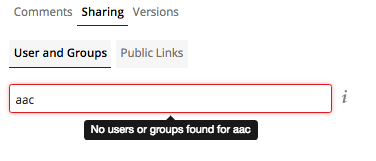
A tooltip appears saying
'No users or groups found for "aac"'
Server configuration
Operating system:
Ubuntu 16.04
Web server:
Apache
Database:
MySQL
PHP version:
7.1
Cache
DB
ownCloud version: (see ownCloud admin page)
{"installed":true,"maintenance":false,"needsDbUpgrade":false,"version":"10.0.8.1","versionstring":"10.0.8 RC1","edition":"Enterprise","productname":"ownCloud"}
Updated from an older ownCloud or fresh install:
Fresh
The content of config/config.php:
Are you using external storage, if yes which one: local/smb/sftp/...
No.
Are you using encryption:
Yes.
Logs
Client configuration
Browser
Chrome.
@pmaier1 When having 'user.search_min_length' => 4 in config.php maybe the tooltip should not appear when searching "aac".
 SergioBertolinSG
All 31 comments
GitMate.io thinks possibly related issues are https://github.com/owncloud/core/issues/2343 (Autocomplete bug in share option), https://github.com/owncloud/core/issues/27734 (Sharing autocomplete user box does not complete if avatar are disabled ), https://github.com/owncloud/core/issues/22910 (Tooltip of a fed.sharing remote user that not exists doesn't disappear), https://github.com/owncloud/core/issues/18551 ([mobile] Autocomplete drop down in sharing dialog not shown ), and https://github.com/owncloud/core/issues/22746 (Tooltip in federated sharing is not showing the full url.).
 ownclouders
on 16 Apr 2018
ownclouders
on 16 Apr 2018
I updated the expected tooltip text to:
No users or groups found containing "aac"
because the search actually returns any users or groups that contain the string in their display name.
 phil-davis
on 16 Apr 2018
phil-davis
on 16 Apr 2018
Case 2:
Type just "aa" in the search box. (less chars than user.search_min_length)
At the moment the tooltip says No users or groups found for aa
If a simple tooltip text change is made to the suggested text above, then it will say:
No users or groups found containing "aa"
And that will also be incorrect.
For this case, it has actually looked for just an exact (case-insensitive) match. Maybe the tooltip could say:
User or group "aa" not found
phil-davis
on 16 Apr 2018
For this case, it has actually looked for just an exact (case-insensitive) match. Maybe the tooltip could say:
User or group "aa" not found
I like that idea for exact matches :+1:
 pmaier1
on 17 Apr 2018
pmaier1
on 17 Apr 2018
Is this a to-do for 10.0.8 ?
Or for future?
IMO people can live with the tooltip text as it is. Making it better/more accurate can come in slow time.
phil-davis
on 17 Apr 2018
not critical, I'd say 10.0.9
 PVince81
on 17 Apr 2018
PVince81
on 17 Apr 2018
Yes, 10.0.9, agree.
pmaier1
on 17 Apr 2018
moving to 10.0.9 as "development" is 10.0.9 and "QA" is 10.0.8
PVince81
on 17 Apr 2018
There are more UX issues with this autocomplete.
We should change the placeholder/tooltip to say "please type at least X characcters" (or better wording) to make it clear you need to type more.
It will do a server search with less chars for exact matches but the message is here to avoid the scenario where users expect a partial search with less.
@pmaier1 @tomneedham @jvillafanez
PVince81
on 25 Apr 2018
Note: the problem already existed before but was less visible because it would be there only for 2 chars or less input. now that we changed the default min chars to 4 the bug is more apparent.
PVince81
on 25 Apr 2018
We should change the placeholder/tooltip to say "please type at least X characcters" (or better wording) to make it clear you need to type more.
That sounds good. Maybe it could say: "Suggestions are shown at a character count of X." where X is read from the config value.
We would lose the "Share with users, groups or remote users" note, though. IMO not that bad as users/groups are mentioned in the tab and the tooltip explains fed sharing (words like "syntax" in there are also not that user-friendly, I guess, but that's another thing).
pmaier1
on 25 Apr 2018
Maybe showing a "you have to enter at least 4 chars" text just above the search box would be good enough, and feels less intrusive.
In any case, this is a band aid for a bigger problem.
 jvillafanez
on 25 Apr 2018
jvillafanez
on 25 Apr 2018
Thought about this again. Probably changing the general default to "4" was not the best decision as this high level of security clearly witnesses usability. I think it would be best to set the default to "2" again and in case someone increases that value they can educate their users.
Maybe showing a "you have to enter at least 4 chars" text just above the search box would be good enough, and feels less intrusive.
I don't really like that idea. We should aim to keep the UI as clean and simple as possible. If we really want to provide some explicit help for users then only the tooltip or the placeholder should be used, IMO. Maybe the "pop-up-tooltip" (no users found..) could give that hint when no recipients are found.
pmaier1
on 26 Apr 2018
So, what approach is recommended to take, would it be enough to replace a placeholder from "Share with users, groups or remote users…" to "Suggestions are shown at a character count of X."?
 VicDeo
on 23 May 2018
VicDeo
on 23 May 2018
I would like to do the following:
- Change the default back to "2" (Release notes!)
- Change the tooltip "No users are found" to "No users are found. Enter X or more characters to get suggestions"
- Probably this needs to be shorter / better English. Any ideas @phil-davis or @settermjd maybe?
- UX opinion from @felixheidecke could be helpful
This would provide a good default in terms of usability vs. security for most installations. Higher security needs can be satisfied through configuration. Usability would be improved by a non-intrusive tooltip that the user will only see when actually no users are found to share with (the point in the flow where the information is relevant).
Need to confirm this with @hodyroff. If there are other opinions or things I might have missed, please speak up.
pmaier1
on 24 May 2018
"No users found. Enter N or more characters to see suggestions"
"No users found. Enter N or more characters to see matches"
"No users found. Enter at least N characters to see matches"
and when matching of groups is also allowed it puts "or groups": "No users or groups found..."
@settermjd do you have any thoughts about ways to make the English shorter?
phil-davis
on 24 May 2018
The value of N needs to be exposed somewhere in an API so clients will know it. Maybe it should be in the capabilities? (I don't think it is there at the moment)
phil-davis
on 24 May 2018
@phil-davis it is, since 10.0.8 https://github.com/owncloud/core/blob/master/apps/files_sharing/lib/Capabilities.php#L122
VicDeo
on 24 May 2018
"No users are found. Enter X or more characters to get suggestions"
Just make it "Enter at least X characters"
 tomneedham
on 24 May 2018
tomneedham
on 24 May 2018
not "Please enter at least X characters" ? to be more polite :-D
I'm fine with the message, if @pmaier1 is too then this is the tasks to be done:
- [ ] Change the default back to "2" (Release notes!)
- [ ] Change the tooltip "No users are found" to "Please enter at least X characters"
@pmaier1 @tomneedham please confirm
PVince81
on 29 May 2018
not "Please enter at least X characters" ? to be more polite :-D
In my original proposal I tried to avoid the need for plural "s" for "characters" as it might be just "1" or more.
Change the tooltip "No users are found" to "Please enter at least X characters"
So, even if you enter 10 chars and no matching users are found you will see this suggestion? This could be confusing. It should either include "No results" or switch to "No results" when X chars have been entered. Feasible? (I chose "No results" as "No users are found" is actually inaccurate.)
pmaier1
on 1 Jun 2018
Something to keep in mind: exact matches might appear even if you type less than the number of required characters. For example if the min chars is 4 but you type "Li" and there's a user with last name "Li", then that user will appear as exact match.
It's tricky to find a short message that covers all these cases...
PVince81
on 1 Jun 2018
@pmaier1 we'll need a final statement about the wording we want to use based on all the input. :-)
PVince81
on 4 Jun 2018
In my original proposal I tried to avoid the need for plural "s" for "characters" as it might be just "1" or more.
our l10n lib code has functions to change the message in case of plural, so no need to worry about this
PVince81
on 5 Jun 2018
Modified proposal:
- [ ] change the default back to 2 (release notes!)
- [ ] if the number of entered chars is below limit, show "Please enter at least X characters for suggestions", because you can still get exact matches when typing less. Message must be adjusted to singular if X is 1. (use the appropriate "n()" translation function argument)
- [ ] if the number of entered chars is above or equal to X, show "No results" if no results were found
@pmaier1
PVince81
on 5 Jun 2018
Perfect, I'm happy with this! Thanks!
pmaier1
on 5 Jun 2018
@PVince81 needs rescheduling for the next sprint
VicDeo
on 8 Jun 2018
@VicDeo thanks, it's already in :smile:
PVince81
on 8 Jun 2018
Looks good. 👍
tomneedham
on 11 Jun 2018
Here you go https://github.com/owncloud/core/pull/31714
VicDeo
on 11 Jun 2018
This thread has been automatically locked since there has not been any recent activity after it was closed. Please open a new issue for related bugs.
![lock[bot] picture](https://avatars.githubusercontent.com/in/6672?v=4&s=40) lock[bot]
on 30 Jul 2019
lock[bot]
on 30 Jul 2019
Related issues
 individual-it
·
3Comments
individual-it
·
3Comments
 patrickjahns
·
4Comments
patrickjahns
·
4Comments
 michaelstingl
·
5Comments
michaelstingl
·
5Comments
 HLeemans
·
4Comments
HLeemans
·
4Comments
 f-s
·
4Comments
f-s
·
4Comments