Core: [Media Player] Select source loop
HASSIO Host : 1.3
Supervisor : 0.96
Home Assistant release : 0.65.3
Component : media_player.webostv
_(First use of this component for me)_
Description of problem :
when I change sources,
tv goes from one source to another in a loop,
example:
when I'm on netflix, and I put HDMI1, the tv will go through:
Netflix, HDMI1, Netflix, HDMI1, Netflix, HDMI1, Netflix, HDMI1, ...
To finally stop, sometimes on HDMI1, sometimes on Netflix
Expected: Change source imediatelly
Config :
media_player:
  - platform: webostv
    host: 192.168.0.4
    name: TV LG
@OddBloke you seem to master this component
 boced66
All 29 comments
I see in the file "webostv.py" :
REQUIREMENTS = ['pylgtv==0.1.7']
Version 0.1.8 of pylgtv seems to include a correction of this kind of case,
Maybe just updating the version will fix the bug.
boced66
on 12 Mar 2018
I think you may have been looking at older commits as well; 0.1.8 only appears to include one minor change: https://github.com/TheRealLink/pylgtv/compare/0.1.7...0.1.8
Do you have any automation set up around your TV?
If you have any logs, those would be extremely helpful.
 OddBloke
on 12 Mar 2018
OddBloke
on 12 Mar 2018
I have the same behaviour with snapcast sources since 0.65.x:
If I restart HASS and select the media-player in the UI, no source is selected. Then I can select a source exactly once. As soon as I select another source it starts to loop between both. It seems the the UI sends constantly alternating service calls until I close the state card for the media player. There is no automation or anything involved:
2018-03-13 05:53:41 INFO (MainThread) [homeassistant.core] Bus:Handling <Event call_service[L]: service_call_id=3049842320-1908, service_data=source=Spotify, entity_id=media_player.snapcast_gro
up_6c4216c83577576755569fc1f84c846f, domain=media_player, service=select_source>
2018-03-13 05:53:41 INFO (MainThread) [snapcast.control.group] set stream to Spotify on default
2018-03-13 05:53:41 INFO (MainThread) [homeassistant.core] Bus:Handling <Event service_executed[L]: service_call_id=3049842320-1908>
2018-03-13 05:53:41 INFO (MainThread) [homeassistant.core] Bus:Handling <Event state_changed[L]: entity_id=media_player.snapcast_group_6c4216c83577576755569fc1f84c846f, old_state=<state media_p
layer.snapcast_group_6c4216c83577576755569fc1f84c846f=idle; friendly_name=snapcast_group_6c4216c8-3577-5767-5556-9fc1f84c846f, is_volume_muted=False, source=Airplay, supported_features=2060, source_list=['Mopidy', 'Airplay', 'Spotify', 'Bluetooth'], volume_level=0.77 @ 2018-03-13T05:37:25.499774+01:00>, new_state=<state media_player.snapcast_group_6c4216c83577576755569fc1f84c846f=idle; friendly_name=snapcast_group_6c4216c8-3577-5767-5556-9fc1f84c846f, is_volume_muted=False, source=Spotify, supported_features=2060, source_list=['Mopidy', 'Airplay', 'Spotify', 'Bluetooth'], volume_level=0.77 @ 2018-03-13T05:37:25.499774+01:00>>
2018-03-13 05:53:41 INFO (MainThread) [homeassistant.core] Bus:Handling <Event call_service[L]: service_call_id=3049842320-1909, service_data=source=Airplay, entity_id=media_player.snapcast_gro
up_6c4216c83577576755569fc1f84c846f, domain=media_player, service=select_source>
2018-03-13 05:53:41 INFO (MainThread) [snapcast.control.group] set stream to Airplay on default
2018-03-13 05:53:41 INFO (MainThread) [homeassistant.core] Bus:Handling <Event service_executed[L]: service_call_id=3049842320-1909>
2018-03-13 05:53:41 INFO (MainThread) [homeassistant.core] Bus:Handling <Event state_changed[L]: entity_id=media_player.snapcast_group_6c4216c83577576755569fc1f84c846f, old_state=<state media_p
layer.snapcast_group_6c4216c83577576755569fc1f84c846f=idle; friendly_name=snapcast_group_6c4216c8-3577-5767-5556-9fc1f84c846f, is_volume_muted=False, source=Spotify, supported_features=2060, source_list=['Mopidy', 'Airplay', 'Spotify', 'Bluetooth'], volume_level=0.77 @ 2018-03-13T05:37:25.499774+01:00>, new_state=<state media_player.snapcast_group_6c4216c83577576755569fc1f84c846f=idle; friendly_name=snapcast_group_6c4216c8-3577-5767-5556-9fc1f84c846f, is_volume_muted=False, source=Airplay, supported_features=2060, source_list=['Mopidy', 'Airplay', 'Spotify', 'Bluetooth'], volume_level=0.77 @ 2018-03-13T05:37:25.499774+01:00>>
2018-03-13 05:53:41 INFO (MainThread) [homeassistant.core] Bus:Handling <Event call_service[L]: service_call_id=3049842320-1910, service_data=source=Spotify, entity_id=media_player.snapcast_gro
up_6c4216c83577576755569fc1f84c846f, domain=media_player, service=select_source>
2018-03-13 05:53:41 INFO (MainThread) [snapcast.control.group] set stream to Spotify on default
2018-03-13 05:53:41 INFO (MainThread) [homeassistant.core] Bus:Handling <Event service_executed[L]: service_call_id=3049842320-1910>
2018-03-13 05:53:41 INFO (MainThread) [homeassistant.core] Bus:Handling <Event state_changed[L]: entity_id=media_player.snapcast_group_6c4216c83577576755569fc1f84c846f, old_state=<state media_p
layer.snapcast_group_6c4216c83577576755569fc1f84c846f=idle; friendly_name=snapcast_group_6c4216c8-3577-5767-5556-9fc1f84c846f, is_volume_muted=False, source=Airplay, supported_features=2060, source_list=['Mopidy', 'Airplay', 'Spotify', 'Bluetooth'], volume_level=0.77 @ 2018-03-13T05:37:25.499774+01:00>, new_state=<state media_player.snapcast_group_6c4216c83577576755569fc1f84c846f=idle; friendly_name=snapcast_group_6c4216c8-3577-5767-5556-9fc1f84c846f, is_volume_muted=False, source=Spotify, supported_features=2060, source_list=['Mopidy', 'Airplay', 'Spotify', 'Bluetooth'], volume_level=0.77 @ 2018-03-13T05:37:25.499774+01:00>>
2018-03-13 05:53:41 INFO (MainThread) [homeassistant.core] Bus:Handling <Event call_service[L]: service_call_id=3049842320-1911, service_data=source=Airplay, entity_id=media_player.snapcast_gro
up_6c4216c83577576755569fc1f84c846f, domain=media_player, service=select_source>
2018-03-13 05:53:41 INFO (MainThread) [snapcast.control.group] set stream to Airplay on default
2018-03-13 05:53:41 INFO (MainThread) [homeassistant.core] Bus:Handling <Event service_executed[L]: service_call_id=3049842320-1911>
2018-03-13 05:53:41 INFO (MainThread) [homeassistant.core] Bus:Handling <Event state_changed[L]: entity_id=media_player.snapcast_group_6c4216c83577576755569fc1f84c846f, old_state=<state media_player.snapcast_group_6c4216c83577576755569fc1f84c846f=idle; friendly_name=snapcast_group_6c4216c8-3577-5767-5556-9fc1f84c846f, is_volume_muted=False, source=Spotify, supported_features=2060, source_list=['Mopidy', 'Airplay', 'Spotify', 'Bluetooth'], volume_level=0.77 @ 2018-03-13T05:37:25.499774+01:00>, new_state=<state media_player.snapcast_group_6c4216c83577576755569fc1f84c846f=idle; friendly_name=snapcast_group_6c4216c8-3577-5767-5556-9fc1f84c846f, is_volume_muted=False, source=Airplay, supported_features=2060, source_list=['Mopidy', 'Airplay', 'Spotify', 'Bluetooth'], volume_level=0.77 @ 2018-03-13T05:37:25.499774+01:00>>
 janLo
on 13 Mar 2018
janLo
on 13 Mar 2018
Thank you for the answer,
I have the logs at the level "Warning", and I have no message, when I do this manipulation,
And I have no automation at the moment
I made a recording of what HASS does,
The tv does the same thing,
boced66
on 13 Mar 2018
Looks similar here. On the phone as well well as in the browser.
This is what the WS traffic looks like when the looping starts:
 {"type":"call_service","domain":"media_player","service":"select_source","service_data":
 {"source":"Spotify","entity_id":"media_player.snapcast_group_6c4216c83577576755569fc1f84c846f"},"id":11}
{"event": {"origin": "LOCAL", "data": {"entity_id": "media_player.snapcast_group_6c4216c83577576755569fc1f84c846f", "old_state": {"entity_id": "media_player.snapcast_group_6c4216c83577576755569fc1f84c846f", "attributes": {"friendly_name": "snapcast_group_6c4216c8-3577-5767-5556-9fc1f84c846f", "is_volume_muted": false, "source": "Airplay", "supported_features": 2060, "source_list": ["Mopidy", "Airplay", "Spotify", "Bluetooth"], "volume_level": 0.77}, "last_updated": "2018-03-13T04:53:42.510106+00:00", "state": "idle", "last_changed": "2018-03-13T04:37:25.499774+00:00"}, "new_state": {"entity_id": "media_player.snapcast_group_6c4216c83577576755569fc1f84c846f", "attributes": {"friendly_name": "snapcast_group_6c4216c8-3577-5767-5556-9fc1f84c846f", "is_volume_muted": false, "source": "Spotify", "supported_features": 2060, "source_list": ["Mopidy", "Airplay", "Spotify", "Bluetooth"], "volume_level": 0.77}, "last_updated": "2018-03-13T05:16:20.329529+00:00", "state": "idle", "last_changed": "2018-03-13T04:37:25.499774+00:00"}}, "event_type": "state_changed", "time_fired": "2018-03-13T05:16:20.329748+00:00"}, "id": 2, "type": "event"}
{"type":"call_service","domain":"media_player","service":"select_source","service_data":{"source":"Airplay","entity_id":"media_player.snapcast_group_6c4216c83577576755569fc1f84c846f"},"id":12}
{"success": true, "result": null, "id": 11, "type": "result"}
{"event": {"origin": "LOCAL", "data": {"entity_id": "media_player.snapcast_group_6c4216c83577576755569fc1f84c846f", "old_state": {"entity_id": "media_player.snapcast_group_6c4216c83577576755569fc1f84c846f", "attributes": {"friendly_name": "snapcast_group_6c4216c8-3577-5767-5556-9fc1f84c846f", "is_volume_muted": false, "source": "Spotify", "supported_features": 2060, "source_list": ["Mopidy", "Airplay", "Spotify", "Bluetooth"], "volume_level": 0.77}, "last_updated": "2018-03-13T05:16:20.329529+00:00", "state": "idle", "last_changed": "2018-03-13T04:37:25.499774+00:00"}, "new_state": {"entity_id": "media_player.snapcast_group_6c4216c83577576755569fc1f84c846f", "attributes": {"friendly_name": "snapcast_group_6c4216c8-3577-5767-5556-9fc1f84c846f", "is_volume_muted": false, "source": "Airplay", "supported_features": 2060, "source_list": ["Mopidy", "Airplay", "Spotify", "Bluetooth"], "volume_level": 0.77}, "last_updated": "2018-03-13T05:16:20.473609+00:00", "state": "idle", "last_changed": "2018-03-13T04:37:25.499774+00:00"}}, "event_type": "state_changed", "time_fired": "2018-03-13T05:16:20.473822+00:00"}, "id": 2, "type": "event"}
{"type":"call_service","domain":"media_player","service":"select_source","service_data":{"source":"Spotify","entity_id":"media_player.snapcast_group_6c4216c83577576755569fc1f84c846f"},"id":13}
{"success": true, "result": null, "id": 12, "type": "result"}
{"event": {"origin": "LOCAL", "data": {"entity_id": "media_player.snapcast_group_6c4216c83577576755569fc1f84c846f", "old_state": {"entity_id": "media_player.snapcast_group_6c4216c83577576755569fc1f84c846f", "attributes": {"friendly_name": "snapcast_group_6c4216c8-3577-5767-5556-9fc1f84c846f", "is_volume_muted": false, "source": "Airplay", "supported_features": 2060, "source_list": ["Mopidy", "Airplay", "Spotify", "Bluetooth"], "volume_level": 0.77}, "last_updated": "2018-03-13T05:16:20.473609+00:00", "state": "idle", "last_changed": "2018-03-13T04:37:25.499774+00:00"}, "new_state": {"entity_id": "media_player.snapcast_group_6c4216c83577576755569fc1f84c846f", "attributes": {"friendly_name": "snapcast_group_6c4216c8-3577-5767-5556-9fc1f84c846f", "is_volume_muted": false, "source": "Spotify", "supported_features": 2060, "source_list": ["Mopidy", "Airplay", "Spotify", "Bluetooth"], "volume_level": 0.77}, "last_updated": "2018-03-13T05:16:20.599586+00:00", "state": "idle", "last_changed": "2018-03-13T04:37:25.499774+00:00"}}, "event_type": "state_changed", "time_fired": "2018-03-13T05:16:20.599785+00:00"}, "id": 2, "type": "event"}
{"type":"call_service","domain":"media_player","service":"select_source","service_data":{"source":"Airplay","entity_id":"media_player.snapcast_group_6c4216c83577576755569fc1f84c846f"},"id":14}
[...]
Same here with my onkyo receiver and the spotify component.
It's a new setup of HASS.
No automation at the moment just select source then looping.
 sstinger
on 13 Mar 2018
sstinger
on 13 Mar 2018
It sounds to me like the title of this issue should change to be more general.
OddBloke
on 13 Mar 2018
Bug https://github.com/home-assistant/home-assistant/issues/10830 might be related. Onkyo.
I have posted a video showing the issue in that bug:
 Konstigt
on 13 Mar 2018
Konstigt
on 13 Mar 2018
Hello, same here, using webostv and HA v0.65.02.
It only happens when changing source through the web interface though. If I fire a "media_player.select_source" service, it works well, without looping.
 stephanerosi
on 14 Mar 2018
stephanerosi
on 14 Mar 2018
The same for me, If I fire a "media_player.select_source", it works.
But I need to pause my media before making the switch,
Is it possible to have the source change send the pause signal before changing?
boced66
on 15 Mar 2018
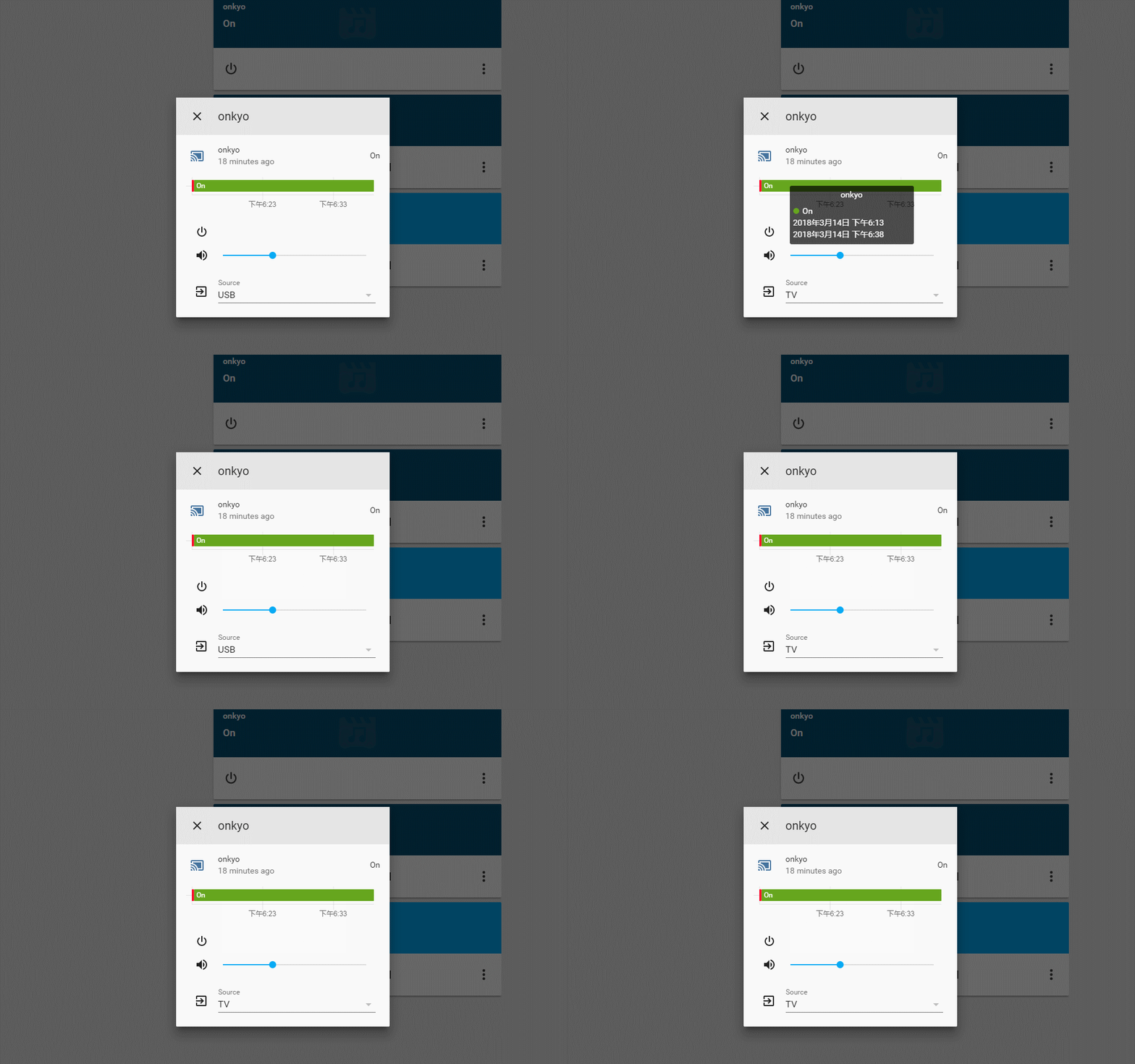
Onkyo mediaplayer: When you select the source, it will keep switching
Home Assistant
0.65.4
Custom UI 20180216
0.63.2 is ok.
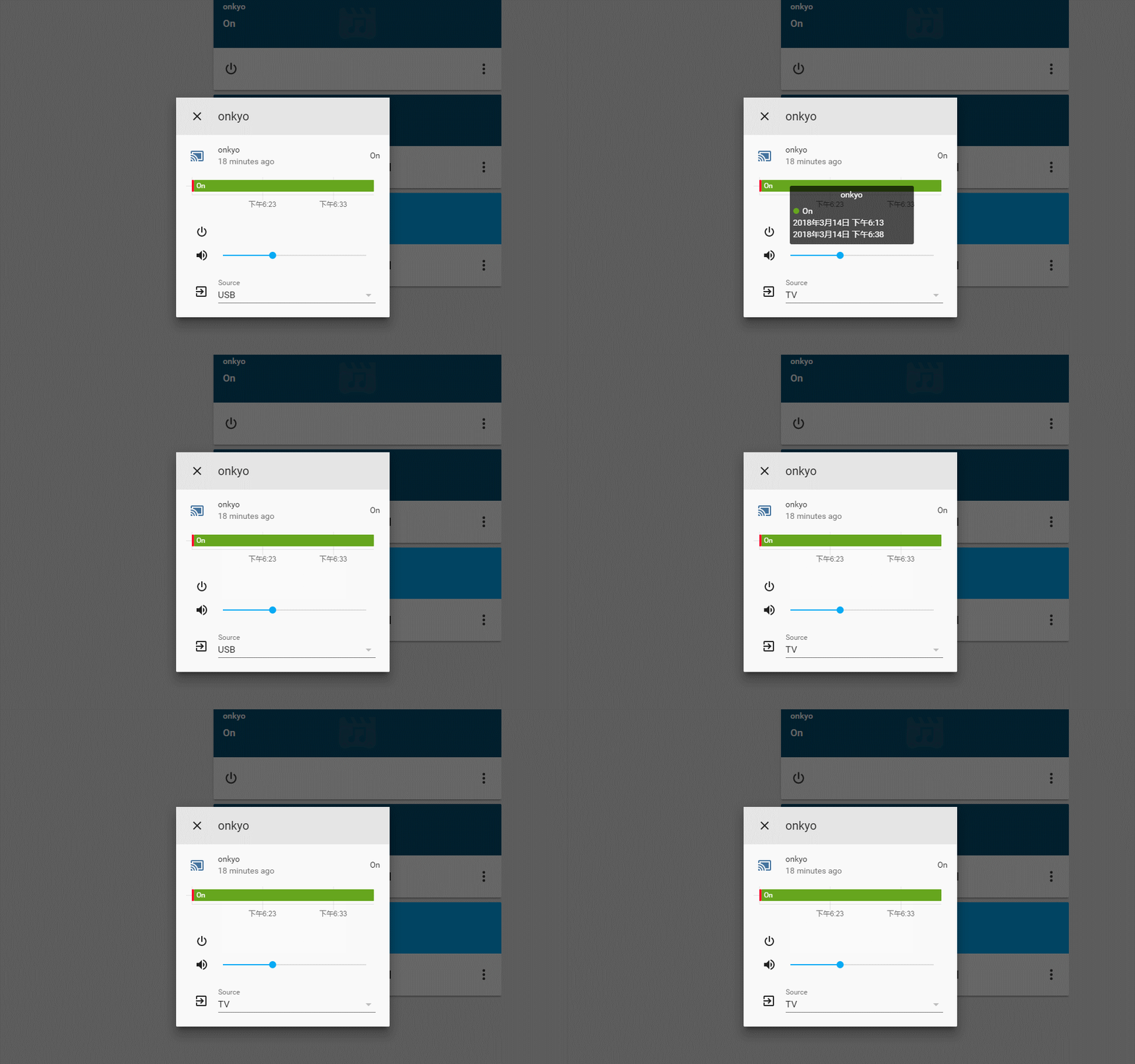
 kukudemajia
on 15 Mar 2018
kukudemajia
on 15 Mar 2018
Same problem, with snapcast.
 happyleavesaoc
on 15 Mar 2018
happyleavesaoc
on 15 Mar 2018
It's a problem in the media player component...
 mizrachiran
on 16 Mar 2018
mizrachiran
on 16 Mar 2018
It seems that this issue has not attracted attention.
kukudemajia
on 16 Mar 2018
Same issue here.
0.65.5 of HA.
 GilbyDettori
on 16 Mar 2018
GilbyDettori
on 16 Mar 2018
I have this problem as well 0.65.5
 jslove
on 19 Mar 2018
jslove
on 19 Mar 2018
same issue with Sonos
 deluxestyle
on 19 Mar 2018
deluxestyle
on 19 Mar 2018
@kukudemajia
What do you mean by "Custom UI 20180216
0.63.2 is ok." ?
stephanerosi
on 21 Mar 2018
Maybe it's a frontend issue : https://github.com/home-assistant/home-assistant-polymer/issues/1001#thread-subscription-status
stephanerosi
on 21 Mar 2018
@stephanerosi Sorry, the version before I upgraded is 0.63.2,it worked well.
But when I downgrade from 0.65.5 to 0.63.2, it doesn't work.
kukudemajia
on 21 Mar 2018
Happening for me as well on my Onkyo using Safari on iPhone. HA 0.65.3
 joe248
on 21 Mar 2018
joe248
on 21 Mar 2018
fixed, close please
 c727
on 21 Mar 2018
c727
on 21 Mar 2018
still not fixed in 0.65.6
deluxestyle
on 21 Mar 2018
0.65.6 was released before the fix. It requires the frontend from 2018-02-10: https://github.com/home-assistant/home-assistant/blob/0.65.6/homeassistant/components/frontend/__init__.py#L27
janLo
on 21 Mar 2018
@MartinHjelmare still not fixed in 0.65.6.
Home Assistant 0.65.6
frontend==20180310.0
More info
aiohttp==3.0.6
aiohttp-cors==0.6.0
asn1crypto==0.24.0
astral==1.5
async-timeout==2.0.0
attrs==17.4.0
Automat==0.6.0
beautifulsoup4==4.6.0
broadlink==0.5.1
certifi==2018.1.18
cffi==1.11.2
chardet==3.0.4
colorlog==3.1.2
constantly==15.1.0
cryptography==2.1.4
cssselect==1.0.3
distro==1.1.0
docopt==0.6.2
enum-compat==0.0.2
fake-useragent==0.1.8
future==0.16.0
fuzzywuzzy==0.16.0
gTTS-token==1.1.1
ha-ffmpeg==1.9
hbmqtt==0.9.1
home-assistant-frontend==20180310.0
homeassistant==0.65.6
hyperlink==17.3.1
idna==2.6
idna-ssl==1.0.1
incremental==17.5.0
influxdb==4.1.1
itchat==1.3.10
Jinja2==2.10
lxml==4.1.1
MarkupSafe==1.0
multidict==4.1.0
mutagen==1.40.0
mysqlclient==1.3.12
netdisco==1.2.4
netifaces==0.10.6
olefile==0.44
onkyo-eiscp==1.2.4
paho-mqtt==1.3.1
parsel==1.3.1
passlib==1.7.1
pexpect==4.0.1
Pillow==5.0.0
pkg-resources==0.0.0
ptyprocess==0.5.2
pyasn1==0.4.2
pyasn1-modules==0.2.1
pycparser==2.18
pycrypto==2.6.1
pycryptodome==3.4.11
PyDispatcher==2.0.5
pydroid-ipcam==0.8
pyOpenSSL==17.5.0
pypng==0.0.18
PyQRCode==1.2.1
python-dateutil==2.6.1
pytz==2018.3
PyYAML==3.12
queuelib==1.4.2
requests==2.18.4
Scrapy==1.5.0
service-identity==17.0.0
six==1.11.0
SQLAlchemy==1.2.2
transitions==0.6.4
Twisted==17.9.0
typing==3.6.4
ua-parser==0.7.3
urllib3==1.22
user-agents==1.1.0
voluptuous==0.11.1
w3lib==1.18.0
websockets==4.0.1
wxpy==0.3.9.8
xmltodict==0.11.0
yarl==1.1.1
zeroconf==0.19.1
zope.interface==4.4.3
kukudemajia
on 22 Mar 2018
The fix was merged today so it hasn't been released yet. Wait for 0.66.
 MartinHjelmare
on 22 Mar 2018
MartinHjelmare
on 22 Mar 2018
cool.
kukudemajia
on 22 Mar 2018
Just updated to 0.66
frontend==20180330.0
But the issue is still there...
stephanerosi
on 1 Apr 2018
My mistake, the frontend cache was not reloaded.
It works well on 0.66.0.
stephanerosi
on 1 Apr 2018
Related issues
 ofuangka
·
3Comments
ofuangka
·
3Comments
 Elmardus
·
3Comments
Elmardus
·
3Comments
 TheZoker
·
3Comments
TheZoker
·
3Comments
 arangates
·
3Comments
arangates
·
3Comments
 piitaya
·
3Comments
piitaya
·
3Comments