Hi we are getting a strange behavior with ASP.net core 2. We have created a simple web API that returns a large amount of JSON data (3.7MB) read from a static JSON file asynchronously. We have found that when we apply load on this application hosted in Azure web apps (> 50 requests) some of the responses contains JSON that is truncated. i.e. we get a status of 200 however the JSON is malformed and truncated. Our original hypothesis we thought was due to the size of the data and and have implemented compression to dis/prove this, however this issue still persists. We have found that this issue does not occur when the size of the Json is less than 1.5 MB and can handle requests > 250.We have also found that when the server resources are increased, i.e. we scale up or out on Azure (from basic) it reduces the frequency it occurs but does not remove it altogether.
To add to the above, we have carried out a similar exercise using ASP.net MVC and we do not get this behavior. The MVC application was also hosted on the same web app.
 ayazaliuk101
All 15 comments
@Eilon
 Petermarcu
on 18 Mar 2018
Petermarcu
on 18 Mar 2018
Can you reproduce this locally?
 davidfowl
on 18 Mar 2018
davidfowl
on 18 Mar 2018
@Davidfowl yes. Also sent the details to MS support with the source code and they can reproduce on their side as well. Need to run more logs for them to escalate to .net core team.
ayazaliuk101
on 18 Mar 2018
Apologies when you say locally i.e. on my local machine then no, but I can reproduce on a Azure web app.
ayazaliuk101
on 18 Mar 2018
@Eilon @davidfowl should this issue get moved to an ASP.NET repo?
Petermarcu
on 23 Mar 2018
@Petermarcu I think that isn't yet clear at this time. Could be an Azure issue.
@ayazaliuk101 - have you been able to find any more info on this?
 Eilon
on 23 Mar 2018
Eilon
on 23 Mar 2018
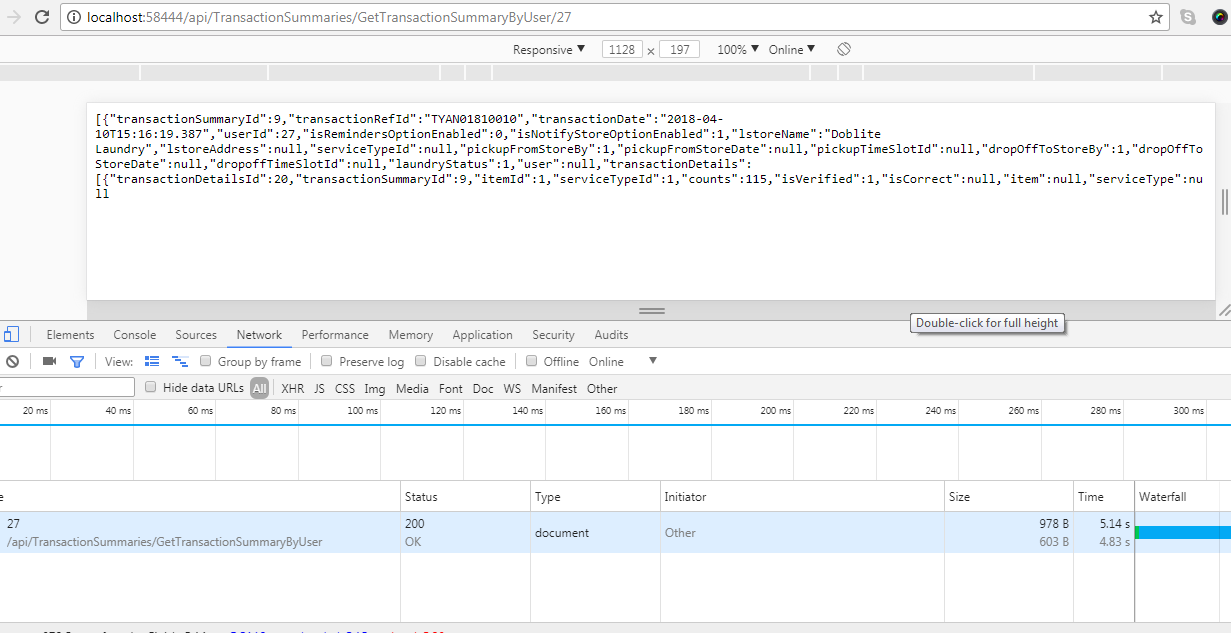
the similar issue , it is generating while debugging ..
 tharmachandran
on 11 Apr 2018
tharmachandran
on 11 Apr 2018
Resolved by this ref .
c#
public void ConfigureServices(IServiceCollection services)
{
    services.AddMvc()
        .AddJsonOptions(
            options => options.SerializerSettings.ReferenceLoopHandling = Newtonsoft.Json.ReferenceLoopHandling.Ignore
        );
}
tharmachandran
on 11 Apr 2018
This issue was moved to aspnet/Home#3047
Eilon
on 11 Apr 2018
I had the same problem, so thanks @tharmachandran for the Json options statement. Fixed the problem for me
 TrevorFradsham
on 3 Dec 2018
TrevorFradsham
on 3 Dec 2018
I also had the same problem and @tharmachandran 's fix worked for me too, thanks for chiming in @TrevorFradsham .
 NeilMcKechnie
on 22 Jan 2019
NeilMcKechnie
on 22 Jan 2019
You can try to increase the size of request JSON.
Have a look at link below
https://www.talkingdotnet.com/how-to-increase-file-upload-size-asp-net-core/
 kizora
on 7 Feb 2019
kizora
on 7 Feb 2019
For anyone else landing here from a search on this issue:
One reason this can happen is if an error happens while serializing the object to JSON. For example a field marked as required that is not present in the data can cause this. The output simply stops and no exception is reported in this case.
Check that you can serialize the json object using JSonConvert.SerializeObject() before returning it and fix up any issues you find.
 IanMercer
on 8 Aug 2019
IanMercer
on 8 Aug 2019
@IanMercer thank you very very much you helpd solving my problem I was working on for two days.
 Schufeli
on 31 Oct 2019
Schufeli
on 31 Oct 2019
In my case this solve my issue on core 3, by this:
https://docs.microsoft.com/en-us/aspnet/core/web-api/advanced/formatting?view=aspnetcore-3.0#add-newtonsoftjson-based-json-format-support
Prior to ASP.NET Core 3.0, the default used JSON formatters implemented using the Newtonsoft.Json package. In ASP.NET Core 3.0 or later, the default JSON formatters are based on System.Text.Json. Support for Newtonsoft.Json based formatters and features is available by installing the Microsoft.AspNetCore.Mvc.NewtonsoftJson NuGet package and configuring it in Startup.ConfigureServices.
public void ConfigureServices(IServiceCollection services)
{
services.AddControllers()
.AddNewtonsoftJson();
}
 proteo5
on 30 Nov 2019
proteo5
on 30 Nov 2019
Related issues
 rykr
·
3Comments
rykr
·
3Comments
 ugurcemozturk
·
3Comments
ugurcemozturk
·
3Comments
 omerlh
·
4Comments
omerlh
·
4Comments
 mmacneil
·
3Comments
mmacneil
·
3Comments
 tai-yi
·
4Comments
tai-yi
·
4Comments
Most helpful comment
Resolved by this ref .
c#
public void ConfigureServices(IServiceCollection services)
{
    services.AddMvc()
        .AddJsonOptions(
            options => options.SerializerSettings.ReferenceLoopHandling = Newtonsoft.Json.ReferenceLoopHandling.Ignore
        );
}