https://stackblitz.com/edit/angular-2owzjd?file=app/app.component.html
I return the data, but in the template they are displayed not processed

 splincode
All 9 comments
You are missing the import 'rxjs/add/observable/of' at app.module.ts and must define a language on app.component.ts by using translate.use(LANG) or translate.setDefaultLang(LANG).
 alexndreazevedo
on 8 Jan 2018
alexndreazevedo
on 8 Jan 2018
I do not understand
splincode
on 8 Jan 2018
Please, read the README.md again if you didn't catch it.
The translations must have a corresponding language defined by one of those methods:
this.translateService.setDefaultLang('<your_lang_here>')
this.translateService.use('<your_lang_here>')
In addition, your code is missing the method Observable.of.
alexndreazevedo
on 8 Jan 2018

import 'rxjs/add/observable/of';
yes, it is being treated by adding imports
splincode
on 9 Jan 2018
But how does he understand that you need to choose English?
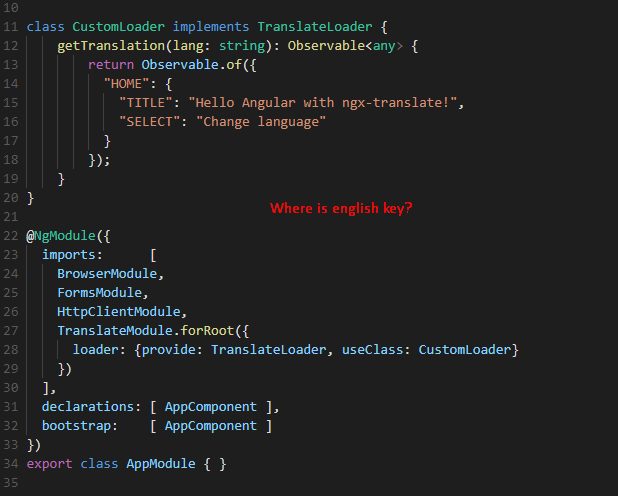

If I can also write nonsense, and it will work

What is the meaning of this code?
this.translateService.setDefaultLang('<your_lang_here>')
this.translateService.use('<your_lang_here>')
It only retrieve the language from loader if you run TranslationService.getTranslation(). It doesn't happen automatically. You must use TranslationService.use() or TranslationService.setDefaultLang() it retrieves the language from loaders.
Check TranslationService.getTranslation(), TranslationService.use() and TranslationService.setDefaultLang(). If it still unclear, sorry but I can't help you more.
alexndreazevedo
on 10 Jan 2018
I still do not understand how it extracts the language from the loader, if I can specify any language
splincode
on 10 Jan 2018
You can specify any language: TranslationService.setDefaultLang('yellow submarine')
The responsible for matching the language with translations is your loader:
lib/src/translate.loader.ts:14
export class RockBandTranslationsLoader extends TranslateLoader {
  public getTranslation(lang: string): Observable<any> {
    switch(lang) {
      case 'white unicorn':
        return Observable.of({ 'ROCK_BAND': 'White Unicorn' });
      case 'yellow submarine':
        return Observable.of({ 'ROCK_BAND': 'Beatles' });
  }
}
Then you can define the default language and the used language:
this.translationService.setDefaultLang('yellow submarine');
this.translationService.use('white unicorn');
Add this to the documentation (readme.md)
splincode
on 10 Jan 2018
Related issues
 ryanki1
·
4Comments
ryanki1
·
4Comments
 Snap252
·
3Comments
Snap252
·
3Comments
 madoublet
·
3Comments
madoublet
·
3Comments
 crebuh
·
3Comments
crebuh
·
3Comments
 alkemist
·
3Comments
alkemist
·
3Comments
Most helpful comment
Add this to the documentation (readme.md)