Core: Translateservice returns keys in service/Injectable constructor
I'm submitting a ... (check one with "x")
[X] bug report => check the FAQ and search github for a similar issue or PR before submitting
[ ] support request => check the FAQ and search github for a similar issue before submitting
[ ] feature request
Current behavior
using the translateservice.get() method inside a constructor of a provider/service in ionic 3 does return the translation Keys instead of their values in the subscription.
Expected/desired behavior
I would expect the translateserice.get() method to work in a service (@Injectable) constructor so that I can store the values retrieved in a plain javascript array to use them in my service's methods.
Reproduction of the problem
@Injectable()
export class UserService {

constructor(private translateService : TranslateService){

    private translations : [string];

    this.translateService.get(['SIGNUP_SUCCESS','DOES_NOTEXIST'])
      .subscribe(values=> {
        this.translations = values; //resolves to {DOES_NOTEXIST : "DOES_NOTEXIST", SIGNUP_SUCCESS:"SIGNUP_SUCCESS"}
      })
  }
}
In a @Page or outside of the constructor (inside a method of the UserService) it will work. My providers are added to the app.module.ts file. There the UserService provider is added to the providers Array. And there also is the following :
TranslateModule.forRoot({
      loader: {
        provide: TranslateLoader,
        useFactory: (createTranslateLoader),
        deps: [HttpClient]
      }
    }),
Please tell us about your environment:
ngx-translate version: 8.0.0
Angular version: 5.0.0
Browser: [Chrome 63]
 romain10009
All 17 comments
Have you defined the default language or use any language?
https://github.com/ngx-translate/core/tree/v9.0.2#2-init-the-translateservice-for-your-application
 alexndreazevedo
on 8 Jan 2018
alexndreazevedo
on 8 Jan 2018
Yes I do, in the constructor of my App Class.
export class MyApp {
  @ViewChild(Nav) nav: Nav;
  rootPage : any = null;

  constructor(private platform: Platform,
              private statusBar: StatusBar,
              private splashScreen: SplashScreen,
              private translate: TranslateService,
              private config : Config,
              private userService : UserService) {
    this.initializeApp();
    this.translate.setDefaultLang('fr');
  }
}
It's hard to debug what is going on. Could you share the repository or use the following template as a starting point? http://plnkr.co/edit/tpl:01UjWY3TKfP6pgwXKuEa
alexndreazevedo
on 9 Jan 2018
The Plunker you provided / the Readme provides is broken, is there on that is working? Could someone fix it, I have no experience with debugging the Plunker.
romain10009
on 9 Jan 2018
plunkr has issues with its server today, resulting in 503 errors... it should hopefully be resolved soon
 ocombe
on 9 Jan 2018
ocombe
on 9 Jan 2018
Try this: https://plnkr.co/edit/L2X3To
alexndreazevedo
on 9 Jan 2018
Have same problem.. thanks
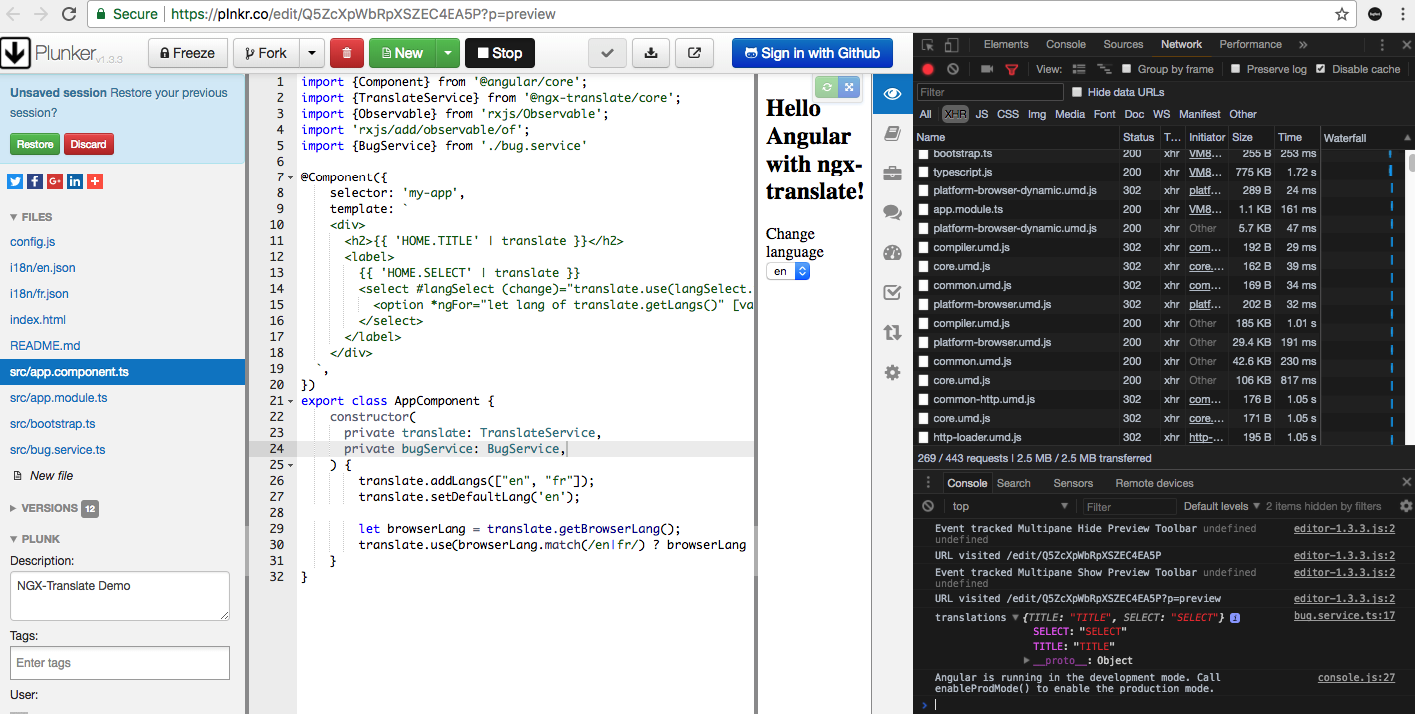
Reproduced here: https://plnkr.co/edit/Q5ZcXpWbRpXSZEC4EA5P?p=preview
see the console log:
 luckylooke
on 25 Jan 2018
luckylooke
on 25 Jan 2018
hi
does translate automatically translates text if the device language is changed or we have to set translateservice.use("lang").
 rameshmkll
on 13 Aug 2018
rameshmkll
on 13 Aug 2018
@rameshmkll are you talking about smartphones?
alexndreazevedo
on 13 Aug 2018
yes
i am using it for ionic mobile application
rameshmkll
on 13 Aug 2018
@rameshmkll this library doesn't detect the browser language automatically. The way to define the language is using the TranslateService to define what language should be used.
If you use Cordova's globalization plugin, you should detect the language of the device: https://ionicframework.com/docs/developer-resources/ng2-translate/
Using this guide for setting it up, you will load the new language whenever the Cordova's globalization plugin emits a new value.
alexndreazevedo
on 13 Aug 2018
I can't get the plunkers to work, but I was able to workaround this issue with the following approach:
Example built from @luckylooke's plunker https://plnkr.co/edit/Q5ZcXpWbRpXSZEC4EA5P?p=preview
constructor (
    public translate: TranslateService,
    ) {
                this.translate.onLangChange.subscribe((event: LangChangeEvent) => {
            this.translate.get( this.uiTexts ).subscribe( translations => {
                console.log('translations', translations)
            });
        })
    }
 MikaelLambert
on 1 Oct 2018
MikaelLambert
on 1 Oct 2018
I'm having the same problem in my Ionic 4 app when I try to subscribe to TranslateService.get(). In the end, all I receive is the key I supplied to the function. Does anyone at least have a workaround? Thanks.
 hanibhat
on 21 Apr 2019
hanibhat
on 21 Apr 2019
@hanibhat We are dealing with the same issue but only inside of our services. A component or page using the same code works perfectly.
 will0684
on 6 Jun 2019
will0684
on 6 Jun 2019
Same here in Ionic 4 inside a servive.
It returns the key.
 untilbit
on 13 Jun 2019
untilbit
on 13 Jun 2019
My issue was I'm using lazy loading for feature module. I also have a shared module. After I changed it to forChild in the shared module it worked:
AppModule:
export function HttpLoaderFactory(http: HttpClient) {
  return new TranslateHttpLoader(http);
}

@NgModule({
  declarations: [
    AppComponent
  ],
  imports: [
    BrowserModule,
    AppRoutingModule,
    TranslateModule.forRoot({
      defaultLanguage: 'en',
      loader: {
          provide: TranslateLoader,
          useFactory: HttpLoaderFactory,
          deps: [HttpClient]
      }
    }),
  ],
  providers: [],
  bootstrap: [AppComponent]
})
export class AppModule { }
SharedModule:
@NgModule({
  declarations: [],
  imports: [
    TranslateModule.forChild({}),
  ],
  exports: [
    CommonModule,
    TranslateModule
  ]
})
export class SharedModule { }
 LeonZhangCarsales
on 28 Apr 2020
LeonZhangCarsales
on 28 Apr 2020
I have this same situation like @LeonZhangCarsales but I have already TranslateModule.forChild()
I did what @MikaelLambert done and this is working for me - but this is only workaround.
Any solution for this?
What I find out problem for slow connection to API (I'm loading JSONs from API) and when I need load few JSONs.
 pawel-stuczynski-eye
on 9 Sep 2020
pawel-stuczynski-eye
on 9 Sep 2020
Related issues
 louisdoe
·
3Comments
louisdoe
·
3Comments
 bjornharvold
·
3Comments
bjornharvold
·
3Comments
 egornoveo
·
4Comments
egornoveo
·
4Comments
 Snap252
·
3Comments
Snap252
·
3Comments
 gmquiroga
·
3Comments
gmquiroga
·
3Comments