.NET Core September 2017 Update
The .NET Core November 2017 Update is available. This release includes .NET Core 1.0.8 .NET Core 1.1.5 and 2.0.1 and .NET Core SDK 1.1.5 and 2.0.3.
You can read about the update in announcement or the .NET Core release notes.
Please report any issues you find with the November 2017 Update, either responding to this issue, creating a new issue or creating a new issue in one of the following repos:
- dotnet/cli - for CLI tools and questions
- dotnet/corefx - for API issues and questions
- dotnet/coreclr - for runtime issues
- dotnet/core-setup - for installer issues
- nuget/home - for NuGet questions and issues
 richlander
All 31 comments
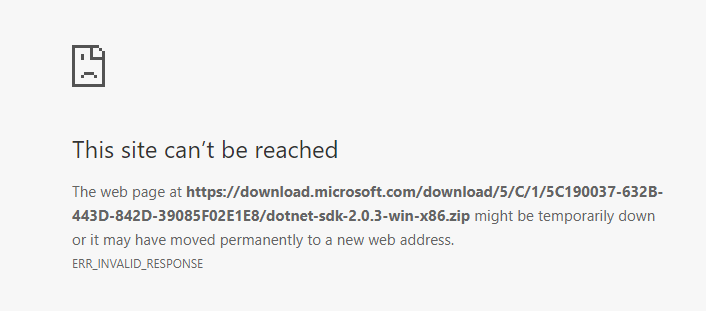
The download link for the 32-bit SDK binaries (https://download.microsoft.com/download/5/C/1/5C190037-632B-443D-842D-39085F02E1E8/dotnet-sdk-2.0.3-win-x86.zip) does not appear to work.
 martincostello
on 15 Nov 2017
martincostello
on 15 Nov 2017
Sorry about that @martincostello , fixed.
 leecow
on 15 Nov 2017
leecow
on 15 Nov 2017
Issue title and heading says September, but description and announcement says November.
 acjh
on 15 Nov 2017
acjh
on 15 Nov 2017
Thanks on that @acjh. You can see that I'm living in the past.
richlander
on 15 Nov 2017
No worries, but the heading still says September.
acjh
on 15 Nov 2017
Although dotnet-sdk-2.0.3 rpm is in the repository it does not appear to be set to upgrade previous installs. So yum update does not install the new version. I noted that dotnet-host 2.0.3 has been updated automatically. Is this correct? Can 2.0.3 sdk be installed without removing 2.0.0
 DavBrennan
on 16 Nov 2017
DavBrennan
on 16 Nov 2017
Yes, 2.0.3 can be installed without removing 2.0.0. Everything targeting 2.0 will start to run on 2.0.3 unless they have explicitly said they don't want to run on anything higher than 2.0.0.
It would be nice if we could still have yum update give the new version even though its installed side by side with the old one.
 Petermarcu
on 16 Nov 2017
Petermarcu
on 16 Nov 2017
Not really going to be a problem we package our apps as rpms so can require 2.0.3 to get it installed. I assume from the above that 2.0.0 can be removed without hurting 2.0.3
DavBrennan
on 16 Nov 2017
Yes, 2.0.0 can be removed unless you have applications that have specifically locked themselves to 2.0.0 which should be rare to never. :)
Petermarcu
on 16 Nov 2017
@DavBrennan - enabling yum/dnf/apt-get update behavior is on the list to work through. Because .NET Core is entirely side-by-side, it presents a few interesting challenges which will need to be figured out.
leecow
on 16 Nov 2017
@leecow - you could create an empty parent rpm say dotnet-update that uses weak Recommends instead of Requires. That would pull new versions of the sdk but would also allow old versions to be removed. See https://fedoraproject.org/wiki/Packaging:WeakDependencies
DavBrennan
on 17 Nov 2017
Excellent, thanks for the pointer @DavBrennan ! fyi @rakeshsinghranchi @wli3
leecow
on 17 Nov 2017
Whatever we do, we should apply to both runtimes and SDK's if there is a good way to do it.
Petermarcu
on 17 Nov 2017
With the packaging for CentOS, did the location of the dotnet binary change between dotnet-host-2.0.0-1.x86_64 and dotnet-host-2.0.3-1.x86_64?
I noticed that 'dotnet' is not in any of the default paths after the upgrade, but the binary is present as /usr/share/dotnet/dotnet
This broke every one of our apps that use 'dotnet' as included in the system path.
I'm not sure where the spec files are for the creation of these packages, so I can't take a look at how it was done...
 CRCinAU
on 24 Nov 2017
CRCinAU
on 24 Nov 2017
All the packaging for the runtime is in the dotnet/core-setup repo
Petermarcu
on 24 Nov 2017
https://github.com/dotnet/core-setup/tree/master/src/pkg/packaging/rpm/scripts . There is an issue with uninstall script that's causing major upgrade remove the symbolic link . Binary RPMs are built using FPM tool.
 rakeshsinghranchi
on 24 Nov 2017
rakeshsinghranchi
on 24 Nov 2017
Hrrrm - in the .spec world, you'd do something like this:
%preun
if [ $1 = 0 ]; then
   unlink /usr/bin/dotnet
fi
This roughly translates to: If we're uninstalling (hence %preun), and we don't have any newer version installed, run the script.
Running a complete script file in what I assume is the %post or %preun sections of the RPM installation - I'm not sure there is an easy way to achieve the same - unless you can pass the same $1 to the script and evaluate it in said script...
CRCinAU
on 24 Nov 2017
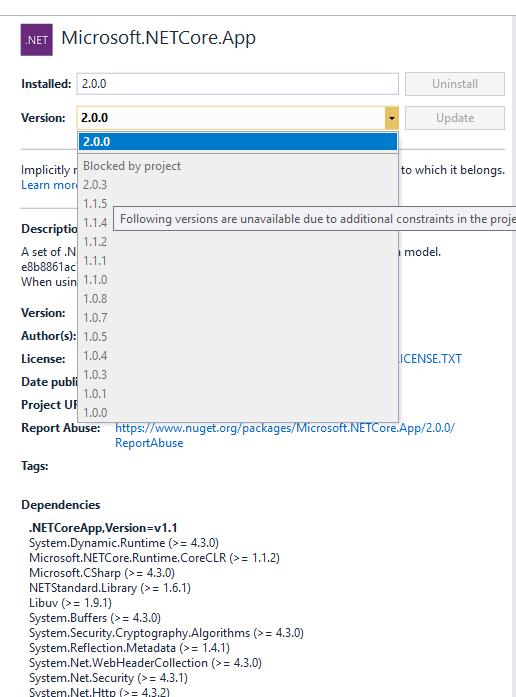
I got an asp.net application which is using 2.0.0, and im try to upgrade to 2.0.3.
The 2.0.3 SDK has intall, but i can't upgrade Microsoft.NetCore.App in Nuget. It says i need to upgrade my SDK, which i already did.
What am i missing?
 chenowen
on 24 Nov 2017
chenowen
on 24 Nov 2017
@chenowen , what are you trying to update? A setting in your project file? Are you publishing a self-contained application or a shared framework application?
If its a shared framework application, it will run on the highest patched version of 2.0.X. So if you installed the 2.0.3 SDK that installs the 2.0.3 runtime and your shared application will run against it.
Petermarcu
on 24 Nov 2017
@chenowen , Thanks. Yes, the proposed fix needs an update in https://github.com/dotnet/core-setup/blob/master/src/pkg/packaging/rpm/scripts/after_remove_host.sh . Opened https://github.com/dotnet/core-setup/issues/3455 to track this issue.
rakeshsinghranchi
on 24 Nov 2017
@Petermarcu I use vs 15.4 to create the project, but the project file missing one configuration <RuntimeFrameworkVersion/>. I have to open the project file and add it manually to fix the issue.
chenowen
on 6 Dec 2017
I guess the next question is why you need to upgrade the NuGet package? Are you building a self-contained application?
Petermarcu
on 6 Dec 2017
@Petermarcu Because of i want to upgrade to EF core 2.0.3
chenowen
on 6 Dec 2017
I see, you shouldn't need to update netcoreapp in order to upgrade EF Core. Do you have a reference to:
<PackageReference Include="Microsoft.AspNetCore.All" Version="2.0.0" />
In your project? That is the reference that you can update to 2.0.3 in order to get EF Core updated?
Petermarcu
on 6 Dec 2017
@Petermarcu That doesn't help.
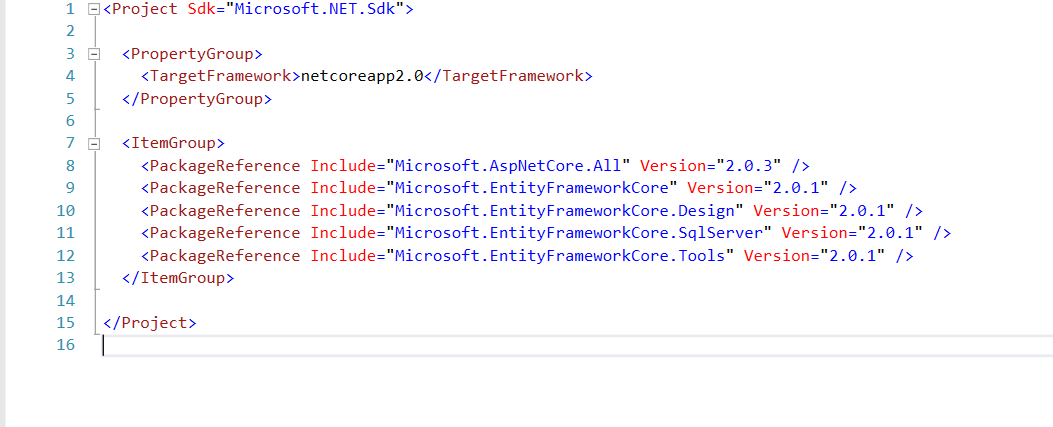
I have to add <RuntimeFrameworkVersion/> to upgrade to 2.0.3.
chenowen
on 7 Dec 2017
@chenowen I am able to confirm (using the gist here) even the visual studio reports that the project is running against dotnet core version 2.0.0, the actual runtime is still going to be the latest version, aka 2.0.3.
@Petermarcu I can see it is very confusing for developers who struggle to confirm if everything is up-to-date. Would love to see this display version get fixed.
 Ming-Sizung
on 7 Dec 2017
Ming-Sizung
on 7 Dec 2017
When you are building a shared framework application, your application can run on 2.0.X for any version of X. Its not until you deploy to production that you know exactly what you are running on.
@Ming-Sizung where in VS are you seeing the display version?
Petermarcu
on 7 Dec 2017
@Petermarcu I understand it should be the real behavior. But if you go to "Manage NuGet Packages" for a project (targeting netcoreapp20), it will still report its running against Microsoft.NetCore.App version 2.0.0 instead of 2.0.3.
Ming-Sizung
on 7 Dec 2017
@Petermarcu The issue is VS think the project is using dotnet core version 2.0.0, so it can't upgrade the ef core to 2.0.3. As ef core 2.0.3 require dotnet core 2.0.3.
chenowen
on 8 Dec 2017
Hello, after updating to DotNetCore.1.0.8_1.1.5-WindowsHosting.exe, installation removed the AspNetCoreModule from IIS modules on Windows 2012 R2 Server and I'm unable to run IIS hosted appliaction. Previous version is OK. Does anyone have the same problem? Thank you
 EriGH
on 21 Dec 2017
EriGH
on 21 Dec 2017
Closing in favor of https://github.com/dotnet/core/issues/1172
Petermarcu
on 22 Feb 2018
Related issues
 ffes
·
3Comments
ffes
·
3Comments
 Rand-Random
·
4Comments
Rand-Random
·
4Comments
 steevcoco
·
4Comments
steevcoco
·
4Comments
 wq807319473
·
3Comments
wq807319473
·
3Comments
 robinwilson16
·
3Comments
robinwilson16
·
3Comments