Core: Traffic Shaping: Direction-"out"-Rules do not match any traffic!
Using: OPNsense 17.7.7_1-amd64
with mutliple gateways and gateway-groups for redundancy.
Shared forwarding is enabled.
Problem: I am not able to shape outgoing traffic (e.g. for VoIP).
Issue: Using an direction-out-rule only works with default gateway.
On all other gateway-interfaces, traffic does not match and bypasses the shaper.
In out setup 004_WAN7 is our default gateway.
A rule for traffic leaving this interface works. Outgoing traffic matches and goes through the shaper.

But choosing any other interface such as 0E4_WAN5 does not work.
There is outgoing traffic; but it does not match. It bypasses the shaper.
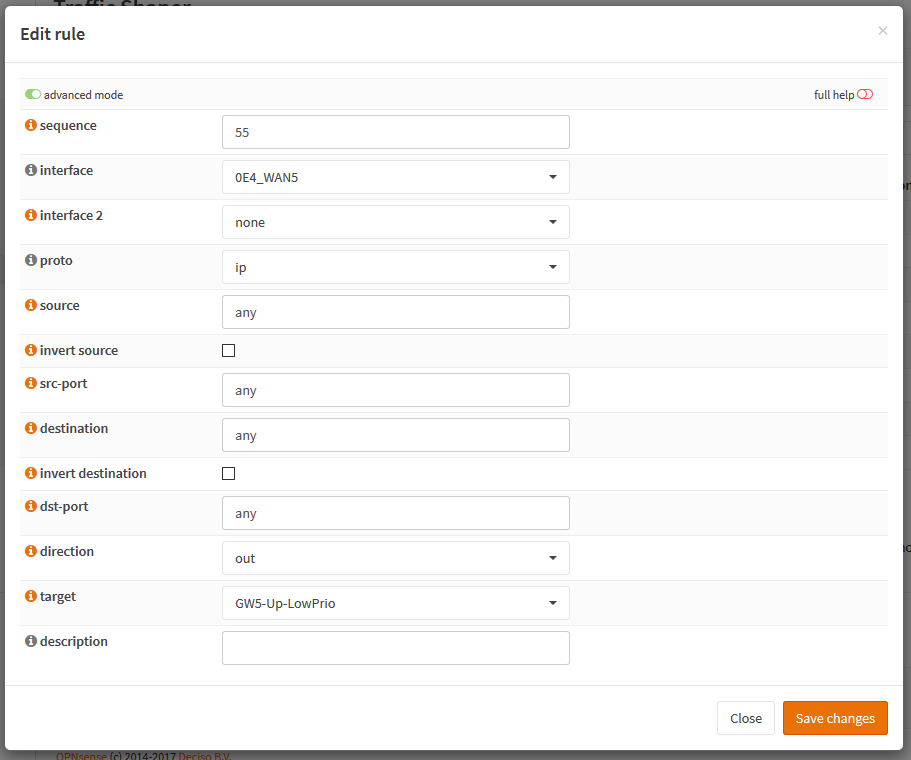
Outgoing traffic flow:
WORKING: LAN-Interface > Firewall-Rules (without route to / gateway = default gateway WAN7) > Traffic-Shaper > WAN7-Gateway-Interface
SHOULD WORK: LAN-Interface > Firewall-Rules (with route to / gateway WAN5 = WAN5) > Traffic-Shaper > WAN5-Gateway-Interface
WHAT HAPPENS: LAN-Interface > Firewall-Rules (with route to / gateway WAN5 = WAN5) > BYPASSES Traffic-Shaper > WAN5-Gateway-Interface
Incoming traffic works in traffic shaper without any problems.
 SeTk
SeTk
All 72 comments
2 Pipes, 2 Queues with 2 different rules for 2 WANs please.
Changing IFs sometimes require are reboot
 mimugmail
on 27 Oct 2017
mimugmail
on 27 Oct 2017
Sure. It is only for testing purpose the same queue.
Same behaviour with seperated pipes/queue/rules.
Reboots/updates have not solved this issue.
SeTk
on 27 Oct 2017
Does changing 0E4_WAN to Default fix this? (Just a test)
mimugmail
on 27 Oct 2017
Yes, traffic shaper for 0E4_WAN5 is working in this case (if it is the default gateway).
Whether route to / gateway in firewall is set to 0E4_WAN5 explicitly or to default.
But not for the old gateway interface 004_WAN7 any more.
SeTk
on 27 Oct 2017
Hi guys,
It's perfectly possible that despite shared forwarding not everything is being shared correctly yet. This will take some time to get to the bottom of. I expect we can look at this in December. It will definitely require kernel patching and I'm not available most of November.
Cheers,
Franco
 fichtner
on 29 Oct 2017
fichtner
on 29 Oct 2017
PS: @SeTk if you can try this with 11.1 base/kernel applied, shared forwarding was improved, now also includes IPv6 if that matters here... https://forum.opnsense.org/index.php?topic=6257.0
fichtner
on 29 Oct 2017
Sorry. I don't want to try 11.1, because both our opnsense machines (in HA configuration) are in 24/7 productive use. You don't recommend to try 11.1 in HA-productive use, do you?
SeTk
on 31 Oct 2017
We need the data points at one point or another before 18.1 is out to work on this, but I would not recommend this in your setup at the moment.
Theoretically 11.0 and 11.1 are similar in nature so syncing between them should not be a problem. You could also skip the „b“ in these test commands to only update the kernel which gives you even less friction.
After a week or two with no other problem report in the forum it’s worth a try.
fichtner
on 31 Oct 2017
Ok, I've upgraded to 11.1, rebooted and tested again.
The issue is still there. :(
Default gateway: Out-Rules matching/working.
Other gateways: Out-Rules don't match/work.
SeTk
on 31 Oct 2017
Thank you, at least we know we need to look at the routing code and that the buggy behaviour is consistent. 👍
On 31. Oct 2017, at 19:08, SeTk notifications@github.com wrote:
Ok, I've upgraded to 11.1, rebooted and tested again.
The issue is still there. :(
Default gateway: Out-Rules matching/working.
Other gateways: Out-Rules don't match/work.—
You are receiving this because you were assigned.
Reply to this email directly, view it on GitHub, or mute the thread.
fichtner
on 31 Oct 2017
@SeTk For me it's working. I'm currently playing with the Traffic Shaper and build a small test bed. I have 2 WANs, one static with 100Mbit (default) and one with a ADSL router in front. When I set a firewall rule to send traffic vom LAN_X via ADSL it's perfectly shaped like I set the values in the pipe's.
But what I experienced was, that CoDel doesn't do what I want ... I can shape to exact values, but ping times are always bad (also with default gateway).
mimugmail
on 19 Nov 2017
@mimugmail Ok, let's compare oure configurations for upload traffic shaper.
WAN1 is default.
Pipes:
- WAN1-Upload-Pipe: I've configured (other settings default)
a fixed bandwidth 5 Mbit/s and
a mask "source"
- WAN2-Upload-Pipe: Same as WAN1, but with a fixed bandwidth 20 Mbit/s
Queues not configures to keep test simple.
Rules:
- WAN1-Upload-Rule: I've configured (other settings default)
sequence 11
interface WAN1 (interface 2 none)
direction "out"
target "WAN1-Upload-Pipe"
- WAN1-Upload-Rule: Same as WAN1 for interface WAN2 and target "WAN2-Upload-Pipe"
To keep sure, configuration is used, I've reseted traffic shaper.
In status than I can see: All upload is handled in WAN1-Upload-Pipe.
Testing from VLAN with WAN1 gateway or default gateway configured: Upload is limited to 5 Mbit/s.
Testing from VLAN with WAN2 gateway configured: Upload is limited to 5 Mbit/s.
Change the setup, so that WAN2 is default gateway allows 20 Mbit/s upload in both cases.
Extend the test with download-shaping (direction-"in"-rules) shows download traffic is assignes the right pipe in bothe cases.
Could you attach screenshots of your pipes and rules in advanced mode?
Thank You for your support!
SeTk
on 19 Nov 2017
@SeTk Hm, in my setup I only tested up/down at same speeds .. now I tweaked the values and get the same behaviour as yours.
WAN1 (d) UP works
WAN1 (d) DOWN works
WAN2 UP fails (used PIPE WAN2 DOWN)
WAN2 DOWN works
@fichtner I'll backup the config and keep this lab alive if you want to do some testing after vacation.
mimugmail
on 20 Nov 2017
Thanks. :)
We don't have a lab enviroment, so a pre-alpha version isn't a goot idea for us.
But after that I like to help with testing too.
SeTk
on 20 Nov 2017
Hi @SeTk @mimugmail ,
I too am observing the same problem and this is on 17,7,8,,,shaper is not restricting the traffic per the bandwidth set. I am open to test this as i have decoupled my HA
 patcsy88
on 29 Nov 2017
patcsy88
on 29 Nov 2017
I am experiencing the exact same issue:
WAN1 (d) UP works
WAN1 (d) DOWN works
WAN2 UP fails (used PIPE WAN1 UP).
WAN2 DOWN works
I.e.: In this example, queue 10008 should have been used (em4), WAN2, and not 10006 (em2, WAN1)
60021 0 0 queue 10008 ip from 192.168.0.0/16 to any via em4
60022 94 15715 queue 10013 ip from any to 192.168.0.0/16 via em4
60023 153 16887 queue 10006 ip from 192.168.0.0/16 to any via em2
60024 0 0 queue 10011 ip from any to 192.168.0.0/16 via em2
Disabling Shared forwarding results in no UP queue (10006, 10008) being used, but down queues work.
Has there been any more tracking down going on on this issue? Something that I could try?
I was thinking about defining no default gateway, but then the policy based routes return destination unreachable for some reason!?
 namezero111111
on 18 Feb 2018
namezero111111
on 18 Feb 2018
I would like to investigate this further since it's blocking a major upgrade (from pfsense 2.0.1); is there any starting point in which direction to look?
namezero111111
on 27 Feb 2018
I have compared sources from pfsense (where this works) to opnsense.
In opnsense, the function _pf_route_ was split into _pf_route_ and _pf_route_shared_ depending on the sysctl value for shared forwarding.
PFSense has not done this, but has _pf_route_ differences (2.4) that have the following comment:
Send it out since it came from state recorded ifp(rt_addr).
Routing table lookup might have chosen not correct interface!
There is also much more "meat" to r->rt being flagged PF_ROUTETO .
I am not enough pf expert to determine whether this is relevant or not, and the code is mostly undocumented, but would that be something to start looking at?
namezero111111
on 4 Mar 2018
Not sure if this is relevant. You can try to turn off shared forwarding to see what happens, but you must also clarify if you compare pfsense shaper or limiter. The pfsense shaper is ALTQ. The limiter is ipfw/dummynet, which is our shaper...
On 4. Mar 2018, at 11:29, Namezero notifications@github.com wrote:
I have compared sources from pfsense (where this works) to opnsense.
In opnsense, the function pf_route was split into pf_route and pf_route_shared depending on the sysctl value for shared forwarding.
PFSense has not done this, but has pf_route differences (2.4) that have the following comment:Send it out since it came from state recorded ifp(rt_addr).
Routing table lookup might have chosen not correct interface!There is also much more "meat" to r->rt being flagged PF_ROUTETO .
I am not enough pf expert to determine whether this is relevant or not, and the code is mostly undocumented, but would that be something to start looking at?
—
You are receiving this because you were mentioned.
Reply to this email directly, view it on GitHub, or mute the thread.
fichtner
on 4 Mar 2018
Thanks for the answer.
With shared forwarding off, upload (outgoing traffic) doesn't enter any queue at all, incoming traffic still does.
That's why i'm suspecting somehow a wrong interface index or something.
namezero111111
on 4 Mar 2018
Baseline is important still, see shaper / limiter question.
We wrote shared forwarding because ipfw and pf in FreeBSD do not go together well. There could be further bugs, but it's essentially non-reproducible in pfSense or FreeBSD because of that....
fichtner
on 4 Mar 2018
Not an expert at all at pf; first time looking at its source and trying to figure anything out, but just reading for now because I'm not sure exactly what to be looking for.
namezero111111
on 4 Mar 2018
Still, simple question: in pfSense did you compare against shaper or limiter?
fichtner
on 4 Mar 2018
I'll set this up again completely with pfsense in limiter mode in our test environment and report; (it was an imported config from a live system).
namezero111111
on 4 Mar 2018
I have a suspicion... https://github.com/opnsense/src/commit/c28403deb5d32def944c07b0321e567ed241de22
fichtner
on 4 Mar 2018
I will gladly test this on the environment I set up; although I have no idea how to compile the kernel.
namezero111111
on 4 Mar 2018
Currently untested, please proceed with care:
# opnsense-update -kr 18.1-shaper
# /usr/local/etc/rc.reboot
Mhh ok stupid question... The update process keeps printing dots after "Fetching kernel-18.1-shaper-amd64.txz" for more than 15 minutes. There is no traffic on the interface.
I fetched the file (+ .sig) manually, and pkg add reports:
pkg: kernel-18.1-shaper-amd64.txz is not a valid package: no manifest found
Am I missing something here?
Never mind, 3rd try is a charm :}
namezero111111
on 4 Mar 2018
Unfortunately this did not result in any change; both behaviors are still the same (with and without shared forwarding enabled) :/
With shared fwd enabled: Default UP queue on interface with default gateway is always used
With shared fwd _disabled_: No queue is used for UP traffic
Kernel update was successful:
uname -a reports
FreeBSD 11.1-RELEASE-p6 FreeBSD 11.1-RELEASE-p6 c28403deb(outgoing_ipfw) amd64
namezero111111
on 4 Mar 2018
Not a package, it's a standard archive.
Thanks for testing. I suspect the kernel network stack tries to undo what we want to achieve with shared forwarding in place. I'll dig a bit deeper soon.
fichtner
on 4 Mar 2018
Any time. I have built a complete test environment around this problem complete with MultiWAN and CARP, I can test everything risk free here.
Just to be clear, the gateway rules are working (i.e. traffic IS leaving on the proper interface. NAT is also correct. It just gets pushed through the wrong pipe internally.
I will finish the pfsense test with limiters and read some more; I will post if any new insights occur.
namezero111111
on 4 Mar 2018
I'm also running into this Issue: 2 WAN interfaces set, and the limits only hold for the default gateway.
Changed from pfSense 2.3.3 to OPNSense and was mainly happy with everything else so far, but the traffic shaping on 2 WAN interfaces did cost me a weekend until figuring out, that it is not my fault.
What I tried as workarounds (all failed):
- Remove the default flag from all Gateways
- Change outbound NATs to manual and add rules expilicitly per network to use a specific gateway (VLAN1 -> GW1, VLAN2+3 -> GW2)
- Disable shared forwarding (and some other parameters from firewall -> settings -> advanced, which I dont remember)
- Add a catch all rule for VLAN1 (GW1 set as Gateway) and VLAN2+3 (GW2 set as Gateway) with allow any - any
- Delete upstream gateways from the GW Interfaces (which suprisingly didn't break anything, I thought those were mandatory?!)
Is the definite origin of the problem already found in the source code?
What does the upstream gateway settings do exactly? Only create automatic outbound NATs?
 madf0x
on 26 Mar 2018
madf0x
on 26 Mar 2018
Is the definite origin of the problem already found in the source code?
No. FreeBSD does not support pf route-to and ipfw dummynet traffic shaping. We wrote these additions for pf and ipfw, but the apparent bug seems to be an unmodifiable override in the network stack that forces the default route interface back. And there is quite a bit of network stack code to go through...
pfSense uses a different approach in this area our approach beyond what we have is uncharted territory.
If anyone beats me to the bug, please, by all means. Otherwise we have to consider this a known limitation for when both shaping and multi-wan are used.
fichtner
on 26 Mar 2018
starts looking for a bug splatting bat
madf0x
on 26 Mar 2018
I'll allocate some time later this week, please ping me, @mimugmail also wants to help test :)
fichtner
on 26 Mar 2018
This would be very sad if this is a known limitation :(
I can only offer time .. but I have plenty of it :D
mimugmail
on 26 Mar 2018
If anyone beats me to the bug, please, by all means.
Any starting point and I'm in. The FreeBSD network code looks largely undocumented (to someone unfamiliar with the structures and general design :}
Otherwise we have to consider this a known limitation for when both shaping and multi-wan are used.
I'd rather help fix so we can migrate the last PFSense 2.1 boxes, too. Leaving this as a know limitation would remove OPNsense from consideration in many business scenarios past "Hey look I have internet at home" because most scenarios would involve shaping.
I really like the new shaper with dummynet, but bringing ALTQ support back for that scenario should be considered before making this a known limitation. *no hate please :} )
namezero111111
on 26 Mar 2018
ALTQ has been off by default for years, many newer drivers do not support it natively and thus require patching beyond what driver writers envision. To some degree it holds back the driver progress and/or creates manual work for downstream to deal with it. On top of this, I don't see it coming back, even being deleted in FreeBSD. And OpenBSD deleted it already.
You mention 2.1 and you probably mean hasync crashes we tried to avoid by diverting in design philosphy in 2015. :)
fichtner
on 26 Mar 2018
As for orientation, the heart of shared forwarding are these 3 functions:
https://github.com/opnsense/src/blob/master/sys/netinet/ip_output.c#L1406-L1485
Shared forwarding tags the traffic for outgoing interface and/or gateway IP, something that pf does not do in FreeBSD (it sends the packet directly on route-to, black holing all traffic for it). ipfw knows tagging the gateway IP, but not the interface...
So we either:
- End up with the network stack assuming the packet is for another interface not correctly enforcing shaping (test kernel we tried earlier, may not be true or wrong spot patched)
- End up forgetting to shape in dummynet / ipfw because an internal lookup is done incorrectly
fichtner
on 26 Mar 2018
Ok I will poke around a bit and see if there is any hope :D
So my understanding is:
- Traffic goes pf => ipfw => network stack (through ip_output() )
- route-to bypasses ipfw. Traffic goes pf => network stack (through ip_output_pfil() )
- Shared forwarding informs ipfw through tagging of the gateway ip on route-to, but not the interface (index??)
- The suspicion is a mis-tagged interface in shared forwarding with route-to (as the default interface / up-queue of it appears to be used)
In that case maybe some tagging is bypassed on route-to, rendering the previous patch is incomplete
Currently I'm trying to understand what the previous patch was supposed to be doing where it was supposed to be doing it.
I'll keep you updated :}
P.S. no crashes for us on 2.1, just getting bit long in the tooth and we already migrated everything not affected by this.
namezero111111
on 26 Mar 2018
- the model is "ip_input ( pf -> ipfw ) -> ip_output ( ipfw -> pf )"
- route-to flow in FreeBSD is "ip_input ( pf )", that's why shared forwarding started...
- ...in OPNsense the packet moves like 1, "route-to" for pf and "fwd" from ipfw manipulate target interface and gateway concurrently
- It's not mistagged. It's likely misinterpreted by something after 2. that is shown in 1. We know that tagging works, otherwise "route-to" or "fwd" would misbehave on their own, which they don't.
You could say the patch is incomplete. But I want to stress the idea that the patch itself is probably not worth reviewing, because of 4. and each individual case is ok. It's a further addition, a version 2, a next step in the evolution of the idea and looking for an obvious bug could sink time where it could be spent elsewhere.
fichtner
on 27 Mar 2018
Ok, here we go again, let's try this:
# opnsense-update -kr 18.1.5-ipfw-both
Basically, right after pf sets route-to on ipfw we restore the decision that pf made which was formerly not possible. This is not a final patch, but to see if we hit the right spot. Please only use in testing environments.
fichtner
on 27 Mar 2018
Squashed commit FYI: https://github.com/opnsense/src/commit/3f50392110d
fichtner
on 27 Mar 2018
And here's another one:
# opnsense-update -kr 18.1.5-ipfw-out
This time, only the outgoing path is adjusted, which seems more aligned with the network stack but may fail to work, so we have both now to compare.
fichtner
on 27 Mar 2018
Great, both kernels work and -out a bit more smoothier:
configured:

wan1 down 10mbit
wan1 up 10mbit

wan2 down 2mbit
wan2 up 0,5mbit

---


kernel default:

download wan1 10mbit
upload wan1 10mbit

download wan2 2mbit
upload wan2 2mbit (max available out)

kernel both:

download wan1 25-50mbit
upload wan1 100mbit

download wan2 2mbit
upload wan2 0,5mbit (crazy flips)

kernel out:

download wan1 25-50mbit
upload wan1 100mbit

download wan2 2mbit
upload wan2 0,5mbit (smoother flips)
kernel -both (out WAN2)
      Cookie: lan10.1522138990.448578.3e69c56c7f87
      TCP MSS: 1440 (default)
[  4] local 10.10.10.10 port 52234 connected to 62.75.151.240 port 5000
Starting Test: protocol: TCP, 1 streams, 131072 byte blocks, omitting 0 seconds, 30 second test
[ ID] Interval           Transfer     Bandwidth       Retr  Cwnd
[  4]   0.00-1.00   sec   273 KBytes  2.23 Mbits/sec    0   40.8 KBytes
[  4]   1.00-2.00   sec  91.4 KBytes   748 Kbits/sec    0   45.0 KBytes
[  4]   2.00-3.00   sec  94.2 KBytes   772 Kbits/sec    0   47.8 KBytes
[  4]   3.00-4.00   sec  67.5 KBytes   553 Kbits/sec    0   54.8 KBytes
[  4]   4.00-5.00   sec   174 KBytes  1.43 Mbits/sec    0   71.7 KBytes
[  4]   5.00-6.00   sec   195 KBytes  1.60 Mbits/sec    0   98.4 KBytes
[  4]   6.00-7.00   sec   127 KBytes  1.04 Mbits/sec   12   77.3 KBytes
[  4]   7.00-8.00   sec  63.3 KBytes   518 Kbits/sec   14   73.1 KBytes
[  4]   8.00-9.00   sec  63.3 KBytes   518 Kbits/sec    0   78.8 KBytes
[  4]   9.00-10.00  sec  63.3 KBytes   518 Kbits/sec    4   75.9 KBytes
[  4]  10.00-11.00  sec  0.00 Bytes  0.00 bits/sec    7   59.1 KBytes
[  4]  11.00-12.00  sec   127 KBytes  1.04 Mbits/sec    0   59.1 KBytes
[  4]  12.00-13.00  sec  63.3 KBytes   518 Kbits/sec    0   64.7 KBytes
[  4]  13.00-14.00  sec  63.3 KBytes   518 Kbits/sec    0   68.9 KBytes
[  4]  14.00-15.00  sec  63.3 KBytes   518 Kbits/sec    0   70.3 KBytes
[  4]  15.00-16.00  sec  63.3 KBytes   518 Kbits/sec    0   71.7 KBytes
[  4]  16.00-17.00  sec  63.3 KBytes   518 Kbits/sec    0   75.9 KBytes
[  4]  17.00-18.00  sec  0.00 Bytes  0.00 bits/sec    2   74.5 KBytes
[  4]  18.00-19.00  sec  0.00 Bytes  0.00 bits/sec    3   54.8 KBytes
[  4]  19.00-20.00  sec   127 KBytes  1.04 Mbits/sec    0   56.2 KBytes
[  4]  20.00-21.00  sec   127 KBytes  1.04 Mbits/sec    0   64.7 KBytes
[  4]  21.00-22.00  sec  0.00 Bytes  0.00 bits/sec    0   73.1 KBytes
[  4]  22.00-23.00  sec  63.3 KBytes   518 Kbits/sec    0   77.3 KBytes
[  4]  23.00-24.00  sec  0.00 Bytes  0.00 bits/sec    3   59.1 KBytes
[  4]  24.00-25.00  sec  63.3 KBytes   518 Kbits/sec    2   53.4 KBytes
[  4]  25.00-26.00  sec   127 KBytes  1.04 Mbits/sec    0   57.7 KBytes
[  4]  26.00-27.00  sec  63.3 KBytes   518 Kbits/sec    0   61.9 KBytes
[  4]  27.00-28.00  sec  63.3 KBytes   518 Kbits/sec    0   63.3 KBytes
[  4]  28.00-29.00  sec  63.3 KBytes   518 Kbits/sec    0   64.7 KBytes
[  4]  29.00-30.00  sec  63.3 KBytes   518 Kbits/sec    0   67.5 KBytes
- - - - - - - - - - - - - - - - - - - - - - - - -
Test Complete. Summary Results:
[ ID] Interval           Transfer     Bandwidth       Retr
[  4]   0.00-30.00  sec  2.36 MBytes   659 Kbits/sec   47             sender
[  4]   0.00-30.00  sec  1.78 MBytes   498 Kbits/sec                  receiver
CPU Utilization: local/sender 0.3% (0.0%u/0.3%s), remote/receiver 0.2% (0.0%u/0.1%s)
kernel -out (out WAN2):
      Cookie: lan10.1522139567.392524.52c4b88a6019
      TCP MSS: 1448 (default)
[  4] local 10.10.10.10 port 52258 connected to 62.75.151.240 port 5000
Starting Test: protocol: TCP, 1 streams, 131072 byte blocks, omitting 0 seconds, 30 second test
[ ID] Interval           Transfer     Bandwidth       Retr  Cwnd
[  4]   0.00-1.00   sec  98.8 KBytes   809 Kbits/sec   25   11.2 KBytes
[  4]   1.00-2.00   sec  92.8 KBytes   761 Kbits/sec    0   15.5 KBytes
[  4]   2.00-3.00   sec  61.9 KBytes   507 Kbits/sec    0   18.3 KBytes
[  4]   3.00-4.00   sec   155 KBytes  1.27 Mbits/sec    0   32.3 KBytes
[  4]   4.00-5.00   sec   155 KBytes  1.27 Mbits/sec    0   52.0 KBytes
[  4]   5.00-6.00   sec   205 KBytes  1.68 Mbits/sec    0   80.2 KBytes
[  4]   6.00-7.00   sec   180 KBytes  1.47 Mbits/sec    0    105 KBytes
[  4]   7.00-8.00   sec  54.8 KBytes   449 Kbits/sec   18   53.4 KBytes
[  4]   8.00-9.00   sec   122 KBytes  1.00 Mbits/sec    6   59.1 KBytes
[  4]   9.00-10.00  sec  67.5 KBytes   553 Kbits/sec    0   74.5 KBytes
[  4]  10.00-11.00  sec  63.3 KBytes   518 Kbits/sec    0   87.2 KBytes
[  4]  11.00-12.00  sec  0.00 Bytes  0.00 bits/sec    8   64.7 KBytes
[  4]  12.00-13.00  sec  63.3 KBytes   518 Kbits/sec    4   61.9 KBytes
[  4]  13.00-14.00  sec  63.3 KBytes   518 Kbits/sec    0   66.1 KBytes
[  4]  14.00-15.00  sec   127 KBytes  1.04 Mbits/sec    0   71.7 KBytes
[  4]  15.00-16.00  sec  63.3 KBytes   518 Kbits/sec    0   74.5 KBytes
[  4]  16.00-17.00  sec  0.00 Bytes  0.00 bits/sec    1   66.1 KBytes
[  4]  17.00-18.00  sec  63.3 KBytes   518 Kbits/sec    2   52.0 KBytes
[  4]  18.00-19.00  sec  63.3 KBytes   518 Kbits/sec    0   54.8 KBytes
[  4]  19.00-20.00  sec  63.3 KBytes   518 Kbits/sec    0   60.5 KBytes
[  4]  20.00-21.00  sec  63.3 KBytes   518 Kbits/sec    0   61.9 KBytes
[  4]  21.00-22.00  sec  63.3 KBytes   518 Kbits/sec    0   63.3 KBytes
[  4]  22.00-23.00  sec  63.3 KBytes   518 Kbits/sec    0   64.7 KBytes
[  4]  23.00-24.00  sec  63.3 KBytes   518 Kbits/sec    0   70.3 KBytes
[  4]  24.00-25.00  sec  63.3 KBytes   518 Kbits/sec    0   81.6 KBytes
[  4]  25.00-26.00  sec  0.00 Bytes  0.00 bits/sec    4   77.3 KBytes
[  4]  26.00-27.00  sec  63.3 KBytes   518 Kbits/sec   10   61.9 KBytes
[  4]  27.00-28.00  sec  63.3 KBytes   518 Kbits/sec    0   56.2 KBytes
[  4]  28.00-29.00  sec   127 KBytes  1.04 Mbits/sec    0   43.6 KBytes
[  4]  29.00-30.00  sec  63.3 KBytes   518 Kbits/sec    0   49.2 KBytes
- - - - - - - - - - - - - - - - - - - - - - - - -
Test Complete. Summary Results:
[ ID] Interval           Transfer     Bandwidth       Retr
[  4]   0.00-30.00  sec  2.34 MBytes   654 Kbits/sec   78             sender
[  4]   0.00-30.00  sec  1.74 MBytes   487 Kbits/sec                  receiver
CPU Utilization: local/sender 0.3% (0.1%u/0.2%s), remote/receiver 0.1% (0.1%u/0.1%s)
Yay. 👍
(more feedback welcome)
fichtner
on 27 Mar 2018
Final patch is https://github.com/opnsense/src/commit/d1cb3383d if all feedback is good
fichtner
on 27 Mar 2018
I can confirm both patches work, and although I can't comment on the smoothness of the flips scientifically, the out patch "behaves" better apparently.
Interesting how the fixed code is the exact same but patches elsewhere (save for the DIR_OUT in the final commit)
Congratulations on a job well done :} Excellent detective work :D
Will be see this in head soon?
namezero111111
on 27 Mar 2018
Symmetry issue... fixed pf in that area later, but ipfw needs the same obviously
The extra explaining made this abundantly clear so thanks for asking! :)
fichtner
on 27 Mar 2018
Any time; especially after digging through that code I have plenty of questions :D.
In the end it's always "obvious" eh?
Either way I have much respect for people qualified enough to touch that code :}
namezero111111
on 27 Mar 2018
It makes so much fun woking on this project, really enjoy the progress 👍
mimugmail
on 27 Mar 2018
Alright so I don't know when we ship this, possibly with the next round of OS security fixes (FreeBSD advisories). If you want to keep this kernel, you can lock it under System: Firmware: Packages, but do not forget to unlock once this really ships, otherwise you'll miss out on security patches.
Thanks everyone, time to close this ❤️
fichtner
on 27 Mar 2018
Glancing over this today it seems that IPv4 works now but not IPv6, so here's another kernel:
# opnsense-update -kr 18.1.5-ipfw
Cheers,
Franco
fichtner
on 28 Mar 2018
(confirmation that IPv4 works as before is probably enough at this point)
fichtner
on 28 Mar 2018
Works as expected with v4
mimugmail
on 28 Mar 2018
btw. enabling CoDel for the W2FQ sched makes the 500kb upload WAY more smother .. 👍
mimugmail
on 28 Mar 2018
We don't have IPv6 yet so I'm unable to check for that, but the new kernel (18.1.5-ipfw) also works for IPv4 here :}
namezero111111
on 28 Mar 2018
Ok interesting. Why rshift IPV6_VERSION?
namezero111111
on 28 Mar 2018
@namezero111111 copied from the same function a number of lines below
fichtner
on 28 Mar 2018
@fichtner Is it possible the patch messes with NAT? Or maybe there is another issue?
It appears as though with a gateway group, the wrong NAT IP is used.
Example:
DMZ1 192.168.4.131 with CARP 192.168.4.135
DMZ2 192.168.4.141 with CARP 192.168.4.150
DMZ1 and DMZ2 gateways are in a gateway group, patched kernel applied.
NAT 192.168.0.0/16 on DMZ1 via 192.168.4.135
NAT 192.168.0.0/16 on DMZ2 via 192.168.4.150
Pings time out/website won't load, etc...
tcpdump capture on DMZ2 show packages originating from 192.168.4.135
When NAT rules are reversed in priority,
tcpdump capture on DMZ1 show packages originating from 192.168.4.150
it seems like something else is affected here by a similar issue.
namezero111111
on 29 Mar 2018
Excerpt from rules.debug looks good:
nat on em3 inet proto tcp from $mx2 to any port 25 -> 192.168.4.150 port 1024:65535 # MX static outbound mapping
no nat on em2 inet from (self) to any # Do not NAT self
no nat on em3 inet from (self) to any # Do not NAT self
nat on em2 inet from 192.168.0.0/16 to any -> 192.168.4.135 port 1024:65535
nat on em3 inet from 192.168.0.0/16 to any -> 192.168.4.150 port 1024:65535
With shared forwarding off the problem does not occur. Turning it back on reproduces it again.
namezero111111
on 30 Mar 2018
18.1.5 or latest master?
mimugmail
on 30 Mar 2018
Yes, unfortunately on both :/
Do you have any reference?
namezero111111
on 30 Mar 2018
I mean why he was asking about the latest version.
I will test the "stock" kernel later to see if this is related, but it was first noticed since the patch.
@mimugmail Did you try with NAT?
namezero111111
on 3 Apr 2018
I'm not sure the patch does anything here. NAT is done in pf, not ipfw. It means you'll likely see the issue on a stock 181.5. And I'm not even sure since you said gateway group and NAT it heavily depends on your WAN state, monitoring and load balancing rules.
fichtner
on 3 Apr 2018
@namezero111111 I tested with NAT on both WANs, sure! Today I'm in the office, if you need more tests just put it here ..
mimugmail
on 3 Apr 2018
Ok, this seems solely related to "Disable State Killing on Gateway Failure". When unchecked (i.e. state killing enabled) the behavior occurs.
When disabled (checked) everything seems fine ("stock" kernel or patched).
Please disregard, this is not related to the patch at all.
namezero111111
on 3 Apr 2018
Best news today :)
mimugmail
on 3 Apr 2018
:)
fichtner
on 3 Apr 2018
Same issue occurs again with OPNsense 20.7.7_1.
 dannykorpan
on 10 Jan 2021
dannykorpan
on 10 Jan 2021
Related issues
 paride
·
4Comments
paride
·
4Comments
 darkain
·
4Comments
darkain
·
4Comments
 TransLunarInjection
·
7Comments
TransLunarInjection
·
7Comments
 BPtLNfxZWo
·
3Comments
BPtLNfxZWo
·
3Comments
 tkald
·
5Comments
tkald
·
5Comments
Most helpful comment
Alright so I don't know when we ship this, possibly with the next round of OS security fixes (FreeBSD advisories). If you want to keep this kernel, you can lock it under System: Firmware: Packages, but do not forget to unlock once this really ships, otherwise you'll miss out on security patches.
Thanks everyone, time to close this ❤️