Core: Unable to access web ui on 0.51.1
Make sure you are running the latest version of Home Assistant before reporting an issue.
You should only file an issue if you found a bug. Feature and enhancement requests should go in the Feature Requests section of our community forum:
Home Assistant release (hass --version): 0.51.1
Python release (python3 --version): Python 3.6.2
Component/platform: frontend
Description of problem:
Unable to access the UI after upgrade to 0.51.1. Getting this error in the web inspector. Tested in Safari and Chrome on macOS and Safari on iOS.
I get the following error in the web inspector console:

Expected:
Web ui to work as expected.
Problem-relevant configuration.yaml entries and steps to reproduce:
Traceback (if applicable):
Additional info:
Using the latest Docker image.
 joch
joch
All 16 comments
Is it the same as https://github.com/home-assistant/home-assistant/issues/8963?
 Molodax
on 13 Aug 2017
Molodax
on 13 Aug 2017
Possibly the same. The API itself works fine though, since I can control things using Apple Home via Homebridge. So it's only related to the frontend itself.
joch
on 13 Aug 2017
Is this about the log in button? Because that button is currently broken. A fix for this has been merged and will most likely go live when 0.51.2 is rolled out. Pressing the Enter key after typing in your password should do the trick.
 fanaticDavid
on 13 Aug 2017
fanaticDavid
on 13 Aug 2017
No, this is something else. Even opening an incognito window and just loading the frontend just gives this. There's no login screen or anything.
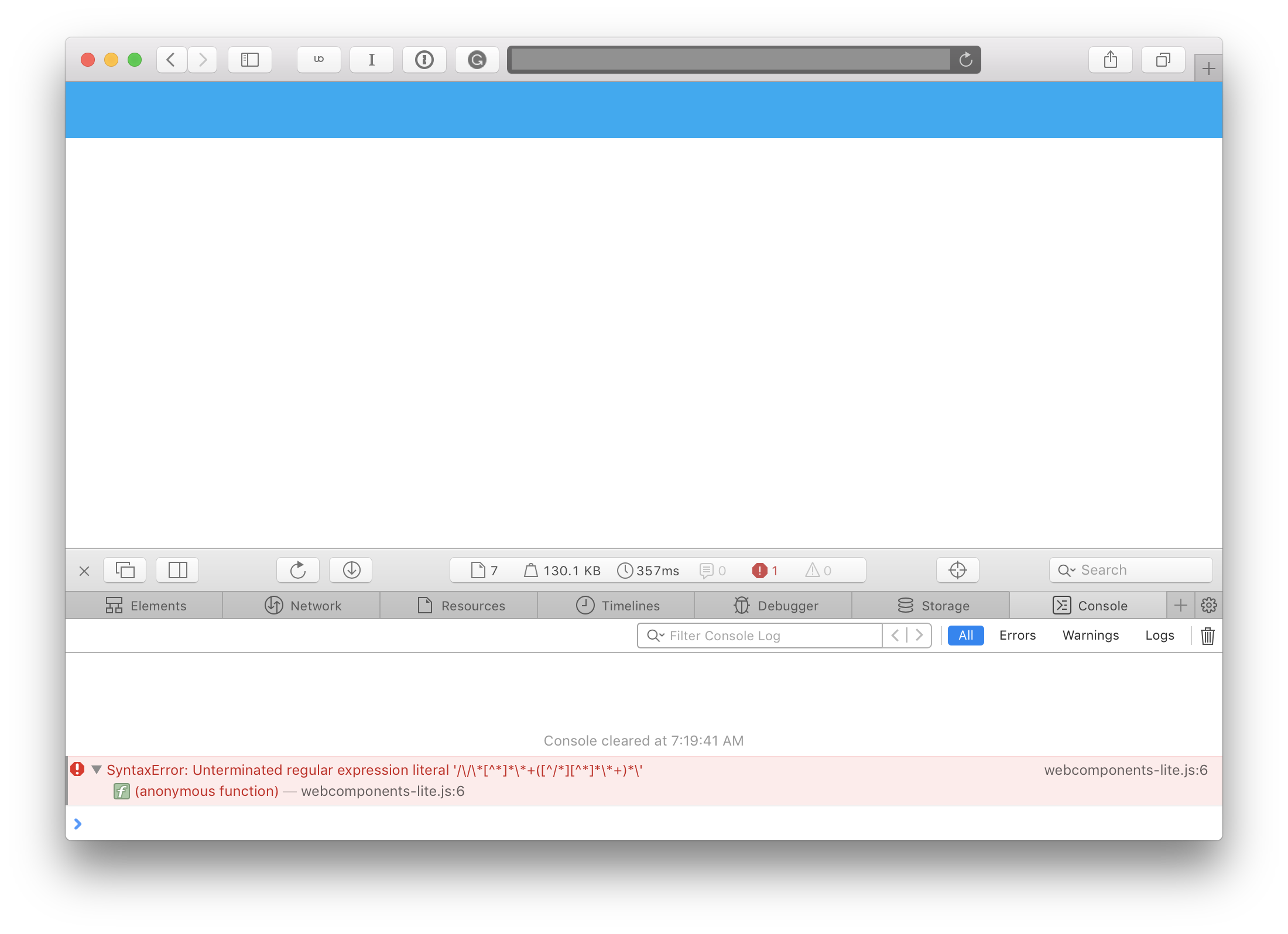
joch
on 14 Aug 2017
Ok so tested this in Chrome, and there I can see the login screen and login by pressing enter.
Maybe all this is related to the login fix coming in 0.51.2 after all. I'll test once it's out!
joch
on 14 Aug 2017
I have the same issue in Firefox 54.0.1 (tested in HA version: 0.51.0, 0.51.1, 0.51.2). Empty screen with blue bar on top. Sometimes refreshing the page a couple of times using Ctrl+F5 helps. Chrome works with no issues. HA version <= 0.50.2 works wells.
The error is different than in the original post:

update:
It looks this is a known bug for Firefox and Edge for webcomponentsjs v1.0.5. It looks it got fixed in 1.0.6
https://github.com/webcomponents/webcomponentsjs/issues/819
 Vilen77
on 14 Aug 2017
Vilen77
on 14 Aug 2017
Updated to 0.51.2, and the same issue remains, eg. above error in Safari on macOS and iOS (including the iOS app), but works fine on Chrome.
joch
on 15 Aug 2017
Same
Running 51.2 on ubuntu..
updates after 50.x results in not being able to load the web ui in ios devices.. both ipad and iphone
safari on el capitan seems to work ok after clearing caches and forcing a reload
hass completely unusable in its current 51.2 state
 duecedriver
on 16 Aug 2017
duecedriver
on 16 Aug 2017
seems that on the iPad... having addblock running prevents the safari hass page from loading...
I get constant cycling there was an error loading page with it enabled..
when addblock is disabled.. and I do a forced reload of the page a couple times it seems to work.. at least for a while...
this didnt happen with previous versions... thanks guys... keep up the great work!!
duecedriver
on 20 Aug 2017
Same situation here:
Firefox (Portable) 55.0.3 64x
HomeAssistant 52.1
Firefox loads a blank screen with the following error in Firefox Console:
TypeError: this._meta.byKey is not a function
Is there anything that the end-user can do it fix it or is it a case that we must wait on an update from someone?
Thanks,
The Capt.
 CaptInsano
on 31 Aug 2017
CaptInsano
on 31 Aug 2017
OK, so I had this problem on 52.1.
I was starting it by using "python -m homeassistant"
I found a post (not here) that I can't find anymore that said start it using "hass"
I now have access to the web interface again.
If I start using "python -m ..." the web interface doesn't work, start it with "hass" and it does
 davesmeghead
on 5 Sep 2017
davesmeghead
on 5 Sep 2017
This problem still exists in 53.0, I'm running HA as a service using the standard Hassbian image. But shouldn't this issue be reported in home-assistant/home-assistant-polymer?
 corneyl
on 12 Sep 2017
corneyl
on 12 Sep 2017
I got it working by first disabling the autominification of JS in Cloudflare, and then replacing the webcomponents-lite.js with the official one at https://github.com/webcomponents/webcomponentsjs/blob/master/webcomponents-lite.js. After that I had to clear the browser cache.
Sadly I'm not sure if the minification or replacing the file fixed the actual issue, but I can investigate if needed.
joch
on 12 Sep 2017
Frontend bugs should be in polymer repo. This has been reported and fixed https://github.com/home-assistant/home-assistant-polymer/issues/428
 balloob
on 13 Sep 2017
balloob
on 13 Sep 2017
_Edit: just posted this in the polymer repo as requested above, sorry about duplicate here_.
I am still getting this error in latest version (0.54) released today.
Firefox 55.0.3
"TypeError: this._meta.byKey is not a function:"
Polymer({is:"iron-icon",properties:{icon:{type:String},theme:{type:String},src:{type:String},_meta:{value:Polymer.Base.create("iron-meta",{type:"iconset"})}},observers:["_updateIcon(_meta, isAttached)","_updateIcon(theme, isAttached)","_srcChanged(src, isAttached)","_iconChanged(icon, isAttached)"],_DEFAULT_ICONSET:"icons",_iconChanged:function(t){var i=(t||"").split(":");this._iconName=i.pop(),this._iconsetName=i.pop()||this._DEFAULT_ICONSET,this._updateIcon()},_srcChanged:function(t){this._updateIcon()},_usesIconset:function(){return this.icon||!this.src},_updateIcon:function(){this._usesIconset()?(this._img&&this._img.parentNode&&Polymer.dom(this.root).removeChild(this._img),""===this._iconName?this._iconset&&this._iconset.removeIcon(this):this._iconsetName&&this._meta&&(this._iconset=this._meta.byKey(this._iconsetName),this._iconset?(this._iconset.applyIcon(this,this._iconName,this.theme),this.unlisten(window,"iron-iconset-added","_updateIcon")):this.listen(window,"iron-iconset-added","_updateIcon"))):(this._iconset&&this._iconset.removeIcon(this),this._img||(this._img=document.createElement("img"),this._img.style.width="100%",this._img.style.height="100%",this._img.draggable=!1),this._img.src=this.src,Polymer.dom(this.root).appendChild(this._img))}});
//# sourceURL=https://xxxxxxxxxx:8123/static/frontend-7e13ce36d3141182a62a5b061e87e77a.html-82.js
Can anyone confirm if it is fixed for them or still broken?
CaptInsano
on 23 Sep 2017
Works fine for me in 0.54 on iOS at least.
joch
on 23 Sep 2017
Related issues
 TheZoker
·
3Comments
TheZoker
·
3Comments
 MartinHjelmare
·
3Comments
MartinHjelmare
·
3Comments
 ofuangka
·
3Comments
ofuangka
·
3Comments
 missedtheapex
·
3Comments
missedtheapex
·
3Comments
 Elmardus
·
3Comments
Elmardus
·
3Comments
Most helpful comment
Frontend bugs should be in polymer repo. This has been reported and fixed https://github.com/home-assistant/home-assistant-polymer/issues/428