Core: How i can open adonis from other device in my network
Hello,
when i open my adonis server it work successfully from localhost with 'http://localhost:3333/'
but when i open it from other pc in my network by my local network ip address like 'http://192.168.1.12:8080/' not working
i want any way to open it by my local network ip or any other way.
 ahmedawm2
All 6 comments
Hello,
Have you tried 'http://192.168.1.12:3333/' ? Currently my Virtual Host IP is 192.168.1.5 and I can access http://192.168.1.5:3333/ Plz cross check.
 navdeepsingh
on 27 Dec 2016
navdeepsingh
on 27 Dec 2016
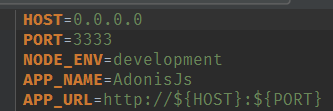
Make sure you change localhost to 0.0.0.0 inside .env file.
 thetutlage
on 27 Dec 2016
thetutlage
on 27 Dec 2016
Make sure you change
localhostto0.0.0.0inside .env file.
here it did not work, can anyone help me?
 Dougmarcolino
on 27 Sep 2018
Dougmarcolino
on 27 Sep 2018
windows firewall :)
 tim3ks
on 17 Jan 2019
tim3ks
on 17 Jan 2019
Dourgmarcolino voce bota o HOST= 0.0.0.0 e restarta o serve que funciona.
 DanleyCr7
on 25 Jan 2020
DanleyCr7
on 25 Jan 2020
This thread has been automatically locked since there has not been any recent activity after it was closed. Please open a new issue for related bugs.
![lock[bot] picture](https://avatars.githubusercontent.com/in/6672?v=4&s=40) lock[bot]
on 10 Mar 2020
lock[bot]
on 10 Mar 2020
Related issues
 Extarys
·
4Comments
navdeepsingh
·
3Comments
Extarys
·
4Comments
navdeepsingh
·
3Comments
 themodernpk
·
3Comments
themodernpk
·
3Comments
 devcaststudio
·
3Comments
devcaststudio
·
3Comments
 itsg2jakhmola
·
3Comments
itsg2jakhmola
·
3Comments
Most helpful comment
Make sure you change
localhostto0.0.0.0inside .env file.