Core: After upgrade from 9.0 to 9.1 by apt-get upgrade: maintenance mode remains active
This is the upgrade log:
root@srvcl02:~# apt-get upgrade
Paketlisten werden gelesen... Fertig
Abhängigkeitsbaum wird aufgebaut.
Statusinformationen werden eingelesen.... Fertig
Paketaktualisierung (Upgrade) wird berechnet... Fertig
Die folgenden Pakete werden aktualisiert (Upgrade):
  owncloud owncloud-deps-php7.0 owncloud-files
3 aktualisiert, 0 neu installiert, 0 zu entfernen und 0 nicht aktualisiert.
Es müssen noch 0 B von 25,1 MB an Archiven heruntergeladen werden.
Nach dieser Operation werden 10,1 MB Plattenplatz zusätzlich benutzt.
Möchten Sie fortfahren? [J/n] j
(Lese Datenbank ... 107274 Dateien und Verzeichnisse sind derzeit installiert.)
Vorbereitung zum Entpacken von .../owncloud_9.1.0-1.1_all.deb ...
Entpacken von owncloud (9.1.0-1.1) über (9.0.2-1.2) ...
Vorbereitung zum Entpacken von .../owncloud-files_9.1.0-1.1_all.deb ...
Entpacken von owncloud-files (9.1.0-1.1) über (9.0.2-2.1) ...
Vorbereitung zum Entpacken von .../owncloud-deps-php7.0_9.1.0-1.1_all.deb ...
owncloud-deps-php5: occ maintenance:mode --on
ownCloud or one of the apps require upgrade - only a limited number of commands are available
You may use your browser or the occ upgrade command to do the upgrade
Maintenance mode enabled
Entpacken von owncloud-deps-php7.0 (9.1.0-1.1) über (9.0.2-1.2) ...
owncloud-files (9.1.0-1.1) wird eingerichtet ...
owncloud-deps-php7.0 (9.1.0-1.1) wird eingerichtet ...
Enabling conf owncloud.
To activate the new configuration, you need to run:
  service apache2 reload
apache2_invoke: Enable module rewrite
apache2_invoke owncloud: already enabled
Leaving server in maintenance mode. Please run occ upgrade manually.

See https://doc.owncloud.org/server/9.1/admin_manual/maintenance/upgrade.html

ownCloud or one of the apps require upgrade - only a limited number of commands are available
You may use your browser or the occ upgrade command to do the upgrade
Maintenance mode enabled
owncloud (9.1.0-1.1) wird eingerichtet ...
root@srvcl02:~#
The maintenance mode is referenced by console message and in fact: it's active:

You may use your browser or the occ upgrade command to do the upgrade
- using browser to complete the upgrade fails: the admin session (which I opened before the update) is showing the maintenance screen, too. So, no chance to complete any update!
- the occ upgrade command should be executed by the apt-get upgrade directly - because apt-get upgrade is often triggered automatically / unattended during night. If the maintenance mode remains active after every oc update until somebody (in best case the admin himself) notifies the admin to complete the upgrade. Well, this can take a few hours, days or months (except the oc admin looks if there is a maintance situation at oc server on every day on the morning as one of the very first things ;-)
 jochenwezel
All 18 comments
@jnweiger
 DeepDiver1975
on 26 Jul 2016
DeepDiver1975
on 26 Jul 2016
@DeepDiver1975 @jochenwezel Keeping the maintenance mode is the expected behavior since quite some time:
Second, the Linux packages will show a different upgrade behavior. Linux packages before 8.2 send an existing ownCloud server into maintenance mode, install the new code base, perform occ upgrade on behalf of the system administrator, then exit out of maintenance mode. This often came unexpected to the admin and is in general not safe as an unattended install. Third party apps are also likely to break this automated process.
Linux packages 8.2 and up change an existing ownCloud server into maintenance mode, install the new code base, and leave the server in maintenance mode. It is up to the system administrator to finalize the upgrade.
I thought i have seen this also documented at doc.owncloud.org but can't find it at the moment.
 ghost
on 26 Jul 2016
ghost
on 26 Jul 2016
To your answer pointing to my point 2
automated update with apt-get is the big advantage of apt-get. Would be great if you could find a way to distribute using this apt-get channel the stable releases incl. most important/common plugins so that it can be re-activated automatically again without breaking plugin.
Maybe you can also provide a switch auto-switch-off-maintenance-mode-after-occ-upgrade = {true|false} for those users who would prefer a running owncloud instead of a waiting-for-admin-owncloud.
To my point 1
ownCloud or one of the apps require upgrade - only a limited number of commands are available
You may use your browser or the occ upgrade command to do the upgrade
Is it possible to explain at console output on how to complete the upgrade and switch off the maintenance mode _via browser_? Is there a special URL to be called by the admin? Which one is it?
jochenwezel
on 26 Jul 2016
automated update with apt-get is the big advantage of apt-get. Would be great if you could find a way to distribute using this apt-get channel the stable releases incl. most important/common plugins so that it can be re-activated automatically again without breaking plugin.
Thats maybe valid for a stable distributions like Debian and their base components. But not for a web application like ownCloud (from my PoV) where you really should do tests and backups before doing any updates.
There where probably good reasons why this behavior was changed in oC 8.2. IIRC tons of people had complained about this old behavior in the past and so the new behavior was chosen.
Is it possible to explain at console output on how to complete the upgrade and switch off the maintenance mode via browser? Is there a special URL to be called by the admin? Which one is it?
This is already shown when running an apt-get update like seen here: https://github.com/owncloud/core/issues/24339
Leaving server in maintenance mode. Please run occ upgrade manually.
See https://doc.owncloud.org/server/9.0/admin_manual/maintenance/upgrade.html
ghost
on 26 Jul 2016
Another suggestion to point 2
It should be possible to check for all existing admin accounts in owncloud database. All or some of these admin accounts should have got an e-mail address. Those with the e-mail address in place should recieve an e-mail as soon as the owncloud goes into maintenance mode for upgrade reasons.
The e-mail should explain to the admin that the owncloud package has been updated by the software package management (apt-get) and waits for the admin for starting a manual occ upgrade and if with success and all plugins are in place, switch-off of maintenance mode is required by occ ...
jochenwezel
on 26 Jul 2016
This is already shown when running an apt-get update like seen here: #24339
This post doesn't contain any information on that point on how to upgrade with browser
If it is really possible to upgrade with browser, there could be a link ready to use on how to login as admin or how to start it pointing to the local owncloud server (not to a general post in documentation).
jochenwezel
on 26 Jul 2016
It needs to be assumed that admins should read at least the manual of a web application they are maintaining:
https://doc.owncloud.org/server/9.1/admin_manual/maintenance/upgrade.html
Personally i don't think that it is needed to overengineer this by throwing messages around. But we will see what @DeepDiver1975 or @jnweiger are thinking about this.
ghost
on 26 Jul 2016
It needs to be assumed that admins should read at least the manual of a web application they are maintaining: https://doc.owncloud.org/server/9.1/admin_manual/maintenance/upgrade.html
Sorry, I don't get the point. Do you want to point out that the documentation recommends to do the upgrade manually?
Then I reply that the same documentation encourages the admins to update frequently.
Another point is that the typical admins run "apt-get upgrade" on their linux systems to update their whole distribution. Well, the typical admin doesn't think of excluding owncloud from the list of packages that shall be updated by apt-get upgrade. This would maybe require additional arguments from the admin to type into the console command. But he will most likely don't do that.
jochenwezel
on 26 Jul 2016
@RealRancor My question to the browser way is still not answered by any of your replies.
jochenwezel
on 26 Jul 2016
@jochenwezel There is no point in doing the browser way when using the packages as you have access to the command line and always should use the occ command line. Thats why no browser way is documented because you shouldn't simple use it.
Every info you need is already provided as pointed out above:
- oC keeps maintenance mode is expected after you have run apt-get upgrade
- You're redirected to https://doc.owncloud.org/server/9.1/admin_manual/maintenance/upgrade.html which includes "Using your Linux package manager with our official ownCloud repositories. This is the recommended method." and pointing you https://doc.owncloud.org/server/9.1/admin_manual/maintenance/package_upgrade.html
- Admins should be able to read the link and follow the steps there including running occ upgrade and putting the oC instance out of maintenance mode
What additional info are you missing here?
ghost
on 26 Jul 2016
ahh, okay. there is no browser way.
so please review the upgrade log output I posted initially:
ownCloud or one of the apps require upgrade - only a limited number of commands are available
You may use your browser or the occ upgrade command to do the upgrade
Maintenance mode enabled
Please replace the line
You may use your browser or the occ upgrade command to do the upgrade
by e.g.
Please use the occ upgrade command to do the upgrade
There is a browser way by putting the installation out of maintenance mode and then opening your oC instance via the webbrowser like http://example.com/owncloud. But its strongly discouraged to use that way. Thats probably why it was removed from the documentation.
ghost
on 26 Jul 2016
okay, the apt-get upgrade output should just follow the documentation and not give any hints to that any more ;-)
jochenwezel
on 26 Jul 2016
automated update with apt-get is the big advantage of apt-get. Would be great if you could find a way to distribute using this apt-get channel the stable releases incl. most important/common plugins so that it can be re-activated automatically again without breaking plugin.
Maybe you can also provide a switch auto-switch-off-maintenance-mode-after-occ-upgrade = {true|false} for those users who would prefer a running owncloud instead of a waiting-for-admin-owncloud.
I fully support this. I actually automated this by hooking into the package upgrade and running the upgrade after the package has been upgraded (ref: https://github.com/debops/ansible-owncloud/issues/28). But a simple option would be nice. I am ok with not doing the upgrade by default but why not allow to do it if the admin really thinks that could be a good idea? You can include your reasons why you don’t do this by default in the docs.
Also, it would be handy to offer the possibility to hook into this upgrade script (currently postinst in owncloud-deps-php5) (ref: https://github.com/debops/ansible-owncloud/issues/34)
 ypid
on 26 Jul 2016
ypid
on 26 Jul 2016
After running
sudo -u www-data php occ upgrade
in the /owncloud directories.
I did some walk around and find that I can edit the config.php file in the /config folder
and verify the 'maintenance' => false,
 mengbingrock
on 21 Nov 2016
mengbingrock
on 21 Nov 2016
same issue after yum update... I cannot upgrade, I cannot exit maintenance mode even after turning it off with the occ command and by manually setting the config to false.
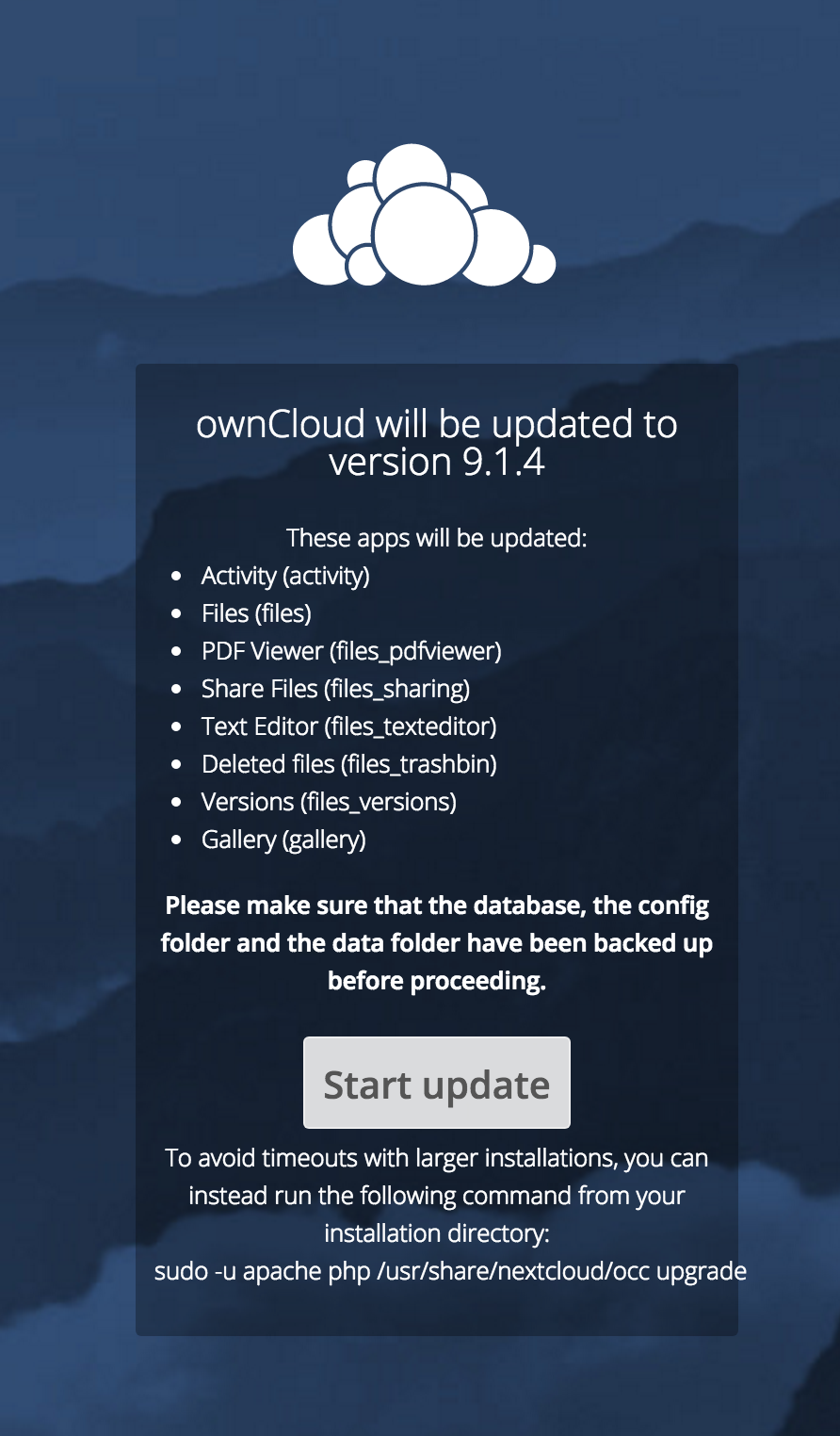
- installed: true
- version: 9.1.4.2
- versionstring: 9.1.4
- edition:
yum list installed|grep owncloud
owncloud-files.noarch 9.0.8-1.1 @centos-7-owncloud
owncloud-httpd.noarch 9.1.4-5.el7 @centos-7-epel
owncloud-mysql.noarch 9.1.4-5.el7 @centos-7-epel
php-owncloud-tarstreamer.noarch 0.1.0-1.el7 @centos-7-epel
 swizzley
on 20 Jul 2017
swizzley
on 20 Jul 2017
Hey, this issue has been closed because the label status/STALE is set and there were no updates for 7 days. Feel free to reopen this issue if you deem it appropriate.
(This is an automated comment from GitMate.io.
 ownclouders
on 21 Dec 2017
ownclouders
on 21 Dec 2017
This thread has been automatically locked since there has not been any recent activity after it was closed. Please open a new issue for related bugs.
![lock[bot] picture](https://avatars.githubusercontent.com/in/6672?v=4&s=40) lock[bot]
on 31 Jul 2019
lock[bot]
on 31 Jul 2019
Related issues
 PVince81
·
4Comments
PVince81
·
4Comments
 dpeger
·
3Comments
dpeger
·
3Comments
 michaelstingl
·
5Comments
michaelstingl
·
5Comments
 rehoehle
·
4Comments
rehoehle
·
4Comments
 gxgani
·
5Comments
gxgani
·
5Comments