Core: Nested group also shows up in view
Make sure you are running the latest version of Home Assistant before reporting an issue.
You should only file an issue if you found a bug. Feature and enhancement requests should go in the Feature Requests section of our community forum:
Home Assistant release (hass --version):
0.23.1
Python release (python3 --version):
3.4.2
Component/platform:
groups within HASS on a Raspberry Pi 3 (AiO installer)
Description of problem:
Adding a child group to a parent group (nesting) results in the child group also being shown in the view group, of which the parent group is a member

Expected:
The child group should - in this case - not show up in the view unless explicitly added in the configuration
Problem-relevant configuration.yaml entries and steps to reproduce:
groups.yaml:
default_view:
  name: "Home"
# icon: mdi:home
  view: yes
  entities:
    - group.phone_tracker
    - group.living_area
    - group.bedroom
    - group.office
    - group.hombot
phone_tracker:
  name: "Phone tracker"
  entities:
    - device_tracker.androidhelios_aw
    - device_tracker.androidhelios_bt
    - group.david_tracker
    - device_tracker.katsiphone_aw

david_tracker:
  name: "David (combined)"
  entities:
    - device_tracker.androidhelios_aw
    - device_tracker.androidhelios_bt
Additional info:
I've tried using hidden: true and view: no on the affected groups, but none of that gave me the desired result.
Also, I am new to GitHub (as a contributor) which means this is my first bug report. Any feedback is welcome!
 fanaticDavid
All 17 comments
The bug report is all good, very informative.
It should indeed not show the entities twice, that's bad 👎
 balloob
on 11 Jul 2016
balloob
on 11 Jul 2016
A small update: I randomly decided to tweak my groups a bit to remove the duplicate information, as I waited for a bug fix, but here's what happened:
I changed
phone_tracker:
  name: "Phone tracker"
  entities:
    - device_tracker.androidhelios_aw
    - device_tracker.androidhelios_bt
    - group.david_tracker
    - device_tracker.katsiphone_aw

david_tracker:
  name: "David (combined)"
  entities:
    - device_tracker.androidhelios_aw
    - device_tracker.androidhelios_bt
to
phone_tracker:
  name: "Phone tracker"
  entities:
#   - device_tracker.smartphone_david_aw
#   - device_tracker.smartphone_david_bt
    - group.david_tracker
    - device_tracker.smartphone_katrina_aw

david_tracker:
  name: "David (combined)"
  entities:
    - device_tracker.smartphone_david_aw
    - device_tracker.smartphone_david_bt
So I basically wanted to get rid of these items (because of the unexpected duplicates on the right):

And ended up with this:

So in other words: it seems a nested child group only shows up twice (in the parent group and in its own 'card') if the members of the child group are also in the parent group...a scenario that only existed for diagnostic purposes for me. Eventually, my intention was going to be to get the view in the last screenshot above.
Imho, this bug report still stands because of the original unexpected behaviour. I just wanted to provide additional information.
fanaticDavid
on 24 Jul 2016
Going to close this one as I have no need for this particular use case anymore. It may also have been fixed in the meantime because of other similar bug reports, but I have no need to test that theory.
fanaticDavid
on 2 Feb 2017
This behavior still exists in .41 and is still what I would consider a bug. Please consider re-opening.
 jonwedell
on 30 Mar 2017
jonwedell
on 30 Mar 2017
I had a similar setup and problem and was able to fix it by setting hidden: true on the root parts I didn't want to show up twice.
I have a group of my devices (cell phone, laptop, tablet) and use nmap to see if any are home and if any of the 3 are then that person is home. But similarly they were showing up twice
 customize:
    device_tracker.sams_laptop:
      hidden: true
    device_tracker.sams_tablet:
      hidden: true
    device_tracker.sams_phone:
      hidden: true
And my groups:
  persons:
   name: People
   entities:
     - group.person_sam

 person_sam:
  name: Sam
  entities:
    - device_tracker.sams_phone
    - device_tracker.sams_laptop
    - device_tracker.sams_tablet
That left me with just the 'People' card showing if Sam was home or not home
 shogan94
on 14 Apr 2017
shogan94
on 14 Apr 2017
Hey, I just wanted to confirm this issue, ran directly into it. Home Assistant version is 0.46.1.
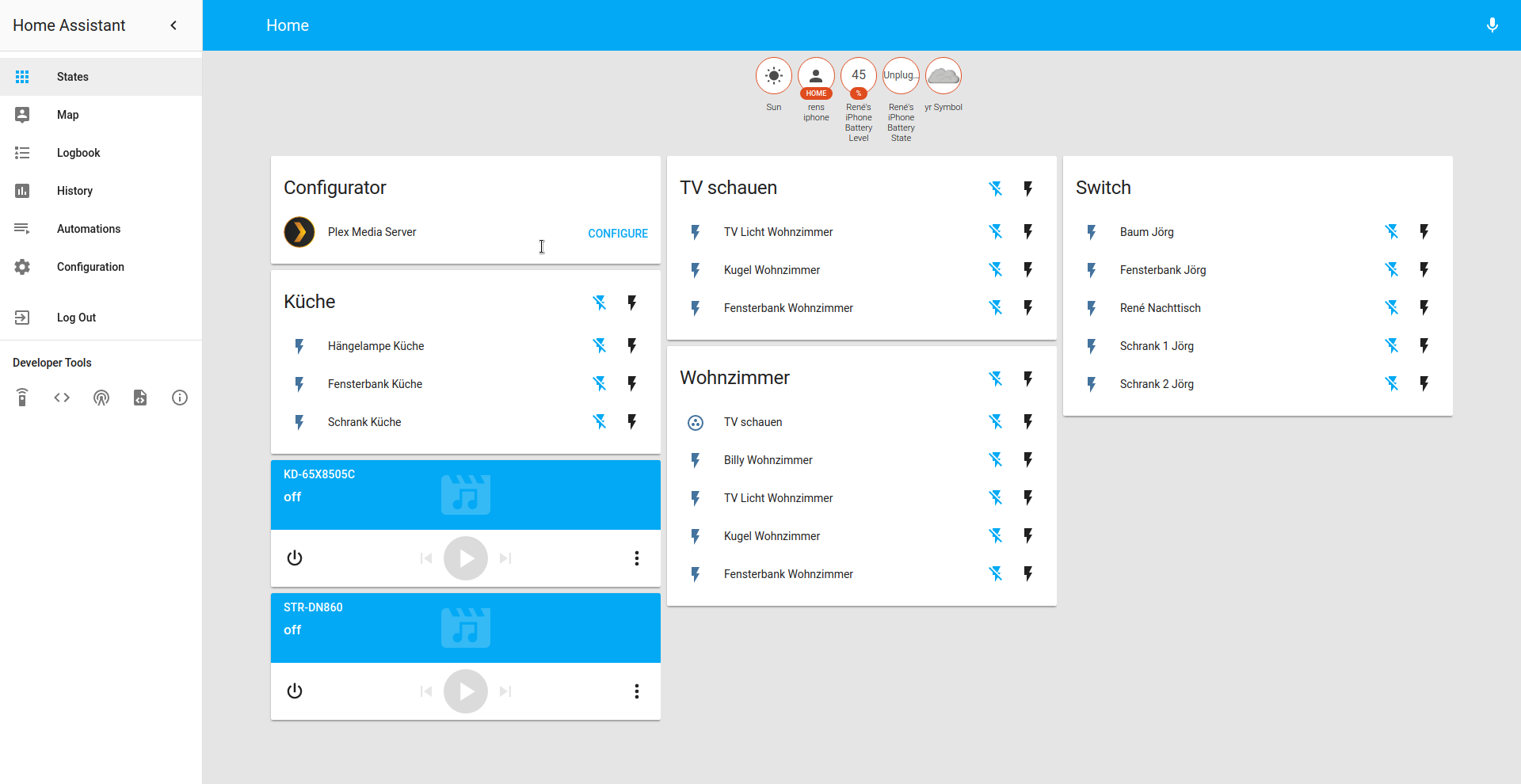
So basically I have some switches in the living room and I want to group some of those together again because I like to switch them on to watch tv. I can't manage to hide the group from the view without also hiding the switch from the parent group.
groups.yaml:
  GNU nano 2.2.6                               File: groups.yaml

kitchen:
  name: Küche
  entities:
    - switch.brst_21_16
    - switch.brst_21_8
    - switch.brst_21_4
view_tv:
  name: TV schauen
  entities:
    - switch.brst_20_16
    - switch.brst_20_8
    - switch.brst_20_4
living:
  name: Wohnzimmer
  entities:
    - group.view_tv
    - switch.brst_20_2
    - switch.brst_20_16
    - switch.brst_20_8
    - switch.brst_20_4
Basically what I wanted is an option to remove the card "TV schauen" but keep the switch for it in "Wohnzimmer".
 BeckmaR
on 16 Jun 2017
BeckmaR
on 16 Jun 2017
@fanaticDavid Bug still present.
 covrig
on 5 Aug 2017
covrig
on 5 Aug 2017
This is still an issue. Trying to hide a "sub"-group, which works, but then it puts all the children of that sub-group up at the top of the page, and removes the sub-group from the parent group.
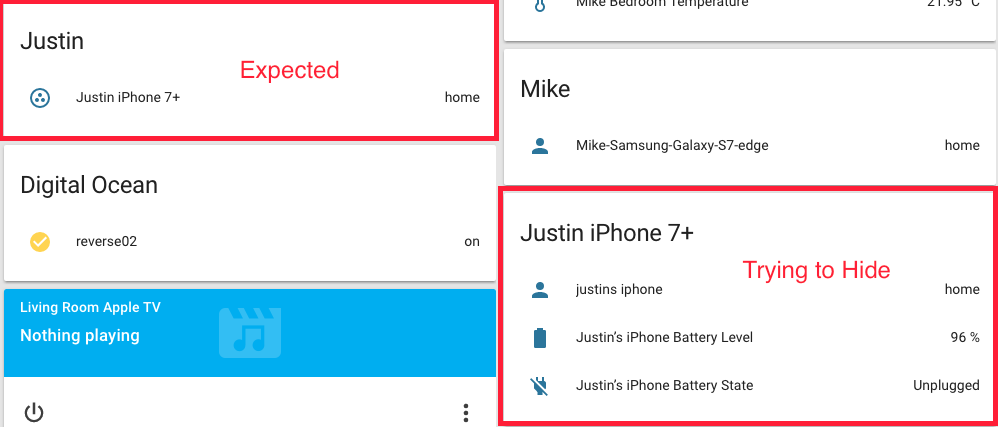
Hiding the subgroup removes it completely from the UI, which I suppose is generally correct, however, it is not the anticipated outcome in this case.
Note that I would like to be able to click on the group in the "Justin" panel, but do not want to see "Justin iPhone 7+" as it's own panel.
 Just-Insane
on 19 Sep 2017
Just-Insane
on 19 Sep 2017
Bug still present as of 0.59.2
When nesting groups, it would be nice to be able to hide the child group without it disappearing from the parent group also:

 CaptInsano
on 6 Dec 2017
CaptInsano
on 6 Dec 2017
I am running into the same issue. It looks like fanaticDavid posted a link to my issue above.
 RonJ103
on 17 Dec 2017
RonJ103
on 17 Dec 2017
According to #11115, this is still a thing.
fanaticDavid
on 3 Mar 2018
+1
 natiz
on 15 Apr 2018
natiz
on 15 Apr 2018
+1 having the same problem. No group-only way to combine a bunch of devices into a single switch without showing each child individually in a separate card.
 coreyo
on 28 May 2018
coreyo
on 28 May 2018
Ok, I guess there is a solution - if you want to hide the "Justin iPhone 7+" group and still show it in the "Justin" group you must mark all entities from "Justin iPhone 7+" as hide_in_default_view: true in customize.yaml.
 piotrdal
on 21 Jun 2018
piotrdal
on 21 Jun 2018
Ok, I guess there is a solution - if you want to hide the "Justin iPhone 7+" group and still show it in the "Justin" group you must mark all entities from "Justin iPhone 7+" as hide_in_default_view: true in customize.yaml.
I'm still learning. Thank you for pointing out this option.
 GroteVriendelijkeReus
on 29 Jun 2018
GroteVriendelijkeReus
on 29 Jun 2018
There hasn't been any activity on this issue recently. Due to the high number of incoming GitHub notifications, we have to clean some of the old issues, as many of them have already been resolved with the latest updates.
Please make sure to update to the latest Home Assistant version and check if that solves the issue. Let us know if that works for you by adding a comment :+1:
 balloobbot
on 26 Oct 2018
balloobbot
on 26 Oct 2018
Lovelace UI is planned to become default in 0.85, and is a lot more customizable. Closing this since it relates to the "old" UI
 cgarwood
on 14 Dec 2018
cgarwood
on 14 Dec 2018
Related issues
 kirichkov
·
3Comments
kirichkov
·
3Comments
 bdraco
·
3Comments
bdraco
·
3Comments
 MartinHjelmare
·
3Comments
MartinHjelmare
·
3Comments
 aweb-01
·
3Comments
aweb-01
·
3Comments
 TheZoker
·
3Comments
TheZoker
·
3Comments
Most helpful comment
This is still an issue. Trying to hide a "sub"-group, which works, but then it puts all the children of that sub-group up at the top of the page, and removes the sub-group from the parent group.
Hiding the subgroup removes it completely from the UI, which I suppose is generally correct, however, it is not the anticipated outcome in this case.
Note that I would like to be able to click on the group in the "Justin" panel, but do not want to see "Justin iPhone 7+" as it's own panel.