Cordova-plugin-iosrtc: VideoElement cannot play video stream
Hello,
Recently I tried to rewrite an iOS SDK which invoke browser-based WebRTC APIs internally to invoke 'cordova-plugin-iosrtc' APIs internally. By now, some API works fine like I can join channel using RTCPeerConnection and publish local video stream using getUserMedia to a peer browser. Amazing plugin!
But <video> play cannot work, the <video> viewport always show its black background but no video stream.
My html look like this
<body>
    ...
        some other tags
    ...
    <video id="local-video" muted autoplay="autoplay" playsinline="playsinline" webkit-playsinline _src="assets/Sunset.mp4" style="width:480px; height:360px; background-color:black;">
    </video>
</body>
My js look like this
window.navigator.mediaDevices.getUserMedia({
        video: {
            deviceId,
        },
        audio: true
    }).then(stream => {
        console.log(`getUserMedia.stream = ${JSON.stringify(stream)}`);
        console.log(`getUserMedia.stream.getTracks = ${JSON.stringify(stream.getTracks())}`);

        // localVideoEl = document.querySelector('.local-video');
        localVideoEl = document.getElementById('local-video');

        // cordova.plugins.iosrtc.observeVideo(localVideoEl)

        localStream = stream;

        // Listen to all events
        TestListenEvents(localStream);
        TestListenEvents(localVideoEl);

        // Attach local stream to video element
        localVideoEl.srcObject = localStream;
        // localVideoEl.play();
    }).catch(err => {
      console.error(`getUserMedia exception: err is ${err}`);
    });
The js logging is something like this

The native logging is something like this
2021-01-26 21:07:42.865961+0800 AgoraNgExample[43511:2623107] iosrtc:videoElementsHandler observeVideo() +8s
2021-01-26 21:07:42.877371+0800 AgoraNgExample[43511:2623107] iosrtc:MediaStreamRenderer new() | [element:"[object HTMLVideoElement]"] +0ms
2021-01-26 21:07:42.878016+0800 AgoraNgExample[43511:2623107] iosrtcPlugin#new_MediaStreamRenderer()
2021-01-26 21:07:42.878237+0800 AgoraNgExample[43511:2623107] PluginMediaStreamRenderer#init()
2021-01-26 21:07:43.046906+0800 AgoraNgExample[43511:2623107] Metal GPU Frame Capture Enabled
2021-01-26 21:07:43.065696+0800 AgoraNgExample[43511:2623107] Metal API Validation Enabled
2021-01-26 21:07:43.243196+0800 AgoraNgExample[43511:2623107] PluginMediaStreamRenderer#run()
2021-01-26 21:07:43.243345+0800 AgoraNgExample[43511:2623107] THREAD WARNING: ['iosrtcPlugin'] took '365.367920' ms. Plugin should use a background thread.
2021-01-26 21:07:43.244000+0800 AgoraNgExample[43511:2623107] iosrtc:MediaStreamRenderer refresh() +2ms
2021-01-26 21:07:43.244168+0800 AgoraNgExample[43511:2623107] iosrtc:MediaStreamRenderer refresh() | no video track yet +1ms
2021-01-26 21:07:43.244347+0800 AgoraNgExample[43511:2623107] iosrtc:MediaStreamRenderer refresh() | [data:{"elementLeft":0,"elementTop":1484,"elementWidth":480,"elementHeight":360,"videoViewWidth":480,"videoViewHeight":360,"visible":true,"opacity":1,"zIndex":0,"mirrored":false,"objectFit":"contain","clip":true,"borderRadius":0}] +1ms
2021-01-26 21:07:43.244657+0800 AgoraNgExample[43511:2623107] iosrtcPlugin#MediaStreamRenderer_refresh()
2021-01-26 21:07:43.244853+0800 AgoraNgExample[43511:2623107] PluginMediaStreamRenderer#refresh() [elementLeft:0.0, elementTop:1484.0, elementWidth:480.0, elementHeight:360.0, videoViewWidth:480.0, videoViewHeight:360.0, visible:true, opacity:1.0, zIndex:0.0, mirrored:false, clip:true, borderRadius:0.0]
2021-01-26 21:07:43.245134+0800 AgoraNgExample[43511:2623107] iosrtc:MediaStreamRenderer render() [stream:{"_listeners":{"addtrack":[null],"removetrack":[null]},"_id":"1254545C-77FA-4123-B9D2-3F96F203DA91","_active":true,"connected":true,"_audioTracks":{"6C6A7F2F-0F19-4FFA-8FAF-ACD53CD39060":{"_listeners":{"ended":[null]},"id":"6C6A7F2F-0F19-4FFA-8FAF-ACD53CD39060","kind":"audio","muted":false,"readyState":"live","_enabled":true,"_ended":false}},"_videoTracks":{"C43BBFBE-6181-4BA2-AFA2-611D73CCB972":{"_listeners":{"ended":[null]},"id":"C43BBFBE-6181-4BA2-AFA2-611D73CCB972","kind":"video","muted":false,"readyState":"live","_enabled":true,"_ended":false}},"_blobId":"MediaStream_1254545C-77FA-4123-B9D2-3F96F203DA91","TestListenEvents":true}] +1ms
2021-01-26 21:07:43.245302+0800 AgoraNgExample[43511:2623107] iosrtcPlugin#MediaStreamRenderer_render()
2021-01-26 21:07:43.245385+0800 AgoraNgExample[43511:2623107] PluginMediaStreamRenderer#render()
2021-01-26 21:07:43.245786+0800 AgoraNgExample[43511:2623107] iosrtc:MediaStreamRenderer close() +1ms
2021-01-26 21:07:43.245944+0800 AgoraNgExample[43511:2623107] iosrtcPlugin#MediaStreamRenderer_close()
2021-01-26 21:07:43.246016+0800 AgoraNgExample[43511:2623107] PluginMediaStreamRenderer#close()
2021-01-26 21:07:43.246071+0800 AgoraNgExample[43511:2623107] PluginMediaStreamRenderer#reset()
2021-01-26 21:07:43.246513+0800 AgoraNgExample[43511:2623107] iosrtc:MediaStreamRenderer new() | [element:"[object HTMLVideoElement]"] +1ms
2021-01-26 21:07:43.246620+0800 AgoraNgExample[43511:2623107] iosrtcPlugin#new_MediaStreamRenderer()
2021-01-26 21:07:43.246668+0800 AgoraNgExample[43511:2623107] PluginMediaStreamRenderer#init()
2021-01-26 21:07:43.249860+0800 AgoraNgExample[43511:2623107] PluginMediaStreamRenderer#run()
2021-01-26 21:07:43.250018+0800 AgoraNgExample[43511:2623107] iosrtc:MediaStreamRenderer refresh() +0ms
2021-01-26 21:07:43.250137+0800 AgoraNgExample[43511:2623107] iosrtc:MediaStreamRenderer refresh() | no video track yet +0ms
2021-01-26 21:07:43.250273+0800 AgoraNgExample[43511:2623107] iosrtc:MediaStreamRenderer refresh() | [data:{"elementLeft":0,"elementTop":1484,"elementWidth":480,"elementHeight":360,"videoViewWidth":480,"videoViewHeight":360,"visible":true,"opacity":1,"zIndex":0,"mirrored":false,"objectFit":"contain","clip":true,"borderRadius":0}] +1ms
2021-01-26 21:07:43.250432+0800 AgoraNgExample[43511:2623107] iosrtcPlugin#MediaStreamRenderer_refresh()
2021-01-26 21:07:43.250529+0800 AgoraNgExample[43511:2623107] PluginMediaStreamRenderer#refresh() [elementLeft:0.0, elementTop:1484.0, elementWidth:480.0, elementHeight:360.0, videoViewWidth:480.0, videoViewHeight:360.0, visible:true, opacity:1.0, zIndex:0.0, mirrored:false, clip:true, borderRadius:0.0]
2021-01-26 21:07:43.250686+0800 AgoraNgExample[43511:2623107] iosrtc:MediaStreamRenderer render() [stream:{"_listeners":{"addtrack":[null],"removetrack":[null],"update":[null],"inactive":[null]},"_id":"1254545C-77FA-4123-B9D2-3F96F203DA91","_active":true,"connected":true,"_audioTracks":{"6C6A7F2F-0F19-4FFA-8FAF-ACD53CD39060":{"_listeners":{"ended":[null]},"id":"6C6A7F2F-0F19-4FFA-8FAF-ACD53CD39060","kind":"audio","muted":false,"readyState":"live","_enabled":true,"_ended":false}},"_videoTracks":{"C43BBFBE-6181-4BA2-AFA2-611D73CCB972":{"_listeners":{"ended":[null]},"id":"C43BBFBE-6181-4BA2-AFA2-611D73CCB972","kind":"video","muted":false,"readyState":"live","_enabled":true,"_ended":false}},"_blobId":"MediaStream_1254545C-77FA-4123-B9D2-3F96F203DA91","TestListenEvents":true}] +0ms
2021-01-26 21:07:43.250963+0800 AgoraNgExample[43511:2623107] iosrtcPlugin#MediaStreamRenderer_render()
2021-01-26 21:07:43.251016+0800 AgoraNgExample[43511:2623107] PluginMediaStreamRenderer#render()
2021-01-26 21:07:43.252872+0800 AgoraNgExample[43511:2623107] Failed to bind EAGLDrawable: <CAEAGLLayer: 0x28031c100> to GL_RENDERBUFFER 1
2021-01-26 21:07:43.253017+0800 AgoraNgExample[43511:2623107] Failed to make complete framebuffer object 8cd6
2021-01-26 21:07:43.254657+0800 AgoraNgExample[43511:2623107] Failed to bind EAGLDrawable: <CAEAGLLayer: 0x280315c60> to GL_RENDERBUFFER 1
2021-01-26 21:07:43.254718+0800 AgoraNgExample[43511:2623107] Failed to make complete framebuffer object 8cd6
I also run cordova-plugin-iosrtc-sample with index-local.js in the same enviroment(iphone, xcode, cordova version, plugin version ...etc), it can play video stream. I tried to compare logging but they seems very similar, seems they both set videoElement to Observer in js and new a MediaStreamRenderer in swift.
I think it should be my usage problem but no idea where to deep into, could you please give me some suggestion? Thanks very much.
Best Regards.
Cordova version: 10.0.0
Cordova iOS version: 6.1.1
Plugin version: 6.0.14
iOS version: 14.3
Xcode version: 12.3
WebRTC-adapter version: latest
WebRTC Framework version: m69
 octopusjames
All 17 comments
Give me a momment i will try to reproduce.
In the mean time, did you try cordova.plugin.refreshVideos()no need to call observeVideo it should be automatic.
 hthetiot
on 26 Jan 2021
hthetiot
on 26 Jan 2021
Got it!
Since you use iOS 14.3 and iosrtc Plugin version: 6.0.14, you need to update to 6.0.17 to solve that bug.
hthetiot
on 26 Jan 2021
related https://github.com/cordova-rtc/cordova-plugin-iosrtc/issues/618
@octopusjames Let me know if using cordova-plugin-iosrtc 6.0.17 solve your issue, prior 6.0.16 we have the issue you describe on ios 14.3+
hthetiot
on 26 Jan 2021
Thank you for the feedback!
I update plugin to 6.0.17 but it still can't work.
I noticed there is a difference between using 6.0.17 and 6.0.14. In 6.0.17 when stream attached to videoElement.srcObject the VideoElement's viewport disappear but in 6.0.14 it remains there with the black background shown.
I tried call with/without invoke refreshVideos() in 6.0.17, seems neither can work.
I don't change my html and my js look like this now
window.navigator.mediaDevices.getUserMedia({
        video: {
            deviceId,
        },
        audio: true
    }).then(stream => {
        console.log(`getUserMedia.stream = ${JSON.stringify(stream)}`);
        console.log(`getUserMedia.stream.getTracks = ${JSON.stringify(stream.getTracks())}`);

        localVideoEl = document.getElementById('local-video');

        localStream = stream;

        // Listen to all events
        TestListenEvents(localStream);
        TestListenEvents(localVideoEl);

        // Attach local stream to video element
        localVideoEl.srcObject = localStream;

        cordova.plugins.iosrtc.refreshVideos();
    }).catch(err => {
      console.error(`getUserMedia exception: err is ${err}`);
    });
New js log
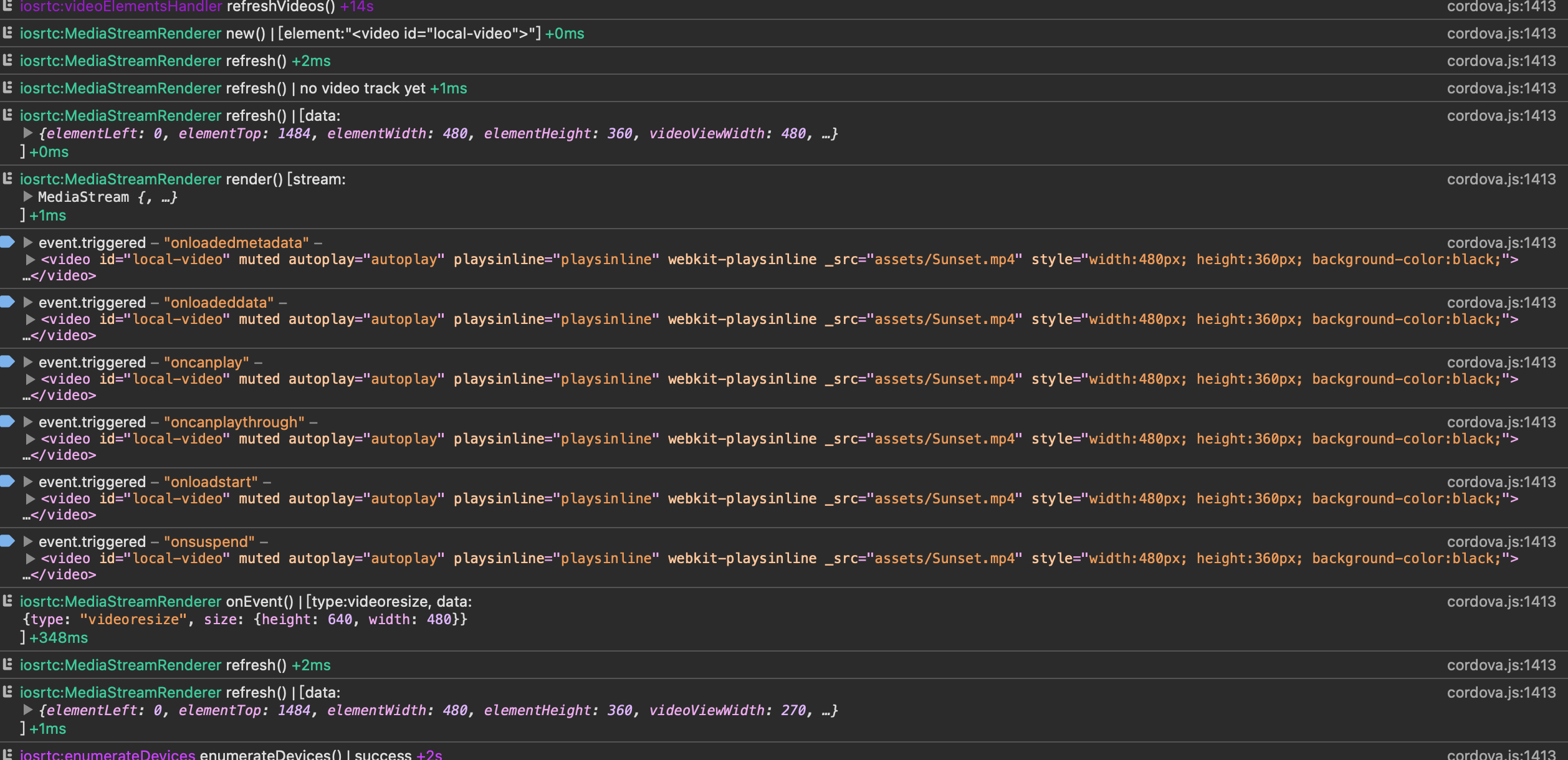
New native log
2021-01-27 12:03:11.062558+0800 AgoraNgExample[46717:2789371] iosrtc:videoElementsHandler refreshVideos() +14s
2021-01-27 12:03:11.071642+0800 AgoraNgExample[46717:2789371] iosrtc:MediaStreamRenderer new() | [element:"[object HTMLVideoElement]"] +0ms
2021-01-27 12:03:11.071930+0800 AgoraNgExample[46717:2789371] iosrtcPlugin#new_MediaStreamRenderer()
2021-01-27 12:03:11.072024+0800 AgoraNgExample[46717:2789371] PluginMediaStreamRenderer#init()
2021-01-27 12:03:11.240315+0800 AgoraNgExample[46717:2789371] Metal GPU Frame Capture Enabled
2021-01-27 12:03:11.257407+0800 AgoraNgExample[46717:2789371] Metal API Validation Enabled
2021-01-27 12:03:11.363992+0800 AgoraNgExample[46717:2789371] PluginMediaStreamRenderer#run()
2021-01-27 12:03:11.364112+0800 AgoraNgExample[46717:2789371] THREAD WARNING: ['iosrtcPlugin'] took '292.195801' ms. Plugin should use a background thread.
2021-01-27 12:03:11.364789+0800 AgoraNgExample[46717:2789371] iosrtc:MediaStreamRenderer refresh() +2ms
2021-01-27 12:03:11.364983+0800 AgoraNgExample[46717:2789371] iosrtc:MediaStreamRenderer refresh() | no video track yet +1ms
2021-01-27 12:03:11.365178+0800 AgoraNgExample[46717:2789371] iosrtc:MediaStreamRenderer refresh() | [data:{"elementLeft":0,"elementTop":1484,"elementWidth":480,"elementHeight":360,"videoViewWidth":480,"videoViewHeight":360,"visible":true,"backgroundColor":"0,0,0","opacity":1,"zIndex":0,"mirrored":false,"objectFit":"contain","clip":true,"borderRadius":0}] +0ms
2021-01-27 12:03:11.365377+0800 AgoraNgExample[46717:2789371] iosrtcPlugin#MediaStreamRenderer_refresh()
2021-01-27 12:03:11.365500+0800 AgoraNgExample[46717:2789371] PluginMediaStreamRenderer#refresh() [elementLeft:0.0, elementTop:1484.0, elementWidth:480.0, elementHeight:360.0, videoViewWidth:480.0, videoViewHeight:360.0, visible:true, opacity:1.0, zIndex:0.0, mirrored:false, clip:true, borderRadius:0.0]
2021-01-27 12:03:11.365925+0800 AgoraNgExample[46717:2789371] iosrtc:MediaStreamRenderer render() [stream:{"_listeners":{"addtrack":[null],"removetrack":[null]},"_id":"5265C501-5F07-4AD0-B083-8C6C1BA6279C","_active":true,"connected":true,"_addedToConnection":false,"_audioTracks":{"DA57ED2B-68D5-4C6C-B866-65A8C87EC468":{"_listeners":{"ended":[null]},"id":"DA57ED2B-68D5-4C6C-B866-65A8C87EC468","kind":"audio","muted":false,"capabilities":{},"readyState":"live","_enabled":true,"_ended":false}},"_videoTracks":{"5E5ADEA8-90B7-4DA5-A65D-2B41E7F53CE8":{"_listeners":{"ended":[null]},"id":"5E5ADEA8-90B7-4DA5-A65D-2B41E7F53CE8","kind":"video","muted":false,"capabilities":{"deviceId":"com.apple.avfoundation.avcapturedevice.built-in_video:1"},"readyState":"live","_enabled":true,"_ended":false}},"_blobId":"MediaStream_5265C501-5F07-4AD0-B083-8C6C1BA6279C","TestListenEvents":true}] +1ms
2021-01-27 12:03:11.366161+0800 AgoraNgExample[46717:2789371] iosrtcPlugin#MediaStreamRenderer_render()
2021-01-27 12:03:11.366212+0800 AgoraNgExample[46717:2789371] PluginMediaStreamRenderer#render()
2021-01-27 12:03:11.369323+0800 AgoraNgExample[46717:2789371] Failed to bind EAGLDrawable: <CAEAGLLayer: 0x2809f4280> to GL_RENDERBUFFER 1
2021-01-27 12:03:11.369405+0800 AgoraNgExample[46717:2789371] Failed to make complete framebuffer object 8cd6
Best Regards.
Cordova version: 10.0.0
Cordova iOS version: 6.1.1
Plugin version: 6.0.17
iOS version: 14.3
Xcode version: 12.3
WebRTC-adapter version: latest
WebRTC Framework version: m69
octopusjames
on 27 Jan 2021
And I can confirm getUserMedia works fine because I can publish video track and browser peer can see iphone's video
octopusjames
on 27 Jan 2021
@octopusjames I think your issue related to video place please check if z-index =-1 specified in video element or via (scss, css) if specified the video will be placed below the wkwebview so it will be not visible.
 MusabBasheer
on 27 Jan 2021
MusabBasheer
on 27 Jan 2021
@octopusjames I think your issue related to video place please check if z-index =-1 specified in video element or via (scss, css) if specified the video will be placed below the wkwebview so it will be no visible.
Good catch @MusabBasheer
Thx for helping.
hthetiot
on 27 Jan 2021
@octopusjames I think your issue related to video place please check if z-index =-1 specified in video element or via (scss, css) if specified the video will be placed below the wkwebview so it will be not visible.
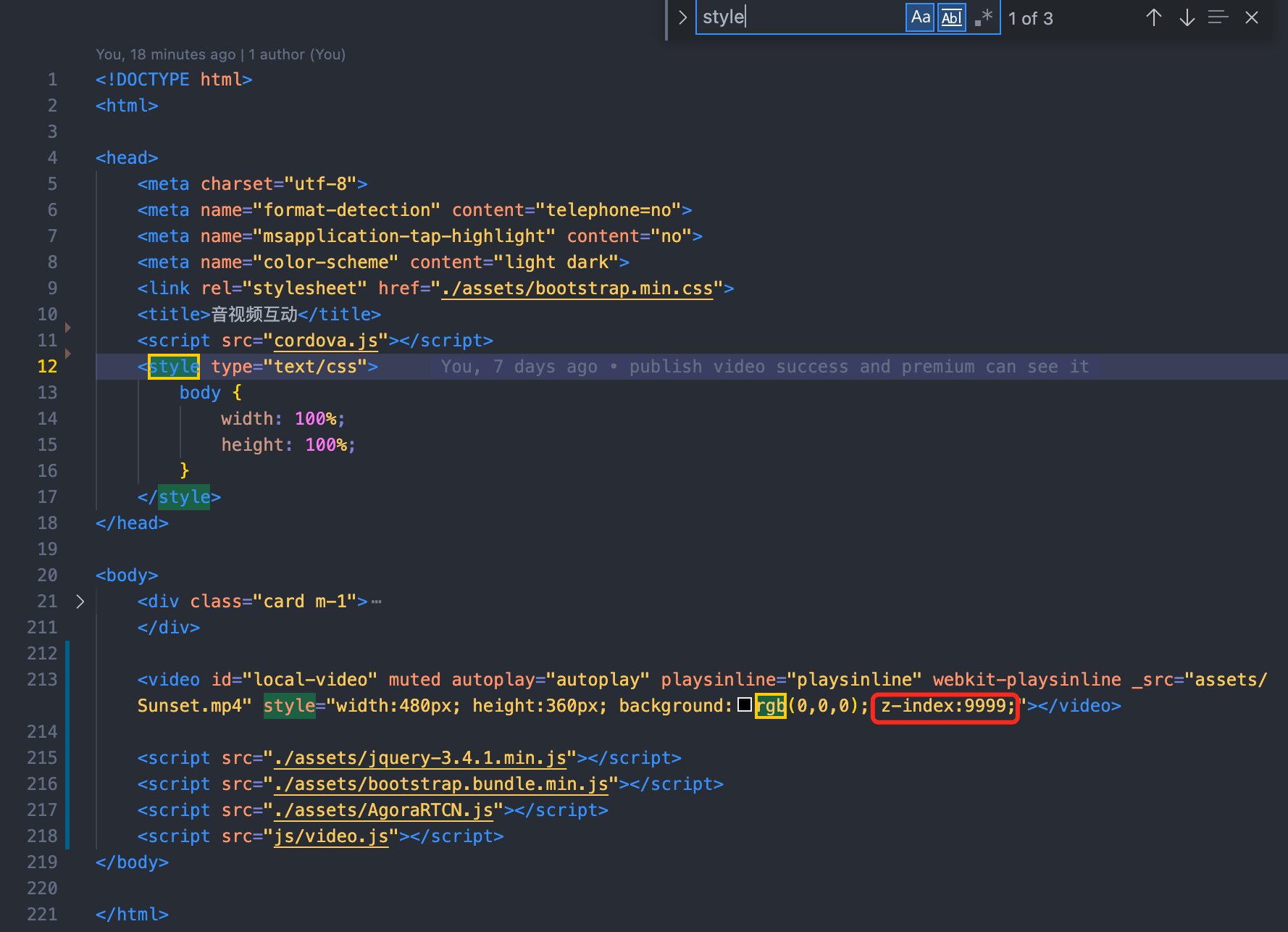
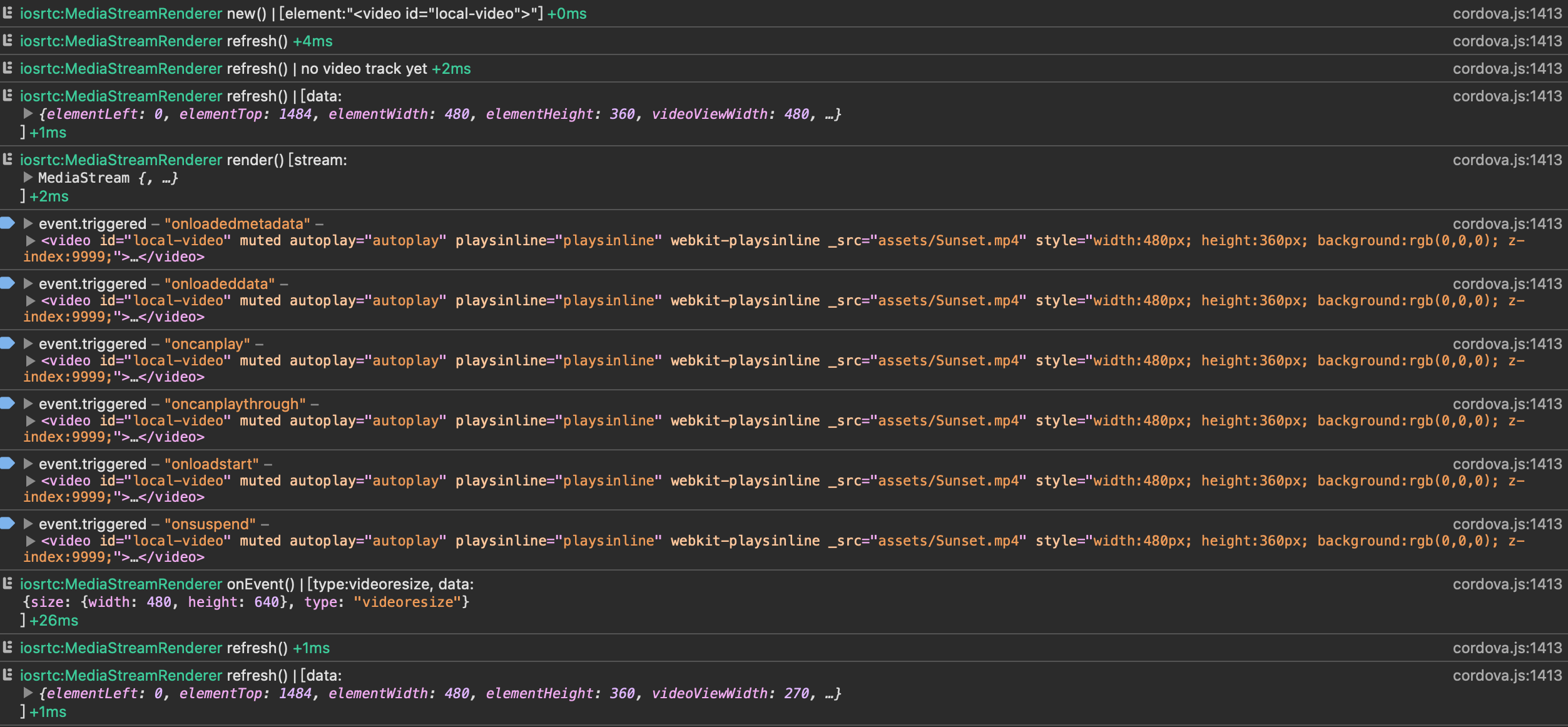
@MusabBasheer : thx, but I didn't write any css code or set z-index property in my html code, to make sure video element place on the top, I even add z-index=9999 in html, but still can't work.
octopusjames
on 27 Jan 2021
@octopusjames please view this link
https://github.com/cordova-rtc/cordova-plugin-iosrtc/blob/master/docs/videoCSS.md
I think you should remove "_src" and the background attribute from the style in video and make the body background transparent.
MusabBasheer
on 27 Jan 2021
@octopusjames contact support"at"sylaps.com we can schedule a 10-15 min session to debug may be.
If you send you code by email i can also debug, if you wish.
hthetiot
on 27 Jan 2021
@octopusjames please view this link
https://github.com/cordova-rtc/cordova-plugin-iosrtc/blob/master/docs/videoCSS.md
I think you should remove "_src" and the background attribute from the style in video and make the body background transparent.
@MusabBasheer
Seems still can't work, I may try something else. But thank you all the same.
octopusjames
on 27 Jan 2021
@octopusjames contact support"at"sylaps.com we can schedule a 10-15 min session to debug may be.
If you send you code by email i can also debug, if you wish.
Thanks Harold, I will write a email right now
octopusjames
on 27 Jan 2021
@hthetiot I should send the mail to [email protected] or your mailbox?
octopusjames
on 27 Jan 2021
yes please use [email protected], https://sylaps.com - https://sylaps.biz that whos is paying for my time supporting iosrtc.
This is usualy for paid support but im offering free support only for you this time ;)
hthetiot
on 27 Jan 2021
At last...
I minimized my html code to leave only necessary tags, the video play works. I will check my html bugs tomorrow.
I also fallback plugin to 6.0.14 and video play can't work with getUserMedia throw an exception

I think this may be the fixed issue in 6.0.17, as expected.
Thx for u guys!
@hthetiot @MusabBasheer
octopusjames
on 27 Jan 2021
ahah well done @octopusjames
Happy RTC in China :)
Thank you for closing, and solving by yourself,.
hthetiot
on 27 Jan 2021
I also fallback plugin to 6.0.14 and video play can't work with getUserMedia throw an exception
I think this may be the fixed issue in 6.0.17, as expected.
That correct, if you use ios 14.3+ you need 6.0.17+, that due the webrtc-adapter overiding iosrtc even if the SHIM is apply after the adapter.
hthetiot
on 27 Jan 2021
Related issues
 ducile
·
4Comments
ducile
·
4Comments
 alaanasreng
·
7Comments
alaanasreng
·
7Comments
 numerized
·
4Comments
numerized
·
4Comments
 ashish-mw
·
11Comments
ashish-mw
·
11Comments
 yogaboy
·
16Comments
yogaboy
·
16Comments
Most helpful comment
At last...

I minimized my html code to leave only necessary tags, the video play works. I will check my html bugs tomorrow.
I also fallback plugin to 6.0.14 and video play can't work with getUserMedia throw an exception
I think this may be the fixed issue in 6.0.17, as expected.
Thx for u guys!
@hthetiot @MusabBasheer