Cordova-plugin-ionic-webview: Some requests are blocked by CORS (ionic 3.8.0 + plugin-webview 4.1.3)
I have faced the issue right after this plugin has been implemented.
Example:
I have an endpoint /users/public/v1/auth/signin
Sign In works perfect when I use it on iPhone 8 plus (13.1.1), iPhone X (13.3.0), LG G6 (8.0.0)
When I am trying to sign in via iPhone 6S (12.1.3):



Otherwise I made the same request via Postman:
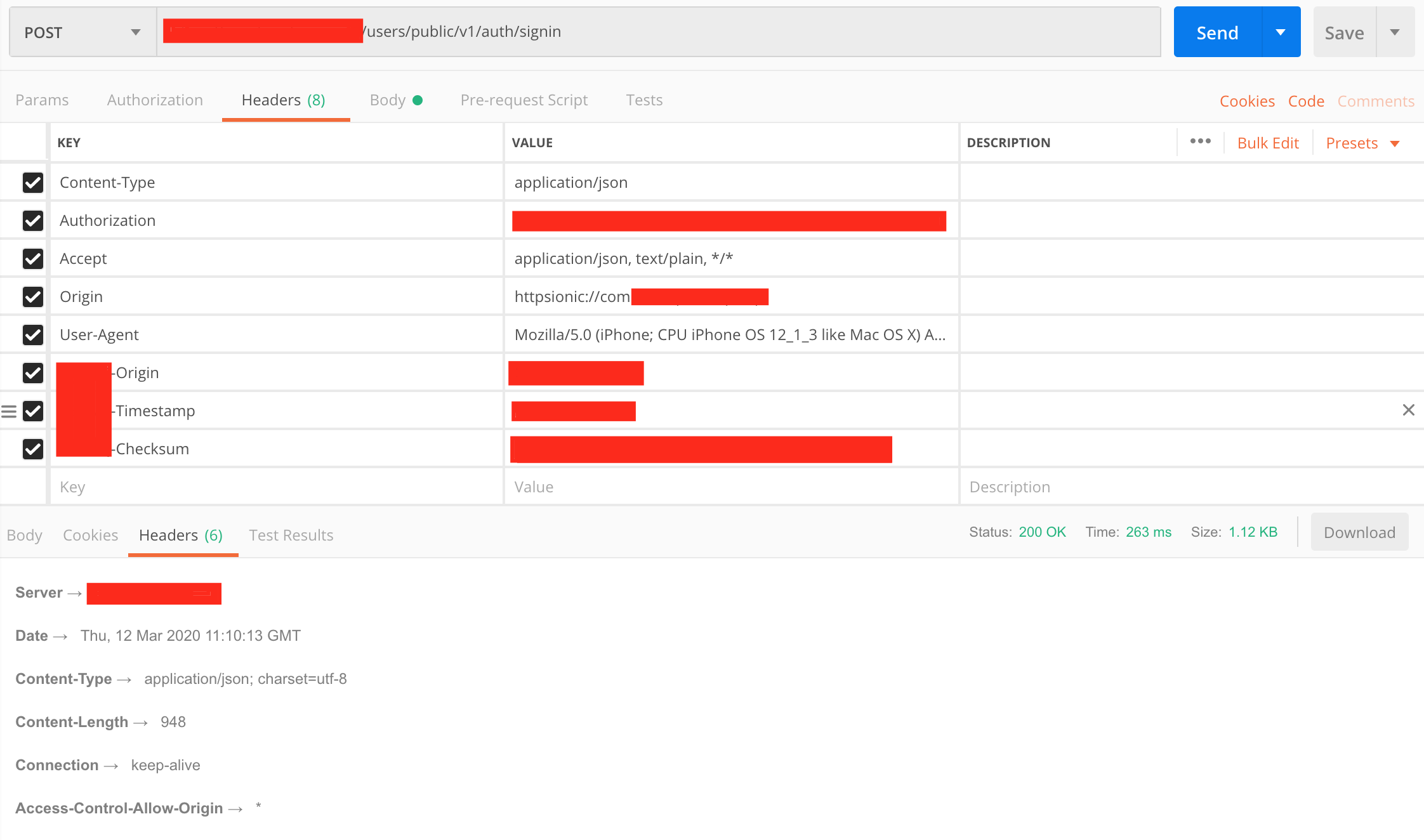
Options:

Another one endpoint returns 200 on iPhone 6S (12.1.3), iPhone 8 plus (13.1.1), but it doesn't work on iPhone X (13.3.0), LG G6 (8.0.0). Reason of blocking isn't Content-Type, just another one header. So I have no idea how to fix it. I've tried different plugin configuration, tried to remove custom headers, change origin and so on. Solution with plugin file xhr (https://github.com/ionic-team/cordova-plugin-ionic-webview/issues/47) works but interface refreshing disappears. Also the idea of disabling CORS policy is a real bad practice.
Ionic info:
ionic (Ionic CLI) : 4.1.0
Ionic Framework : ionic-angular 3.8.0
@ionic/app-scripts : 3.2.4
Cordova:
cordova (Cordova CLI) : 8.0.0
System:
Android SDK Tools : 26.1.1
ios-deploy : 1.9.4
ios-sim : 8.0.2
NodeJS : v8.10.0
npm : 6.11.3
OS : macOS
Xcode : Xcode 11.3.1 Build version 11C504
Config.xml (@@ - variables):
<?xml version='1.0' encoding='utf-8'?>
<widget id="@@appId" version="@@appVersion" android-versionCode="@@appAndroidVersion"
        xmlns="http://www.w3.org/ns/widgets"
        xmlns:android="http://schemas.android.com/apk/res/android"
>
  <name>@@appName</name>
  <description>@@appDescription</description>
  <author email="#################" href="#################">#################</author>
  <content src="index.html"/>
  <access origin="*"/>
  <preference name="Hostname" value="@@appId" />
  <allow-navigation href="http://ionic.local/*"/>
  <allow-navigation href="httpsionic://*"/>
  <allow-intent href="http://*/*"/>
  <allow-intent href="https://*/*"/>
  <allow-intent href="tel:*"/>
  <allow-intent href="sms:*"/>
  <allow-intent href="mailto:*"/>
  <allow-intent href="geo:*"/>
  <preference name="webviewbounce" value="false"/>
  <preference name="UIWebViewBounce" value="false"/>
  <preference name="DisallowOverscroll" value="true"/>
  <preference name="android-minSdkVersion" value="16"/>
  <preference name="BackupWebStorage" value="none"/>
  <preference name="SplashMaintainAspectRatio" value="true"/>
  <preference name="FadeSplashScreenDuration" value="300"/>
  <preference name="SplashShowOnlyFirstTime" value="false"/>
  <preference name="SplashScreen" value="screen"/>
  <preference name="SplashScreenDelay" value="3000"/>
  <preference name="AutoHideSplashScreen" value="false"/>
  <preference name="orientation" value="portrait"/>
  <preference name="phonegap-version" value="cli-8.0.0"/>
  <preference name="deployment-target" value="8.0"/>
  <preference name="SplashShowOnlyFirstTime" value="false"/>
  <preference name="SplashScreen" value="screen"/>
  <preference name="AutoHideSplashScreen" value="false"/>
  <preference name="KeyboardResize" value="true"/>
  <preference name="KeyboardResizeMode" value="ionic"/>
  <preference name="CordovaWebViewEngine" value="CDVWKWebViewEngine" />
  <preference name="WKWebViewOnly" value="true" />
  <feature name="CDVWKWebViewEngine">
    <param name="ios-package" value="CDVWKWebViewEngine" />
  </feature>
  <preference name="cordova.plugins.diagnostic.modules" value="CAMERA EXTERNAL_STORAGE" />

  <platform name="android">
    <preference name="Scheme" value="http" />
    <preference name="MixedContentMode" value="2" />
    <allow-intent href="market:*"/>
    <icon density="ldpi" src="resources/android/icon/drawable-ldpi-icon.png"/>
    <icon density="mdpi" src="resources/android/icon/drawable-mdpi-icon.png"/>
    <icon density="hdpi" src="resources/android/icon/drawable-hdpi-icon.png"/>
    <icon density="xhdpi" src="resources/android/icon/drawable-xhdpi-icon.png"/>
    <icon density="xxhdpi" src="resources/android/icon/drawable-xxhdpi-icon.png"/>
    <icon density="xxxhdpi" src="resources/android/icon/drawable-xxxhdpi-icon.png"/>
    <splash density="land-ldpi" src="resources/android/splash/drawable-land-ldpi-screen.png"/>
    <splash density="land-mdpi" src="resources/android/splash/drawable-land-mdpi-screen.png"/>
    <splash density="land-hdpi" src="resources/android/splash/drawable-land-hdpi-screen.png"/>
    <splash density="land-xhdpi" src="resources/android/splash/drawable-land-xhdpi-screen.png"/>
    <splash density="land-xxhdpi" src="resources/android/splash/drawable-land-xxhdpi-screen.png"/>
    <splash density="land-xxxhdpi" src="resources/android/splash/drawable-land-xxxhdpi-screen.png"/>
    <splash density="port-ldpi" src="resources/android/splash/drawable-port-ldpi-screen.png"/>
    <splash density="port-mdpi" src="resources/android/splash/drawable-port-mdpi-screen.png"/>
    <splash density="port-hdpi" src="resources/android/splash/drawable-port-hdpi-screen.png"/>
    <splash density="port-xhdpi" src="resources/android/splash/drawable-port-xhdpi-screen.png"/>
    <splash density="port-xxhdpi" src="resources/android/splash/drawable-port-xxhdpi-screen.png"/>
    <splash density="port-xxxhdpi" src="resources/android/splash/drawable-port-xxxhdpi-screen.png"/>
    <edit-config file="AndroidManifest.xml" mode="merge" target="/manifest/application">
      <application allowBackup="false"/>
    </edit-config>
    <config-file parent="/manifest/application" target="AndroidManifest.xml">
      <meta-data android:name="google_analytics_adid_collection_enabled" android:value="false" />
    </config-file>
    <resource-file src="google-services.json" target="/app/google-services.json"/>
  </platform>
  <platform name="ios">
    <preference name="iosScheme" value="httpsionic" />
    <preference name="WKSuspendInBackground" value="false" />
    <allow-intent href="itms:*"/>
    <allow-intent href="itms-apps:*"/>
    <icon height="57" src="resources/ios/icon/icon.png" width="57"/>
    <icon height="114" src="resources/ios/icon/[email protected]" width="114"/>
    <icon height="40" src="resources/ios/icon/icon-40.png" width="40"/>
    <icon height="80" src="resources/ios/icon/[email protected]" width="80"/>
    <icon height="120" src="resources/ios/icon/[email protected]" width="120"/>
    <icon height="50" src="resources/ios/icon/icon-50.png" width="50"/>
    <icon height="100" src="resources/ios/icon/[email protected]" width="100"/>
    <icon height="60" src="resources/ios/icon/icon-60.png" width="60"/>
    <icon height="120" src="resources/ios/icon/[email protected]" width="120"/>
    <icon height="180" src="resources/ios/icon/[email protected]" width="180"/>
    <icon height="72" src="resources/ios/icon/icon-72.png" width="72"/>
    <icon height="144" src="resources/ios/icon/[email protected]" width="144"/>
    <icon height="76" src="resources/ios/icon/icon-76.png" width="76"/>
    <icon height="152" src="resources/ios/icon/[email protected]" width="152"/>
    <icon height="167" src="resources/ios/icon/[email protected]" width="167"/>
    <icon height="29" src="resources/ios/icon/icon-small.png" width="29"/>
    <icon height="58" src="resources/ios/icon/[email protected]" width="58"/>
    <icon height="87" src="resources/ios/icon/[email protected]" width="87"/>
    <splash height="1136" src="resources/ios/splash/Default-568h@2x~iphone.png" width="640"/>
    <splash height="1334" src="resources/ios/splash/Default-667h.png" width="750"/>
    <splash height="2208" src="resources/ios/splash/Default-736h.png" width="1242"/>
    <splash height="1242" src="resources/ios/splash/Default-Landscape-736h.png" width="2208"/>
    <splash height="1536" src="resources/ios/splash/Default-Landscape@2x~ipad.png" width="2048"/>
    <splash height="2048" src="resources/ios/splash/Default-Landscape@~ipadpro.png" width="2732"/>
    <splash height="768" src="resources/ios/splash/Default-Landscape~ipad.png" width="1024"/>
    <splash height="2048" src="resources/ios/splash/Default-Portrait@2x~ipad.png" width="1536"/>
    <splash height="2732" src="resources/ios/splash/Default-Portrait@~ipadpro.png" width="2048"/>
    <splash height="1024" src="resources/ios/splash/Default-Portrait~ipad.png" width="768"/>
    <splash height="960" src="resources/ios/splash/Default@2x~iphone.png" width="640"/>
    <splash height="480" src="resources/ios/splash/Default~iphone.png" width="320"/>
    <icon height="1024" src="resources/ios/icon/icon-1024.png" width="1024"/>
    <splash height="2732" src="resources/ios/splash/Default@2x~universal~anyany.png" width="2732"/>
    <resource-file src="GoogleService-Info.plist" />
    <config-file target="*-Info.plist" parent="ITSAppUsesNonExemptEncryption" mode="add">
      <false/>
    </config-file>
  </platform>
  <allow-navigation href="http://10.35.3.51:8100"/>
  <allow-navigation href="http://10.35.3.51:4200"/>
  <allow-navigation href="http://10.35.3.163:8100"/>

  <engine name="ios" spec="5.1.1"/>
  <engine name="android" spec="7.1.4"/>

  <plugin name="cordova-plugin-console" spec="^1.0.5"/>
  <plugin name="cordova-plugin-device" spec="^1.1.7"/>
  <plugin name="cordova.plugins.diagnostic" spec="5.0.1" />
  <plugin name="cordova-plugin-splashscreen" spec="^4.1.0"/>
  <plugin name="cordova-plugin-statusbar" spec="^2.2.2"/>
  <plugin name="cordova-plugin-whitelist" spec="^1.3.1"/>
  <plugin name="cordova-plugin-ionic-keyboard" spec="2.2.0"/>
  <plugin name="cordova-plugin-file" spec="4.3.3" />
  <plugin name="cordova-plugin-printer" spec="0.8.0" />
  <plugin name="cordova-plugin-filepath" spec="1.4.2"/>
  <plugin name="cordova-plugin-filechooser" spec="1.2.0"/>
  <plugin name="cordova-plugin-fcm-with-dependecy-updated" spec="^2.4.0" />
  <plugin name="cordova-plugin-file-opener2" spec="^2.1.4">
    <variable name="ANDROID_SUPPORT_V4_VERSION" value="^27.0.0" />
  </plugin>
  <plugin name="cordova-plugin-network-information" spec="2.0.2" />
  <plugin name="cordova-plugin-filepicker" spec="1.1.6" />
  <plugin
    name="cordova-plugin-camera"
    source="git"
    spec="https://github.com/apache/cordova-plugin-camera.git#295e928784e2a9785982fbf15b05215a317774df"
  />
  <plugin name="cordova-android-support-gradle-release" spec="^3.0.1">
    <variable name="ANDROID_SUPPORT_VERSION" value="27.0.0" />
  </plugin>
  <plugin name="cordova-plugin-iroot" spec="0.8.1">
    <variable name="ENABLE_BUSYBOX_CHECK" value="false" />
  </plugin>
  <plugin name="cordova-plugin-ionic-webview" spec="4.1.3" />
</widget>
 alexverbitsky
All 3 comments
The issue has been fixed by setting up allowed headers explicitly. Access-Control-Allow-Headers: * doesn't work on some devices
alexverbitsky
on 13 Mar 2020
Hey @alexverbitsky I'm facing the same problem. Could you please share with us how did you solve the problem?
 erikramalho
on 26 Mar 2020
erikramalho
on 26 Mar 2020
He was using Access-Control-Allow-Headers: * on the server and that caused problem on some devices, so you have to change it to the headers you need to allow instead of saying all (*).
something like Access-Control-Allow-Headers: X-Custom-Header, Upgrade-Insecure-Requests
 jcesarmobile
on 26 Mar 2020
jcesarmobile
on 26 Mar 2020
Related issues
 lincolnthree
·
7Comments
lincolnthree
·
7Comments
 BorntraegerMarc
·
5Comments
BorntraegerMarc
·
5Comments
 jairemix
·
3Comments
jairemix
·
3Comments
 yelhouti
·
5Comments
yelhouti
·
5Comments
 Yuripetusko
·
3Comments
Yuripetusko
·
3Comments
Most helpful comment
He was using
Access-Control-Allow-Headers: *on the server and that caused problem on some devices, so you have to change it to the headers you need to allow instead of saying all (*).something like
Access-Control-Allow-Headers: X-Custom-Header, Upgrade-Insecure-Requests