Cordova-plugin-ionic-webview: 2.x on iOS: incompatibility with cordova-hot-code-push-plugin - showing white page after app was killed and restarted
Using cordova-hot-code-push-plugin, if you kill the app via appswitcher and restart it, a white page is displayed.
The location of this new white index page is:
in iOS simulator:
http://localhost:8080/Users/****/Library/Developer/CoreSimulator/Devices/***/data/Containers/Data/Application/***/Library/Application%20Support/com******.prod/cordova-hot-code-push-plugin/2018.08.09-10.50.04/www//index.html
on real device:
http://localhost:8080/var/mobile/Containers/Data/Application/****/Library/Application%20Support/com.******.prod/cordova-hot-code-push-plugin/2018.08.09-10.50.04/www//index.html
When i the reload the app vie Webinspector i see it's a 404.
If i do a window.location.replace('http://localhost:8080/index.html') everything works as intended - until the app gets killed and restarted again.
it seems to have to do with #138
 berndlackinger
All 35 comments
I had the same issue while using https://github.com/Microsoft/cordova-plugin-code-push
I worked around by modifying function setServerPath of CDVWKWebViewEngine.m.
Basically, i handled 2 more cases:
- CDV_LOCAL_SERVER is null in some cases
- Modify request to path (^/var/mobile/|^/Users/) to
It seems to be working. I'm not sure of any side effect.
=> Please let me know if this would be fine?
-(void)setServerPath:(NSString *) path
{
    self.basePath = path;
    BOOL restart = [self.webServer isRunning];
    if (restart) {
        [self.webServer stop];
    }

    if (self.CDV_LOCAL_SERVER == nil) {
        NSDictionary * settings = self.commandDelegate.settings;
        //bind to designated hostname or default to localhost
        NSString *bind = [settings cordovaSettingForKey:@"WKBind"];
        if(bind == nil){
            bind = @"localhost";
        }

        //bind to designated port or default to 8080
        int portNumber = [settings cordovaFloatSettingForKey:@"WKPort" defaultValue:8080];

        //set the local server name
        self.CDV_LOCAL_SERVER = [NSString stringWithFormat:@"http://%@:%d", bind, portNumber];
    }

    NSString *serverUrl = self.CDV_LOCAL_SERVER;

    [self.webServer addGETHandlerForBasePath:@"/" directoryPath:path indexFilename:((CDVViewController *)self.viewController).startPage cacheAge:0 allowRangeRequests:YES];

    NSString *codePushUrl =@"(^/var/mobile/|^/Users/)";
    [self.webServer addHandlerForMethod:@"GET" pathRegex:codePushUrl requestClass:GCDWebServerFileRequest.class asyncProcessBlock:^(__kindof GCDWebServerRequest * _Nonnull request, GCDWebServerCompletionBlock  _Nonnull completionBlock) {

        NSString *absUrl = [[[request URL] absoluteString] stringByReplacingOccurrencesOfString:serverUrl withString:@""];

        NSRange range = [absUrl rangeOfString:@"?"];
        if (range.location != NSNotFound) {
            absUrl = [absUrl substringToIndex:range.location];
        }

        GCDWebServerFileResponse *response = [GCDWebServerFileResponse responseWithFile:absUrl];
        completionBlock(response);
    }];

    [self.webServer addHandlerForMethod:@"GET" pathRegex:@"_file_/" requestClass:GCDWebServerFileRequest.class asyncProcessBlock:^(__kindof GCDWebServerRequest * _Nonnull request, GCDWebServerCompletionBlock  _Nonnull completionBlock) {
        NSString *urlToRemove = [serverUrl stringByAppendingString:@"/_file_"];
        NSString *absUrl = [[[request URL] absoluteString] stringByReplacingOccurrencesOfString:urlToRemove withString:@""];

        NSRange range = [absUrl rangeOfString:@"?"];
        if (range.location != NSNotFound) {
            absUrl = [absUrl substringToIndex:range.location];
        }

        GCDWebServerFileResponse *response = [GCDWebServerFileResponse responseWithFile:absUrl];
        completionBlock(response);
    }];
    if (restart) {
        [self startServer];
    }
}
 superbigsoft
on 10 Aug 2018
superbigsoft
on 10 Aug 2018
May not be the issue here but I see an error in your URL's
www//index.html
should have only 1x /
 ghenry22
on 10 Aug 2018
ghenry22
on 10 Aug 2018
@ghenry22 i saw that too, tried the window.location.replace thing without the second slash - didn't work either.
berndlackinger
on 10 Aug 2018
@superbigsoft i tried your changes and later your whole fork - the app crashes then.
berndlackinger
on 10 Aug 2018
maybe i should mention that it works flawlessly in the 1.x version of cordova-plugin-ionic-webview, but then we do not have the local webserver for android
berndlackinger
on 10 Aug 2018
@berndlackinger: could you copy here the exception causing app to crash?
superbigsoft
on 10 Aug 2018
i am no iOS developer, but XCODE shows me GCDWebServerFileResponse.m line 82

berndlackinger
on 10 Aug 2018
@berndlackinger: me neither iOS nor Android dev. But if you can setup a simple demo and upload it to another repo, i might try to help debugging it.
superbigsoft
on 10 Aug 2018
Here's how to reproduce it:
cordova create TestProject com.example.testproject TestProject
cd ./TestProject
cordova platform add ios
cordova plugin add [email protected]
cordova plugin add cordova-hot-code-push-plugin
cordova emulate ios
-> everything works with the 1.x version of the webview plugin and hot code push
cordova plugin rm cordova-plugin-ionic-webview
cordova plugin rm cordova-hot-code-push-plugin
cordova plugin add [email protected]
cordova emulate ios
-> everything works with the 2.x version of the webview plugin without hot code push
cordova plugin add cordova-hot-code-push-plugin
cordova emulate ios
-> does not work with the 2.x version of the webview plugin and hot code push
berndlackinger
on 10 Aug 2018
@berndlackinger: i fixed the error in my repo. Could you please try again? The problem was because Hot-Code-Push is storing file in folder "Application Support" which is when encoded in URL turned into "Application%20Support" that can't be found by the GCDWebServer
superbigsoft
on 11 Aug 2018
@superbigsoft i am happy to report it is working :) 💯
Thanks a lot!
berndlackinger
on 13 Aug 2018
@berndlackinger @superbigsoft I had the same problem, and I couldn't find the CDVWK WebViewEngine. M. file, hoping to get help
 litianyangz
on 28 Aug 2018
litianyangz
on 28 Aug 2018
@superbigsoft I saw your repo, I will test this out and create a PR against the ionic-webview to merge these changes in
ghenry22
on 29 Aug 2018
@litianyangz are you using my repo? What error did you get?
superbigsoft
on 29 Aug 2018
@ghenry22 Feel free to review and merge the changes. However please note that i'm not iOS/Android developer so i'm not 100% sure about my fixes. So it's great if you can review and let us know if it works well.
superbigsoft
on 29 Aug 2018
@superbigsoft I didn't find the CDVWKWebViewEngine.m. file. Can you write the demo and tell me the connection address?
litianyangz
on 29 Aug 2018
@litianyangz: you can try my repo: cordova plugin add https://github.com/superbigsoft/cordova-plugin-ionic-webview.git
superbigsoft
on 29 Aug 2018
@superbigsoft OK, thank you. I look forward to good results.
litianyangz
on 29 Aug 2018
@superbigsoft
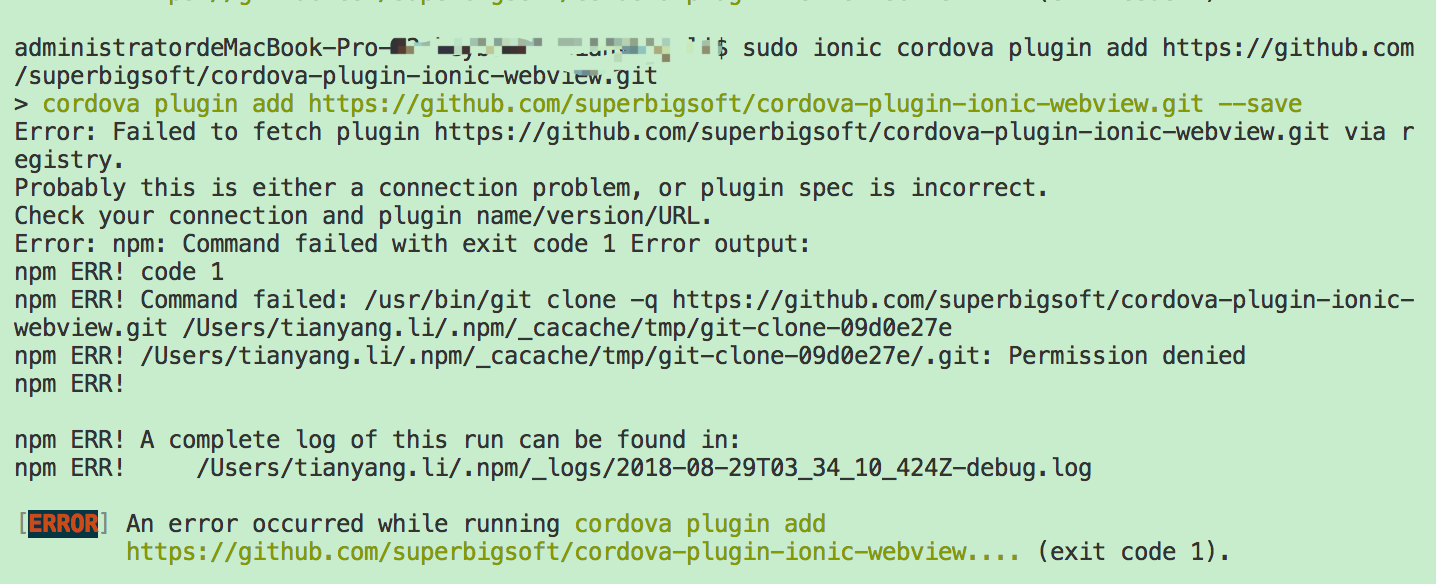
There seems to be no jurisdiction
litianyangz
on 29 Aug 2018
@superbigsoft
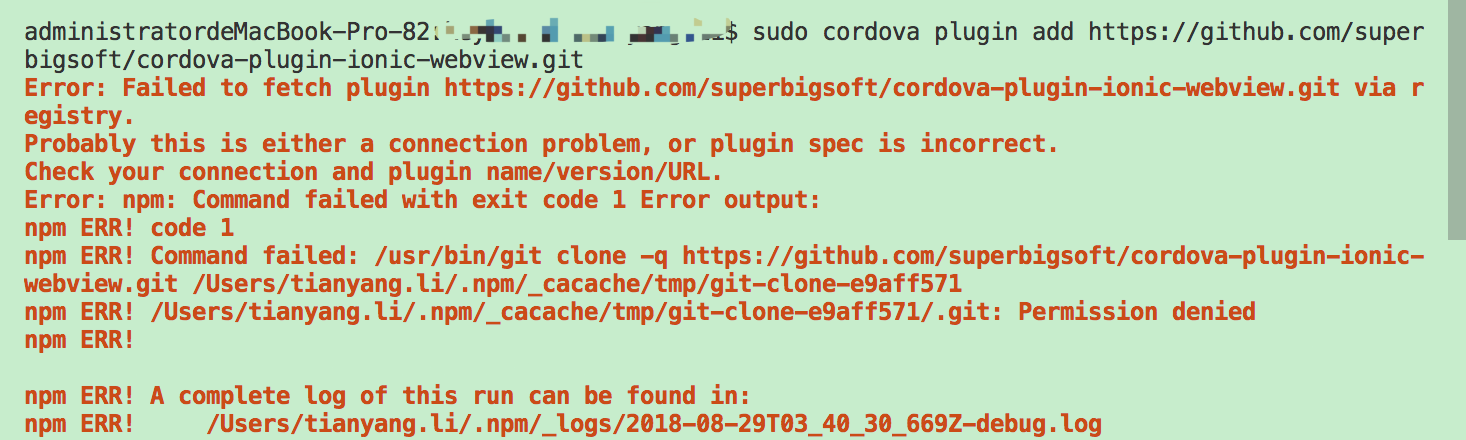
litianyangz
on 29 Aug 2018
@superbigsoft
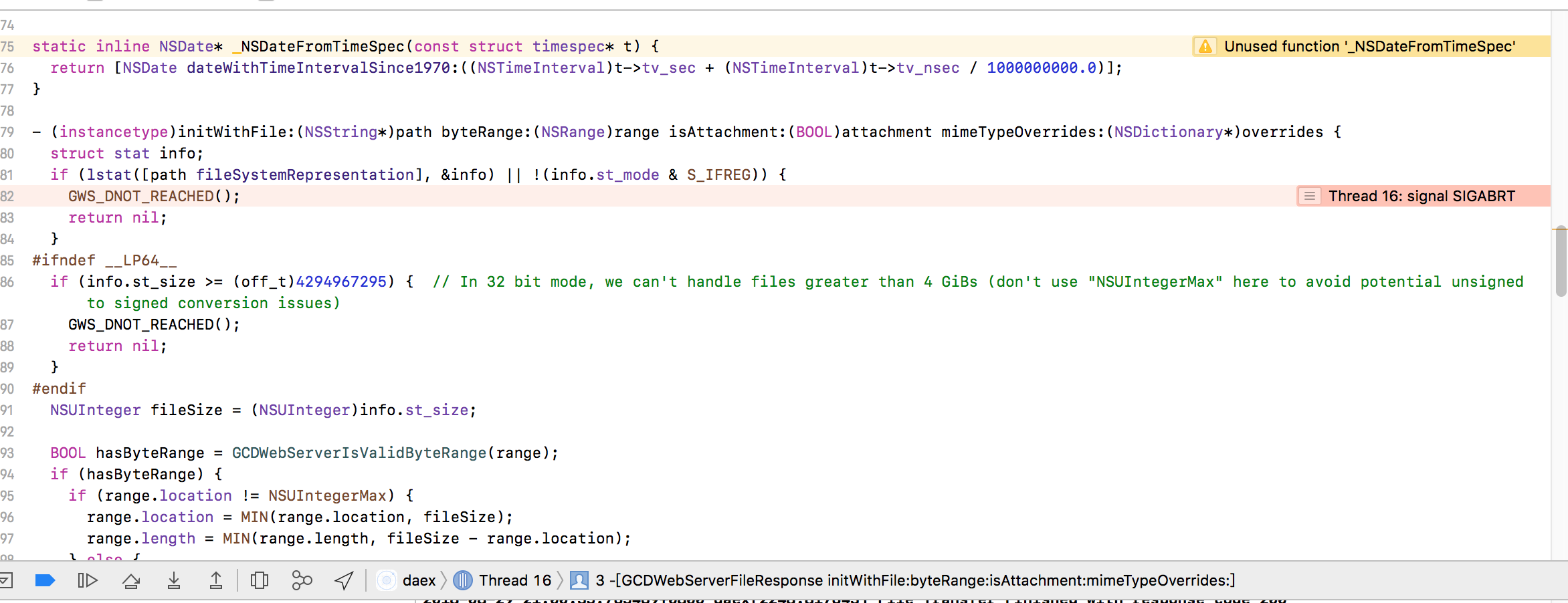
litianyangz
on 29 Aug 2018
@litianyangz please let me know what the value of variable path at line 81 is?
superbigsoft
on 29 Aug 2018
@superbigsoft Can you tell me what chat tools you use? Maybe we can communicate with chat tools.
litianyangz
on 30 Aug 2018
@superbigsoft i am happy to report it is working :) 💯
Thanks a lot!
litianyangz
on 30 Aug 2018
@superbigsoft Thanks for providing your repo, it works for me on iOS. However, I'm also seeing this same issue on Android. Are you able to check into a similar fix for Android like you've done for iOS?
 davidemanske
on 16 Sep 2018
davidemanske
on 16 Sep 2018
@superbigsoft Thank you very much for solving my problem, but it seems not perfect. There is a blank in the bottom. Occasionally APP exit!
 hooliy
on 31 Oct 2018
hooliy
on 31 Oct 2018
I am experiencing the same problem as @hooliy. Any chance that the ionic team will look at resolving this properly?
 moldstadt
on 24 Nov 2018
moldstadt
on 24 Nov 2018
We’re removing the internal web server so maybe the issue will resolve itself once that is out
 mlynch
on 24 Nov 2018
mlynch
on 24 Nov 2018
@mlynch Just to be clear this plug-in will no longer serve assets from http urls but file:// urls instead?
 shaxxx
on 24 Nov 2018
shaxxx
on 24 Nov 2018
@mlynch Can you elaborate on that? Im testing upgrading from 1.2 to 2.2.5 (to fix xcode 10 ios 12 bug) and it causes a lot of issues on our Android version, that it now has a webserver.
 sithwarrior
on 28 Nov 2018
sithwarrior
on 28 Nov 2018
We’re removing the internal web server so maybe the issue will resolve itself once that is out
Hi @mlynch any update on this issue ?
 akash-pal
on 14 Dec 2018
akash-pal
on 14 Dec 2018
I have the same problem here even with @superbigsoft repo
 Silvest89
on 21 Dec 2018
Silvest89
on 21 Dec 2018
We’re removing the internal web server so maybe the issue will resolve itself once that is out
Should we just assume this is not going to happen and start thinking about Ionic 4?
davidemanske
on 30 Dec 2018
Its been a months now with no news.
Is the web server still going to be removed, or has the situation changed? I realise these things take time, but it would be nice to know whats going to happen.
@mlynch, willing to comment?
 akimakitalo
on 8 Feb 2019
akimakitalo
on 8 Feb 2019
We’re removing the internal web server so maybe the issue will resolve itself once that is out
@mlynch Is this still happening?
sithwarrior
on 8 Mar 2019
Related issues
 jairemix
·
3Comments
jairemix
·
3Comments
 BorntraegerMarc
·
5Comments
BorntraegerMarc
·
5Comments
 mowaiskalam
·
6Comments
mowaiskalam
·
6Comments
 odecharette
·
4Comments
odecharette
·
4Comments
 acollazomayer
·
3Comments
acollazomayer
·
3Comments
Most helpful comment
@superbigsoft Thanks for providing your repo, it works for me on iOS. However, I'm also seeing this same issue on Android. Are you able to check into a similar fix for Android like you've done for iOS?