Cordova-plugin-googlemaps: Minimum container dimension is 100x100 in pixels error
After upgrading to the latest version of this plugin, I am getting an error of minimum container dimension is 100x100 in pixels and the map does not render. I know that the div I have for the map is much larger than 100x100 pixels. If I print div.style.height and div.style.width to the console prior to my plugin.google.maps.Map.getMap(div, mapOptions) function, I get a height of 358px and a width of 358px. However, when I print div.offsetWidth and div.offsetHeight to the console I get a height of 0 and a width of 0. There is clearly a 358px x 358px open space on my page that the map gets rendered on.
 tennist
All 17 comments
Please share your project files on github.
 wf9a5m75
on 21 May 2018
wf9a5m75
on 21 May 2018
Here is a link to the project files
tennist
on 21 May 2018
I forgot to mention that you will need to add the android platform to the project before building it out.
tennist
on 21 May 2018
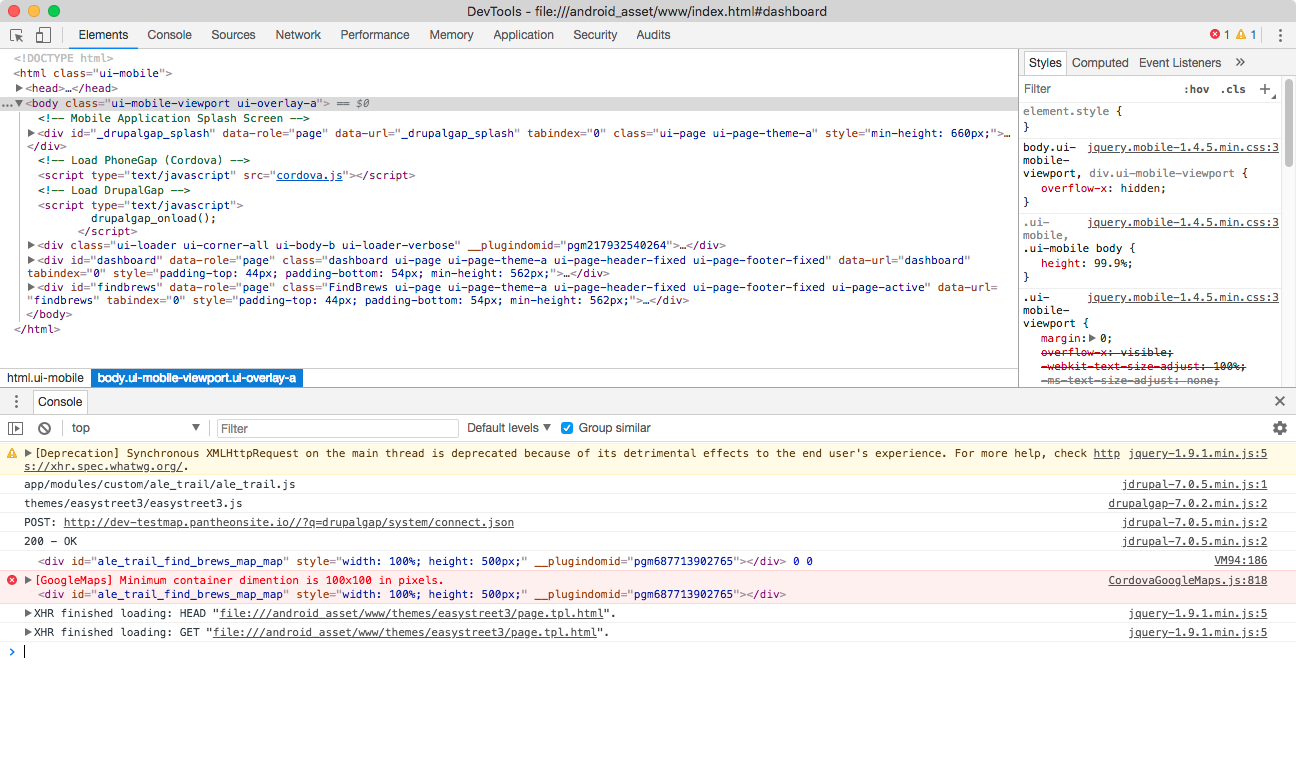
If I insert code like this,

it seems 0 x 0 pixels.
wf9a5m75
on 21 May 2018
However, when I print div.offsetWidth and div.offsetHeight to the console I get a height of 0 and a width of 0. There is clearly a 358px x 358px open space on my page that the map gets rendered on.
It's your programing problem, not this plugin.
You must specify a div which is larger than 100x100 pixels BEFORE Map.getMap().
wf9a5m75
on 21 May 2018
I generate the div in my page call back, then I initialize the map in the pageshow event. The div is already specified and should be loaded prior to initializing the map.
tennist
on 22 May 2018
I don't know DrupalGap lifecycle, and I'm not interested in.
Important thing is the <div> must be larger than 100x100px BEFORE executing Map.getMap(). That's all.
wf9a5m75
on 22 May 2018
Thanks for your help here. You got me pointed in the right direction by suggesting that the div wasn't completely rendered yet. The page is supposed to be completely loaded before drupalgap's pageshow events are fired, but it appears this is not not entirely true. I wrapped my pageshow code in a 250ms timeout function and the map is working once again. You can mark this as fixed. Thanks again!
tennist
on 22 May 2018
@tennist @wf9a5m75 Hi. Can someone give me some light? I'm running a timeout of 5 seconds and I keep getting this error.
`
Minimum container dimension is 100x100 in pixels error
< div id="map_canvas" style="width:500px; height:500px; z-index: 1 !important; overflow: auto !important;">
`
this is my code: I am using IONIC V1
`
var mapDiv=document.getElementById("map_canvas")
document.addEventListener("deviceready", onDeviceReady, false);
function onDeviceReady(){
$timeout(function(){
map= plugin.google.maps.Map.getMap(mapDiv);
},5000)
}
<div id="map_canvas" style="width:500px; height:500px; z-index: 1 !important; overflow: auto !important;"></div>
`
 YeisonVelez11
on 16 Jul 2018
YeisonVelez11
on 16 Jul 2018
That is as far as my experience goes on this. You usually get this error if the container has not been created yet.
Device ready doesn't necessarily mean the page is loaded, but I imagine it should be after a 5sec timeout. I would suggest placing your code in a pageshow event.
Also for a timeout I would suggest the following:
setTimeout(function() {
   map= plugin.google.maps.Map.getMap(mapDiv);
}, 5000);
tennist
on 16 Jul 2018
@tennist so what can I use instead of deviceready? Within 2 hours I arrive at my house I will try and tell you. thank you very much. although the timeout does the same of the setTimeout ..
YeisonVelez11
on 16 Jul 2018
my app uses the jQuery Mobile pageshow event. This triggers code once the page is shown.
https://api.jquerymobile.com/1.3/pageshow/
I believe this is deprecated as of JQM 1.4, but I use JQM 1.3. There is a similar feature in 1.4 you can research if you wish to use the newest version.
tennist
on 16 Jul 2018
in my case with timeout should be works... I use setTimeout and not works :( same problem
YeisonVelez11
on 16 Jul 2018
It sounds to me that your getMap is being called before the page is shown. Do you have JQM loaded into your app? If so, use the pageshow event. If not, I would suggest loading it just to test and see if the pageshow works for you.
tennist
on 16 Jul 2018
excuse me my ignorance what is JQM
YeisonVelez11
on 16 Jul 2018
jQuery Mobile as described a few comments up the page. I also provided a link to the pageshow event documentation in that comment.
tennist
on 17 Jul 2018
I am facing the same problem today. Is there any solution?
 setu1421
on 20 Jul 2018
setu1421
on 20 Jul 2018
Related issues
 Tong2203
·
5Comments
Tong2203
·
5Comments
 melkir
·
5Comments
melkir
·
5Comments
 lakano
·
4Comments
lakano
·
4Comments
 sebagon
·
4Comments
sebagon
·
4Comments
 bigbossmaher
·
3Comments
bigbossmaher
·
3Comments