Cordova-plugin-googlemaps: [bug] BUG: Loading Map again crashes with message that map already exists.
I'm submitting a ... (check one with "x")
[ x ] bug report
If you choose 'problem or bug report', please select OS: (check one with "x")
[ x ] Android
cordova information: (run $> cordova plugin list)
cordova-plugin-compat 1.0.0 "Compat"
cordova-plugin-console 1.0.5 "Console"
cordova-plugin-device 1.1.4 "Device"
cordova-plugin-geolocation 2.4.3 "Geolocation"
cordova-plugin-googlemaps 2.1.1 "cordova-plugin-googlemaps"
cordova-plugin-inappbrowser 1.7.1 "InAppBrowser"
cordova-plugin-network-information 1.3.3 "Network Information"
cordova-plugin-request-location-accuracy 2.2.2 "Request Location Accuracy"
cordova-plugin-splashscreen 4.0.3 "Splashscreen"
cordova-plugin-statusbar 2.2.2 "StatusBar"
cordova-plugin-uniquedeviceid 1.3.2 "UniqueDeviceID"
cordova-plugin-whitelist 1.3.1 "Whitelist"
cordova-sqlite-storage 2.0.4 "Cordova sqlite storage plugin"
cordova.plugins.diagnostic 3.6.8 "Diagnostic"
ionic-plugin-keyboard 2.2.1 "Keyboard"
onesignal-cordova-plugin 2.2.1 "OneSignal Push Notifications"
If you use @ionic-native/google-maps, please tell the package.json (only @ionic-native/core and @ionic-native/google-maps are fine mostly)
 "@ionic-native/core": "^4.4.0",
 "@ionic-native/diagnostic": "^4.4.0",
 "@ionic-native/geolocation": "^4.4.0",
 "@ionic-native/google-maps": "^4.4.0",
Current behavior:
When loading map page from menu it crashes , with error message
console.error: GoogleMaps DIV[__pluginMapId='map_0_1171669735998'] has already map.
Expected behavior:
It should load map
Screen capture or video record:

Related code, data or error log (please format your code or data):
Menu Item load map code
this.nav.setRoot(MainPage);
Variables
 map: GoogleMap;
 mapElement: HTMLElement;
 map_id = "map";
Code for creating map
 this.mapElement = document.getElementById(this.map_id);
      /*
      * @comment: Initial configuration for map pointing central brunch
      * */
      let mapOptions: GoogleMapOptions = {
        controls: {
          compass: false,
          myLocationButton: false,
          indoorPicker: false,
          mapToolbar: false
        },
        camera: {
          target: {
            lat: 40.1817318,
            lng: 44.5122556
          },
          zoom: 8
        },
        styles: [{
          stylers: [{
            saturation: -100
          }]
        }]
      };
      /*
      * @comment: Creating google map
      * */
      if (!this.map) {

        this.map = GoogleMaps.create(this.mapElement, mapOptions);
      }
Suggest
Create static method to destroy map object or resset
 ananmelkonyan
All 57 comments
Please share your project files on GitHub. I will check it tomorrow.
 wf9a5m75
on 15 Nov 2017
wf9a5m75
on 15 Nov 2017
I will create demo project and share with you thanks.
ananmelkonyan
on 15 Nov 2017
Got failing loading in a new project the map
ananmelkonyan
on 15 Nov 2017
what do you mean?
wf9a5m75
on 15 Nov 2017
It is not loading map on new project in the latest ionic, i will try to do some research upon this bug, when project ready i will post it here
ananmelkonyan
on 16 Nov 2017
If you share the project, I will check it.
wf9a5m75
on 16 Nov 2017
ananmelkonyan
on 16 Nov 2017
https://docs.google.com/presentation/d/1zlkmoSY4AzDJc_P4IqWLnzct41IqHyzGkLeyhlAxMDE/edit#slide=id.g292c767148_0_0
wf9a5m75
on 16 Nov 2017
@wf9a5m75 Appreciate this thanks but the problem not in device ready, i posted gif that shows what happening,
When it opening map first time is ok, second time on page load it says console.error: GoogleMaps DIV[__pluginMapId='map_0_1171669735998'] has already map.
ananmelkonyan
on 16 Nov 2017
console.error: GoogleMaps DIV[__pluginMapId='map_0_1171669735998'] has already map.
This means you tried to create a map to the same map div.
GoogleMaps.create(); means create an instance.
So if you use Google Maps JavaScript API v3, do you create a map for the same div?
wf9a5m75
on 16 Nov 2017
Yes, because when you reload page it cant get old initiated map
ananmelkonyan
on 16 Nov 2017
I'm not sure how use this plugin in your project, but let's assumes tab template of ionic.
When you change the tab page from A to B, ionic keep the DOM tree of page A. The map div is not removed.
wf9a5m75
on 16 Nov 2017
so how can get initiated map and assign it to this.map
ananmelkonyan
on 16 Nov 2017
You need to create own provider, and keep the map instance in the provider. Or remove the map when you leave the page.
wf9a5m75
on 16 Nov 2017
and how to remove map?
ananmelkonyan
on 16 Nov 2017
map.remove() (Please read the document first)
wf9a5m75
on 16 Nov 2017
i used that not working actually
ananmelkonyan
on 16 Nov 2017
throws me same error
ananmelkonyan
on 16 Nov 2017
If you want to help you by me, please share your actual project files. Otherwise, please debug by yourself.
wf9a5m75
on 16 Nov 2017
@wf9a5m75 just a moment please i need confirmation from PM
ananmelkonyan
on 16 Nov 2017
BTW, bitbucket.org or gitlub provides free private git repository.
I'm not interested in your project code at all.
So I don't leak your code.
wf9a5m75
on 16 Nov 2017
@watacoz3 I trust you its just company policy, can you give me your username at bitbucket please thanks.
ananmelkonyan
on 16 Nov 2017
wf9a5m75
wf9a5m75
on 16 Nov 2017
thanks
ananmelkonyan
on 16 Nov 2017
If you need to sign your company NDA, please send it to my e-mail address (see my profile page)
wf9a5m75
on 16 Nov 2017
Thanks very much for your help, i'l ping you when share to bitbucket.
ananmelkonyan
on 16 Nov 2017
You are doing great work
ananmelkonyan
on 16 Nov 2017
Please see src/pages/main/main.ts
ananmelkonyan
on 16 Nov 2017
Did you invite me or someone else?
wf9a5m75
on 16 Nov 2017
Found your repo. I will check it later.
wf9a5m75
on 16 Nov 2017
Okay, I got the reason of GoogleMaps DIV[__pluginMapId='map_0_1171669735998'] has already map..
Because you write your code like this:
this.mapElement = document.getElementById('map-main-page');
if (!this.map) {
  this.map = GoogleMaps.create(this.mapElement, mapOptions);
}
The ionic framework uses fade-in and fade-out when you change the pages, even accessing to the same page.
In your case, for changing language, the ionic regenerates new DOM tree.
So if there is the same div tag in pageA(Eng page) and pageB(Rus page), can you image what happens?
this.mapElement = document.getElementById('map-main-page');
This code returns the div of pageA, because it is still remained during the fading out.
So the <div id="map-main-page"> is still remained, that's why the plugin outputs the error GoogleMaps DIV[__pluginMapId='map_0_1171669735998'] has already map..
But very after, the element is removed. That's why the plugin remove the map automatically.
Then you get a blank page.
For the reason, I recommend to use this way for ionic users.
https://github.com/mapsplugin/cordova-plugin-googlemaps-doc/blob/master/v2.0.0/ReleaseNotes/ionic-googlemaps-4.3.3/README.md#update-specifying-element-id-for-mapcreate
if (!this.map) {
  this.map = GoogleMaps.create('map-main-page', mapOptions);
}
Since @ionic-native/[email protected], the wrapper plugin waits the specified ID element is loaded. This prevents this problem.

wf9a5m75
on 17 Nov 2017
@wf9a5m75 Thanks you very much, you helped a lot thanks
ananmelkonyan
on 17 Nov 2017
You are welcome.
wf9a5m75
on 17 Nov 2017
@wf9a5m75 Can you please give me grade.build content because i get blank map with only google logo
ananmelkonyan
on 17 Nov 2017
That's your problem
https://github.com/mapsplugin/cordova-plugin-googlemaps-doc/blob/master/v1.4.0/TroubleShooting/Blank-Map/README.md
wf9a5m75
on 17 Nov 2017
Nice thanks, very much.
ananmelkonyan
on 20 Nov 2017
@wf9a5m75 Dear Masashi its not working for ios, can you please provide more info.
ananmelkonyan
on 20 Nov 2017
@wf9a5m75 i added repo tht can help you. named ios_map
ananmelkonyan
on 20 Nov 2017
I just run your project files. What is the problem?
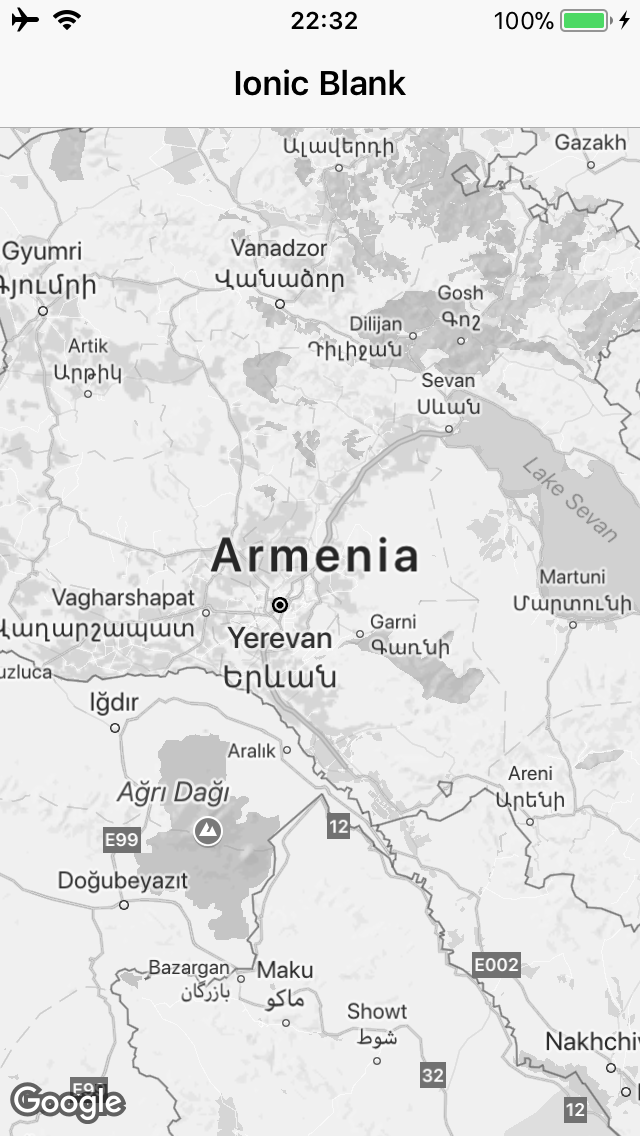
wf9a5m75
on 21 Nov 2017
@wf9a5m75 Its givving me blank map
ananmelkonyan
on 21 Nov 2017
@wf9a5m75 can you please give me some info on which version did you run, i am running on latest xcode
ananmelkonyan
on 21 Nov 2017
I just built and run your project files.
wf9a5m75
on 21 Nov 2017
Blank map means your api key is wrong.
https://github.com/mapsplugin/cordova-plugin-googlemaps-doc/blob/master/v1.4.0/TroubleShooting/Blank-Map/README.md
wf9a5m75
on 21 Nov 2017
I guess you forget to enable the Google Maps SDK for iOS, or you set the restriction for the api key.
wf9a5m75
on 21 Nov 2017
@wf9a5m75 i have fully looked at your documentation, let me make screen shoot
ananmelkonyan
on 21 Nov 2017
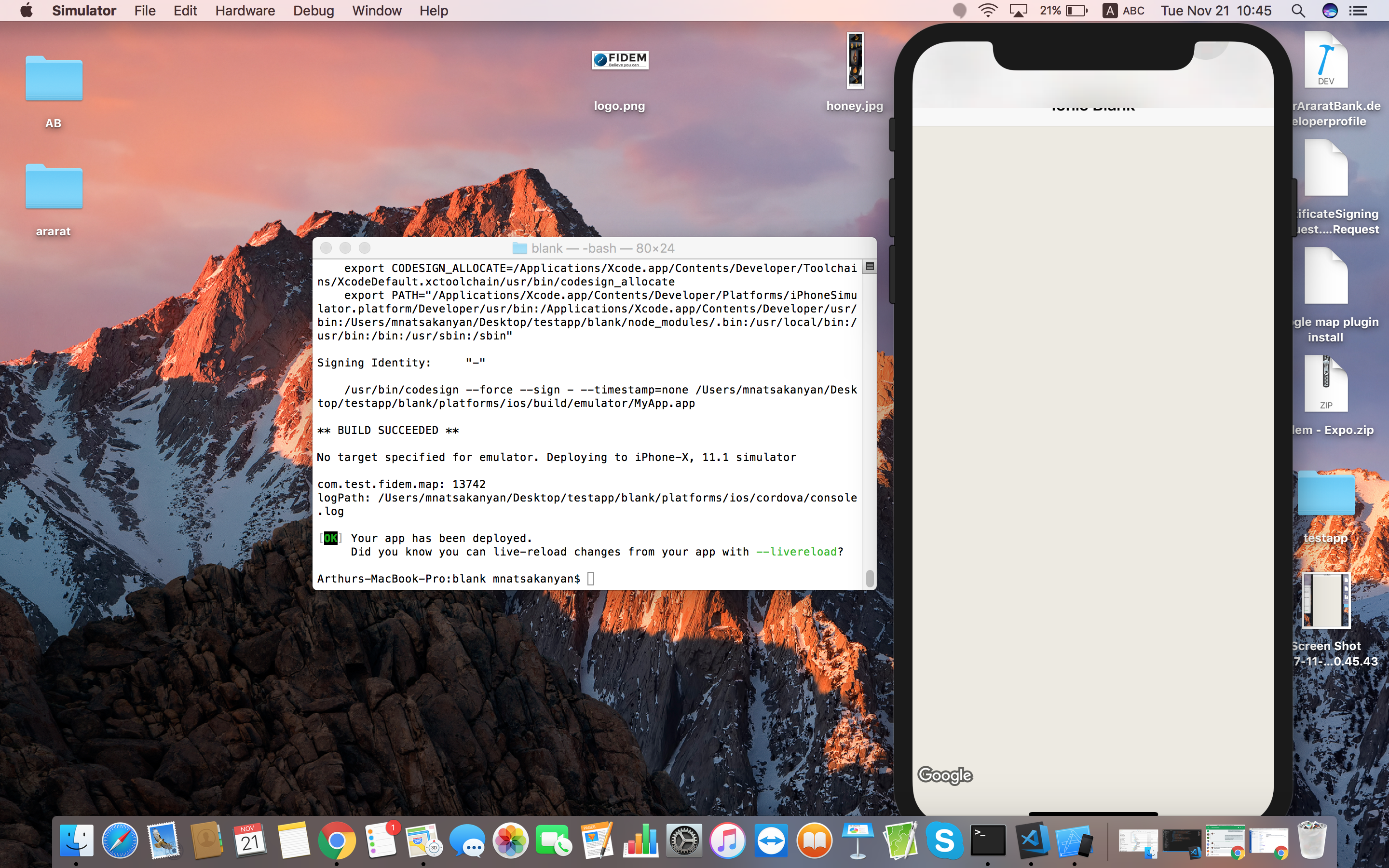
ananmelkonyan
on 21 Nov 2017
Definitely your key is the problem.
wf9a5m75
on 21 Nov 2017
Please show me the screen capture of project console of Google APIs
wf9a5m75
on 21 Nov 2017
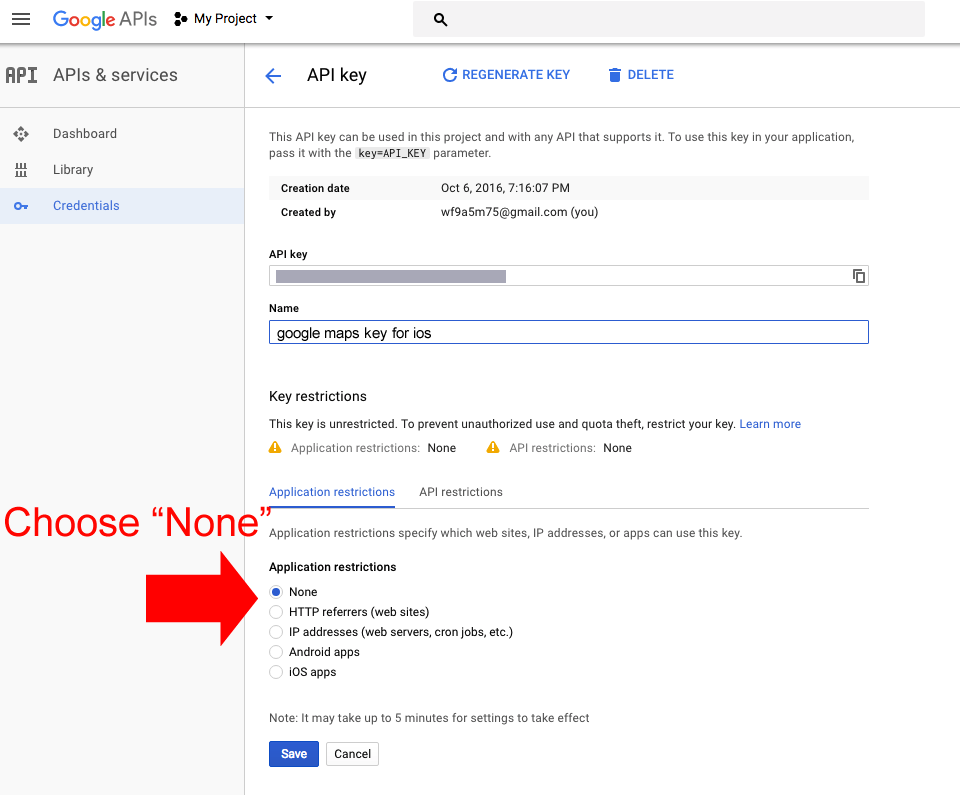
wf9a5m75
on 21 Nov 2017
Should be like this.
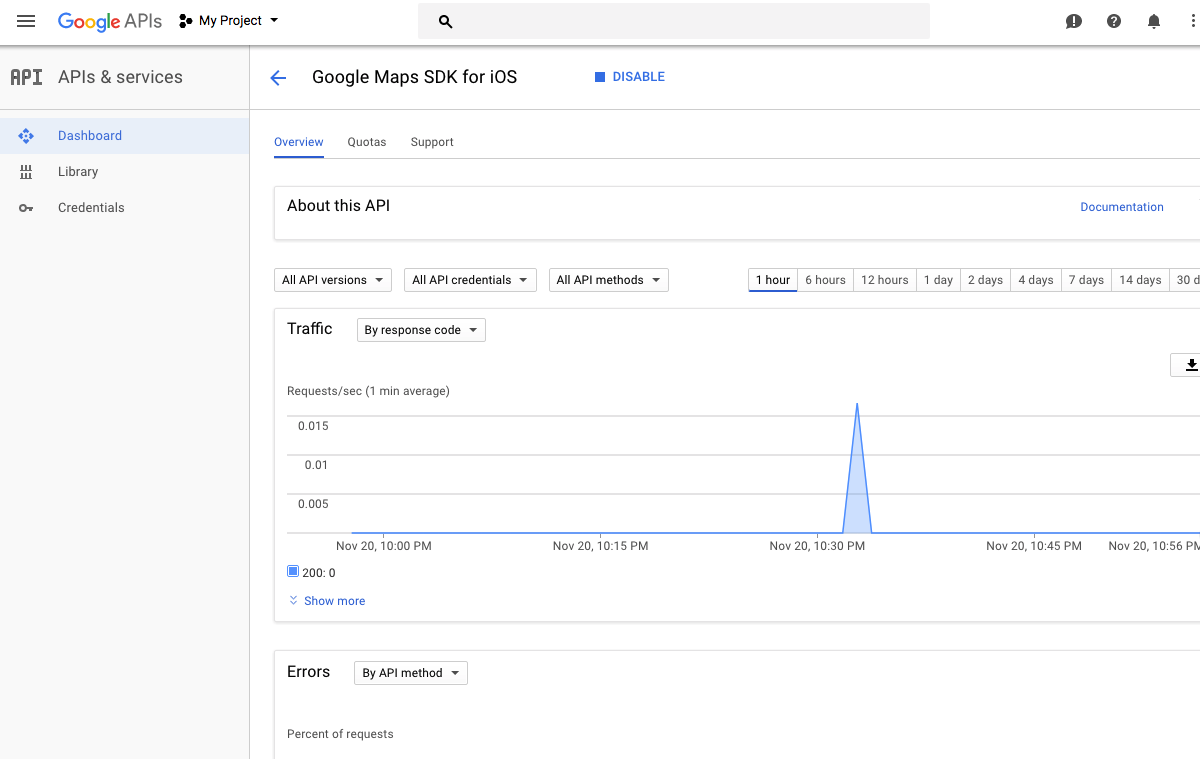
wf9a5m75
on 21 Nov 2017
@wf9a5m75 found the issue during plugin install the first key was always running even if i changed it to manually from config.xml, i removed plugin installed with new key and it worked, so in ios to change key i always need to remove and install it again
ananmelkonyan
on 21 Nov 2017
Well, you can modify the api keys by your hand if you are familiar with Cordova deeply, but it's kind of complex. Remove the plugin and install it again is the easiest way.
wf9a5m75
on 21 Nov 2017
@wf9a5m75 thanks for your support helped me alot.
ananmelkonyan
on 21 Nov 2017
You are welcome.
By the way, I appreciate if you support for this project.
This is not mandatory asking, but I appreciate if you donate some amount because I spend my private time for your fail.
wf9a5m75
on 21 Nov 2017
@wf9a5m75 Yes shure :)
ananmelkonyan
on 15 Dec 2017
On iOS after Menu Open and close map gets half blank
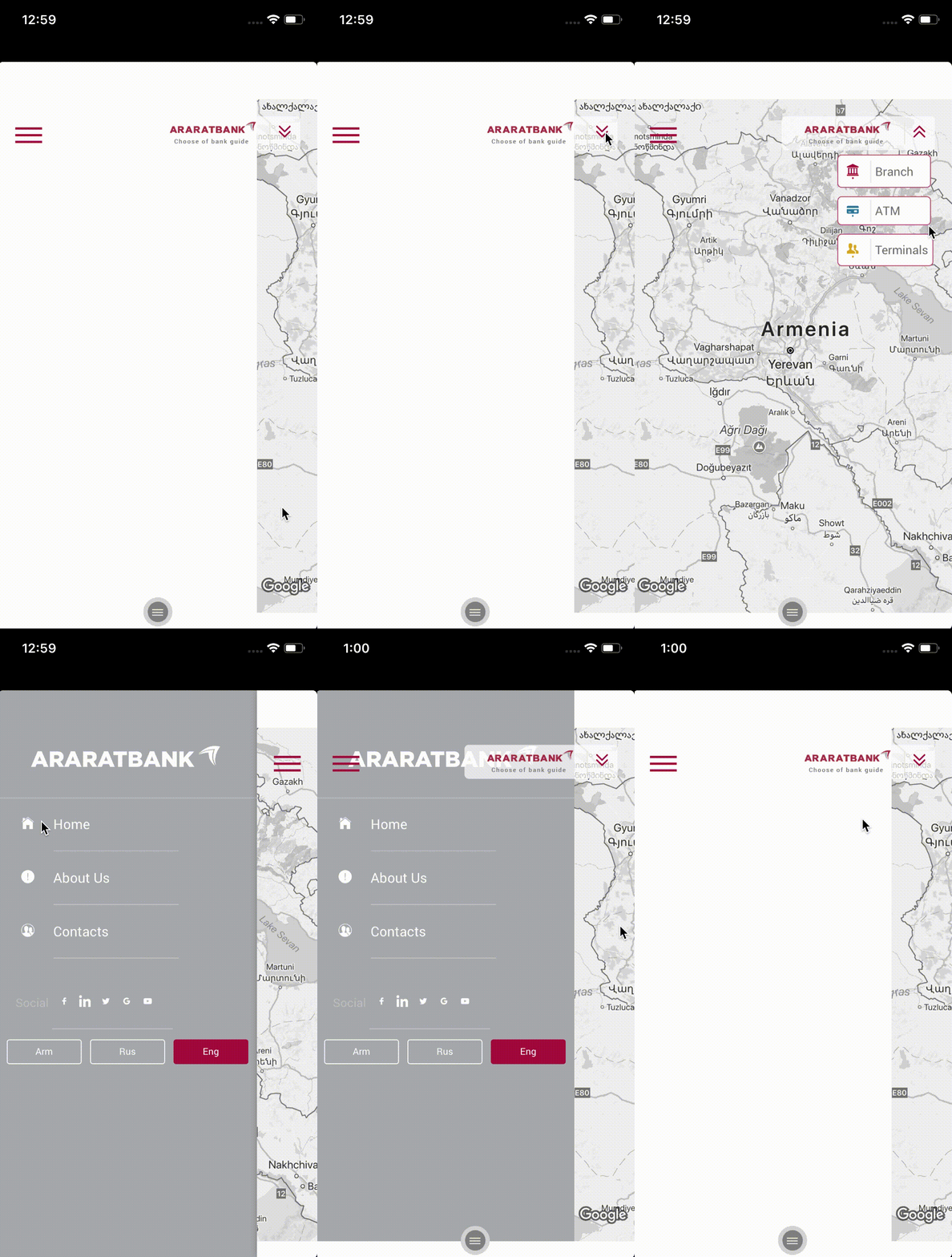
ananmelkonyan
on 15 Dec 2017
@wf9a5m75 any suggest?
 mnatsakanyan
on 18 Dec 2017
mnatsakanyan
on 18 Dec 2017
Related issues
 ahmadkam72
·
3Comments
ahmadkam72
·
3Comments
 vosecek
·
3Comments
vosecek
·
3Comments
 rosnaib11
·
5Comments
rosnaib11
·
5Comments
 ebellempire
·
3Comments
ebellempire
·
3Comments
 melkir
·
5Comments
melkir
·
5Comments
Most helpful comment
Okay, I got the reason of
GoogleMaps DIV[__pluginMapId='map_0_1171669735998'] has already map..Because you write your code like this:
The ionic framework uses
fade-inandfade-outwhen you change the pages, even accessing to the same page.In your case, for changing language, the ionic regenerates new DOM tree.
So if there is the same div tag in pageA(Eng page) and pageB(Rus page), can you image what happens?
This code returns the div of pageA, because it is still remained during the fading out.
So the
<div id="map-main-page">is still remained, that's why the plugin outputs the errorGoogleMaps DIV[__pluginMapId='map_0_1171669735998'] has already map..But very after, the element is removed. That's why the plugin remove the map automatically.
Then you get a blank page.
For the reason, I recommend to use this way for ionic users.
https://github.com/mapsplugin/cordova-plugin-googlemaps-doc/blob/master/v2.0.0/ReleaseNotes/ionic-googlemaps-4.3.3/README.md#update-specifying-element-id-for-mapcreate
Since
@ionic-native/[email protected], the wrapper plugin waits the specified ID element is loaded. This prevents this problem.