Cordova-plugin-googlemaps: simple question
i suppose that all markers are in this variable : parking_Markers
how can i change a marker icon ( that have a specific titl ) with for loop
 bigbossmaher
All 58 comments
marker.setIcon()
 wf9a5m75
on 12 Nov 2017
wf9a5m75
on 12 Nov 2017
i konw this , but how to make the loop
bigbossmaher
on 12 Nov 2017
Just loop with the for statement, or use BaseArrayClass.
Did you find the document pages?
wf9a5m75
on 13 Nov 2017
So how did you try by yourself?
wf9a5m75
on 13 Nov 2017
I'm a javascript beginner, can you please give me the code directly, and i will be very thankful
bigbossmaher
on 13 Nov 2017
Please study JavaScript first.
https://www.w3schools.com/js/js_loop_for.asp
wf9a5m75
on 13 Nov 2017
Yes i know this, but i could not implement in this situation
bigbossmaher
on 13 Nov 2017
So how did you implement? Please show me your code.
The important thing is to resolve this (easy) situation by yourself.
wf9a5m75
on 13 Nov 2017
ping
wf9a5m75
on 14 Nov 2017
Sorry , i can't find any solution , can you help me ?
bigbossmaher
on 14 Nov 2017
So how did you write your code? I haven't seen your code anything. So how can I help you?
wf9a5m75
on 14 Nov 2017
Please share your project files on github. Then I will check your code.
wf9a5m75
on 14 Nov 2017
i suppose that all markers are in this variable : parking_Markers
I want simply to show all title of markers
How exacly
bigbossmaher
on 14 Nov 2017
This plugin (native APIs) is able to display only one InfoWindow.
If you don't want to share your code, I can not help you further. Because too less information.
wf9a5m75
on 14 Nov 2017
It is so simple
I want some thing like this
For ( i==0;i
}
bigbossmaher
on 14 Nov 2017
Do you want to display 10 alerts?
wf9a5m75
on 14 Nov 2017
Just i want to code that make this and i will modify it
bigbossmaher
on 14 Nov 2017
Just to make to. Make you understand my situation
bigbossmaher
on 14 Nov 2017
If you manage the marker instances correctly, your code should work
For ( i= 0;i<markers.length;i++){
alert(Markers[i].getTitle());
}
If it doesn't work, your code is wrong in somewhere.
wf9a5m75
on 14 Nov 2017
ping
wf9a5m75
on 14 Nov 2017
i get unlimited undifined alert windows
and this in console
11-15 01:00:43.779 21874-21908/com.parking.tunisie D/EGL_emulation: eglMakeCurrent: 0x93246c80: ver 2 0 (tinfo 0xa1a1f200)
this is the code i used
for( i=0;i
}
the app is working and markers are showed on the map
bigbossmaher
on 15 Nov 2017
i get unlimited undifined alert windows
Yes, I think so.
Your code is the same as this.
for (var i = 0; i < 10; i++) {
  alert(i);
}
You told me that it will work :flushed:
bigbossmaher
on 15 Nov 2017
Yes. It worked, isn't it?
wf9a5m75
on 15 Nov 2017
I haven't seen your code overall, so I can not give proper advices.
For example, I don't know how you put marker instances into the parking_Markers variable.
That's why I asked Please share your project files on github. Then I will check your code.
wf9a5m75
on 15 Nov 2017
If you don't know how to share your project files on github, read here.
https://guides.github.com/activities/hello-world/
wf9a5m75
on 15 Nov 2017
this is what you sent me in another ticket .
You need to manage marker instances by yourself.
For example,
var _globalMarkerList = [];
...
map.addMarker({
...
}, function(marker) {
_globalMarkerList.push(marker);
});
function removeLastMarker() {
var lastMarker = _globalMarkerList.pop();
if (lastMarker) {
lastMarker.remove();
}
}
bigbossmaher
on 15 Nov 2017
And i used this method
bigbossmaher
on 15 Nov 2017
wf9a5m75
on 15 Nov 2017
Did you solve this?
wf9a5m75
on 15 Nov 2017
just give me 1 day :)
thanks
bigbossmaher
on 16 Nov 2017
Of course.
wf9a5m75
on 16 Nov 2017
var positionList = new plugin.google.maps.BaseArrayClass(parking_Markers);

positionList.map(function() {

}, function(markers) {
    alert(markers[0].getTitle());
});

});
and it is not working , should i upload to git the full project?
bigbossmaher
on 18 Nov 2017
should i upload to git the full project?
Yes! (I repeated so many times)
If no, I don't help you anymore. Because you are rude for me. Hiding your information, and spending my private times a lot.
wf9a5m75
on 18 Nov 2017
i'm very sorry , i just work as full time , and i develop my app in the night , now it it 2 AM . i will upload it ASAP
and sorry again
bigbossmaher
on 18 Nov 2017
Understand, but that's why I asked to share your code on github. I can check your code while you are sleeping.
wf9a5m75
on 18 Nov 2017
the full project is uploaded here
https://github.com/bigbossmaher/Parking2017
but the most important things are here in the JS file
https://github.com/bigbossmaher/Parking2017/blob/master/www/js/my-app.js ( line 782 is for creating markers )
my question is how can i access to markers data like titles etc , and show them in loop for exemple.
thnaks a lot for your effort
bigbossmaher
on 19 Nov 2017
Thank you for sharing the code.
And this plugin keeps own properties you set when you create a marker.
For example, if you want to hold "store_id", you can do this.
map.addMarker({
   'position': {
     lat: storedData.lat,
     lng: storedData.lng
   },
   'title': "Votre Voiture est ici",
   'icon' : 'www/icons/car.png',
   'animation': plugin.google.maps.Animation.DROP,
   'store_id' : "store_38"  // <--- set your own property
}, function(marker) {

  marker.on(plugin.google.maps.event.MARKER_CLICK, function() {
    alert(marker.get('store_id'));
  });
});
Marker class extends BaseClass. The BaseClass has set() and get() methods.
You can set your data, and get it anytime.
marker.set("store_id", "store_32");
var store_id = marker.get("store_id");
In your code, you hold the marker instances in position_mark_car variable.
So, you can access the marker data like this.
position_mark_car.forEach(function(marker) {
  console.log(marker.get("store_id"));
});
If you want to get all values of all markers, you can use Array.map()
var store_ids = position_mark_car.forEach(function(marker) {
  return marker.get("store_id");
});
i'm very thankful , but i can't manage icons using own properties. may be i should explain to you what i want to do exacly.
this is an app for parking. it shows all parkings in tunisia . each marker
should show how much is filled ( 0 / 25 / 50 / 75 / 100% ) , and i used 5 icons each icon for specific pourcentage.


as you know the pourcentage is changing , so every 30 seconds i'm getting the new values , and i should change the icons to fit the new value.
my current solutions is to clear all markers and recreate them with the new icons . and is see it too a lot of memory .
i'm looking for a solution like going throw each marker and change it icon only if he has a diferent icon.
thnaks
bigbossmaher
on 20 Nov 2017
Is that all information? No more hiding information?
wf9a5m75
on 20 Nov 2017
yes this is all infromations :)
bigbossmaher
on 20 Nov 2017
i want to create a seperate function that will execute each 30 seconds and go throw each marker , and change the icon if the parking pourcentage is changed.
bigbossmaher
on 20 Nov 2017
Ok, I will show you the example code later.
But you should explain like above from the first. Then we could save lots of time and stressful.
Time is money
This is common idiom in world wide.
You should consider how you can save the time of other person who you ask your question.
During the waiting time, please read this page deeply, and understand as much as possible.
If you have some questions, post here.
wf9a5m75
on 20 Nov 2017
yes , i will read it , and thanks for your time and your tips.
bigbossmaher
on 20 Nov 2017
@bigbossmaher Please give me the write permission. I will commit the fixed & cleaned-up code on a new branch.
wf9a5m75
on 21 Nov 2017
I changed your code (a lot).
There are many things I advice to you, but I only explain the logic of marker update at here.
Your logic:
- Get parking list from your server
- then add markers (
addMarkers() function) onto the map. - After that, remove the markers after 15 sec, then go back to step 1.
The problem is cost of adding marker. Adding markers / removing markers takes time, and use memory.
So key point is to update only changed parking lots.
In your code, the etat_actuelle field contains the usage percent of the packing lot.
Other fields are always the same as before.
So you only need to monitor the etat_actuelle value.
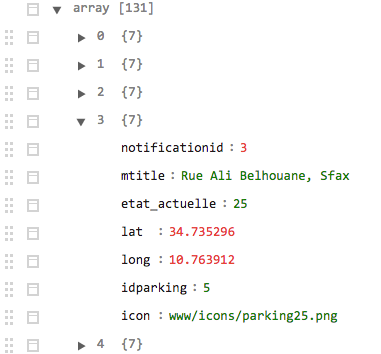
As I mentioned yesterday, this plugin can contains extra data, and if the value is changed, (key)_changed event is occurred (I believe you already understand this if you read the page).
So you can store all fields & values into makers.
var mvcArray = new plugin.google.maps.BaseArrayClass(data);
//-------------------------------------
// Create markers for the first time
//-------------------------------------
mvcArray.map(function(markerOptions, cb) {
  map.addMarker(markerOptions, cb);
}, function(markers) {

  markers.forEach(function(marker) {
    var idparking = marker.get("idparking");
    parking_Markers[idparking] = marker;
    marker.on("etat_actuelle_changed", onEtatActuelle_change);
    marker.on(plugin.google.maps.event.MARKER_CLICK, onParkingMarker_click);
  });
  callback();
});
In the above code, key point is this line.
If the value of etat_actuelle field is changed, etat_actuelle_changed event is occurred.
marker.on("etat_actuelle_changed", onEtatActuelle_change);
After 15 sec, you get the updated data from server, then you just need to update the etat_actuelle_changed field.
(I think 60 sec is enough for parking. Save the battery usage)
//-------------------------------------
// From second time, and after...
//-------------------------------------
mvcArray.map(function(markerOptions, cb) {
  var keys = Object.keys(markerOptions);
  var idparking = markerOptions.idparking;
  var marker = parking_Markers[idparking];
  marker.set("etat_actuelle", markerOptions.etat_actuelle);
  cb();
}, callback);
If the value is updated, you can get the notification.
Then you can set new icon for only updated parking spots.
function onEtatActuelle_change(oldValue, newValue, marker) {
  console.log(marker.get("idparking", oldValue + " -> " + newValue));
  newValue = newValue || "0";
  marker.setIcon("www/icons/parking" + newValue + ".png");
}
Really , i want to hug you.
Just give me some time to check your answer completly
Thanks a lot man :)
bigbossmaher
on 21 Nov 2017
ping
wf9a5m75
on 21 Nov 2017
I committed the code to the fixes branch.
wf9a5m75
on 21 Nov 2017
hello , thank you ,
1 - you are now a collabrator
after deleting the data variable in the ferst line and callback() function the code is not showing markers , do you think those propositions can cause the issue
A - maybe the https://parking.tn/app/parking.php is not in a good format , i suggest replacing
"lat":xx.xx,"long":xx.xx
with
"position": {
{"lat": xx.xx, "lng": xx.xx}
}
B - we haven't used the varible ParkingData that contains the json format of https://parking.tn/app/parking.php
bigbossmaher
on 21 Nov 2017
after deleting the data variable in the ferst line and callback() function the code is not showing markers
Where are you taking about?
wf9a5m75
on 21 Nov 2017
the code in the brach is working
AWESOME
for(i=0;i<5000;i++){
alert("thanks a lot");
}
give some time to try it
bigbossmaher
on 21 Nov 2017
Sounds good. Is that all you need to help?
wf9a5m75
on 21 Nov 2017
If you have further problems, please make another issue thread. I will help you.
By the way, I appreciate if you support for this project.
This is not mandatory asking, but I appreciate if you donate some amount to keep this plugin as free.
wf9a5m75
on 21 Nov 2017
donation sent :)
bigbossmaher
on 21 Nov 2017
Thank you for your kindness!
wf9a5m75
on 21 Nov 2017
in your function
function onEtatActuelle_change(oldValue, newValue, marker) {
//console.log(marker.get("idparking", oldValue + " -> " + newValue));
newValue = newValue || "0";
marker.setIcon("www/icons/parking" + newValue + ".png");
}
i get this in the console
Uncaught TypeError: marker.setIcon is not a function", source: file:///android_asset/www/js/my-app.js (895)
bigbossmaher
on 21 Nov 2017
How about this?
function onEtatActuelle_change(oldValue, newValue) {
  var marker = this;
  //console.log(marker.get("idparking", oldValue + " -> " + newValue));
  newValue = newValue || "0";
  marker.setIcon("www/icons/parking" + newValue + ".png");
}
Related issues
 melkir
·
5Comments
melkir
·
5Comments
 vosecek
·
3Comments
vosecek
·
3Comments
 sebagon
·
4Comments
sebagon
·
4Comments
 splitice
·
5Comments
splitice
·
5Comments
 rosnaib11
·
5Comments
rosnaib11
·
5Comments